Baseten in Bifrost: Call Model APIs, decision models and your own deployments by name

Suresh Chaudhary
Nov 25, 2026 · 4 min read
Bifrost could already reach Baseten-hosted models through Hugging Face's inference router. With v2.6.0, Baseten is now a built-in provider, covering Model APIs and the models you deploy yourself, called with your Baseten API key.
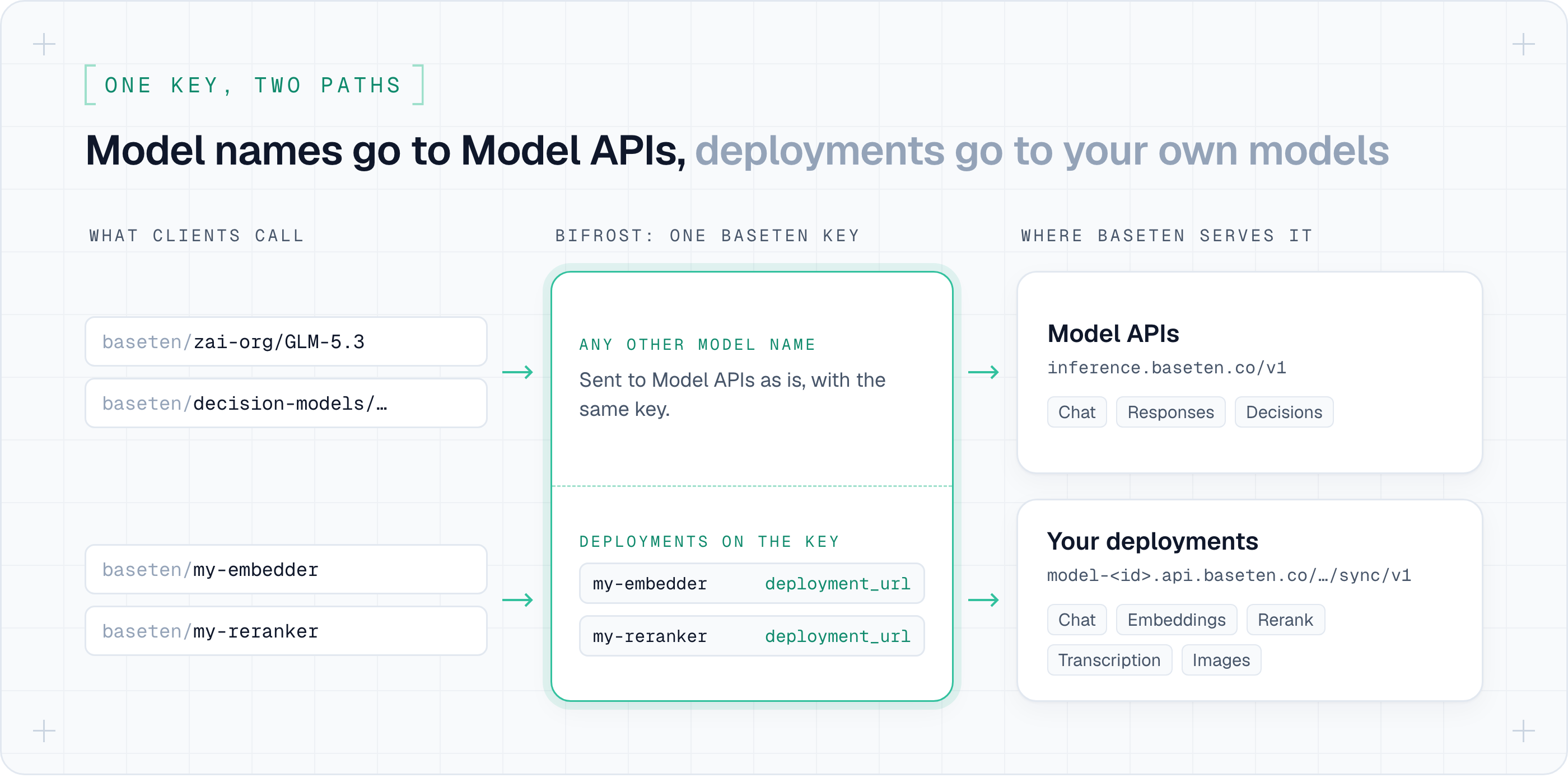
Baseten serves open models in two ways: Model APIs, a shared endpoint where you call hosted models by name, and dedicated deployments of the models you deploy yourself, each on its own URL.
Say your support team runs an assistant on Baseten that uses both. It answers customers with GLM-5.3 on Model APIs. It finds help articles with an embedding model and a reranker the team deployed themselves. And it sorts each incoming ticket into billing or technical support.
As platform and security admins, you would want all of that traffic routed through Bifrost, under the team's virtual key, inside its budget and in the same logs as everything else. There were two ways to achieve this, and neither covered the whole flow:
- Hugging Face's router reaches Baseten models with a Hugging Face token and Hugging Face's model IDs, but not your own deployments
- A custom OpenAI-compatible provider gets closer, but Baseten's chat API rejects fields it doesn't define, so a request that carries
max_completion_tokensor adevelopermessage can come back as an HTTP 400 error. And every deployment has its own URL, so each one would need its own custom provider.
With Bifrost v2.6.0, baseten is now a built-in provider.
Call Model APIs with the requests your apps already send
Go to Models → Model Providers, add Baseten with Add New Provider, and add your Baseten API key. Every Model APIs model is then available as baseten/<model>
Bifrost adjusts each request to Baseten's schema before sending it. max_completion_tokens goes out as max_tokens, a developer message goes out as system, and fields Baseten doesn't define, such as service_tier, are dropped.
Streaming, tool calls and structured output work as usual. reasoning_effort passes through, and the model's thinking comes back as the message's reasoning. On Model APIs, Responses API requests go to Baseten's own /responses route.
If you set up Baseten earlier as a custom provider named baseten, that name now belongs to this provider. The dashboard offers to rename the custom one so both can exist side by side.
Point a model name at your own deployment
The support assistant's embedding model runs on a dedicated deployment, not on Model APIs. To reach it, add a deployment to the Baseten key: a name your clients call, such as my-embedder, and the deployment's /sync/v1 URL from the Baseten dashboard. Requests for baseten/my-embedder go to that deployment, with the same API key.
In the UI, edit the Baseten key, open Deployments, add a row, expand it, and fill Deployment URL. In config.json, the same thing is an alias on the key:
model_name is the model the deployment runs, so logs show Qwen/Qwen3-Embedding-0.6B instead of not-required. The provider guide explains what to put in model_id for each kind of deployment.
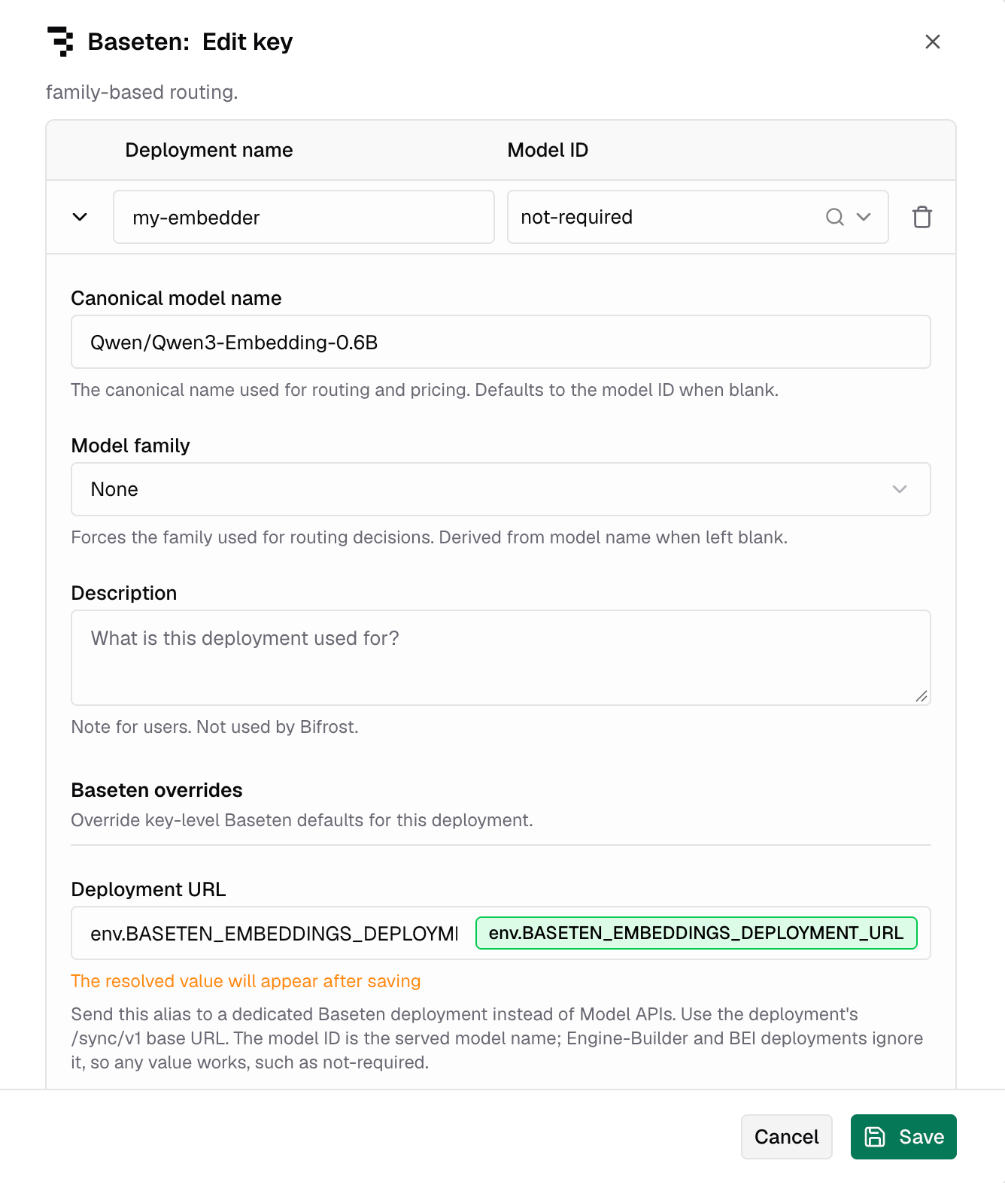
Bifrost sends your API key to the deployment URL, so the URL must be https. If an env reference resolves to nothing, the request fails instead of falling back to Model APIs.
Run retrieval on your deployments too
Model APIs has no embeddings or rerank routes, so these run on deployments built with Baseten Embeddings Inference (BEI). Clients call them through Bifrost's usual routes:
A second deployment, my-reranker, points at a reranker deployed on BEI with its /rerank route, set up the same way as my-embedder, and /v1/rerank returns the help articles ordered by relevance, with top_n and return_documents working as they do on other providers:
Deployments work the same way for chat, transcription and image generation. For image generation only, you can also use the /predict URL the dashboard shows, which is the only route FLUX.1 dev and schnell serve. Embeddings, rerank, transcription and images need a deployment URL, and a request without one fails before it reaches Baseten, with an error that names the missing field.
Sort tickets with Baseten's decision models
Routing a ticket to billing or technical support needs a typed answer that code can act on. Baseten's decision models return one, and Bifrost serves them on /v1/decisions:
Swap the slug for baseten-elephant-9b-latest or baseten-mammoth-27b-latest to use the larger models. The request shape is the same as for other decision providers, so switching providers only changes model.
Get started
Upgrade to Bifrost v2.6.0 or later, in open source or Enterprise. Add your Baseten API key under Models → Model Providers, then add a deployment for each model you run yourself. Baseten bills dedicated deployments by the minute of instance time, not by token, so set custom pricing for a deployment if you want its calls to count against budgets. The Baseten provider guide covers every operation and parameter.