A Closer Look at Bifrost Adaptive Routing: How It Works, and What You Can Now See

Pratham Mishra
Oct 22, 2026 · 12 min read
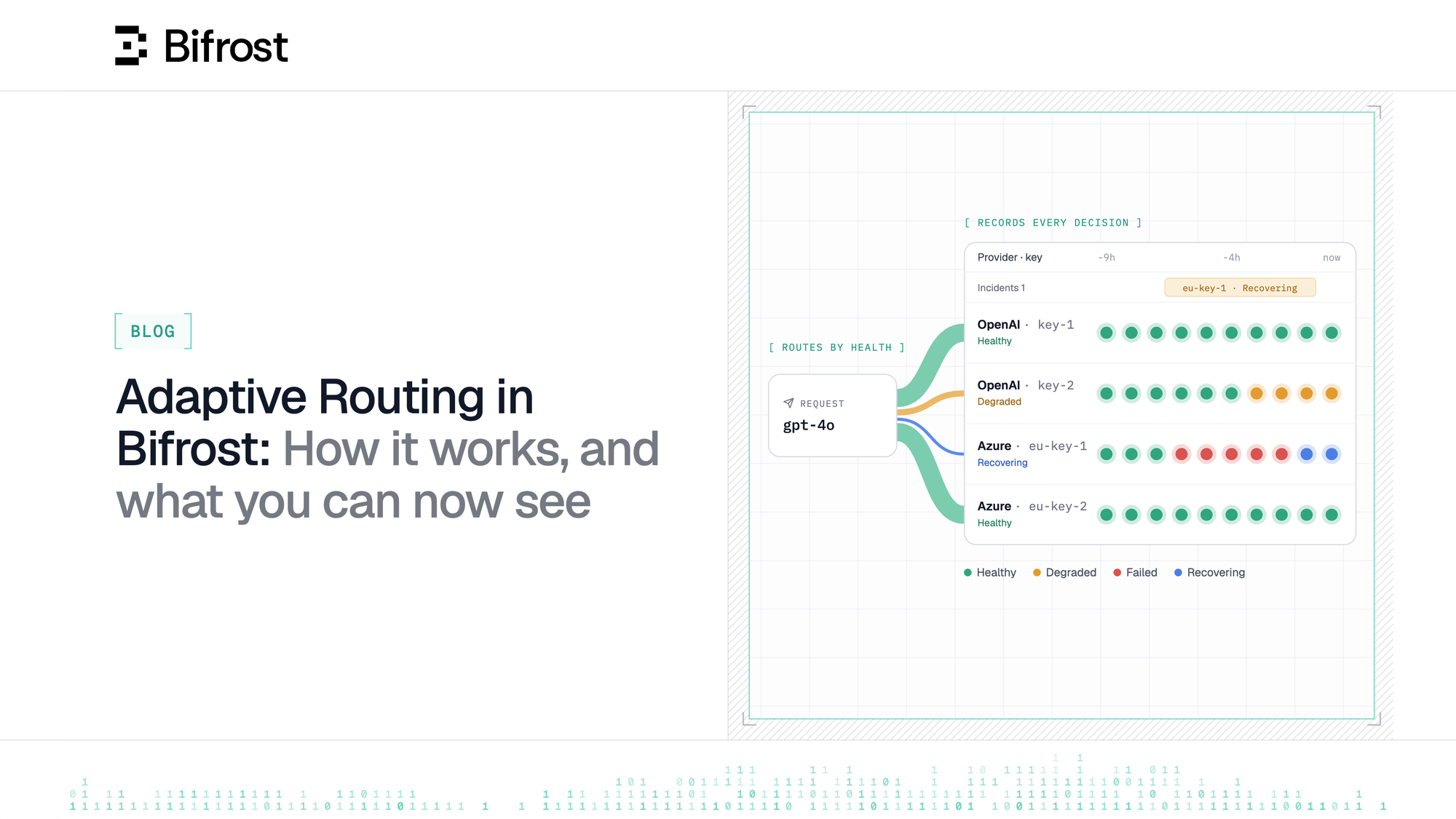
Adaptive routing has kept LLM traffic on healthy providers and keys for over a year. Here's how it works, and what it now shows you: what it observed, what it did, and when you need to step in.
Every team that puts an LLM in front of users learns the same lesson quickly: your product is only as reliable as the provider serving the model, and providers have bad days. They go down, slow to a crawl, rate limit you in the middle of a launch, run your account out of credit, retire the model you depend on, or reject a key someone rotated without telling you. None of it is announced ahead of time.
For over a year, adaptive routing in Bifrost Enterprise has absorbed that on its own. When a provider or a key starts failing, requests automatically move to healthier ones, and move back once things recover. Most of the time, your users never notice.
The hard part was never the routing. It was figuring out:
- What happened? Which provider or key went wrong, when, and for how long?
- Did our requests make it? Did users see errors, or did routing catch them in time?
- Is anything still broken? Most problems pass on their own. Some need a person.
Answering used to mean digging: querying request logs, lining up timestamps across nodes, or handing it all to your coding agent and hoping it pieced the events together.
Now Bifrost shows you through an interactive dashboard, an incidents page and a routing summary on every request that helps answer "what happened?" through just a few clicks.
Why LLM traffic is hard to keep healthy
A normal API call goes to a service you run. An LLM call goes to someone else's: OpenAI, Anthropic, Google, AWS, Azure and others, each with its own capacity, limits and outages. When you depend on them, you inherit all of it.
What goes wrong is rarely a clean outage:
- Overload. The provider is up, but too busy to answer, so requests fail or slow down at peak times.
- Rate limits. Every key has a budget of requests and tokens per minute. A traffic spike, a few long prompts or a batch job can use it up in seconds.
- Credit and quota. An account runs out of credit or hits its spend cap, and every request on that key fails until someone tops it up.
- Rejected keys. A key is revoked, rotated or mistyped, and the provider refuses it outright.
- Models and regions. A model is retired, a key isn't allowed to use a model, or a provider refuses requests from a region.
- Plain slowness. Nothing fails, but one provider or key takes far longer than usual, and your users wait.
Adaptive Routing doesn't wait for an outage. A key that is only slower than usual gets less traffic, one that keeps failing gets none until it recovers, and one the provider rejects is held until a check passes.
Most teams run several providers and many keys to spread load and cost. That helps, but it also multiplies the places where something can go wrong. And these failures are usually partial: one key, on one model, for a few minutes.
Too small for a provider's status page, yet too big for your users to ignore.
The usual configurations only go so far. Fixed weights split traffic in the same shares whatever each provider is doing right now. Retries help with a blip, but a retry on a provider that is down just fails again. Fallback lists are written once, and can point at a provider that is failing too. A rejected key keeps failing until someone notices.
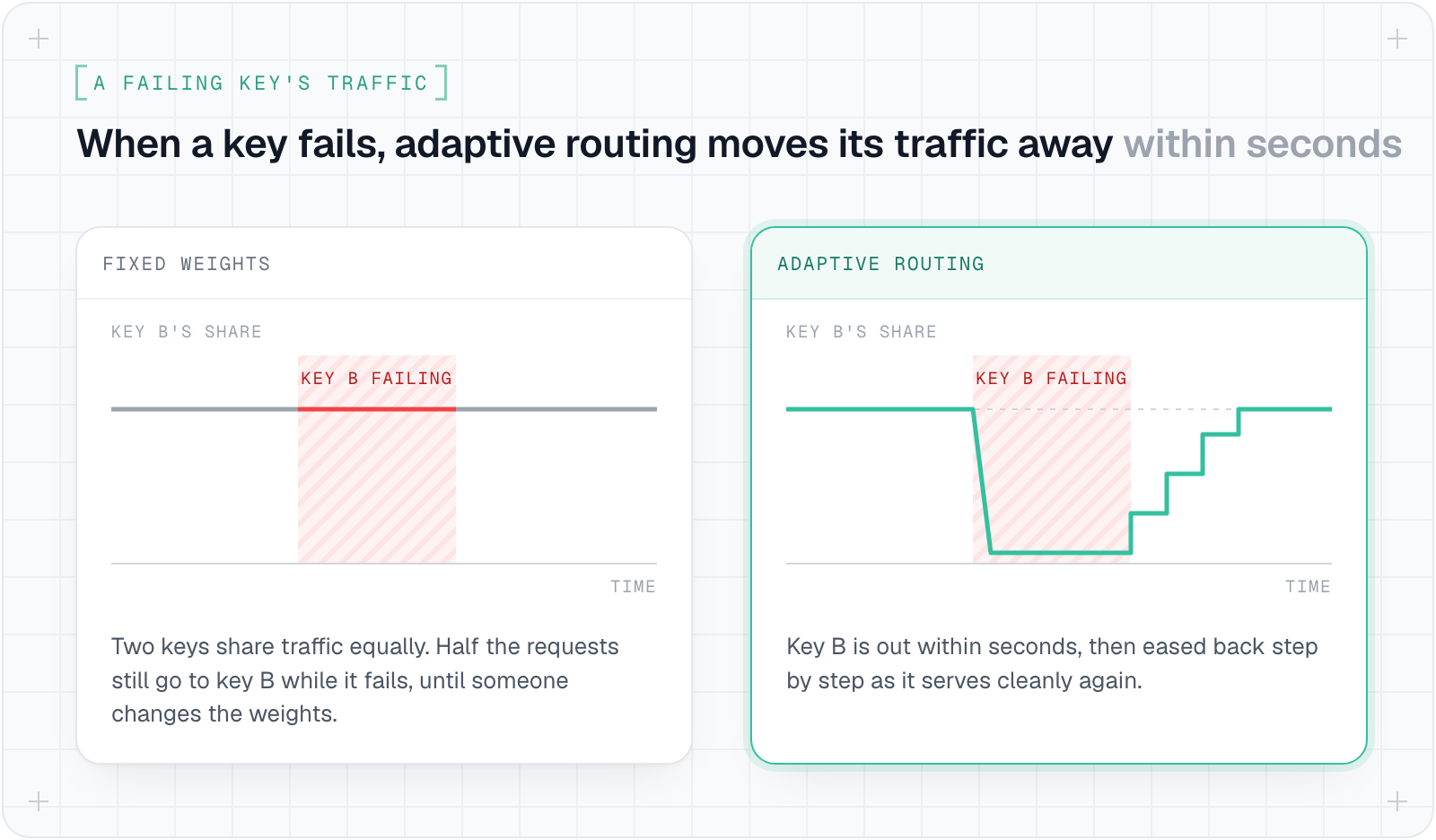
That is the gap adaptive routing fills: routing decisions made from what is actually happening in realtime, request by request. ⚡️
How adaptive routing works
Adaptive routing makes two decisions for every request, based on how each provider and key has been doing on your own recent traffic.
First the provider, then the key. Say a request asks for gpt-4o without naming a provider. Several providers may serve that model, and routing picks the healthiest of them, lining up the other healthy ones behind it as fallbacks, best first. Then it picks the key on that provider. Healthier, faster and less busy keys get more of the traffic, but every working key keeps some share, so a key that has recovered gets noticed instead of sitting idle.
Picture that request at a moment when OpenAI is healthy, Azure is having a rough patch and Groq is failing outright. Routing sends the request to OpenAI, lines Azure up behind it as a fallback, and leaves Groq out.
On OpenAI, one key is serving normally and takes the biggest share. A second failed earlier and is back on a smaller share for now. A third was rejected by OpenAI, so it is skipped until routing checks it again. How the request turns out, served, failed or slow, feeds into the picks for the next one. The diagram below shows the same request.
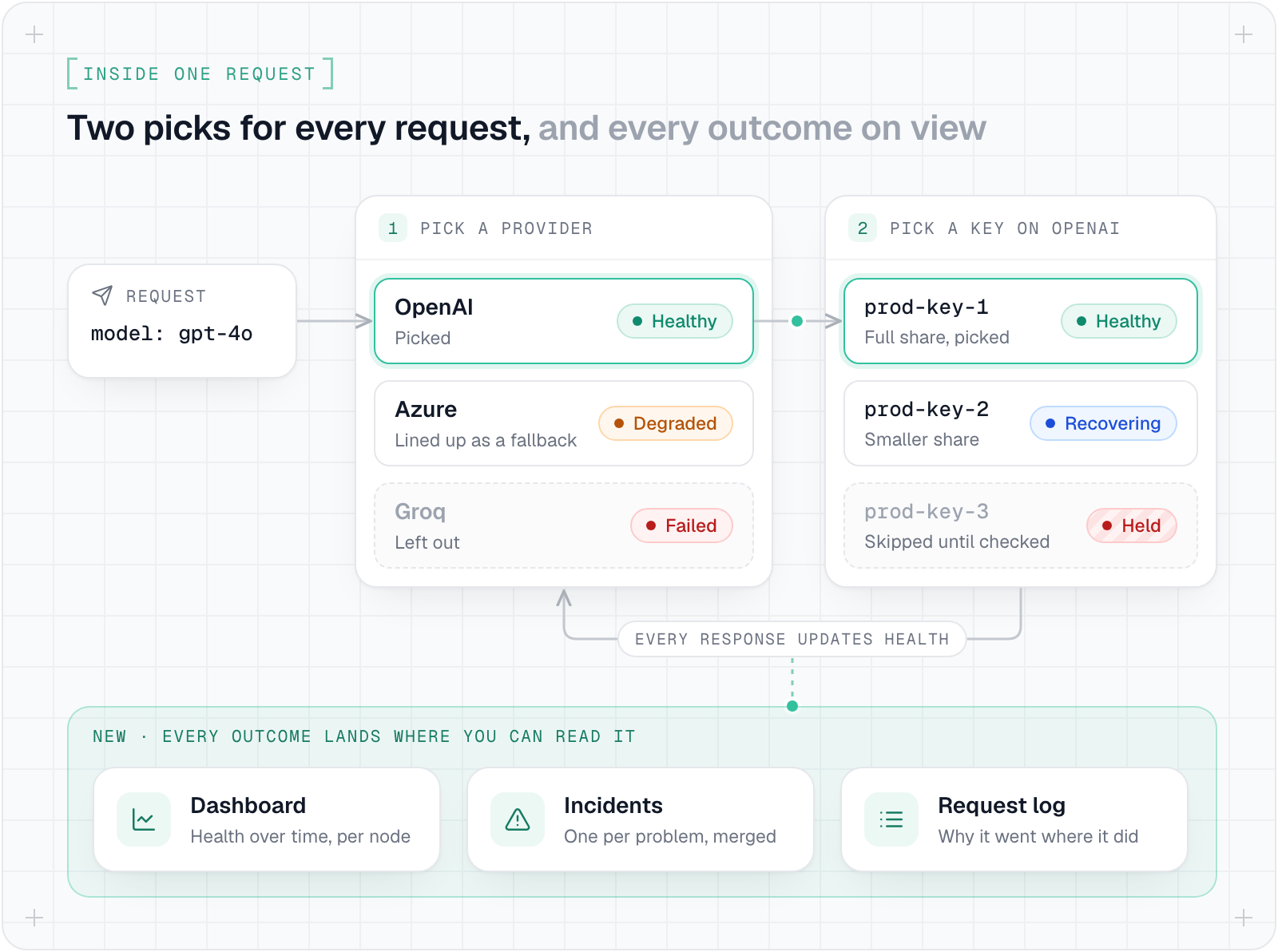
All of this runs on health measured from your own traffic. Errors weigh the most, then speed, then load, and speed is judged against each key's own normal, so a key that slows down stands out even on a day when every provider is slow. Routing never sends health checks of its own, and a request that was wrong to begin with, or that the user cancelled, doesn't count against a key.
For each model it serves, a key is in one of four states, the same ones the dashboard colours its rows by:
- Healthy: a full share of traffic.
- Degraded: failing now and then, or much slower than usual, so it gets less.
- Failed: out of rotation.
- Recovering: back on a small share that grows as it serves cleanly.
Keys go out within seconds and come back gradually, so a provider that has only half recovered isn't knocked over again. A provider stays in rotation while any of its keys still serve.
Some failures don't need an error rate to spot: a revoked credential, an empty account, a model the key can't reach or that was retired, a blocked region, a rate limit. Each repeats on every request until something changes, so routing holds the key on the first one, across the whole cluster, for every model or only the one affected. After a wait, one real request checks it. Each failed check makes the next wait longer, unless the provider says how long to wait, and editing the key releases the hold straight away.
None of this overrides a choice you made. When your app, a routing rule or a virtual key names the provider, such as openai/gpt-4o, routing keeps it and only picks the key. You decide whether it may move those requests off a provider that is failing, add healthy fallbacks behind it, or skip fallbacks that are failing, and all three stay off until you turn them on.
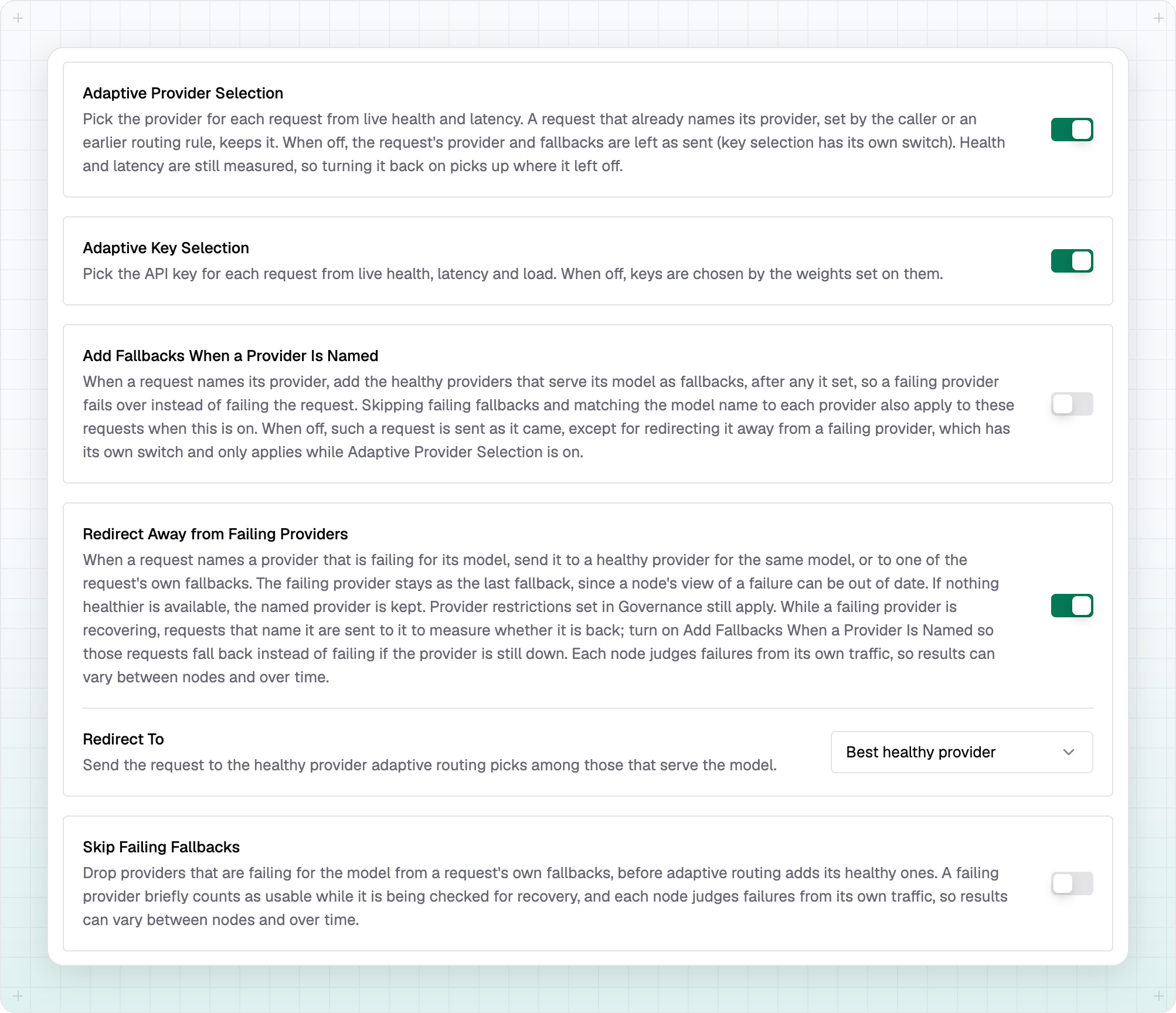
It doesn't break a conversation's cache either. Hopping between providers or keys throws away the prompt cache a conversation or agent run has warmed up, so requests that carry a session ID stay on the provider and key that served them last. Claude Code, Codex CLI and OpenCode already send one, and other clients can send x-bf-session-id.
A session stays put while its provider and key are healthy, and moves as soon as routing sees them failing or held.
All of these calls are made locally, and that makes routing region-aware with no setup. Each node scores its own traffic every few seconds, so no request waits on a central service, and each node judges providers from where it sits.
Routing knows where it is. Nobody told it. The traffic did. 🌍
Say you run nodes in Frankfurt and Virginia, with an Azure deployment in each region. To Frankfurt, the EU deployment is close and the US one is an ocean away; to Virginia, it's the other way round. When that distance adds meaningfully to response time, each node leans its traffic toward the deployment near it. When it adds a few milliseconds to a request that takes seconds, the split barely moves, because a key is penalised in proportion to how much slower it is, allowing for prompt size, not for where it is.
Regional trouble stays regional too. If the route from your EU nodes to OpenAI starts timing out while the US is fine, the EU nodes send their traffic to the other providers serving the model, and the US nodes carry on as before. Only what holds everywhere is shared: a provider almost always refuses a key the same way from every region, so once one node sees a refusal, every node holds that key. New nodes pick up the holds already in place, and holds survive restarts.
What's new is that every one of these decisions now leaves a record. Each node records every change of state, every hold, check and release, and every edit to a key, a provider or the settings, plus a snapshot each minute. Bifrost groups those events into Incidents, one per problem however many nodes saw it, and gives each a status that answers one question: do you need to do anything?
- Mitigated: routing is keeping traffic off the problem.
- Recovering: it is back and earning its traffic back.
- Resolved: it is over.
- Needs attention: routing can't fix it alone, and the incident says what to do.
One rough day, through the new UI
A day when a few providers misbehave used to mean an afternoon digging through the logs. Here is how the same day plays out now.
The Dashboard
You open Adaptive Routing > Dashboard to see how the last 24 hours went. Four numbers sit across the top: eight incidents, one of them still needing attention; 1.8K requests saved; 312 failed; and 68.2%, the share of requests whose provider adaptive routing picked.
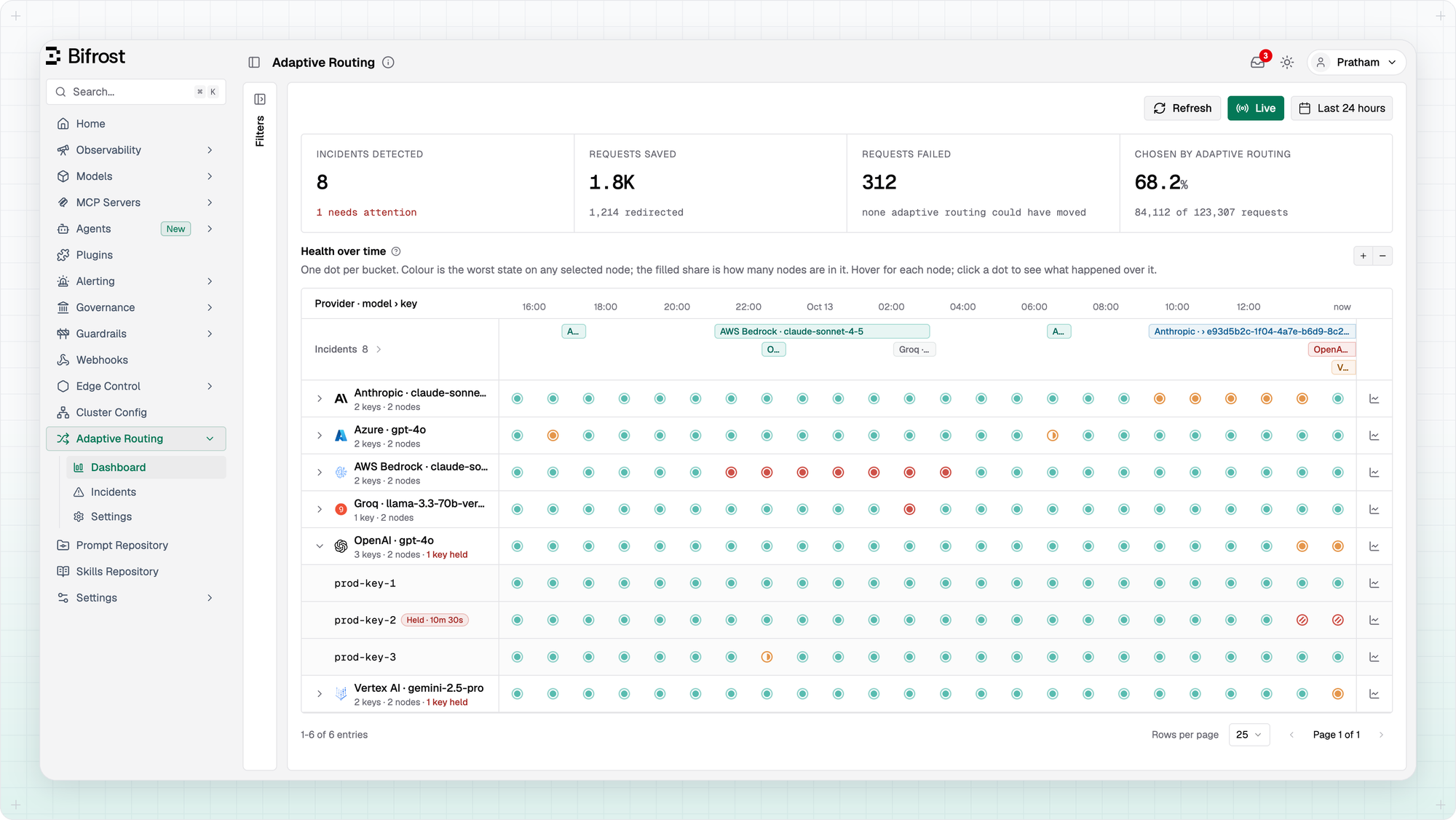
Each number is careful about what it claims. Requests saved counts only what adaptive routing did itself: 1,214 requests it redirected off a failing provider, plus the ones a fallback it added went on to serve. Your own retries and fallback lists don't count toward it, so the 1.8K is on top of whatever you had already set up.
Requests failed leaves out requests that were wrong to begin with, and ones the caller cancelled. The line under it is the one to watch: it counts the failures a setting could have avoided, requests kept on a failing provider because redirecting was off. Today it reads none.
As for the 68.2%: most of the other requests named their provider, through the app, a routing rule or a virtual key, so routing picked only their key. Click any figure for its breakdown.
Below the numbers is the timeline. Each row is a provider and model, and expands to show its keys. Each dot is a stretch of time, coloured by the worst state any node saw in it, and when only some nodes saw it, the dot fills only part way. A hatched dot is a held key. Above the rows, the incidents lane draws each incident as a bar across the time it lasted, and clicking any dot shows what happened in that stretch.
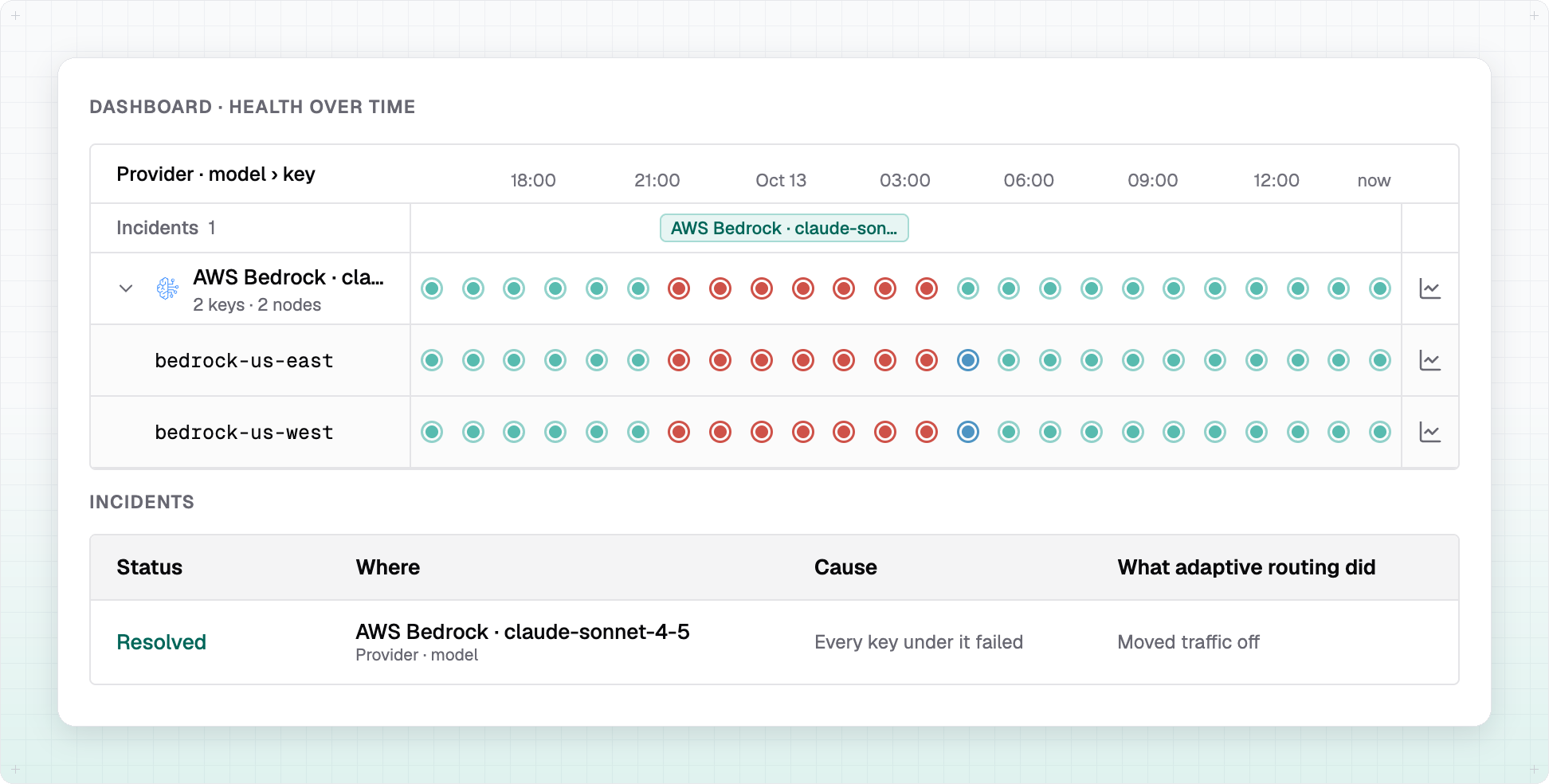
One row stands out: AWS Bedrock's claude-sonnet-4-5 is red for six straight hours while the providers around it stay green. You click it, and the incident is already Resolved. Every Bedrock key failed, so routing moved the traffic to the other providers serving the model, then brought it back once Bedrock recovered. Nobody was paged, and nobody needed to be.
Further down, one OpenAI key, prod-key-2, carries a Held badge, and this is the incident that needs you. OpenAI keeps rejecting the key, so routing took it out of rotation on every node and tried it again nine times, each time with a real request. Every try was refused. A rejected key won't fix itself, and the incident tells you what to do: replace it. You swap in a new key, the edit clears the hold, and routing checks the new key on its own.
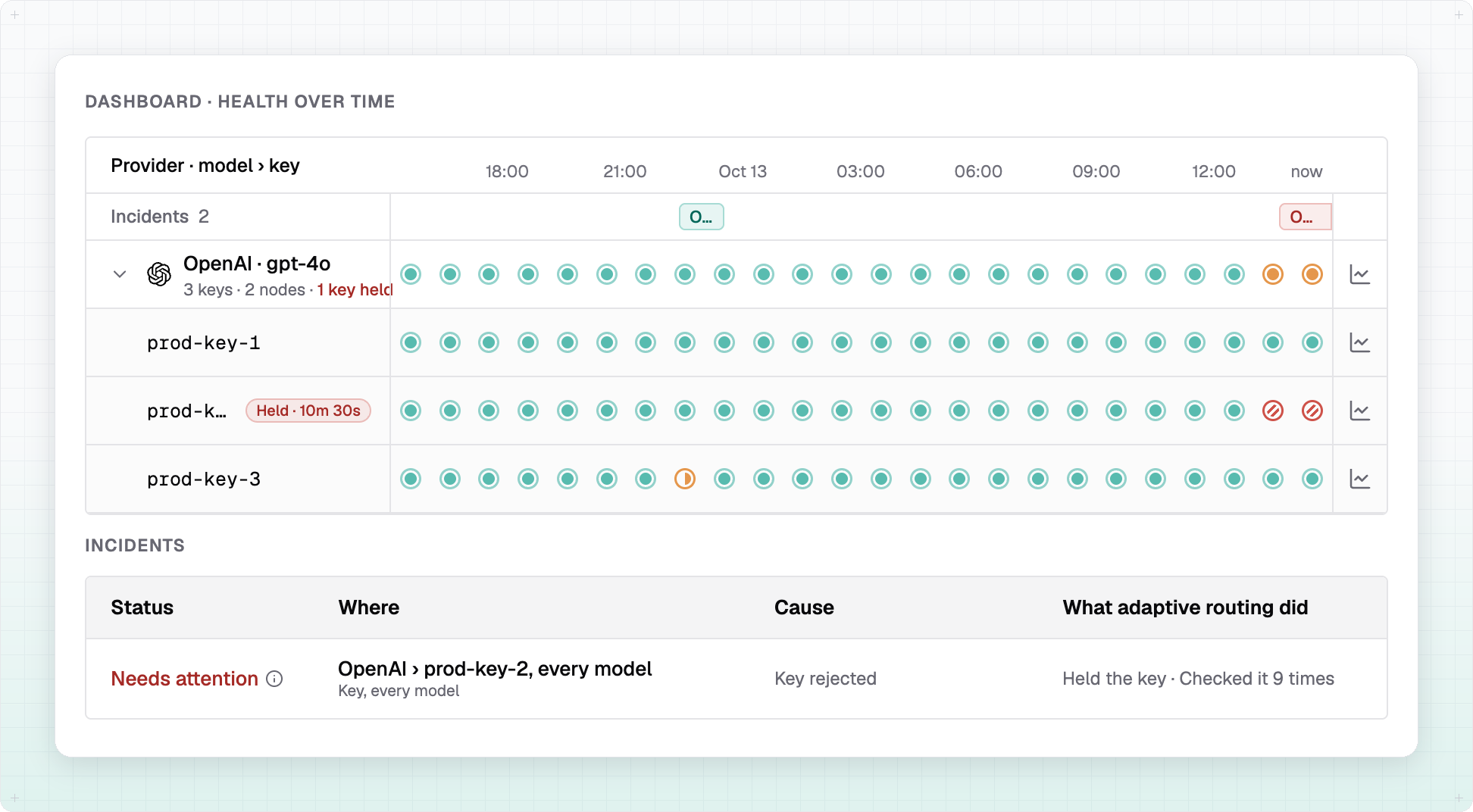
A rejected key is one of only a few problems that land in Needs attention. The others are a key out of quota, requests failing with no healthy key or provider left to send them to, and requests kept on a failing provider because redirecting is off. Each needs something only a person can change: a key, a quota, a fallback or a setting. Every other incident is a problem routing is already working around, and it says so.
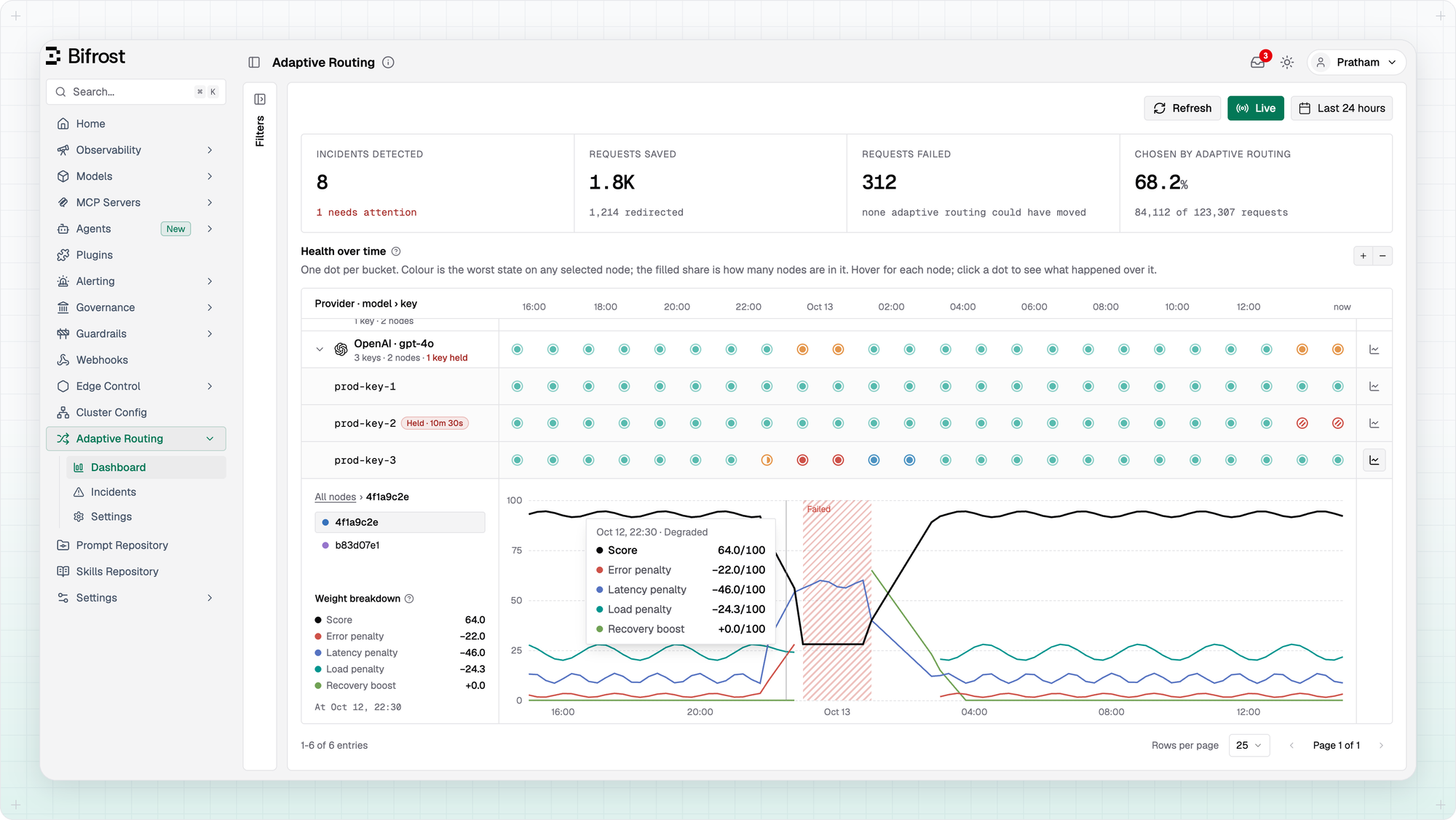
The same OpenAI row holds a smaller story too. prod-key-3 had a rough patch of its own: amber, then red, then blue as it recovered. The chart button at the end of its row opens its routing score, out of 100, on each node, and shows why routing treated it the way it did. As the key slowed down and its errors rose, the latency and error penalties climbed and the score sank. The key went to Failed and out of rotation, and then the recovery boost lifted it back as it served cleanly again. Hover any moment for the full breakdown: the reasoning behind every pick, as a chart instead of a log query.
The Incidents page
To dive deeper, you switch to Incidents and widen the window to last 7 days. Ten incidents, one row each, saying what went wrong, where, and what routing did about it: held the key, moved traffic off, or gave it less traffic, and how many times it checked a held key.
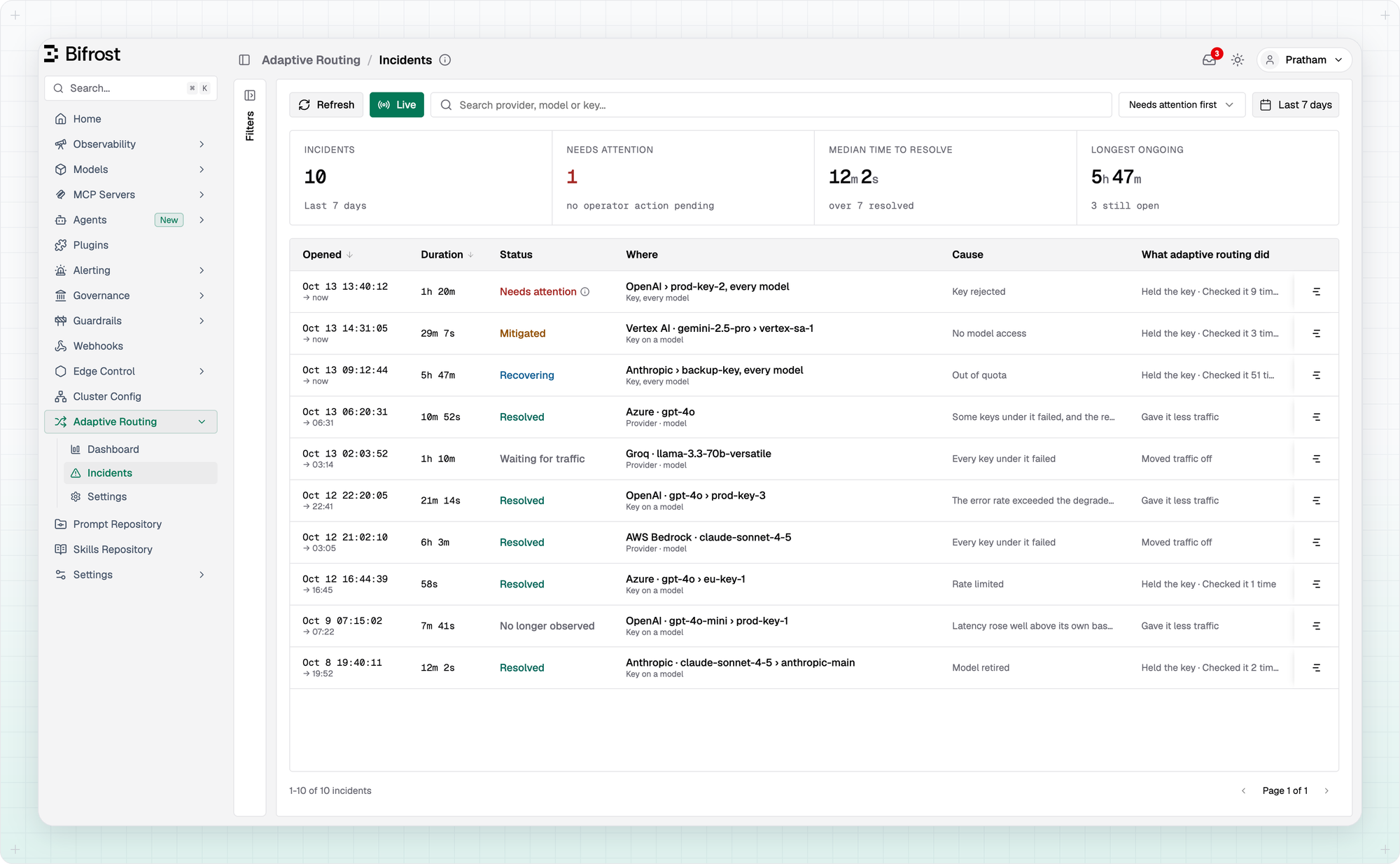
Read down the list, and most of the week took care of itself. An Azure key, eu-key-1, was rate limited for under a minute. Routing held it, sent its traffic to the provider's other key, checked it once, and the check served. A Vertex AI key lost access to gemini-2.5-pro, so that one model is held on the key, and the incident reads Mitigated: routing has it covered, and there is nothing to do unless it lasts. Anthropic's backup-key ran out of credit, someone has already topped it up, and it is back on a small share, Recovering. Across the week, the median incident resolved in about twelve minutes.
The one at the top still needs you, so you open it: OpenAI's prod-key-2. The sheet tells the whole story in one place. The held key card quotes OpenAI's own answer, a 401 for an incorrect API key, says what to do about it, and shows when routing checks the key next. Nine checks so far, nine refusals, and only three failed requests, all from callers that named prod-key-2 directly, so routing couldn't move them. Everything else went to the other keys.
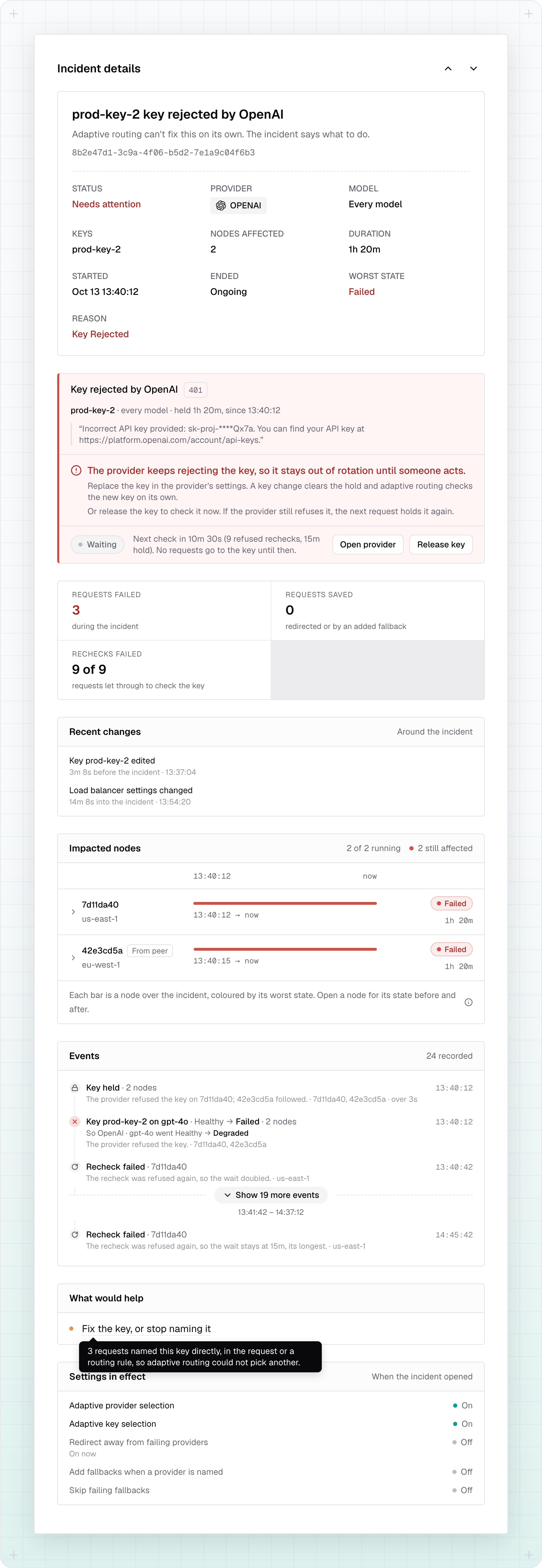
Recent changes has the twist: prod-key-2 was edited three minutes before the incident opened, which points straight at the likely cause, a new value OpenAI doesn't recognise. It also shows a settings change fourteen minutes in, and Settings in effect says what it was: redirecting away from failing providers was off when the incident opened, and is on now. Events lists every hold and check in order, and Impacted nodes marks the node that held the key only because the other one saw the refusal first.
The fix is one edit away. Open provider takes you to the key, and saving the right value clears the hold on every node, after which routing checks the new key with live traffic. Or Release key checks the existing one straight away. What would help adds the follow-up: fix the key, or stop naming it in the requests or routing rule that pin it, so routing can move them next time.
The request log
Then a support question lands: why was a customer's request served by Azure when the app asked for OpenAI? You open that request's log, and its Adaptive Routing summary has the answer. The request named OpenAI's gpt-4o, which was failing at the time, and with redirecting turned on, routing sent it to Azure's gpt-4o instead. On Azure it used eu-key-2 and skipped eu-key-1, which was rate limited. View in routing history takes you back to that moment on the dashboard.
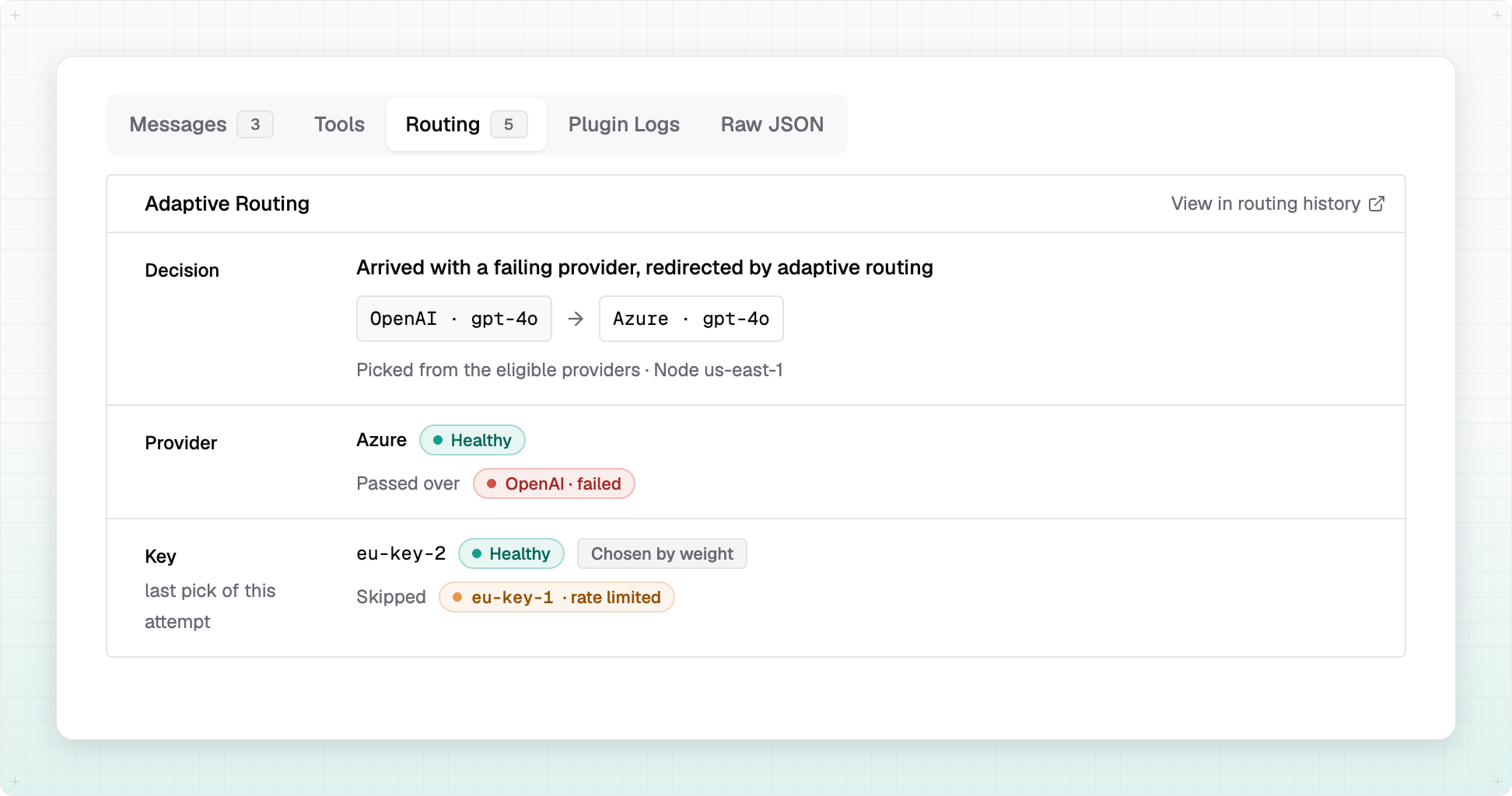
When the question is wider, say every request routing moved off the provider it named this week, the Adaptive Routing filters in Logs find them all. The same filters find every request that served as the check of a held key.
Three questions, three screens, a few minutes. No log queries, no scripts, and no asking an agent to piece it together.
Try it now
Adaptive routing is turned on by default in Bifrost Enterprise. The dashboard and incidents keep their history in your log store, Postgres or ClickHouse. A settings page decides how far routing may go, for example whether it can move a request away from a provider the request named.
Everything about setup and settings is in the docs: the Adaptive Routing overview, How it works, Incidents & Monitoring and Session affinity.
LLM traffic will stay unpredictable. Adaptive routing has kept production requests on healthy providers and keys through it for over a year, and now every decision it makes leaves a record you can read. Try Bifrost Enterprise.