Run guardrails on LLM and MCP traffic in the order you choose
Madhu Shantan
Oct 22, 2026 · 4 min read
Picture an enterprise organization that uses an AI agent to draft replies to support tickets. The tickets come straight from customers, so they contain whatever information customers share. Some customers may include full account numbers. Other customers may ask whether they should move their savings into a particular fund, which perhaps the compliance team does not want an AI answering.
With Guardrails in Bifrost, the platform team can enforce multiple guardrail profiles with varying rules on the agent’s input:
- A Prompt Guardrails judge that blocks requests for investment advice
- Use a third party guardrail provider like AWS Bedrock Guardrails, which could check for prompt attacks
- A Custom Regex profile that blocks account numbers
With these rules in place, consider a scenario where a customer writes in about a failed transfer and pastes their account number. Technically, the regex rule alone is enough to block the request to the agent. But in the current execution order, the Prompt Guardrail happens to run first which means the ticket, account number included, is sent to an LLM so it can confirm the customer isn’t asking for investment advice. Then it goes to AWS Bedrock for prompt injection checks and only then does it run the regex rule where it eventually gets blocked.
In this example, the enterprise ended up paying for two checks that didn’t change the eventual outcome, but their user experienced the delay, and the account number was shared with an LLM provider and another third party service.
Across a day of tickets, this adds up. Until now, Bifrost admins could choose which profiles a rule used, but not which one ran first.
What's now possible
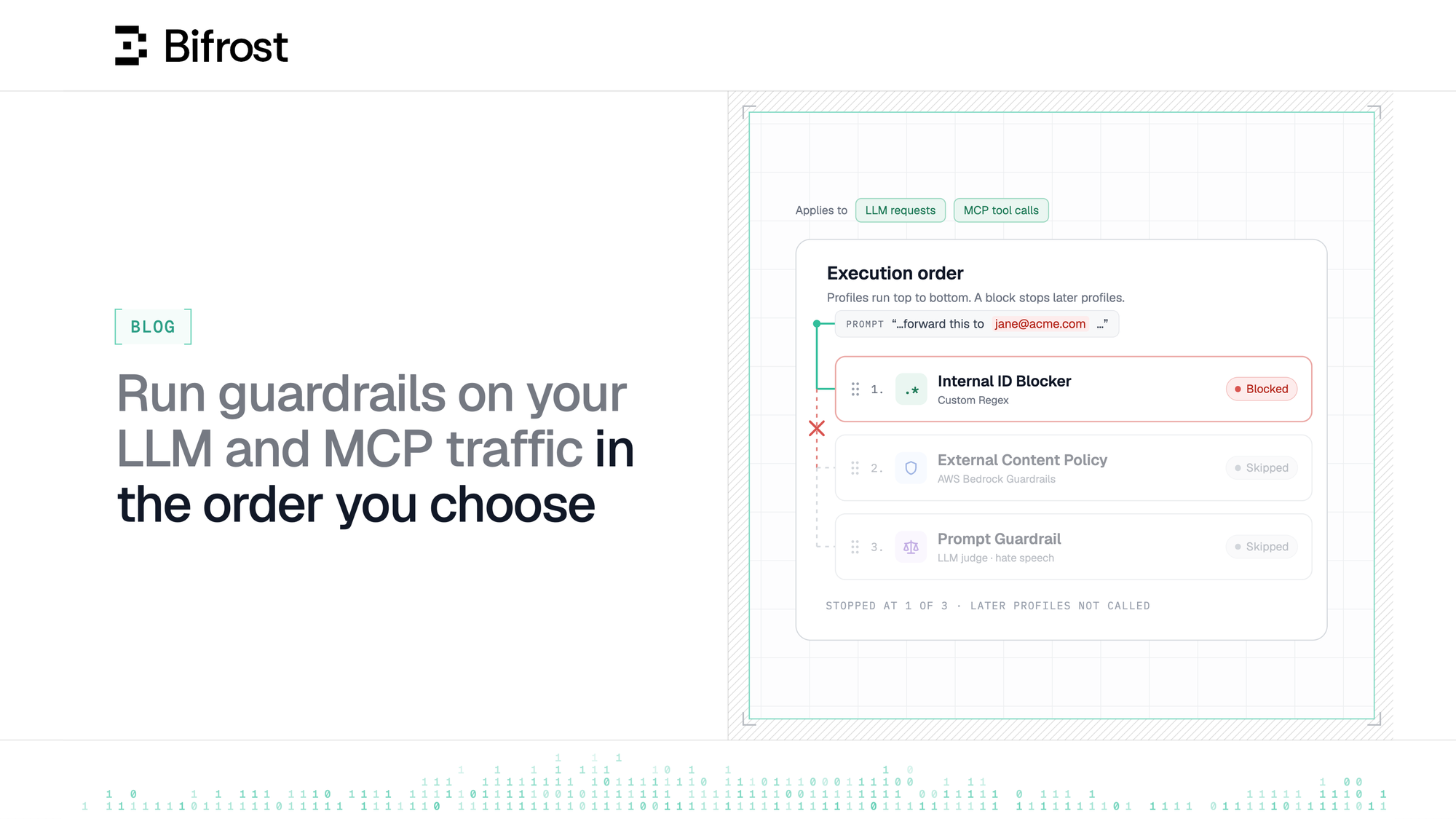
Bifrost Enterprise v2.3.0 lets you set the order of the profiles in a rule. They run from top to bottom, and the first one that blocks ends the execution sequence. Nothing after it runs.
In the example above, put the regex first, and the ticket with the account number stops there. The Bedrock rule and LLM judge never see the request.
Three tickets through the same rule
With the regex first, Bedrock second and the judge last:
- A ticket with an account number is blocked by the regex. Bedrock and the judge don’t run
- A ticket that tries to override the agent’s instructions passes the regex and is blocked by Bedrock. The judge doesn’t run
- A normal question about a failed transfer passes all three checks and reaches the agent
| When a profile… | What happens next |
|---|---|
| Allows the ticket | The next profile runs |
| Blocks the ticket | Later profiles don’t run, and the request is blocked |
| Errors or times out | Bifrost reports the error and the next profile still runs |
Set the order in the rule editor
In Guardrails → Configuration, create or edit a rule and select its profiles. The execution order list appears below the profile picker. Profiles run from top to bottom; drag a profile by its handle to move it, then save the rule.
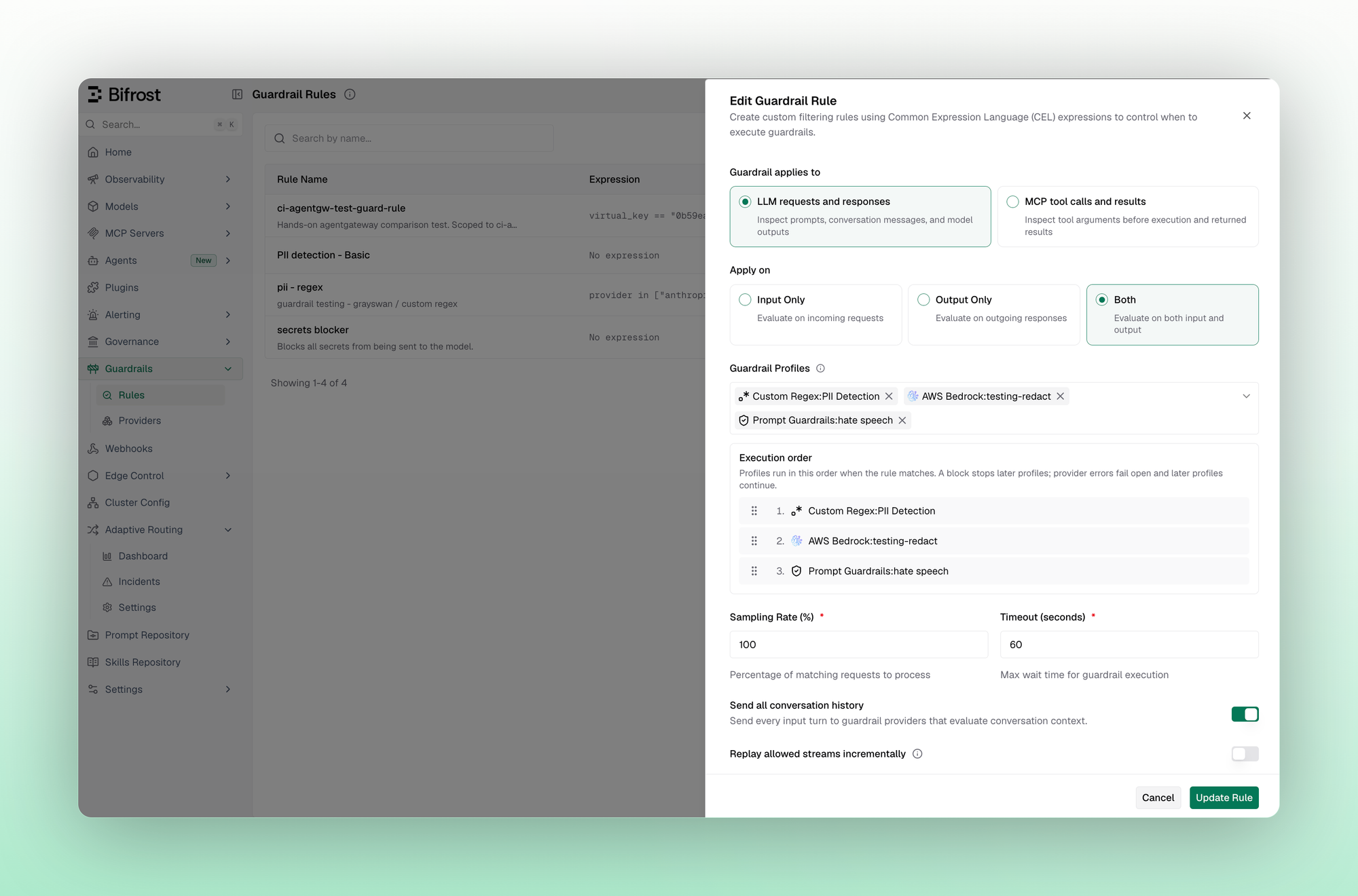
Profiles remain reusable. Their positions belong to the rule, so the same profile can run first in one rule and later in another. Reordering one rule does not rearrange every other rule that uses those profiles.
Save the same order through the API
API users control the sequence through the ordered selectedGuardrailProfiles list in the rule's create or update payload. For example, this payload excerpt represents the three checks above; replace the illustrative IDs with your existing profile IDs:
Reorder the list to change execution order. Bifrost persists that sequence and reloads it with the rule. Duplicate profile IDs are rejected, and you do not need to assign numeric priorities yourself.
The setting applies to profiles within LLM and MCP rules. It does not establish a global order across matching rules: separate rules and conversation-turn batches can run concurrently.
For teams running layered guardrails, the benefit becomes clear - choose the first check deliberately, make the sequence easy to review, and avoid later provider calls when an earlier profile blocks. Start with the regex checks that can make a definitive blocking decision, then add the broader evaluations your policy needs.
Get started today
Read the Guardrails documentation to configure profile execution order in Bifrost Enterprise.