
Routing LLM Requests by Difficulty in Bifrost : Complexity Router
Madhu Shantan
May 16, 2026 · 7 min read
"Write a one-line summary of this doc" and "refactor this 2000 loc module for multi-tenancy" both arrive as the same chat completion request - unless your application already sends them to different models. If you pin both to your strongest model, you burn money on the easy half. If you pin both to a cheap model, the hard half comes back broken.
This mismatch keeps showing up now that workloads are mixed - chat alongside code review alongside agents alongside long-form reasoning, all flowing through the same endpoint. The requests have almost nothing in common in terms of how hard they are to answer, but the gateway can't tell them apart.
The standard routing signals don't close the gap. Model name, provider, request type, headers, token budget - these tell you where a request came from and what kind of API call it is. None of them tell you how hard the work is. And the work is what actually decides which model makes sense.
So the question becomes how to get that signal - cheap enough to run on every request, and reliable enough to trust inside a routing rule.
Two ways to solve it
Semantic routing: This embeds the user message and classifies it against reference examples per tier. It can answer "what is this request about?" (the intent of the request) in addition to "how hard is it?" - that's a broader and often useful job. The cost is an embedding call on every request, which lands you in the tens-to-hundreds-of-milliseconds range and introduces a new dependency in your hot path.
Complexity routing: This is a deterministic alternative - score the request inside the gateway process using explicit signals, no external call, and map the result to a tier. You can always trace back why a request landed where it did.
We built complexity routing first. The reason is practical: something that runs deterministically in under a millisecond with no external dependencies fits the widest range of deployments. It does a narrower job than semantic routing and it does it essentially for free in terms of latency.
The routing config
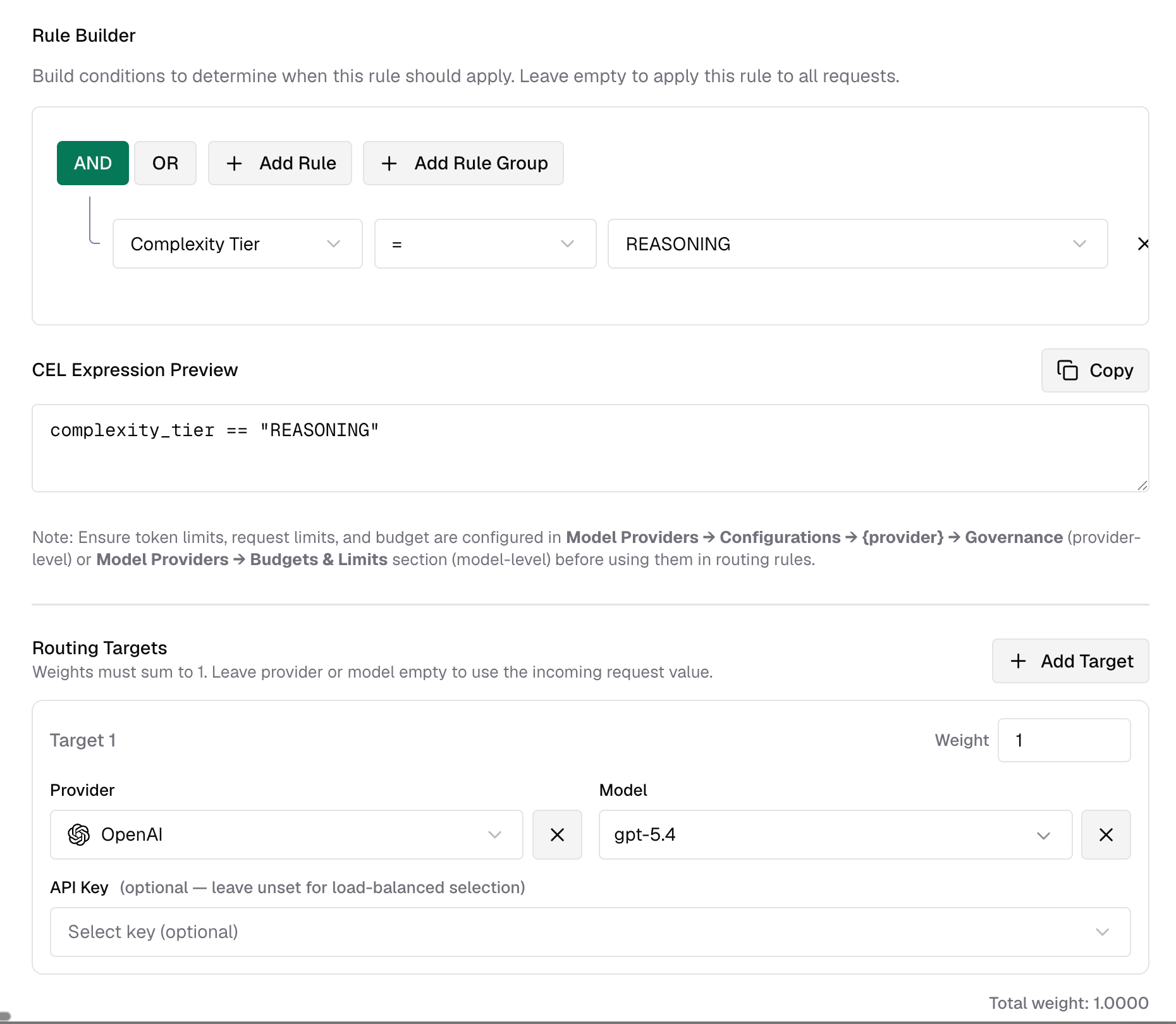
The router classifies each chat request into one of four tiers - SIMPLE, MEDIUM, COMPLEX, REASONING - and exposes the result as a CEL variable called complexity_tier inside Bifrost's routing engine.
A full setup looks like:
That's the whole application-side change - nothing. One endpoint, zero code changes. Bifrost evaluates the expression before the request goes out.
It also composes with everything else in the rule engine. You can write rules like:
team_name == "ml-research" && complexity_tier == "REASONING" budget_used > 80 && complexity_tier in ["COMPLEX", "REASONING"].
You don't need a separate routing layer for this.
How the score is built
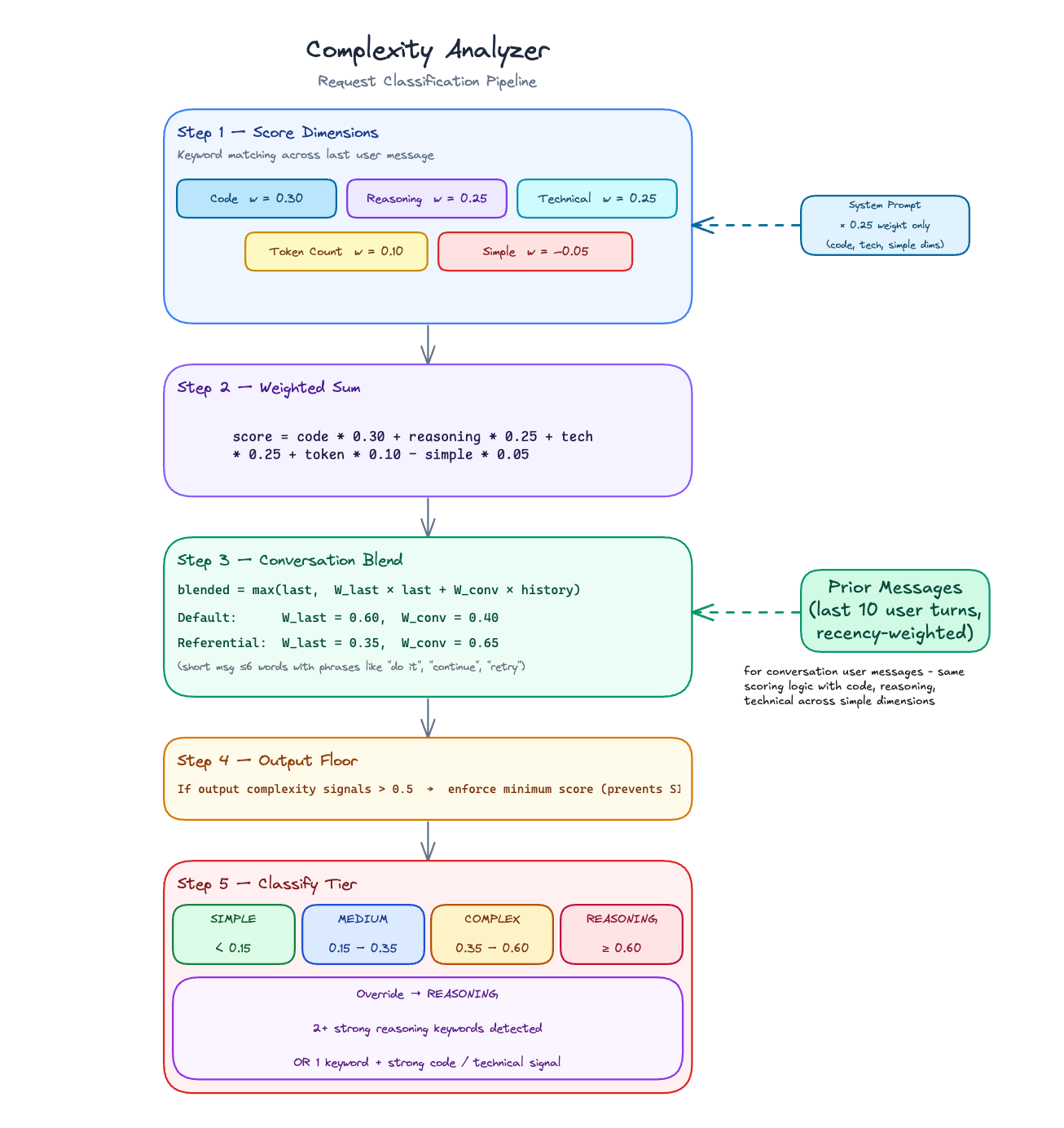
Every request gets a score between 0 and 1. It's a weighted sum across five dimensions from a single-pass keyword scan over the last user message:
Code, reasoning, and technical signals push the score up. Simple - greetings, trivial lookups - subtracts a small dampener. Token count adds a light lift for long prompts since length loosely correlates with effort.
Each dimension's count is capped before normalizing, so a prompt that says "debug" six times doesn't score six times higher than one that says it once.
A few design decisions in here that aren't obvious from the formula:
Output complexity is a floor, not a weight. A prompt like "list every AWS service and explain each one with examples" is a lot of work for the model even if the question itself isn't technically complex. The first version of the scorer treated output signals like any other dimension - they'd get summed in and often not move the needle enough. So we pulled them out and made them a floor instead: if output markers are strong enough, the final score can't drop below a minimum. "List every X" can't accidentally land in SIMPLE. Limiting phrases like "briefly" or "top 5" dampen the floor, so "briefly name the top 5" doesn't trip it.
The reasoning override bypasses the score entirely. Some of the hardest prompts are short. "Justify this tradeoff" doesn't generate much token count, doesn't hit many technical keywords - the weighted sum undersells it. When two or more strong reasoning phrases appear in the last message, or one appears alongside heavy code or technical signal, we force REASONING regardless of what the score says. It's an escape hatch for the class of prompt the numeric approach systematically misses.
The simple dampener backs off on complex prompts. If the prompt is long enough (≥30 words) or contains two or more strong signals, the dampener drops to near-zero. Otherwise a long technical explanation that opens with "hi, quick question" gets unfairly penalized.
The parts most classifiers get wrong
Keyword-count-and-classify isn't a new idea. Other gateways ship some version of it. The part that usually gets left out is what happens around the current message - and that's where the interesting failures live.
Conversation history. Scoring only the last message in isolation is the obvious starting point, but it breaks down fast in real usage. Follow-ups in a technical conversation are still technical. We score up to 10 prior user turns and blend them with the current score at 60/40 in favor of the last message. The final blended score is max(last_message, blend) - history can pull a score up but never drag it down. A new trivial question inside a heavy session doesn't inflate; a short technical follow-up stays technical.
Referential follow-ups. This one showed up early in testing: phrases like "do it," "try again," "use option 2" are practically zero-signal on their own. A naive scorer sends them to the cheap model. But they inherit the complexity of whatever they refer back to - they're not new asks, they're continuations. When the last message is ≤6 words, scores low standalone, and the prior context is non-trivial, we flip the blend weights to 35/65 so context dominates. Without it, "do it" after a long architecture discussion routes to the cheap model. With it, the follow-up stays in the right tier.
Without conversation blending: "do it" after a long design discussion → SIMPLE.
System prompt at 0.25×. The system prompt contributes to code, technical, and simple signals but only at a quarter of the user-message weight - and it never touches reasoning, token count, or output floor. The reasoning for the cap: "You are a Kubernetes expert" should nudge scores slightly, not override the actual question being asked. Early versions had the system prompt weight higher and it caused a lot of false escalations on simple follow-ups inside domain-specific sessions. The user's message should dominate.
Microsecond budget
Across benchmarks, the analyzer adds roughly 80-300 microseconds per request and stays below 1ms. Latency scales linearly with prompt length - it's a single pass over the text, so that's expected.
That constraint drove most of the design decisions. Anything involving an LLM call or an embedding in the hot path adds tens to hundreds of milliseconds and a new failure mode. A heuristic scorer that runs in-process stays inside the budget a gateway can actually afford - which is why this is reasonable as something that's just on by default, not something you enable carefully.
Tunable to your traffic
Two things are configurable, and both matter depending on your use case.
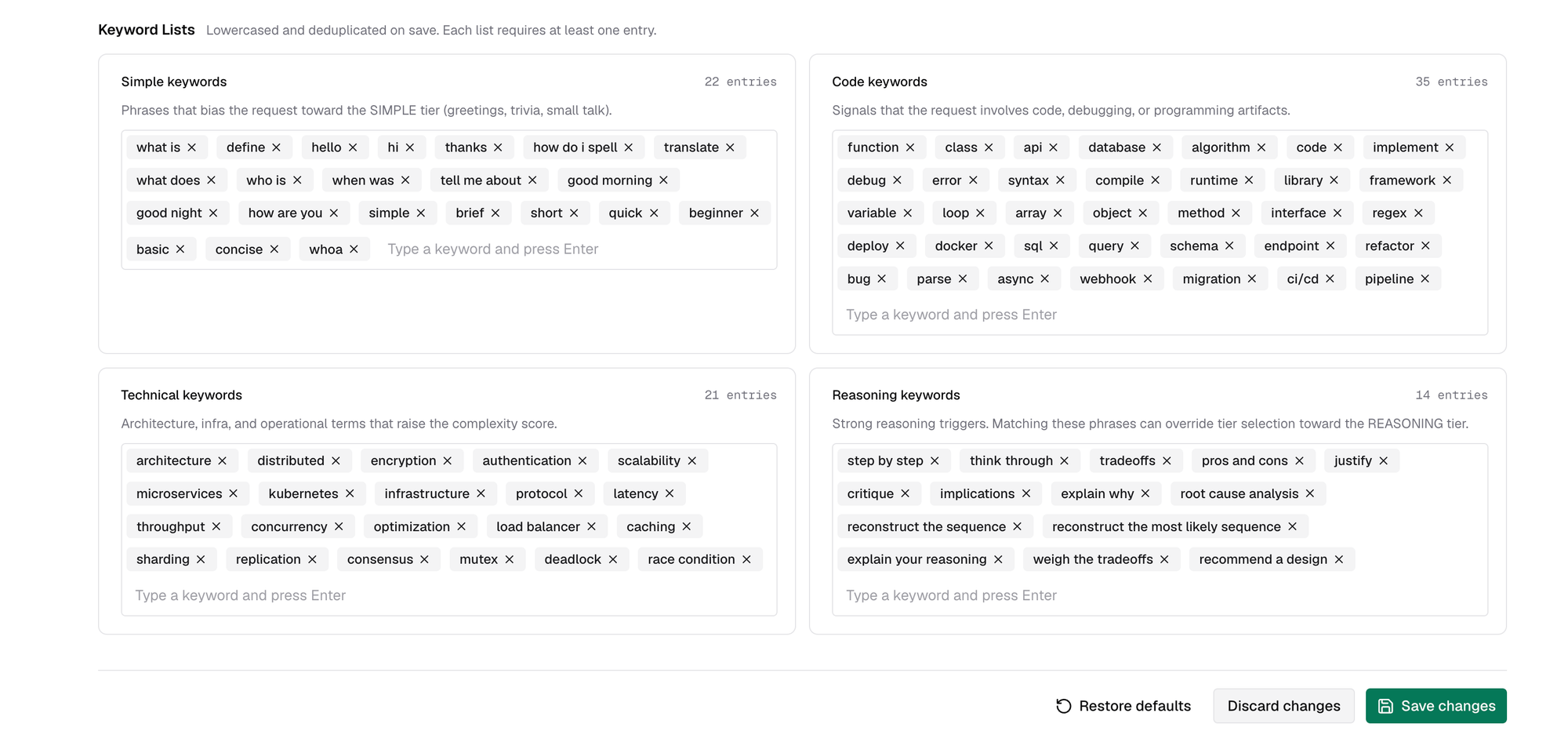
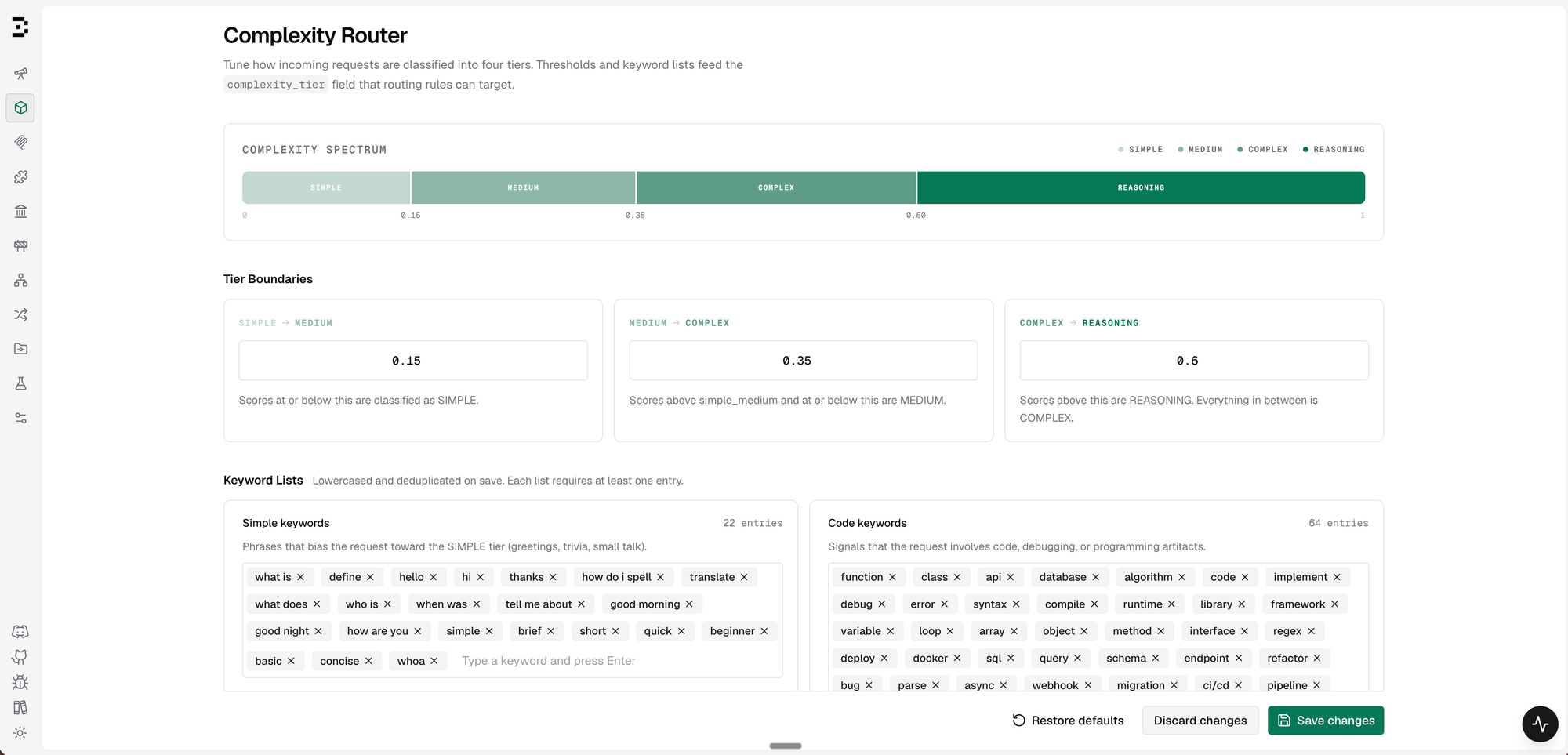
Keyword lists - The four user-editable dimensions (code, reasoning, technical, simple) ship with defaults we tuned against a broad traffic mix. But every product's traffic looks different. A legal-tech workload needs different technical keywords than a devtools one. You can add domain terms to any list or pull out defaults that don't fit.
One thing worth flagging: the reasoning keywords list gates the tier-override path, not just scoring. Adding broad single-word terms like "explain" or "analyze" will push a lot of requests to REASONING. Stick to specific multi-word phrases like "step by step" or "root cause analysis."
Tier boundaries - The three thresholds that slice the score into tiers default to 0.15 / 0.35 / 0.60. If you want to send more traffic toward your reasoning model, lower the top boundary. If you want to default cheaper, raise it. The Complexity Spectrum bar in the UI updates live as you type so you can see the traffic distribution shift before saving.
Where it falls short
It's a heuristic. A few things it won't catch well:
Lexical, not semantic. The scorer looks at surface keywords, not what you actually mean. A conceptual question that happens to use technical words - "why did you pick CEL over alternatives" - still scores as code-heavy, because the vocabulary alone tips it. Semantic routing handles this well.
English-only keyword lists out of the box.
The tier is a hint, not a ground truth. Routing policy is still user-defined CEL on top. Misclassifications degrade gracefully - the request still gets served, just by a different model than intended. That's fine for most cases, but if your workload has unusual patterns the defaults don't cover, the keyword lists and thresholds are there to tune.
The bar isn't perfect classification. It's being meaningfully better than "everything goes to the same place" - which turns out to be a lower bar than it sounds once you look at a real traffic mix.
The question routing was missing
Static routing answers "who sent this" and "which model did they ask for." Useful, but not complete.
Complexity routing adds "how hard is the work here" - a signal you can get in microseconds, tune to your domain, and audit from the routing logs after the fact.
It's a small primitive. But it changes a lot about how routing policy gets written, and because it lives inside the same CEL rule engine everything else in Bifrost governance uses, it composes cleanly with whatever you're already routing on - team scope, budget limits, request type, headers - without any special-casing.
Full configuration reference - tier boundaries, keyword lists, API endpoints, and config.json schema - is in the Complexity Router docs.