MiniMax and BytePlus ModelArk are now built-in providers in Bifrost
Suresh Chaudhary
Nov 18, 2026 · 7 min read
Bifrost already routes OpenAI, Anthropic, Gemini and 20+ other providers through one OpenAI-compatible API. With Bifrost v2.4.0, MiniMax and BytePlus ModelArk join built-in providers list in open source and Enterprise, so your teams can call MiniMax-M3, Seedream, Seedance and MiniMax speech models on the same endpoints, under the same virtual keys, budgets and logs.
Platform teams use Bifrost to give application teams one API for model providers, with access, budgets and logs set once in the Gateway. Consider an app team that is building a short-video feature as an AI capability. They want to leverage MiniMax-H3 and ByteDance's Seedance for the clips, Seedream for thumbnails, and MiniMax speech for the voiceover. They come to you, the person who runs the Gateway, and ask for access to both platforms: MiniMax and BytePlus ModelArk.
Both APIs look like OpenAI at first glance. The differences show up once requests are in production:
- MiniMax reports some failures, such as an empty balance or a rate limit, as HTTP 200 with an error code inside the body, so a client that checks the status code records a success. Its speech API returns audio as hex text
- Video on both platforms runs as an async task with its own create and poll endpoints (MiniMax, ModelArk). A ModelArk (Ark) key belongs to one region and only serves the models you activated in the ModelArk console.
Without built-in support, every app team must write and maintain this handling on their own. Those calls are also ungoverned and go straight to MiniMax and BytePlus, outside the virtual keys, budgets and logs you've already set up in the Gateway.
With Bifrost v2.4.0, minimax and byteplus are now built-in providers in open source and Enterprise. You add a provider key once, and teams call minimax/MiniMax-M3 or byteplus/dreamina-seedance-2-5-260628 on the same /v1/... endpoints they use for every other model.
| What your teams call | MiniMax | BytePlus ModelArk |
|---|---|---|
| Chat and Responses API, streamed or not | MiniMax-M3 and other MiniMax text models | Seed, DeepSeek and the other models you activate in ModelArk |
| Image generation | image-01 | Seedream, including edits and streaming |
| Video generation | MiniMax-H3, MiniMax-H3-Max | Seedance |
| Embeddings | Not supported | skylark-embedding-vision-251215 (text, image and video) |
| Speech and transcription | speech-2.8-hd, speech-2.8-turbo, asr-1.0 | Not supported |
Add a key and keep your controls
Go to Models → Model Providers, click Add New Provider, and pick MiniMax or BytePlus. Paste the API key or point to an environment variable such as env.MINIMAX_API_KEY.
For BytePlus, list the model or endpoint IDs the key should serve under Allowed Models. This list is also what Bifrost returns from /v1/models for the provider.
Bifrost calls https://ark.ap-southeast.bytepluses.com by default. If your key belongs to another region, set network_config.base_url to that region's host, for example https://ark.eu-west.bytepluses.com. MiniMax's mainland China platform works the same way with https://api.minimaxi.com.
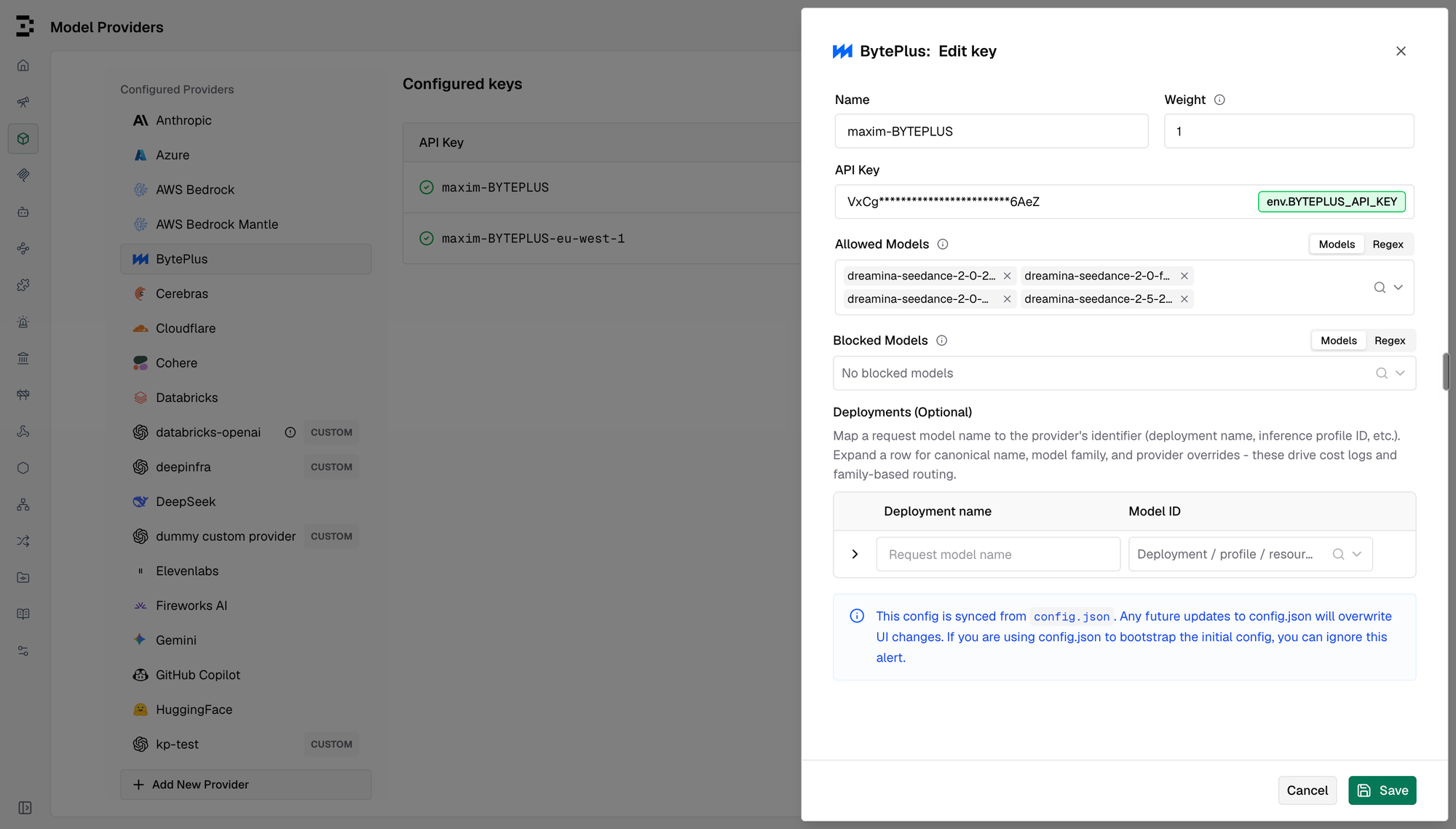
From there, both providers behave like any other in the Gateway. Virtual keys decide which teams can reach them, budgets and rate limits apply, and every request lands in the logs.
Chat and reasoning in the shape your apps already handle
MiniMax-M3 and Ark's reasoning models think before they answer, and each platform returns that thinking its own way. Bifrost asks MiniMax to split its thinking out of the answer, so it arrives in the message's reasoning field instead of as <think> tags inside the text. Ark's reasoning_content comes back in the same field.
reasoning_effort works on both. Bifrost maps it onto each platform's own values. For Ark, xhigh and max become high, the top of its range. On MiniMax-M3 and Ark's reasoning models, none turns thinking off. MiniMax's M2.x models and M3.1 Flash Preview always think.
Errors come back as HTTP errors. When MiniMax answers with a 200 and an error code in the body, Bifrost returns the status that code stands for. An insufficient balance becomes a 402, a rate limit becomes a 429, and blocked content becomes a 400. Ark's own error codes, such as ModelNotOpen for a model you haven't activated, stay in error.code so your team can see what to fix.
Images and video on the same endpoints
Seedream and image-01 generate images through /v1/images/generations, so the thumbnail call is byteplus/dola-seedream-5-0-pro-260628 or minimax/image-01. Seedance and MiniMax-H3 generate video through /v1/videos, with the same create, poll, download and delete calls for both:
Poll GET /v1/videos/{id} until the status is completed, then fetch the MP4 from GET /v1/videos/{id}/content. Swap the model for minimax/MiniMax-H3 and the same calls work. Bifrost turns size into each platform's resolution and aspect ratio.
Seedream can also stream. With stream: true, each image arrives as soon as Seedream finishes it, instead of after the whole group. Ark streams on Seedream 5.0 lite, 4.5 and 4.0. Seedream 5.0 pro and flash reject stream: true with a 400.
Seedance options without a standard field, such as reference videos, reference audio, draft tasks and return_last_frame, are accepted as extra params.
Here is the video the cURL request above produced:
Speech and transcription with MiniMax
MiniMax speech models are on /v1/audio/speech, streamed or not. MiniMax sends audio as hex text, and Bifrost decodes it, so your app receives MP3, WAV or another format it can play. A voice ID MiniMax doesn't know comes back as a 400 instead of a 200 with no audio.
asr-1.0 handles /v1/audio/transcriptions, with word or sentence timestamps, speaker labels on each word, SRT and VTT output, and streaming.
BytePlus sells speech as a separate product with its own keys, so the BytePlus provider doesn't cover it.
See what each image and video costs
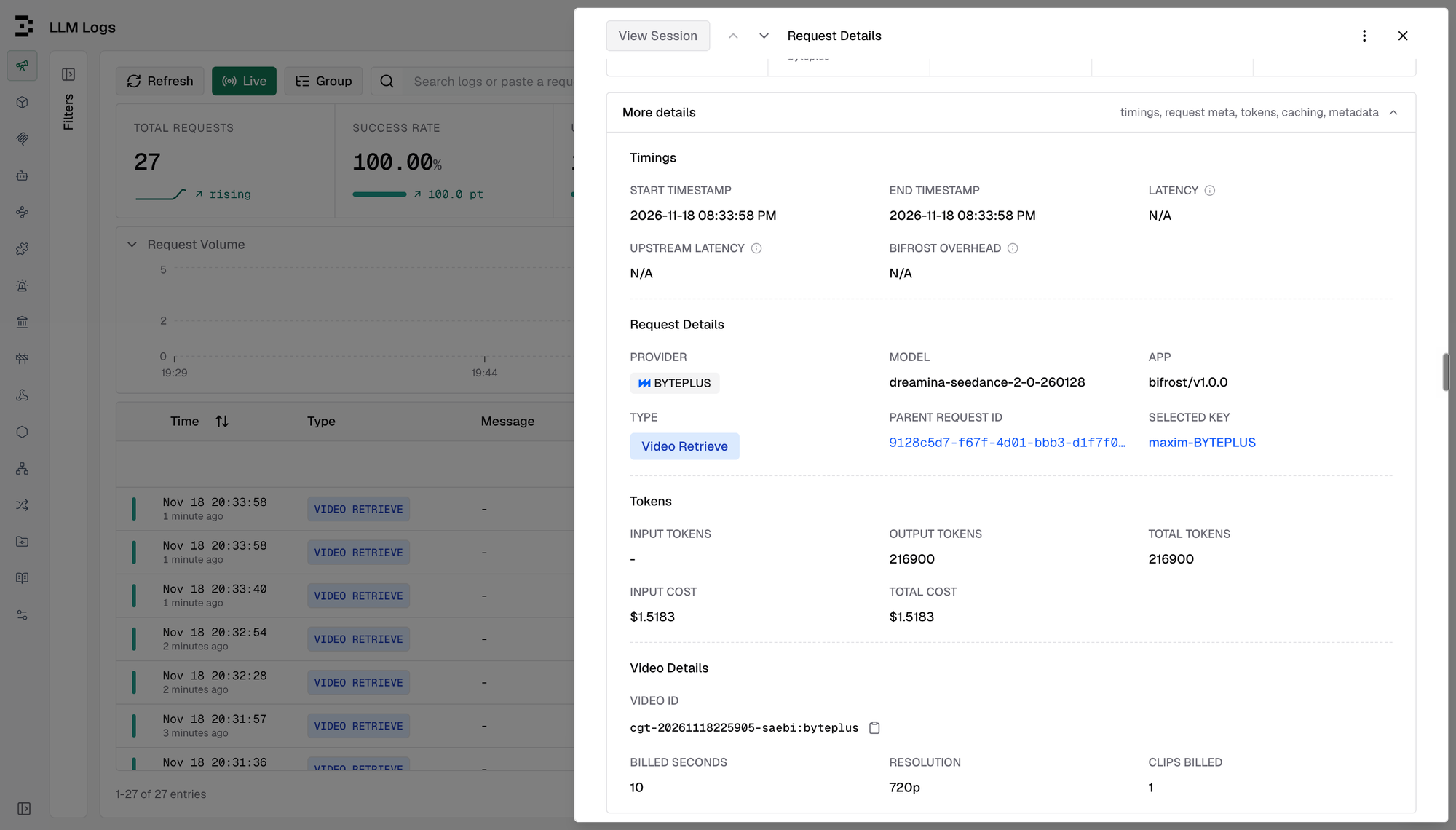
Seedance bills a video on the output tokens Ark reports for the task. Bifrost records those tokens and prices the video on them. Seedream images are priced per image, and where a rate depends on image size, Bifrost uses the size Seedream actually produced, not a tier like 2K from the request.
A video's final cost isn't known when the request is made, so Bifrost prices MiniMax and Seedance jobs once they finish. In LLM Logs, the cost appears on the call that retrieves the finished video, linked to the original request.
Get started today
Upgrade to Bifrost v2.4.0 or later, add a MiniMax or BytePlus key, and point your teams at minimax/<model> or byteplus/<model>. The setup and every parameter mapping are in the docs for MiniMax and BytePlus.