Meet Warp: An agent for your gateway's telemetry
Vrinda Kohli
Oct 15, 2026 · 7 min read
Warp is a new agent built into the Bifrost dashboard. You ask it a question about your gateway traffic in plain English. It answers by running queries against your log store, not by guessing.
Getting answers out of your LLM logs
Every request through Bifrost is logged with its provider, model, tokens, cost, latency, status, virtual key and full message content. That data already holds the answers to most questions about your LLM usage.
But each question takes its own path through the dashboard. To answer "Why did spend jump on Tuesday?" - you’d need to add a time filter, a team filter and a sort by cost. "Which model has the worst p95 this week?" is a different view with different filters. "Did anyone complain about the new checkout flow?" can't be answered with a filter at all, because the answer lives in what the requests say.
Warp turns all of these into one interface where a question goes in and a grounded answer comes out.
Enabling and using Warp
Warp is visible by default on OSS deployments. To use Warp, you will need to turn on the 'Warp' feature flag in the 'Settings' section. Enabling the flag unlocks the full setup and configuration experience.
Note: Warp is disabled by default for all Enterprise deployments. You can use Warp by enabling the feature flag mentioned above.
What Warp is
Think of Warp as your co-pilot. It lives in a chat panel in your Bifrost dashboard. Under the hood, it’s a tool-calling agent that runs on the Responses API, through your own Bifrost Gateway instance. It has no direct database access. Everything it knows about your deployment comes from a fixed set of read-only tools.
That design is intentional and is aimed at one failure mode in particular: An LLM will happily answer a data question from its priors, and the result is a fluent, specific, invented number. From an observability tool standpoint - that's worse than no answer, because it feels exactly like a real one.
How it works
The agent loop
The loop is straightforward. Send the conversation and tool definitions to the model. Run any tool calls it returns. Append the results. Repeat until the model answers.
The tools cover the questions people ask most:
- Metrics: totals, cost, user or team budgets, tokens, latency percentiles and throughput over any window.
- Usage rankings: top users, teams, virtual keys and more by spend and usage, with a trend against the previous period.
- Model performance: rank models by spend and compare providers on latency and throughput.
- Logs: list, count and open individual requests, including the full detail of a failed one.
- Request traces: follow one request through its retries and fallbacks, with each attempt's error and latency. This is the tool that answers "why", not just "what".
- Virtual keys: read a key's budgets and rate limits, even for a key that hasn't seen traffic yet.
- Discovery: list the real values in your deployment, like model names, apps and keys, so Warp filters on things that exist.
Every tool follows three rules:
- Read-only. No tool can write anything. Warp can look, but it can't touch.
- Bounded. Results are capped before they reach the model. One careless query can't dump megabytes of prompts into the context window.
- Scoped. Every query runs as the person asking. If your access control limits you to your team's traffic, so does Warp. It can never show you data you couldn't already pull from the logs API yourself.

The loop has a budget too. By default Warp gets eight steps. On the last one, its tools are taken away and it's told to answer with what it has. You get a clearly labelled partial answer instead of an error.
Scope is about precision, too
On the gateway, data access control decides what you're allowed to see. A separate layer decides what you meant.
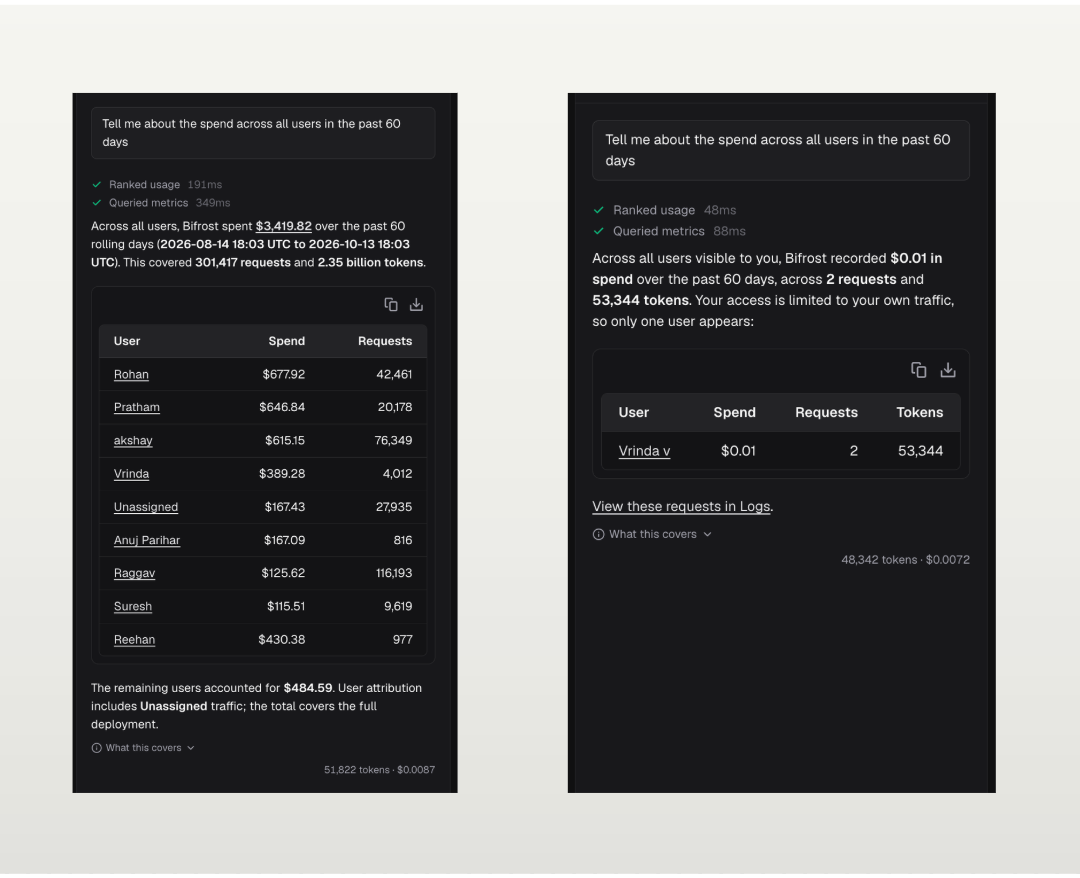
On a deployment serving many teams, a "what did we spend last week?" question could have several correct answers. Silently picking the widest one gives you a confident number about the wrong thing. So Warp applies a default:
- A signed-in user's own traffic is the default
- A caller with no row-level restriction (an admin, say) defaults to the whole deployment. Warp’s response is labelled to reflect the data access a user has
- With no identity, Warp simply asks you which team, customer or business unit you mean before it queries
- A scope named in the question always wins. The store still decides whether you can see it
Clarifying questions as structured data
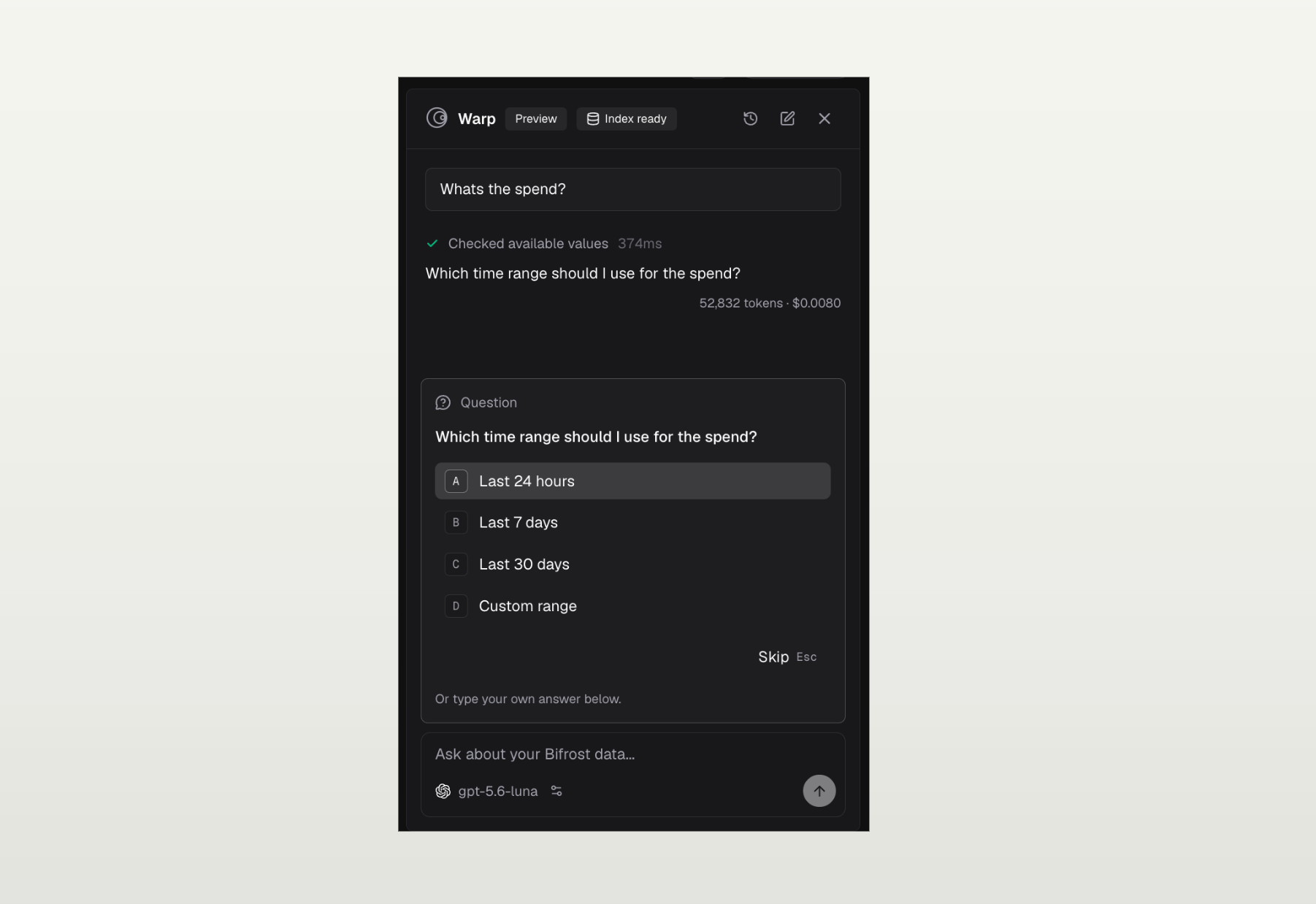
Ambiguous time windows get the same treatment. Instead of a free-text "which period?", Warp asks a structured question with a list of options. The UI renders those as a picker, with each option carrying a short hint.
Search by meaning
Filters are great for "how much" questions. They're useless for "what about" questions.
So Warp maintains a semantic index of your logs in a vector store, in its own namespace (BifrostWarpLogs by default). New logs are embedded by a background worker pool. Indexing never blocks the logging writer or the original inference request. A Sidekiq backfill job covers existing logs. It checkpoints so it can resume, and it pins the embedding config so a mid-run settings change can't mix two embedding spaces in one index.
At query time, Warp embeds two to five phrasings of the topic. It then joins the matches back to the log store using the caller's context, so row-level scope still applies. Vector metadata is only ever a prefilter. Semantic search’s results are ranked, not judged, so Warp reads each row and drops the off-topic ones before it counts or quotes anything.
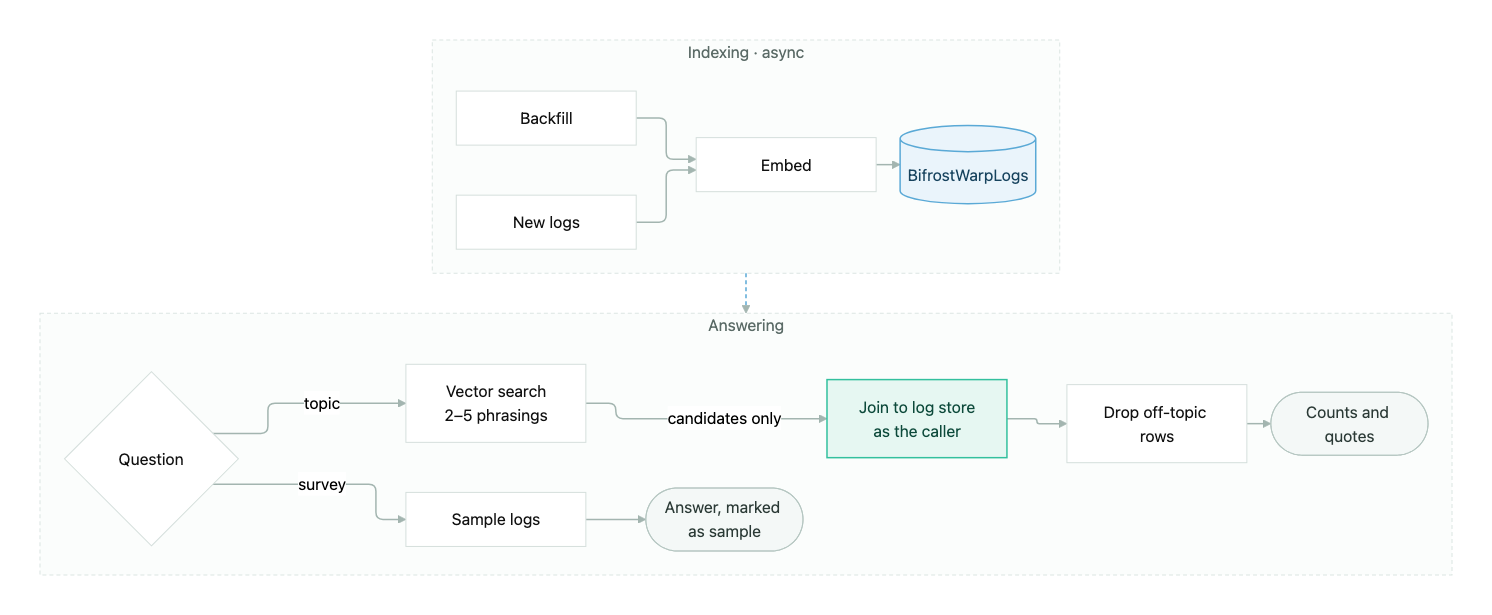
Broad survey questions ("what were folks in the team working on?") take a different path: a bounded sample of logs with their content. The answer says plainly that it's a sample, not the full picture.
Answers you can verify
Warp is built so you can cross-check what it tells you:
- Links point to real logs. Answers link back to the matching rows on the logs page. Warp checks every link against the ones its tools returned, so you don't get broken or made-up URLs
- Time windows are exact. Answers with numbers end with the absolute time range the query used. "Last week" becomes the actual start and end.
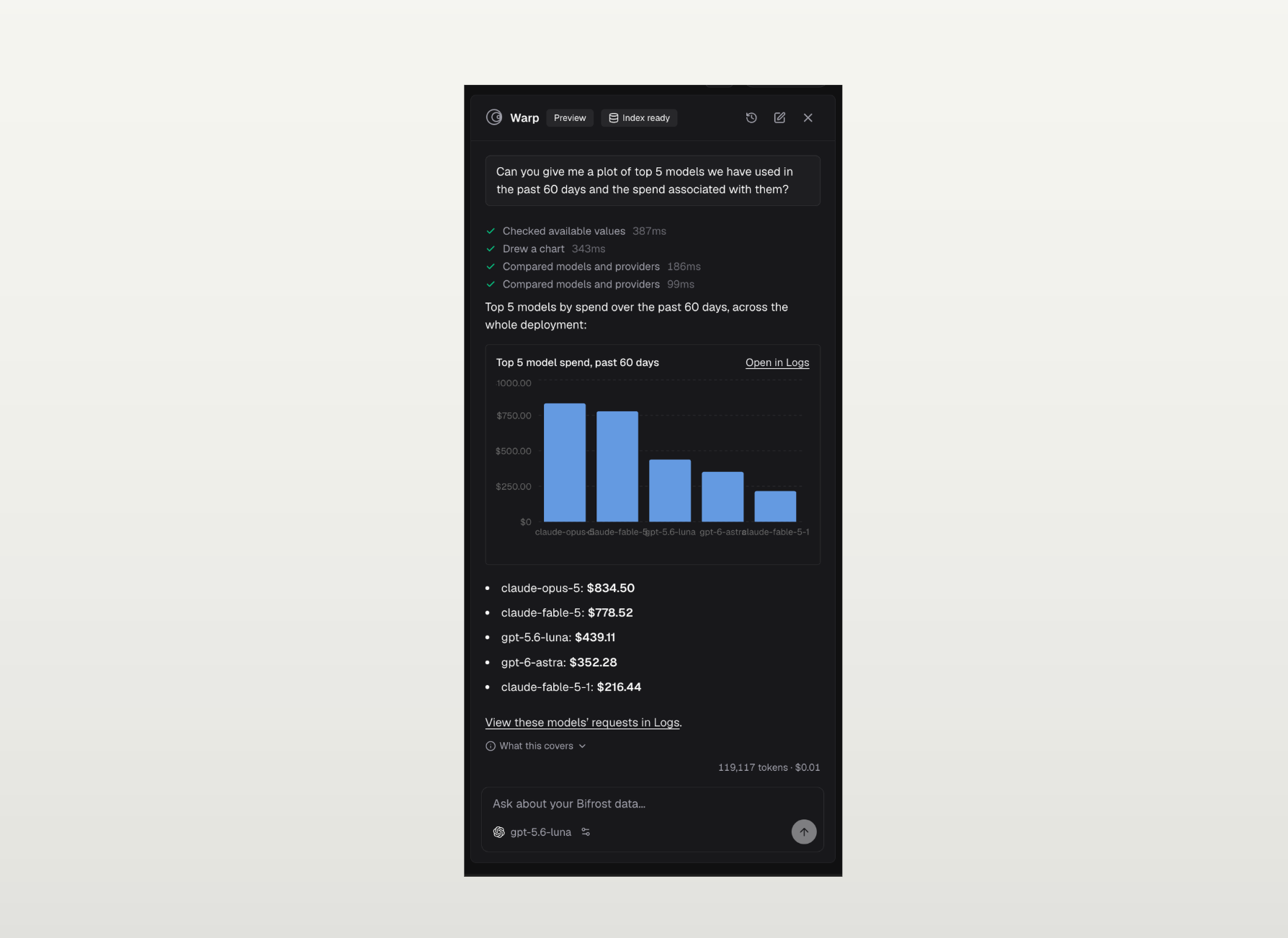
- Charts are drawn from tool data. When Warp draws a chart, the numbers come straight from a query result. The model only picks which result to show. It never types the numbers.
Configuration
Warp runs on a model you pick, separate from the provider pool your gateway serves. The pool is what your deployment serves to others. Warp is what it runs for itself. Keeping them apart means rotating a tenant-facing key doesn't change who answers dashboard questions. It also keeps Warp's own spend separate from the tenant traffic it reports on.
| Field | Notes |
|---|---|
provider, model | The default model for the agent loop |
api_key_id | A reference to an existing provider key, resolved by Bifrost. Not a secret, so no encryption or redaction is needed |
additional_models | Up to 20 extra models users can switch to in the panel |
temperature, reasoning_effort | Optional. Temperature from 0 to 2 |
max_iterations | Default 8, range 2 to 20 |
request_timeout_seconds | Per upstream call. Default 120 |
history_retention_days | Default 30. Separate from log retention |
system_prompt_suffix | Deployment-specific instructions |
embedding_provider, embedding_model | What the semantic index is built with |
semantic_search_threshold, semantic_search_limit | Default 0.5 and 10 (max 25) |
Warp needs the logging plugin, since logs are what its tools read. It also needs a connected vector store for the semantic index. Once both are in place, run the log index backfill so search covers your history, not just new traffic.
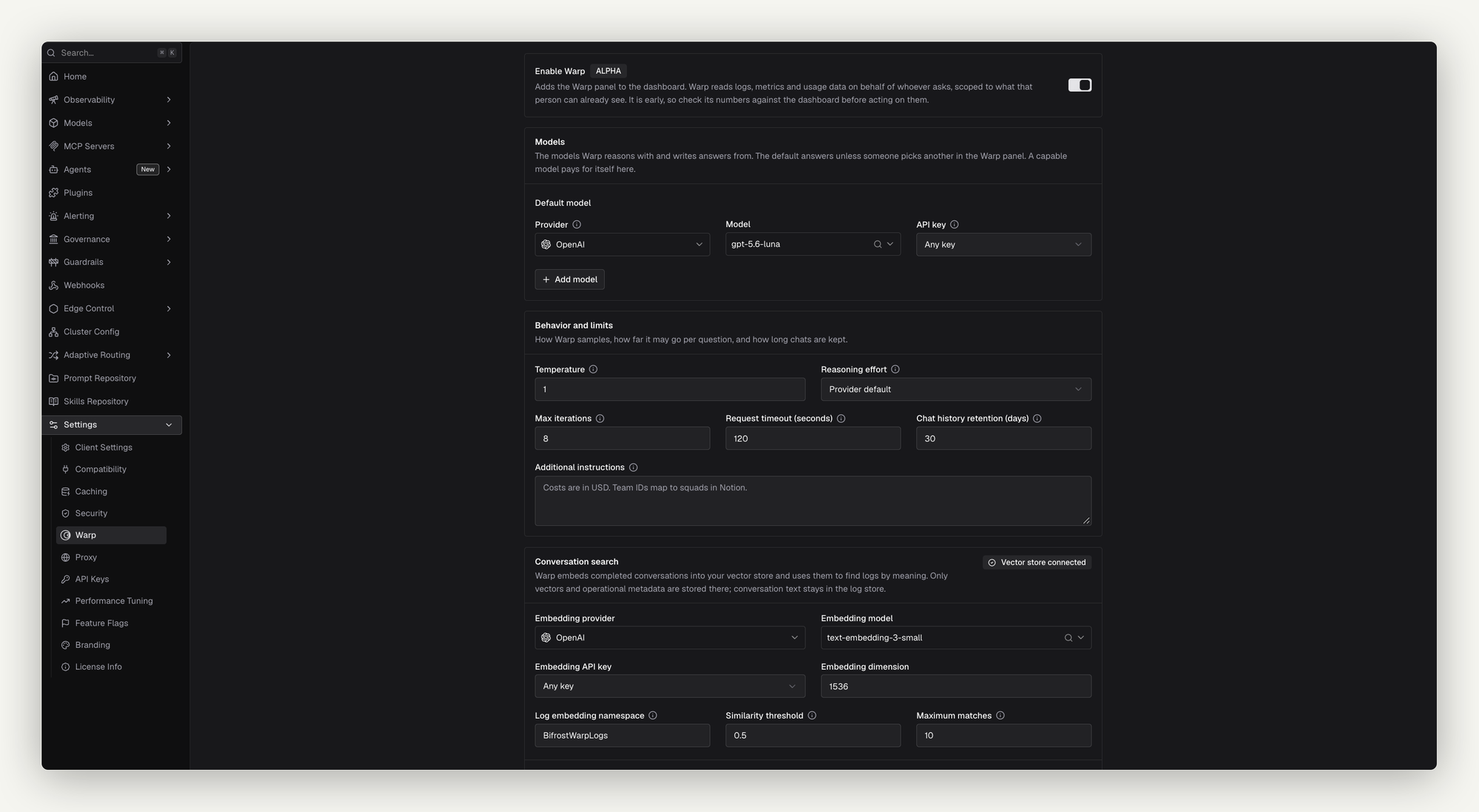
Admins get full access to Warp’s settings, and can configure the same at every possible granularity for the entire deployment.
Try it
Some good first questions:
- "What did we spend on OpenAI this month, by team?"
- "Why did error rates spike yesterday afternoon?"
- "Which model has the best p95 latency for us this week?"
- "How close is the
support-botkey to its budget?" - "Find conversations where users asked to cancel their subscription."
Conversations are saved per user, so you can reopen a thread later. /clear starts a new one.
Warp is available now in the Bifrost dashboard. Open it with Cmd+I and ask it something you've been meaning to look up.