Cross App Access in Bifrost: Agent access to SaaS tools, approved in Okta and logged at the Gateway
Reehan
Nov 19, 2026 · 8 min read
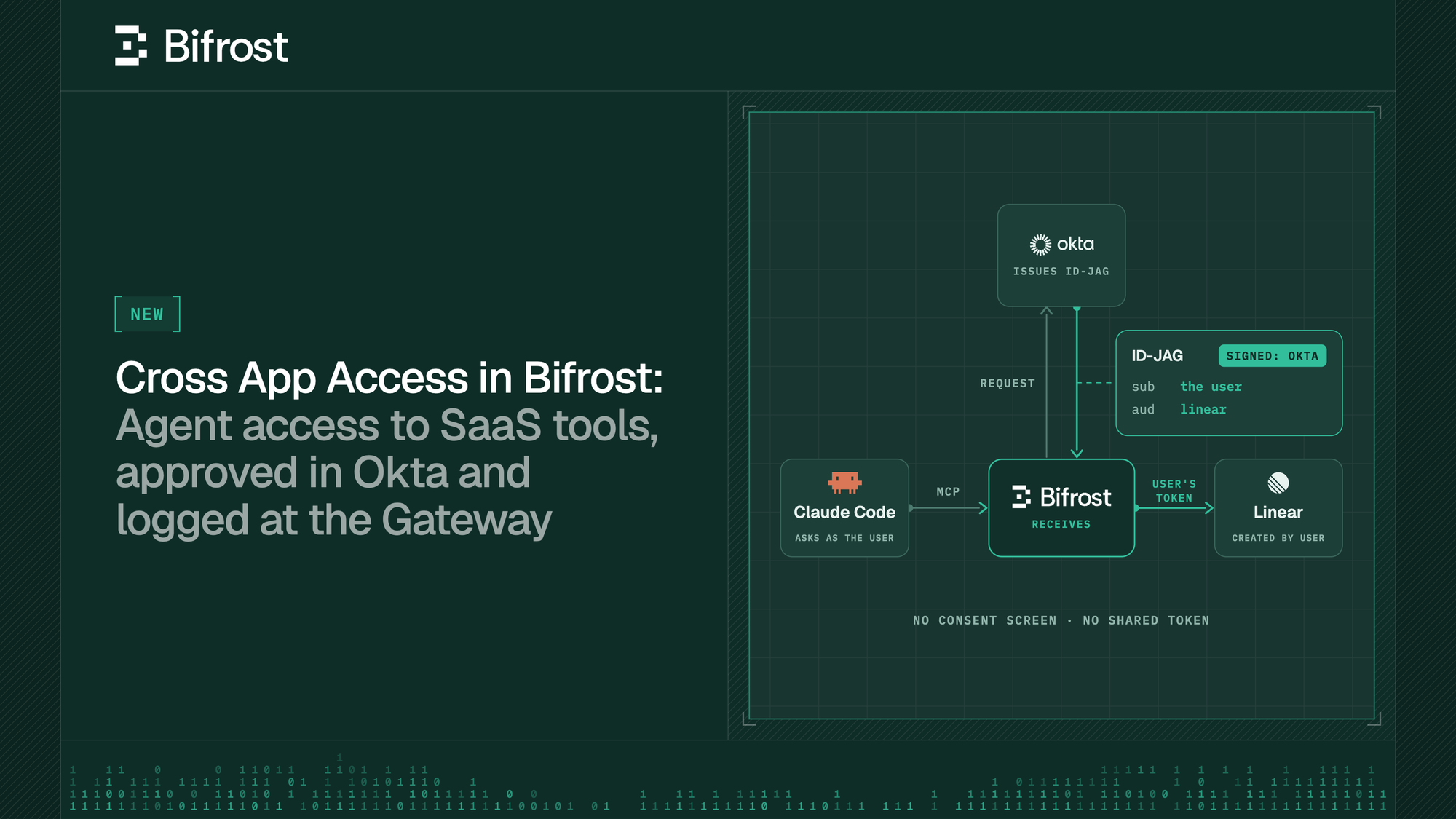
Users and employees now ask agents to act inside the SaaS tools your company uses. For example - a coding agent such as Claude Code or Cursor, or a custom agent you've built, files issues in Linear and reads them before making changes to code. Each of those calls needs a credential for the SaaS tool, and today you usually have two ways to provide this credential:
- You can hand every agent a shared admin token. It's quick, but every agent can then access whatever that one account can, and every issue it files shows the same name
- Or you can have each employee connect with per-user OAuth, which gets the name right: each person clicks through a consent screen for each tool their agents use. Those approvals happen one person at a time, outside your identity provider. Your Okta policy decides who can sign in to Linear, but it has no say in which agents reach Linear on that person's behalf.
Cross App Access (XAA) was built to close that gap. With Bifrost Enterprise, you can now leverage XAA at the Gateway for any agent that reaches Bifrost as a signed-in user, with Okta as the identity provider, for SaaS apps that accept Cross App Access, such as Linear.
Cross App Access moves agent approval into your identity provider
Cross App Access is an open extension to OAuth that Okta introduced in 2025. The OAuth working group adopted it as an IETF draft, and MCP took it on as its Enterprise-Managed Authorization extension.
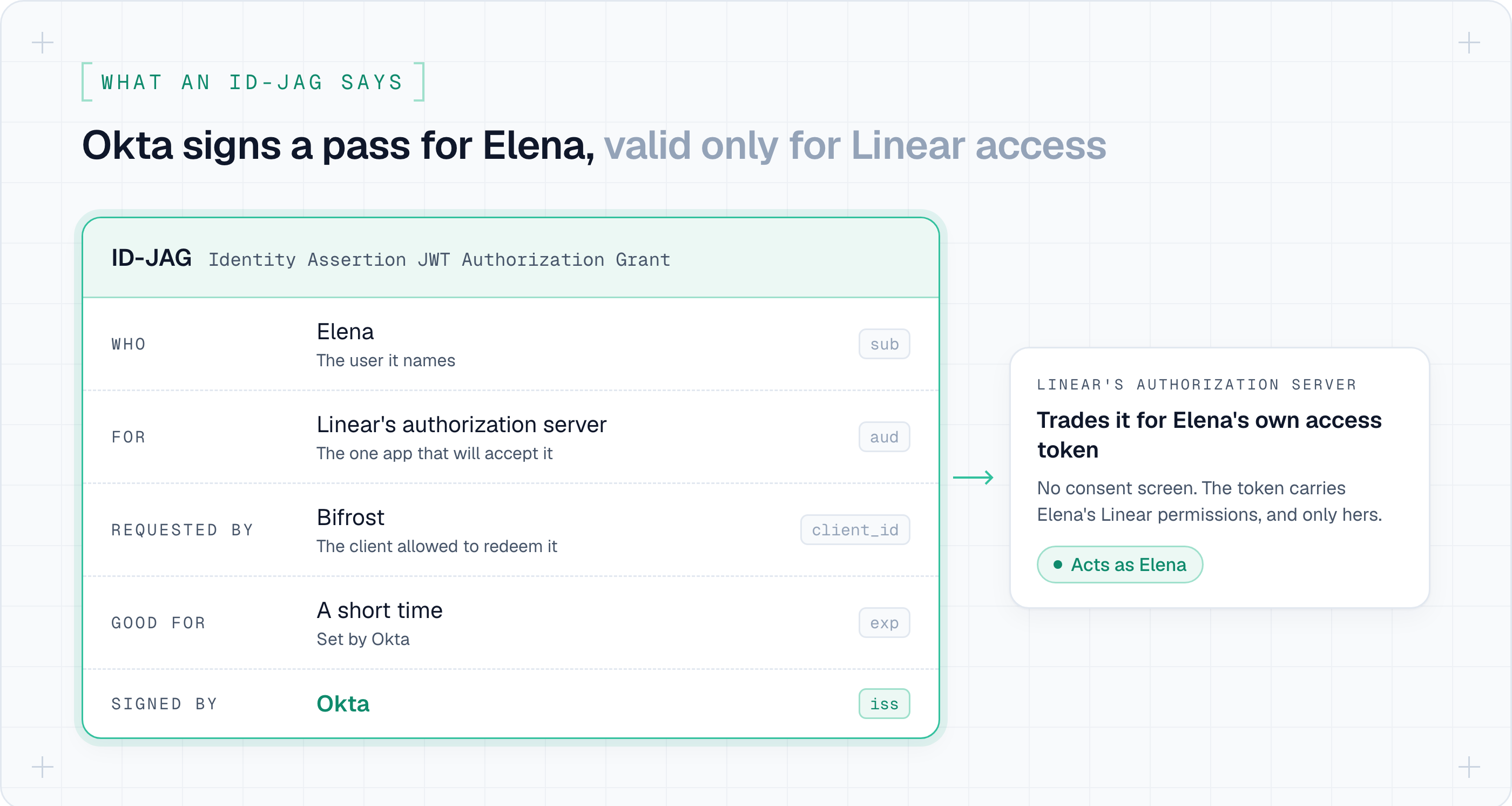
It moves the approval from each employee to you, the admin. You approve "this agent may reach Linear for these users" once in Okta. When an agent needs access, Okta issues an ID-JAG (Identity Assertion JWT Authorization Grant): a short-lived assertion, signed by Okta, that names the user and is addressed to one app. The app trades it for that user's own access token. There's no consent screen, and access follows the user's assignments in Okta.
What running it at the Gateway adds
If an AI app your teams use supports Cross App Access, it can leverage this mechanism on its own, without a gateway. However, support varies by client, and the agents your teams build would each have to implement it and register separately in Okta.
With Bifrost, any agent that reaches the Gateway as a signed-in user gets to leverage Cross App Access, under the same tool permissions and logs you already set for the rest of its traffic:
- One registration covers every agent: You register Bifrost as the AI agent in Okta. Okta decides which apps it may reach and for which users, Bifrost decides which tools each user may call, and the SaaS app decides what each user can see there.
- One log for each person: Bifrost records each tool call under the person who asked, with the app the client reports, such as Claude Code or Cursor, alongside that person's model calls through Bifrost. Okta sees one requester, Bifrost, so the logs are where you see which app made a call.
How this works at the Gateway
Take Elena, an engineer on the Analytics team. She signs in to Bifrost through Okta, and her Claude Code connects to Bifrost's MCP gateway signed in as her.
As an admin, you've approved Bifrost for Linear once in Okta, and Elena is assigned to Linear there. Midway through a code refactor, Elena asks Claude Code to file a Linear issue for a bug it found.
Tracing the call, with Bifrost in the middle
When Claude Code's MCP tool call for Linear reaches Bifrost:
- Bifrost asks Okta for an ID-JAG that names Elena, addressed to Linear. Okta checks its policy first: is Bifrost approved to reach Linear, and is Elena assigned to Linear? If not, Okta issues nothing.
- Bifrost presents the ID-JAG to Linear's authorization server, which returns an access token for Elena's own Linear account.
- Bifrost calls Linear's tool with Elena's token. The issue is filed as Elena, and Bifrost returns the result to Claude Code.
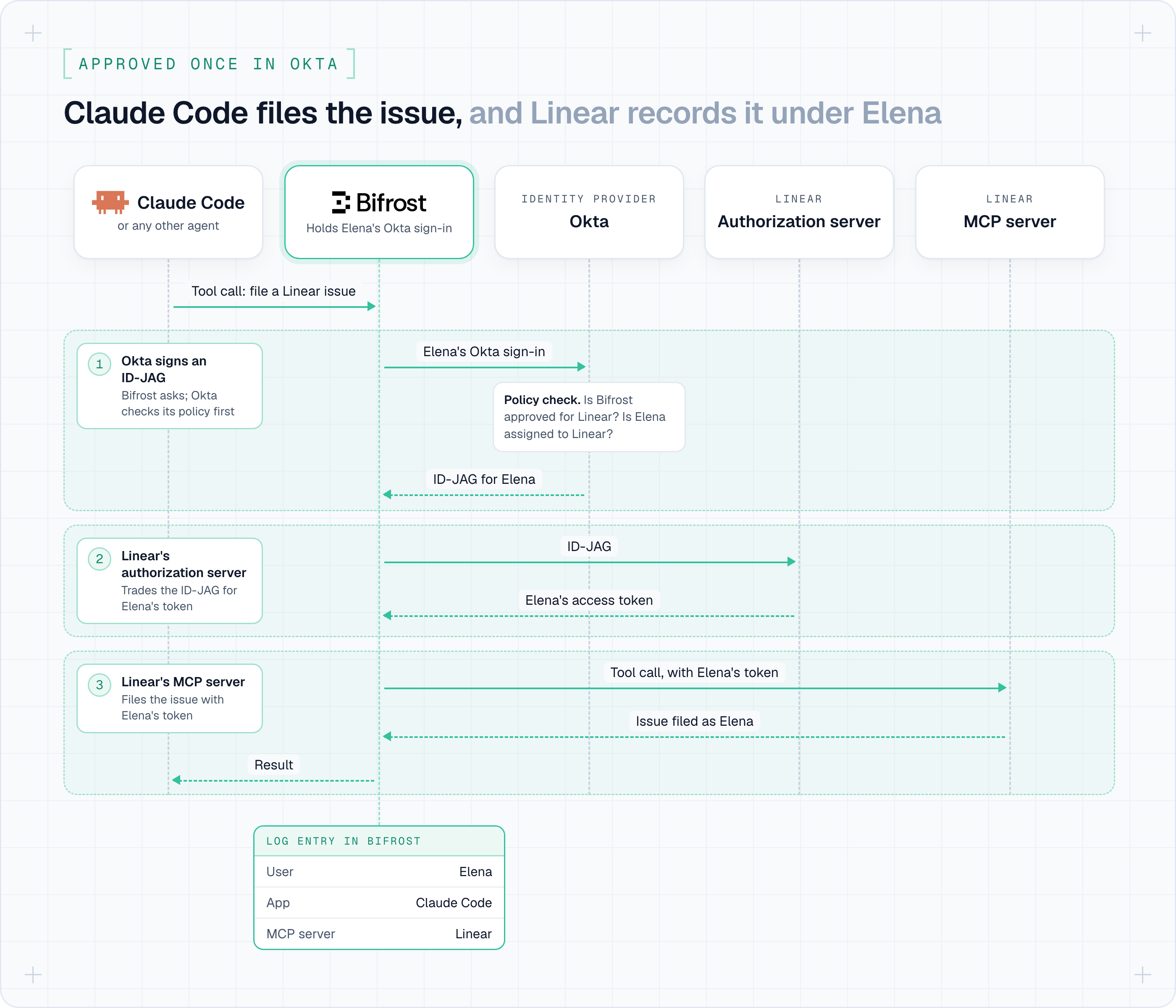
Claude Code itself doesn't take part in either exchange, so the same works for any other agent that reaches Bifrost as a signed-in user.
The ID-JAG Okta signs in step 1 names Elena, and Linear is the only app that will accept it:
Removing someone in Okta stops new ID-JAGs at once, but the tokens Bifrost already holds for them keep working until they expire. To cut someone off right away, delete them in Bifrost or remove their access to the Linear MCP server.
Closing the loop
The filed issue appears in Linear under Elena's name, and the agent could reach only what Elena can reach in Linear. Elena never saw a consent screen, and no one shared a Linear token. In Bifrost, the call is logged under Elena, from Claude Code, alongside her model calls.
Note: A request that carries only a virtual key can't use it, even a key a user owns, because there's no Okta sign-in to exchange.
Compare the ways an agent can reach a SaaS tool
Bifrost already supports several ways to authenticate to an MCP server, and each method fits a case. Cross App Access adds one for SaaS apps your identity provider already manages.
| Auth type in Bifrost | Who the SaaS app sees | Who approves access | Works with third-party SaaS |
|---|---|---|---|
| Server-level (headers or OAuth) | One account for everyone | The admin, once | Yes |
| Per-user OAuth | Each user | Each user, for each server | Yes |
| Direct token exchange | Each user | Your identity provider | No, only servers that trust your identity provider's tokens |
| Cross App Access | Each user | The admin, in Okta, once per app | Yes, where the app accepts ID-JAGs |
Let AI apps reach Bifrost as the user
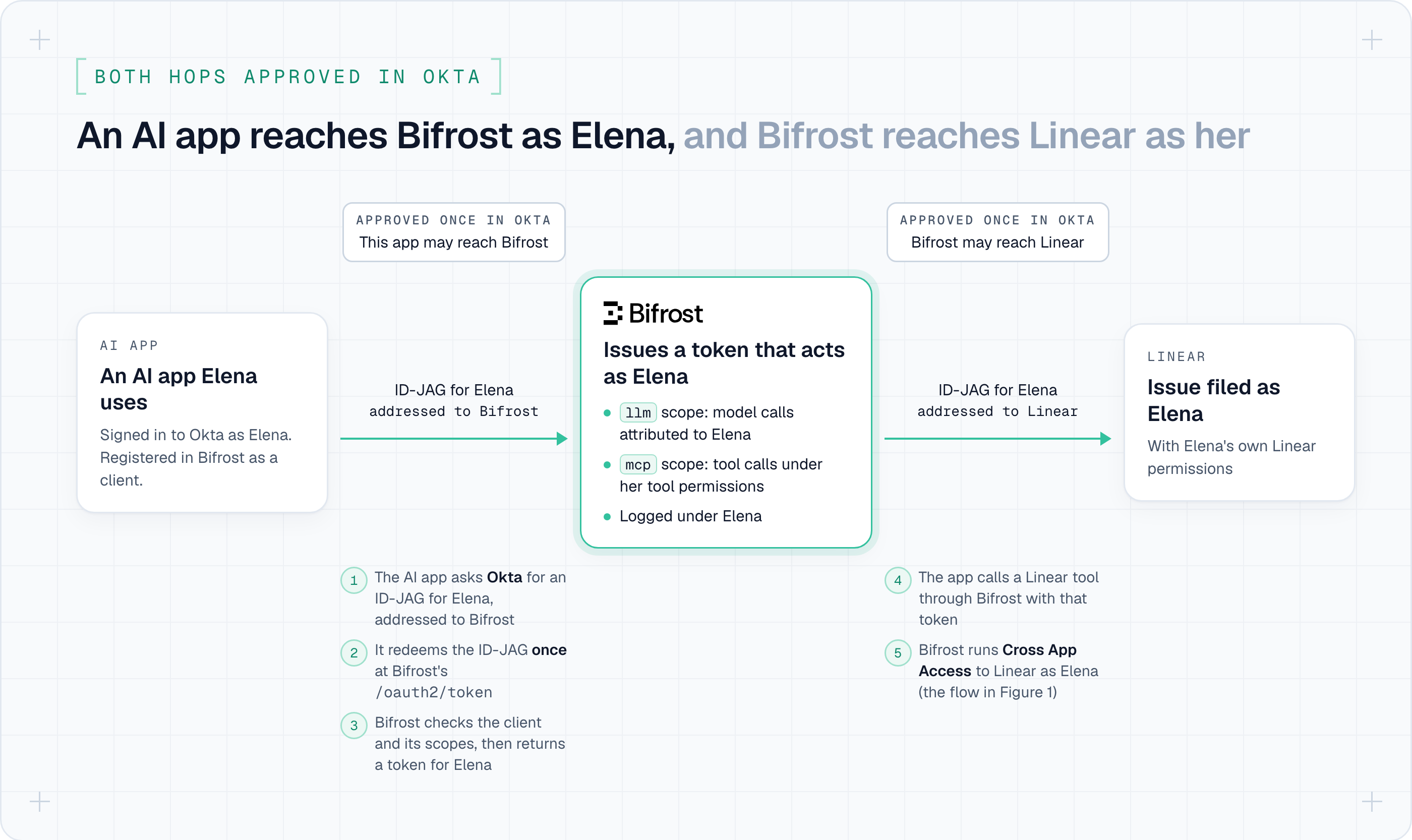
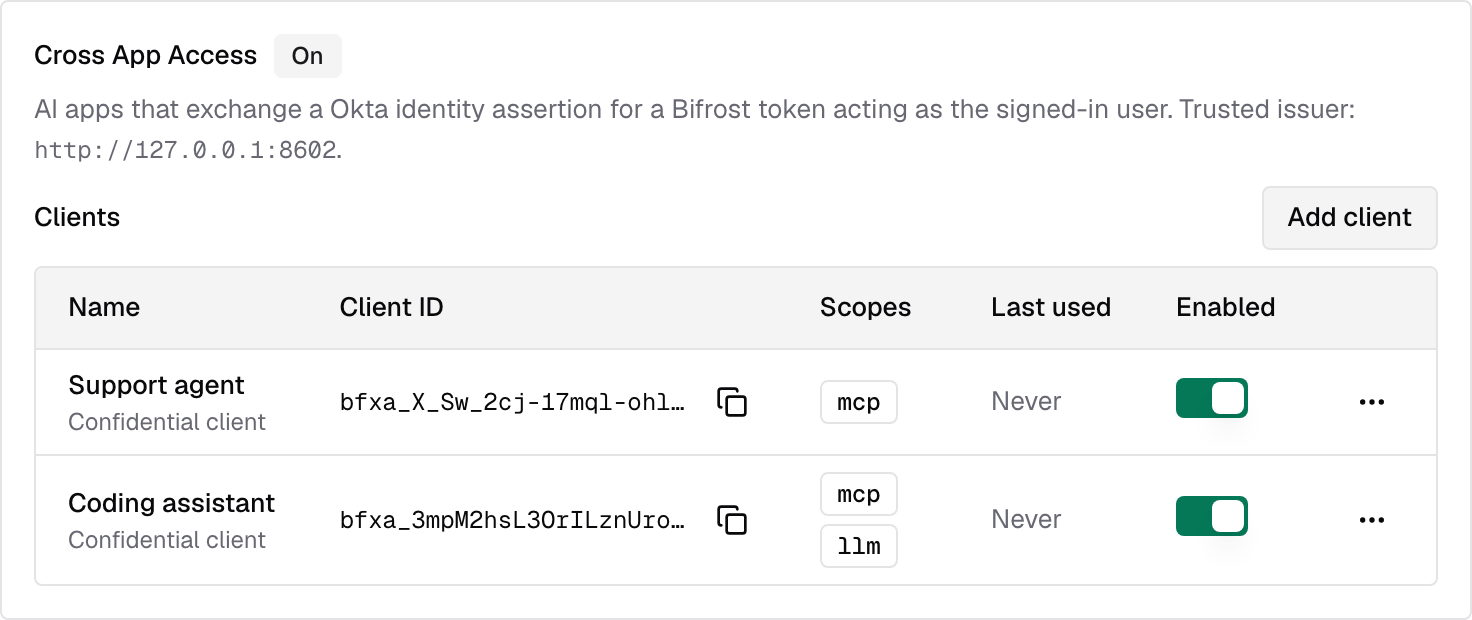
Bifrost also accepts Cross App Access in the other direction. An AI app/agent that you as an Okta admin have approved can exchange an ID-JAG with Bifrost for a token that acts as, and is attributed to, that user.
- Choose what each app may reach: Register each AI app as a client and give it scopes:
mcpfor Bifrost's MCP gateway, andllmfor inference routes, so the app's model calls are attributed to the user too. - Revoke an app at once: Disabling or rescoping a client refuses its tokens immediately, on every node of a cluster. Each ID-JAG an app presents to Bifrost can be redeemed only once, so a copied one can't be reused.
Put together, an AI app reaches Bifrost as Elena, and Bifrost reaches Linear as Elena, with both connections approved in Okta.
Turn it on under User Provisioning → Cross App Access on your Okta SSO provider. It needs Bifrost's OAuth server, with the issuer URL set under Config → Security.
Set it up
- In Okta, register the OIDC app Bifrost uses for SSO as an AI agent (Directory → AI agents), enable its Token Exchange grant, and add a resource connection to the SaaS app with the scopes Bifrost may request and Bifrost's client ID at that app.
- At the SaaS app, register Bifrost as a client that may use the
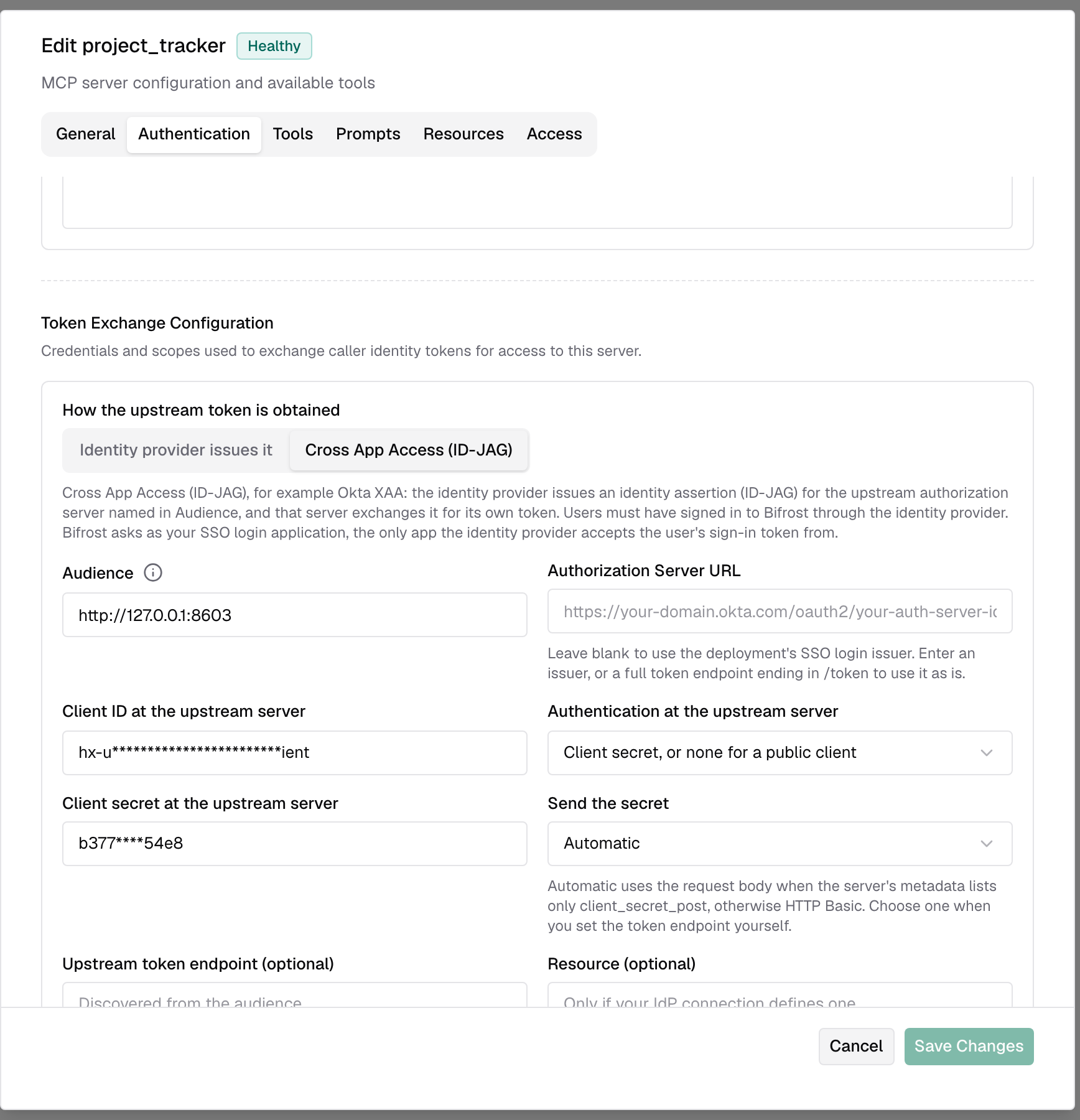
jwt-bearergrant. Each app does this differently; Linear's MCP docs cover Linear. - In Bifrost, add the MCP server with Token exchange as the auth type and Cross App Access (ID-JAG) as how the upstream token is obtained. Set Audience to the app's authorization server issuer and fill in Client ID at the upstream server. Bifrost verifies the connection with your own Okta session and discovers the server's tools.
Get started today
Cross App Access is available in Bifrost Enterprise v2.4.0 and later, with Okta as the identity provider. Follow the Cross App Access docs.