Chain guardrail profiles and use decision models as judges: Keep redacted data out of later guardrail checks
Madhu Shantan
Nov 17, 2026 · 6 min read
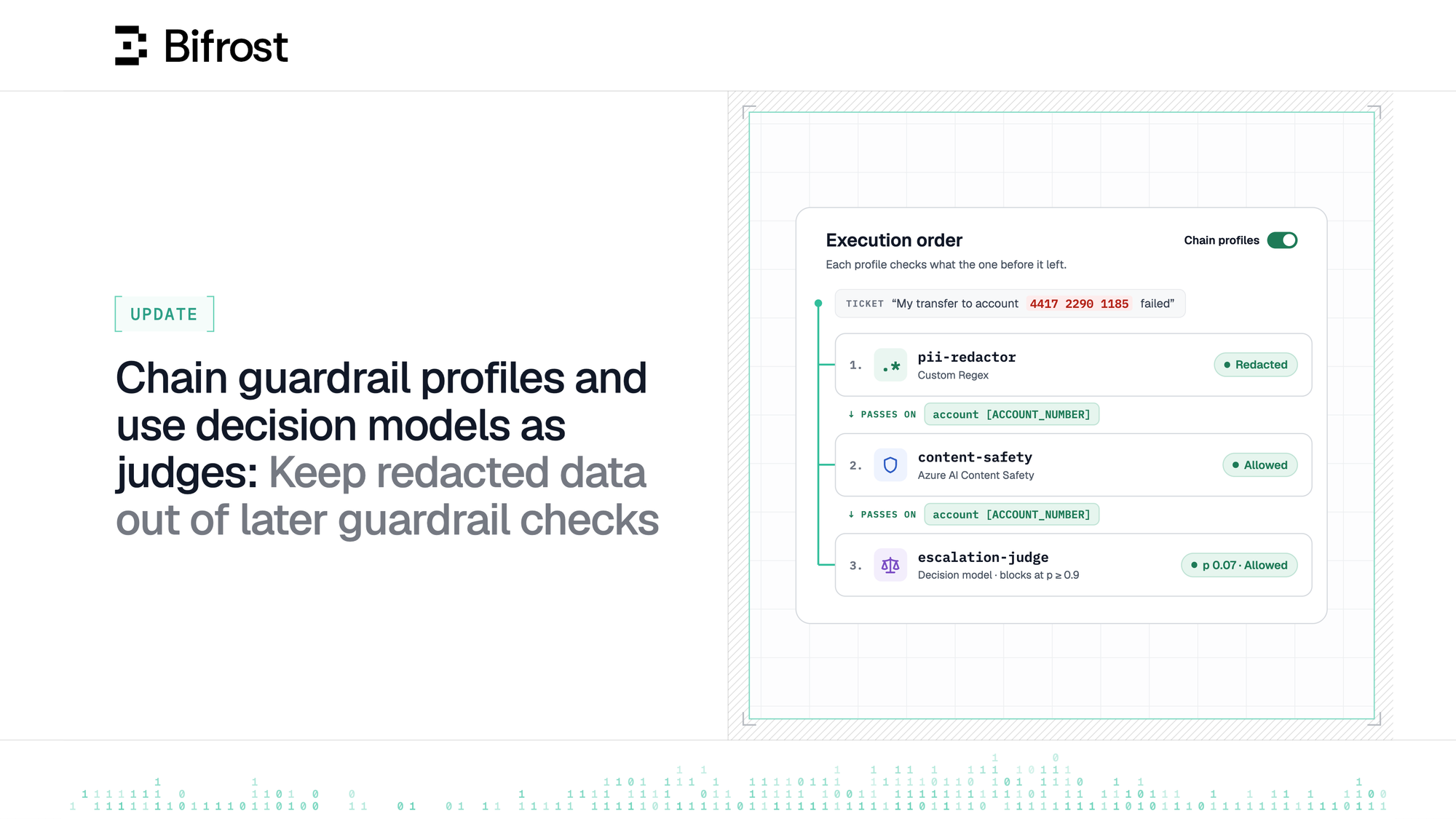
Bifrost Enterprise already lets you choose the order guardrail profiles run in. Now, a redaction by one profile carries through to every profile check after it, and a judge at the end of a rule can be a decision model instead of a standard LLM.
Security and IT teams use guardrails in Bifrost to check the prompts, responses and tool calls that pass through the Gateway. One rule may often link several profiles: a local regex that catches account numbers, an external content-safety check, and a judge model that checks the request against the company's own policies. Since v2.3.0, you can choose the order they run in, so a cheap local check runs before the costlier ones.
The ability to choose the execution order helps when you want to block a request and prevent other guardrail checks from executing but what happens when you want your first check to redact a value, and only then allow the redacted result to reach other checks?
Today, every profile in a guardrail rule evaluates the original payload, and Bifrost combines their results afterwards. So even when the regex redacts the account number, the content-safety provider and the judge both receive it.
A prompt guardrail judge adds a second cost - it could only be an LLM, so every request that got past the earlier checks pays for an LLM call and waits for its answer.
This leads to two questions:
- Can a subsequent guardrail check only see the request that an earlier check acted on?
- Can the prompt guardrail judge be faster and cheaper than an LLM call, and still be tuned to your requirements?
Bifrost Enterprise v2.4.0 onward, you can do both. Guardrail profiles in a rule can now be chained, and prompt guardrails can now use a decision model as the judge.
Let later guardrail checks see only the acted on result
Using the same example from the previous blog - consider a support agent that drafts replies to customer tickets. A customer writes in about a failed transfer and pastes their bank account number. You want the ticket answered, so the rule redacts the account number instead of blocking the ticket. Start with two of the rule's profiles:
- A PII profile that redacts account numbers.
- An external content-safety check.
Unchained, the external providers receive the full ticket, account number included. Chained, it receives the ticket with the account number already redacted.
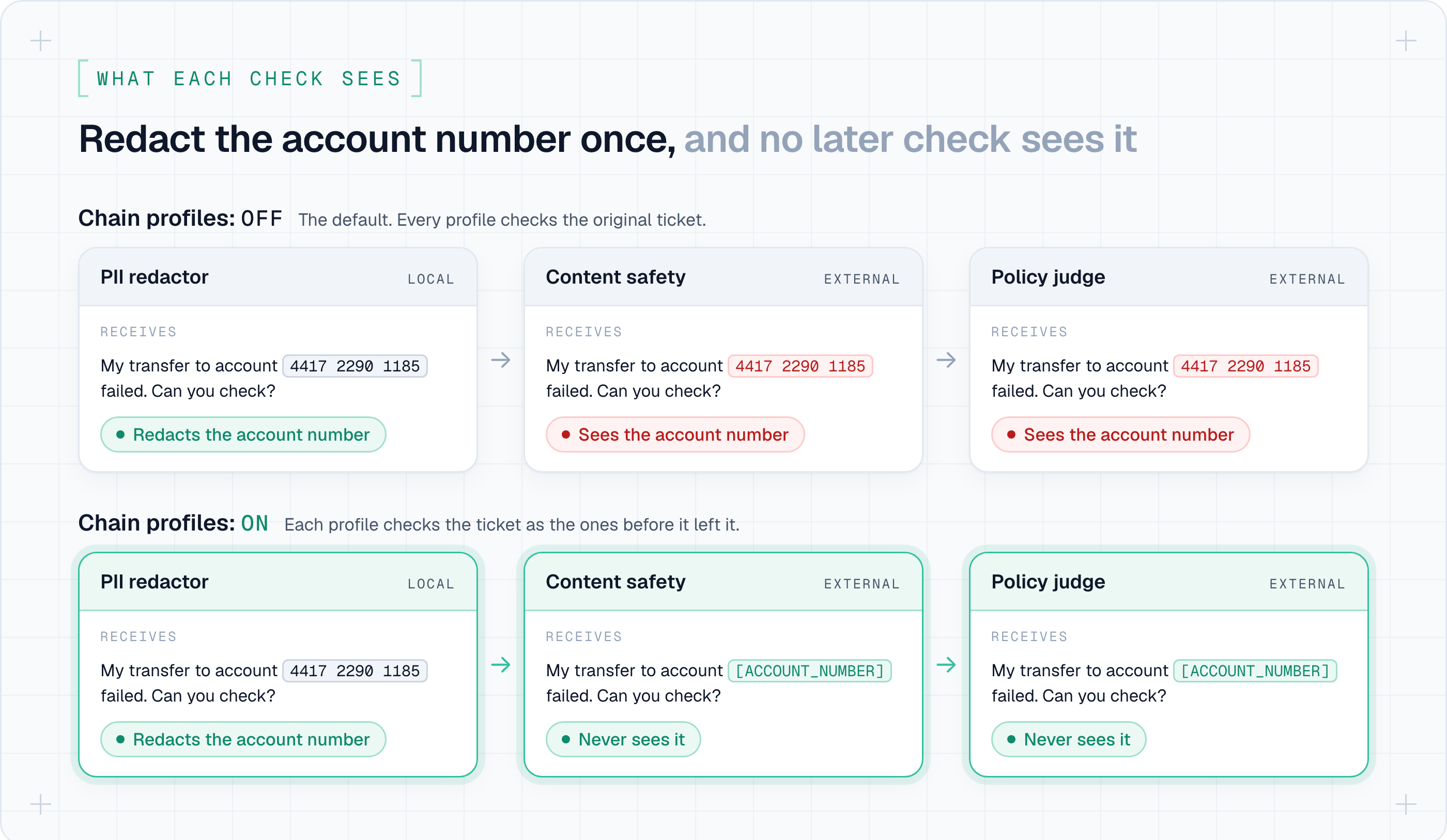
Profiles run in the order you set in the rule:
- A profile that blocks ends the chain. Later profiles do not execute.
- A profile that errors or times out is skipped. The next profile gets the payload as it stood.
- If a profile returns a change Bifrost cannot apply safely, the rule fails closed.
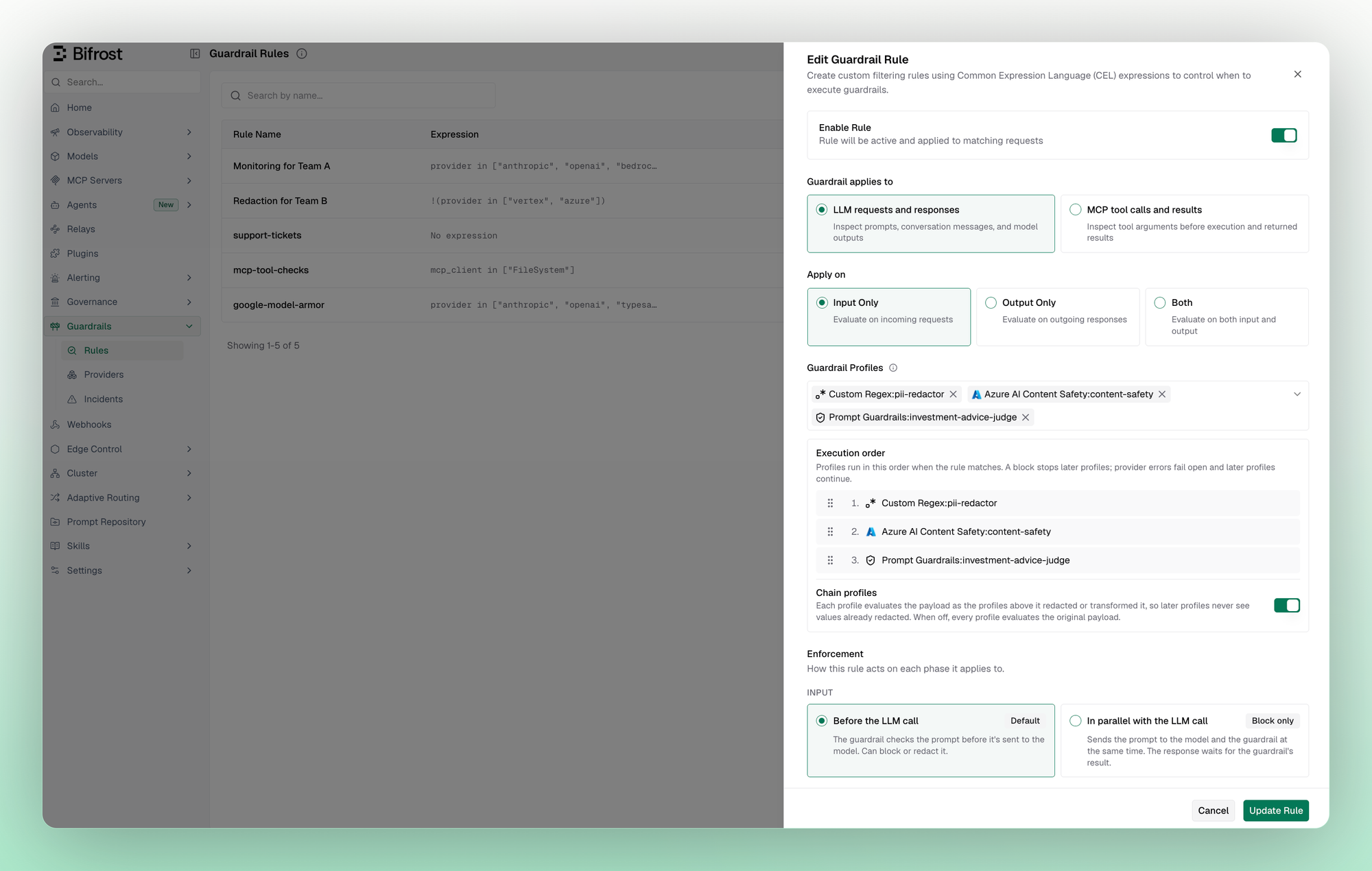
Chaining is set per rule and is off by default, so existing rules behave as before. Rules still run in parallel with each other. To turn it on, open a rule under Guardrails → Rules and switch on Chain profiles, or set profileExecutionMode to chained through the API.
Let a decision model enforce your custom org policies
The last guardrail profile in the example above is a prompt guardrail: a judge that checks traffic against a rule you write in plain language, such as "Block requests for investment advice." Until now, the judge was always an LLM.
It can now be a decision model, which answers a question about a piece of content with a probability instead of generated text. Decision models are typically faster and cheaper per check than an LLM judge, and the point at which they block is a number you set.
| LLM judge | Decision model | |
|---|---|---|
| You configure | Rule, system prompt, output token cap | Rule and block threshold |
| Returns | ALLOW or BLOCK with a reason | A 0 to 1 probability that the content violates the rule |
Bifrost asks the model one question: does this content violate the rule? The content is blocked when the probability is at or above the block threshold, which defaults to 0.9. Raise it to block only clear violations, or lower it to catch borderline ones.
If the model refuses or returns no probability, Bifrost logs a judge error, and like any judge error, the guardrail fails open: the request continues.
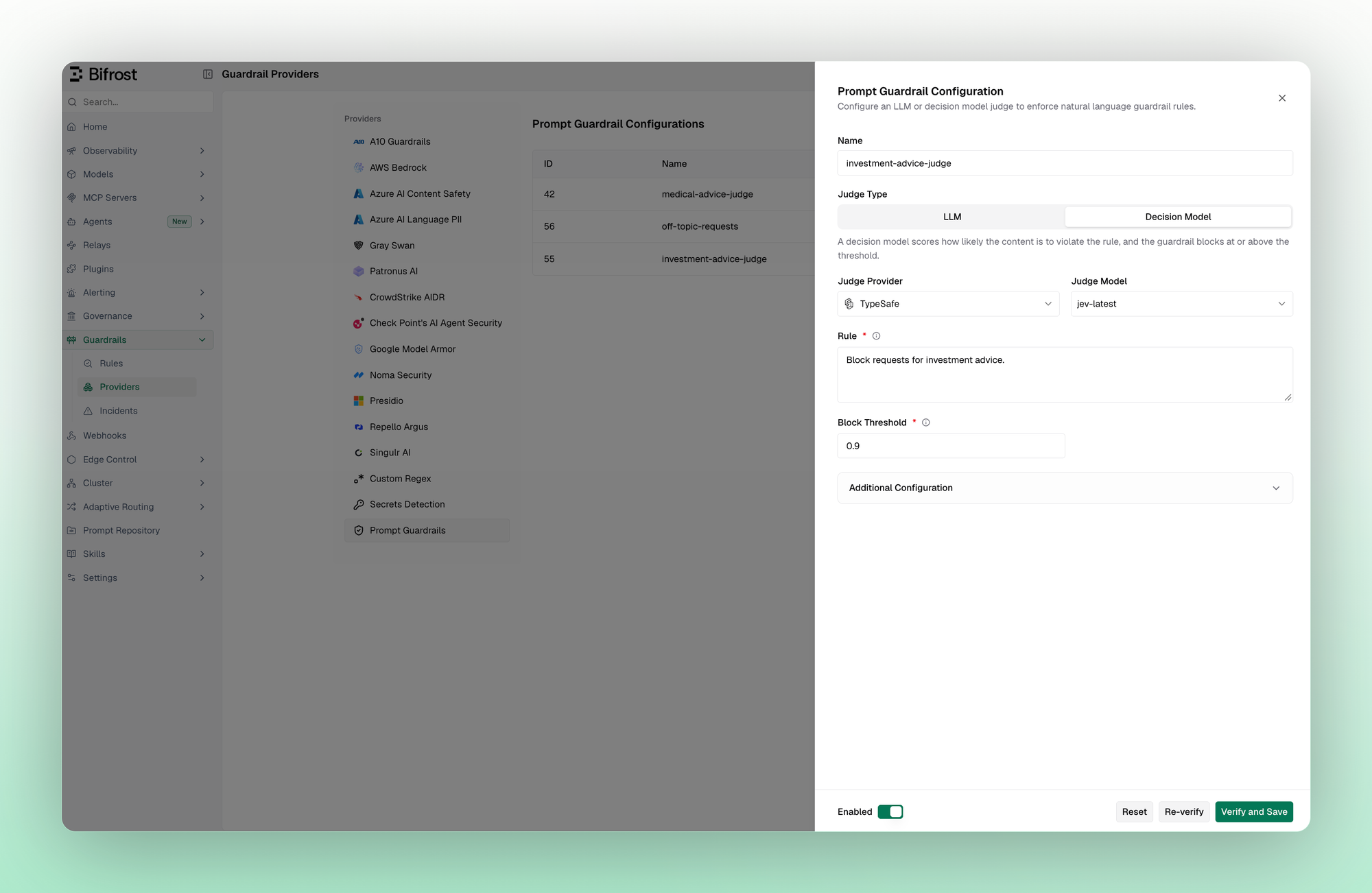
To use a decision model as a judge, open a prompt guardrail profile under Guardrails → Providers → Prompt Guardrails, set Judge Type to Decision Model, pick the provider and model, and set the Block Threshold. Only native decision models can judge, such as TypeSafe's jev-latest or a self-hosted one. The provider list shows only providers that serve them.
Redact first, then let a decision model judge
Put the judge at the end of the same rule: the PII profile redacts the account number, the content-safety check runs on the redacted ticket, and a decision model judges what is left. The judge profile's config:
And an excerpt of the rule that chains the three, with your own profile IDs in place of these:
The content-safety check and the judge now see only the redacted ticket, so the account number never reaches either provider. In the logs, the redaction appears under each profile in the chain, in order.
Also new in guardrails
Two smaller changes arrive in Bifrost Enterprise v2.6.0:
- Per-rule tuning for the secrets guardrail. The secrets guardrail is built on Gitleaks' detection rules, which are all enabled by default. You can now disable individual rules, such as the AWS access token rule, or change a rule's entropy threshold, such as the generic API key rule's, for one profile without affecting the others.
- Service tier in rule conditions.
service_tieris now a CEL variable for LLM rules, so a rule can include or skip traffic by the tier a request asks for. For example, this condition skips OpenAI's fast and priority tiers:
Get started today
Chained profiles and decision model judges are in Bifrost Enterprise v2.4.0, and the two smaller changes arrive in v2.6.0. The Guardrails docs cover profiles and rules, and the Prompt Guardrails docs cover decision model judges, and the Secrets Detection docs cover rule overrides.