> ## Documentation Index
> Fetch the complete documentation index at: https://www.getmaxim.ai/docs/llms.txt
> Use this file to discover all available pages before exploring further.
# Tracing Quickstart
> Set up distributed tracing for your GenAI applications to monitor performance and debug issues across services. This guide demonstrates distributed tracing setup using an enterprise search chatbot example with multiple microservices.
export const MaximPlayer = ({url}) => {
return ;
};
## How to set up distributed tracing?
This guide demonstrates distributed tracing setup using an enterprise search chatbot (similar to Glean) example that:
* Connects to company data sources (Google Drive, Dropbox)
* Enables natural language search across data via Slack or web interface
## System architecture
The application uses 5 microservices:
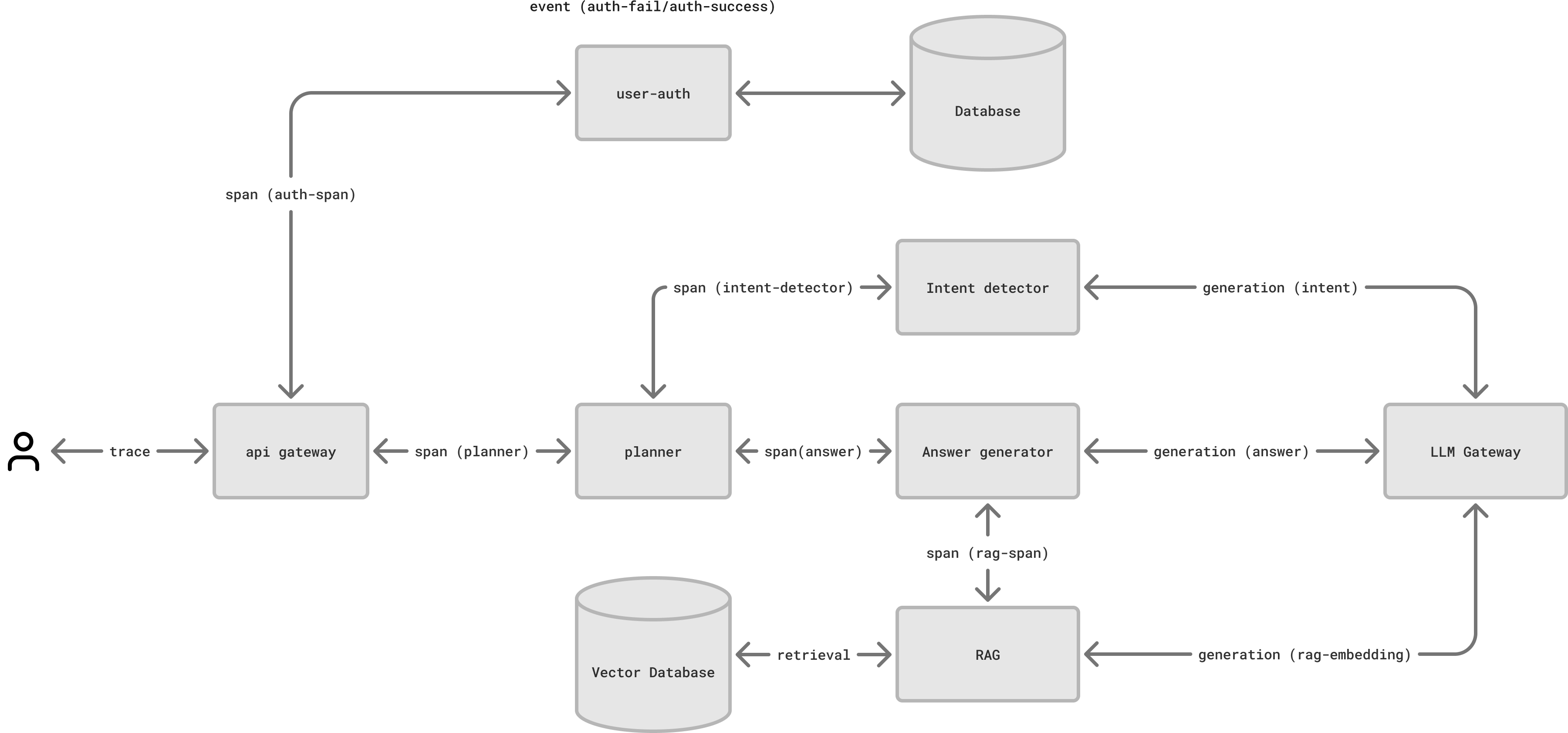 1. **API Gateway**: Authenticates the users and routes API requests
2. **Planner**: Creates execution plans for queries
3. **Intent detector**: Analyzes query intent
4. **Answer generator**: Creates prompts based on planner instructions and RAG context
5. **RAG pipeline**: Retrieves relevant information from vector database
## Setting up the Maxim dashboard
### 1. Create Maxim repository
Create a new repository called "Chatbot production":
### 2. Generate API key
Navigate to Settings → API Keys
Generate and save new API key
### 3. Install SDK
```package-install theme={null}
npm install @maximai/maxim-js
```
```bash Python theme={null}
pip install maxim-py
```
```bash Go theme={null}
go get github.com/maximhq/maxim-go
```
```groovy Java theme={null}
compileOnly("ai.getmaxim:sdk:0.1.3")
```
### 4. Initialize logger
Add this code to initialize the logger in each service:
```typescript JS/TS theme={null}
import { Maxim } from "@maximai/maxim-js";
const maxim = new Maxim({ apiKey: "api-key" });
const logger = await maxim.logger({ id: "log-repository-id" });
```
```python Python theme={null}
from maxim import Config, Maxim
from maxim.logger import LoggerConfig
maxim = Maxim(Config(apiKey=apiKey))
logger = maxim.logger(LoggerConfig(id="log-repository-id"))
```
```go Go theme={null}
import "github.com/maximhq/maxim-go"
import "github.com/maximhq/maxim-go/logging"
m := maxim.Init(&maxim.MaximSDKConfig{
ApiKey: "api-key"
})
logger, err := m.GetLogger(&logging.LoggerConfig{Id: "log-repository-id"})
```
```java Java theme={null}
import ai.getmaxim.sdk.Maxim;
Maxim maxim = new Maxim(new Config(null, "api-key", null, false));
Logger logger = maxim.logger(new LoggerConfig("log-repository-id"));
```
### 5. Create trace in API gateway
Use `cf-request-id` as trace identifier:
```typescript JS/TS theme={null}
const trace = logger.trace({
id: req.headers["cf-request-id"],
name: "user-query",
tags: {
userId: req.body.userId,
accountId: req.body.accountId
},
});
trace.input("Hello, how are you?");
trace.output("I'm fine, thank you!");
trace.end();
```
```python Python theme={null}
from maxim.logger import TraceConfig
trace = logger.trace(TraceConfig(
id=request.headers.get("cf-request-id"),
name="user-query",
tags={
"userId": request.json.get("userId"),
"accountId": request.json.get("accountId")
}
))
trace.set_input("Hello, how are you?")
trace.set_output("I'm fine, thank you!")
trace.end()
```
```go Go theme={null}
trace := logger.Trace(&logging.TraceConfig{
Id: r.Header.Get("Cf-Request-Id"),
Name: "user-query",
Tags: map[string]string{
"userId": r.Body.UserId,
"accountId": r.Body.AccountId,
},
})
trace.SetInput("Hello, how are you?")
trace.SetOutput("I'm fine, thank you!")
trace.End()
```
```java Java theme={null}
Trace trace = logger.trace(new TraceConfig(
req.getHeader("cf-request-id"),
"user-query",
Map.of("userId", req.getBody().getUserId(), "accountId", req.getBody().getAccountId())
));
trace.setInput("Hello, how are you?");
trace.setOutput("I'm fine, thank you!");
trace.end();
```
You can get a hold of a trace in two ways:
```typescript JS/TS theme={null}
// Method 1: Using logger and trace ID
logger.traceTag("trace-id", "newTag", "newValue");
logger.traceEnd("trace-id");
// Method 2: Using trace object
const trace = logger.trace({ id: "trace-id" });
trace.addTag("newTag", "newValue");
trace.end();
```
```python Python theme={null}
from maxim.logger import TraceConfig
# Method 1: Using logger and trace ID
trace = logger.trace_add_tag("trace-id", "newTag", "newValue")
logger.trace_end("trace-id")
# Method 2: Using trace object
trace = logger.trace(TraceConfig(id="trace-id"))
trace.add_tag("newTag", "newValue")
trace.end()
```
```go Go theme={null}
// Method 1: Using logger and trace ID
logger.AddTagToTrace("trace-id", "newTag", "newValue")
logger.EndTrace("trace-id")
// Method 2: Using trace object
trace := logger.Trace(&logging.TraceConfig{
Id: "trace-id",
})
trace.AddTag("newTag", "newValue")
trace.End()
```
```java Java theme={null}
// Method 1: Using logger and trace ID
logger.traceAddTag("trace-id", "newTag", "newValue");
logger.traceEnd("trace-id");
// Method 2: Using trace object
Trace trace = logger.trace(new TraceConfig("trace-id"));
trace.addTag("newTag", "newValue");
trace.end();
```
You can manipulate every entity of Maxim observability framework (Span, Generation, Retrieval, Event) in the same way.
### 6. Add spans in services
Create spans to track operations in each service:
```typescript JS/TS theme={null}
const trace = logger.trace({id: req.headers["cf-request-id"]});
const span = trace.span({
id: uuid(),
name: "plan-query",
tags: {
userId: req.body.userId,
accountId: req.body.accountId
},
});
```
```python Python theme={null}
from maxim.logger import SpanConfig
trace = logger.trace({"id": request.headers.get("cf-request-id")})
span = trace.span(SpanConfig(
id=uuid4(),
name="plan-query",
tags={
"userId": request.json.get("userId"),
"accountId": request.json.get("accountId")
}
))
```
```go Go theme={null}
trace := logger.Trace(&logging.TraceConfig{
Id: r.Header.Get("cf-Request-Id"),
})
span := trace.Span(&logging.SpanConfig{
Id: r.Header.Get("cf-Request-Id"),
Name: "plan-query",
Tags: map[string]string{
"userId": r.Body.UserId,
"accountId": r.Body.AccountId,
},
})
```
```java Java theme={null}
Trace trace = logger.trace(new TraceConfig(
req.getHeader("cf-request-id"),
));
Span span = trace.span(new SpanConfig(
req.getHeader("cf-request-id"),
"plan-query",
Map.of("userId", req.getBody().getUserId(), "accountId", req.getBody().getAccountId())
));
```
When creating spans, consider adding relevant tags that provide context about the operation being performed. These tags help in filtering and analyzing traces later. Remember to end each span once its operation completes to ensure accurate timing measurements.
### 7. Log LLM calls
```typescript JS/TS theme={null}
const generation = span.generation({
id: uuid(),
name: "plan-query",
provider: "openai",
model: "gpt-3.5-turbo-16k",
modelParameters: { temperature: 0.7 },
tags: {
userId: req.body.userId,
accountId: req.body.accountId
},
});
```
```python Python theme={null}
from maxim.logger import GenerationConfig
generation = span.generation(GenerationConfig(
id=uuid4(),
name="plan-query",
provider="openai",
model="gpt-3.5-turbo-16k",
messages: [{ role: "system", content: "SYSTEM PROMPT" }],
model_parameters={"temperature": 0.7},
))
```
```go Go theme={null}
generation := span.Generation(&logging.GenerationConfig{
Id: r.Header.Get("cf-Request-Id"),
Name: "plan-query",
Provider: "openai",
Model: "gpt-3.5-turbo-16k",
Messages: []logging.CompletionRequest {
{
Role: "system",
Content: "SYSTEM PROMPT",
},
},
ModelParameters: map[string]interface{}{"temperature": 0.7},
})
```
```java Java theme={null}
Generation generation = span.generation(new GenerationConfig(
req.getHeader("cf-request-id"),
"plan-query",
"openai",
"gpt-3.5-turbo-16k",
Arrays.asList(new Message("system", "SYSTEM PROMPT")),
Map.of("temperature", 0.7),
));
```
```typescript JS/TS theme={null}
generation.result({
id: uuid(),
object: "chat.completion",
created: Date.now(),
model: "gpt-3.5-turbo-16k",
choices: [{
index: 0,
message: {
role: "assistant",
content: "response"
},
finish_reason: "stop"
}],
usage: {
prompt_tokens: 100,
completion_tokens: 50,
total_tokens: 150
}
});
```
```python Python theme={null}
generation.result({
"id": str(uuid4()),
"object": "chat.completion",
"created": int(time.time()),
"model": "gpt-3.5-turbo-16k",
"choices": [{
"index": 0,
"message": {
"role": "assistant",
"content": "response"
},
"finish_reason": "stop"
}],
"usage": {
"prompt_tokens": 100,
"completion_tokens": 50,
"total_tokens": 150
}
})
```
```go Go theme={null}
generation.Result(&logging.GenerationResult{
Id: r.Header.Get("cf-Request-Id"),
Object: "chat.completion",
Created: time.Now().Unix(),
Model: "gpt-3.5-turbo-16k",
Choices: []logging.Choice{
{
Index: 0,
Message: &logging.Message{
Role: "assistant",
Content: "response",
},
FinishReason: "stop",
},
},
Usage: &logging.Usage{
PromptTokens: 100,
CompletionTokens: 50,
TotalTokens: 150,
},
})
```
```java Java theme={null}
generation.result(new GenerationResult(
req.getHeader("cf-request-id"),
"chat.completion",
System.currentTimeMillis() / 1000L,
"gpt-3.5-turbo-16k",
Arrays.asList(new Choice(
0,
new Message("assistant", "response"),
"stop"
)),
new Usage(100, 50, 150)
));
```
Maxim currently supports OpenAI message format. to convert other messaging formats to OpenAI format in the SDK.
## View traces
Access your traces in the Maxim dashboard within seconds of logging. The dashboard shows:
* Complete request lifecycle
* Durations and relationships of the Entities (Span/Trace)
* LLM generation details
* Performance metrics
[Schedule a demo](https://getmaxim.ai/demo) to see how Maxim AI helps teams ship reliable agents.
1. **API Gateway**: Authenticates the users and routes API requests
2. **Planner**: Creates execution plans for queries
3. **Intent detector**: Analyzes query intent
4. **Answer generator**: Creates prompts based on planner instructions and RAG context
5. **RAG pipeline**: Retrieves relevant information from vector database
## Setting up the Maxim dashboard
### 1. Create Maxim repository
Create a new repository called "Chatbot production":
### 2. Generate API key
Navigate to Settings → API Keys
Generate and save new API key
### 3. Install SDK
```package-install theme={null}
npm install @maximai/maxim-js
```
```bash Python theme={null}
pip install maxim-py
```
```bash Go theme={null}
go get github.com/maximhq/maxim-go
```
```groovy Java theme={null}
compileOnly("ai.getmaxim:sdk:0.1.3")
```
### 4. Initialize logger
Add this code to initialize the logger in each service:
```typescript JS/TS theme={null}
import { Maxim } from "@maximai/maxim-js";
const maxim = new Maxim({ apiKey: "api-key" });
const logger = await maxim.logger({ id: "log-repository-id" });
```
```python Python theme={null}
from maxim import Config, Maxim
from maxim.logger import LoggerConfig
maxim = Maxim(Config(apiKey=apiKey))
logger = maxim.logger(LoggerConfig(id="log-repository-id"))
```
```go Go theme={null}
import "github.com/maximhq/maxim-go"
import "github.com/maximhq/maxim-go/logging"
m := maxim.Init(&maxim.MaximSDKConfig{
ApiKey: "api-key"
})
logger, err := m.GetLogger(&logging.LoggerConfig{Id: "log-repository-id"})
```
```java Java theme={null}
import ai.getmaxim.sdk.Maxim;
Maxim maxim = new Maxim(new Config(null, "api-key", null, false));
Logger logger = maxim.logger(new LoggerConfig("log-repository-id"));
```
### 5. Create trace in API gateway
Use `cf-request-id` as trace identifier:
```typescript JS/TS theme={null}
const trace = logger.trace({
id: req.headers["cf-request-id"],
name: "user-query",
tags: {
userId: req.body.userId,
accountId: req.body.accountId
},
});
trace.input("Hello, how are you?");
trace.output("I'm fine, thank you!");
trace.end();
```
```python Python theme={null}
from maxim.logger import TraceConfig
trace = logger.trace(TraceConfig(
id=request.headers.get("cf-request-id"),
name="user-query",
tags={
"userId": request.json.get("userId"),
"accountId": request.json.get("accountId")
}
))
trace.set_input("Hello, how are you?")
trace.set_output("I'm fine, thank you!")
trace.end()
```
```go Go theme={null}
trace := logger.Trace(&logging.TraceConfig{
Id: r.Header.Get("Cf-Request-Id"),
Name: "user-query",
Tags: map[string]string{
"userId": r.Body.UserId,
"accountId": r.Body.AccountId,
},
})
trace.SetInput("Hello, how are you?")
trace.SetOutput("I'm fine, thank you!")
trace.End()
```
```java Java theme={null}
Trace trace = logger.trace(new TraceConfig(
req.getHeader("cf-request-id"),
"user-query",
Map.of("userId", req.getBody().getUserId(), "accountId", req.getBody().getAccountId())
));
trace.setInput("Hello, how are you?");
trace.setOutput("I'm fine, thank you!");
trace.end();
```
You can get a hold of a trace in two ways:
```typescript JS/TS theme={null}
// Method 1: Using logger and trace ID
logger.traceTag("trace-id", "newTag", "newValue");
logger.traceEnd("trace-id");
// Method 2: Using trace object
const trace = logger.trace({ id: "trace-id" });
trace.addTag("newTag", "newValue");
trace.end();
```
```python Python theme={null}
from maxim.logger import TraceConfig
# Method 1: Using logger and trace ID
trace = logger.trace_add_tag("trace-id", "newTag", "newValue")
logger.trace_end("trace-id")
# Method 2: Using trace object
trace = logger.trace(TraceConfig(id="trace-id"))
trace.add_tag("newTag", "newValue")
trace.end()
```
```go Go theme={null}
// Method 1: Using logger and trace ID
logger.AddTagToTrace("trace-id", "newTag", "newValue")
logger.EndTrace("trace-id")
// Method 2: Using trace object
trace := logger.Trace(&logging.TraceConfig{
Id: "trace-id",
})
trace.AddTag("newTag", "newValue")
trace.End()
```
```java Java theme={null}
// Method 1: Using logger and trace ID
logger.traceAddTag("trace-id", "newTag", "newValue");
logger.traceEnd("trace-id");
// Method 2: Using trace object
Trace trace = logger.trace(new TraceConfig("trace-id"));
trace.addTag("newTag", "newValue");
trace.end();
```
You can manipulate every entity of Maxim observability framework (Span, Generation, Retrieval, Event) in the same way.
### 6. Add spans in services
Create spans to track operations in each service:
```typescript JS/TS theme={null}
const trace = logger.trace({id: req.headers["cf-request-id"]});
const span = trace.span({
id: uuid(),
name: "plan-query",
tags: {
userId: req.body.userId,
accountId: req.body.accountId
},
});
```
```python Python theme={null}
from maxim.logger import SpanConfig
trace = logger.trace({"id": request.headers.get("cf-request-id")})
span = trace.span(SpanConfig(
id=uuid4(),
name="plan-query",
tags={
"userId": request.json.get("userId"),
"accountId": request.json.get("accountId")
}
))
```
```go Go theme={null}
trace := logger.Trace(&logging.TraceConfig{
Id: r.Header.Get("cf-Request-Id"),
})
span := trace.Span(&logging.SpanConfig{
Id: r.Header.Get("cf-Request-Id"),
Name: "plan-query",
Tags: map[string]string{
"userId": r.Body.UserId,
"accountId": r.Body.AccountId,
},
})
```
```java Java theme={null}
Trace trace = logger.trace(new TraceConfig(
req.getHeader("cf-request-id"),
));
Span span = trace.span(new SpanConfig(
req.getHeader("cf-request-id"),
"plan-query",
Map.of("userId", req.getBody().getUserId(), "accountId", req.getBody().getAccountId())
));
```
When creating spans, consider adding relevant tags that provide context about the operation being performed. These tags help in filtering and analyzing traces later. Remember to end each span once its operation completes to ensure accurate timing measurements.
### 7. Log LLM calls
```typescript JS/TS theme={null}
const generation = span.generation({
id: uuid(),
name: "plan-query",
provider: "openai",
model: "gpt-3.5-turbo-16k",
modelParameters: { temperature: 0.7 },
tags: {
userId: req.body.userId,
accountId: req.body.accountId
},
});
```
```python Python theme={null}
from maxim.logger import GenerationConfig
generation = span.generation(GenerationConfig(
id=uuid4(),
name="plan-query",
provider="openai",
model="gpt-3.5-turbo-16k",
messages: [{ role: "system", content: "SYSTEM PROMPT" }],
model_parameters={"temperature": 0.7},
))
```
```go Go theme={null}
generation := span.Generation(&logging.GenerationConfig{
Id: r.Header.Get("cf-Request-Id"),
Name: "plan-query",
Provider: "openai",
Model: "gpt-3.5-turbo-16k",
Messages: []logging.CompletionRequest {
{
Role: "system",
Content: "SYSTEM PROMPT",
},
},
ModelParameters: map[string]interface{}{"temperature": 0.7},
})
```
```java Java theme={null}
Generation generation = span.generation(new GenerationConfig(
req.getHeader("cf-request-id"),
"plan-query",
"openai",
"gpt-3.5-turbo-16k",
Arrays.asList(new Message("system", "SYSTEM PROMPT")),
Map.of("temperature", 0.7),
));
```
```typescript JS/TS theme={null}
generation.result({
id: uuid(),
object: "chat.completion",
created: Date.now(),
model: "gpt-3.5-turbo-16k",
choices: [{
index: 0,
message: {
role: "assistant",
content: "response"
},
finish_reason: "stop"
}],
usage: {
prompt_tokens: 100,
completion_tokens: 50,
total_tokens: 150
}
});
```
```python Python theme={null}
generation.result({
"id": str(uuid4()),
"object": "chat.completion",
"created": int(time.time()),
"model": "gpt-3.5-turbo-16k",
"choices": [{
"index": 0,
"message": {
"role": "assistant",
"content": "response"
},
"finish_reason": "stop"
}],
"usage": {
"prompt_tokens": 100,
"completion_tokens": 50,
"total_tokens": 150
}
})
```
```go Go theme={null}
generation.Result(&logging.GenerationResult{
Id: r.Header.Get("cf-Request-Id"),
Object: "chat.completion",
Created: time.Now().Unix(),
Model: "gpt-3.5-turbo-16k",
Choices: []logging.Choice{
{
Index: 0,
Message: &logging.Message{
Role: "assistant",
Content: "response",
},
FinishReason: "stop",
},
},
Usage: &logging.Usage{
PromptTokens: 100,
CompletionTokens: 50,
TotalTokens: 150,
},
})
```
```java Java theme={null}
generation.result(new GenerationResult(
req.getHeader("cf-request-id"),
"chat.completion",
System.currentTimeMillis() / 1000L,
"gpt-3.5-turbo-16k",
Arrays.asList(new Choice(
0,
new Message("assistant", "response"),
"stop"
)),
new Usage(100, 50, 150)
));
```
Maxim currently supports OpenAI message format. to convert other messaging formats to OpenAI format in the SDK.
## View traces
Access your traces in the Maxim dashboard within seconds of logging. The dashboard shows:
* Complete request lifecycle
* Durations and relationships of the Entities (Span/Trace)
* LLM generation details
* Performance metrics
[Schedule a demo](https://getmaxim.ai/demo) to see how Maxim AI helps teams ship reliable agents.