> ## Documentation Index
> Fetch the complete documentation index at: https://www.getmaxim.ai/docs/llms.txt
> Use this file to discover all available pages before exploring further.
# Forwarding via Data Connectors
> Send your traces to Maxim once and we'll forward them to your preferred observability platforms - New Relic, Snowflake, or any OpenTelemetry collector.
export const MaximPlayer = ({url}) => {
return ;
};
## Unified Observability with Maxim
Maxim acts as your central observability hub, eliminating the need to instrument your applications multiple times. **Send your traces once to Maxim, and we'll forward them to your preferred observability platforms** while providing AI-powered insights.
### Supported Platforms
* New Relic
* Snowflake
* Any OpenTelemetry (OTLP) collector
Navigate to your log repository, click the top-right menu, and select "Set up data connectors" to manage your connections.
## Why Use Maxim as Your Observability Hub?
* **Single Instrumentation**: Instrument once with Maxim, forward to multiple destinations
* **Enriched Data**: Maxim enhances your traces with AI context before forwarding
* **Consistent Format**: Normalized data across all your observability tools
* **Reduced Overhead**: Lower instrumentation maintenance and network traffic
* **Centralized Control**: Manage all your observability connections in one place
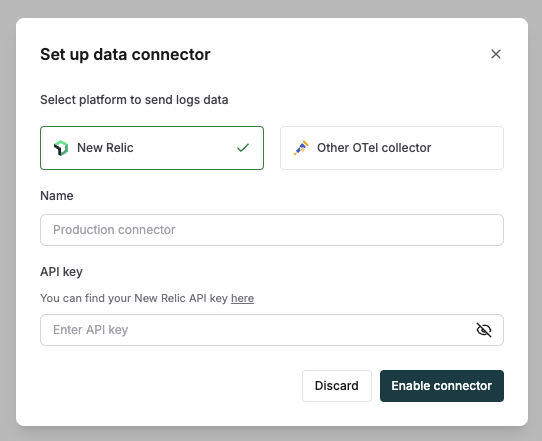
## Connect to New Relic
Select "New Relic" as your platform in the data connectors setup dialog.
Name your connector - for example, Production connector.
Enter your New Relic API key from your [account settings](https://one.newrelic.com/api-keys).
 ## Connect to Snowflake
Select "Snowflake" as your platform in the data connectors setup dialog.
Name your connector - for example, Production connector.
Login to your Snowflake account.
Open profile menu and select "Connect a tool to Snowflake".
Select "Connectors/Drivers" tab and then "Go Driver Connection String".
Select Warehouse, Database, Schema, and Connection method as "Password".
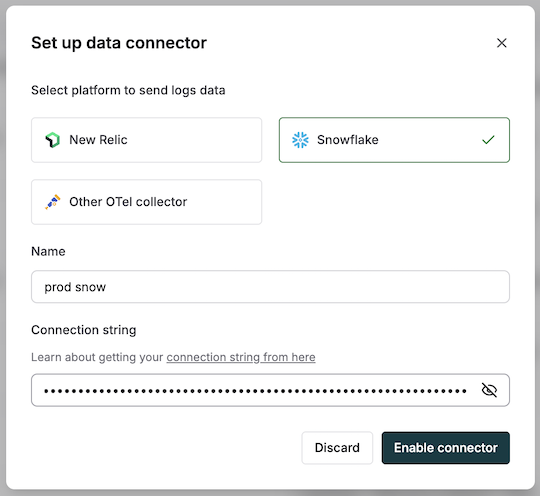
## Connect to Snowflake
Select "Snowflake" as your platform in the data connectors setup dialog.
Name your connector - for example, Production connector.
Login to your Snowflake account.
Open profile menu and select "Connect a tool to Snowflake".
Select "Connectors/Drivers" tab and then "Go Driver Connection String".
Select Warehouse, Database, Schema, and Connection method as "Password".
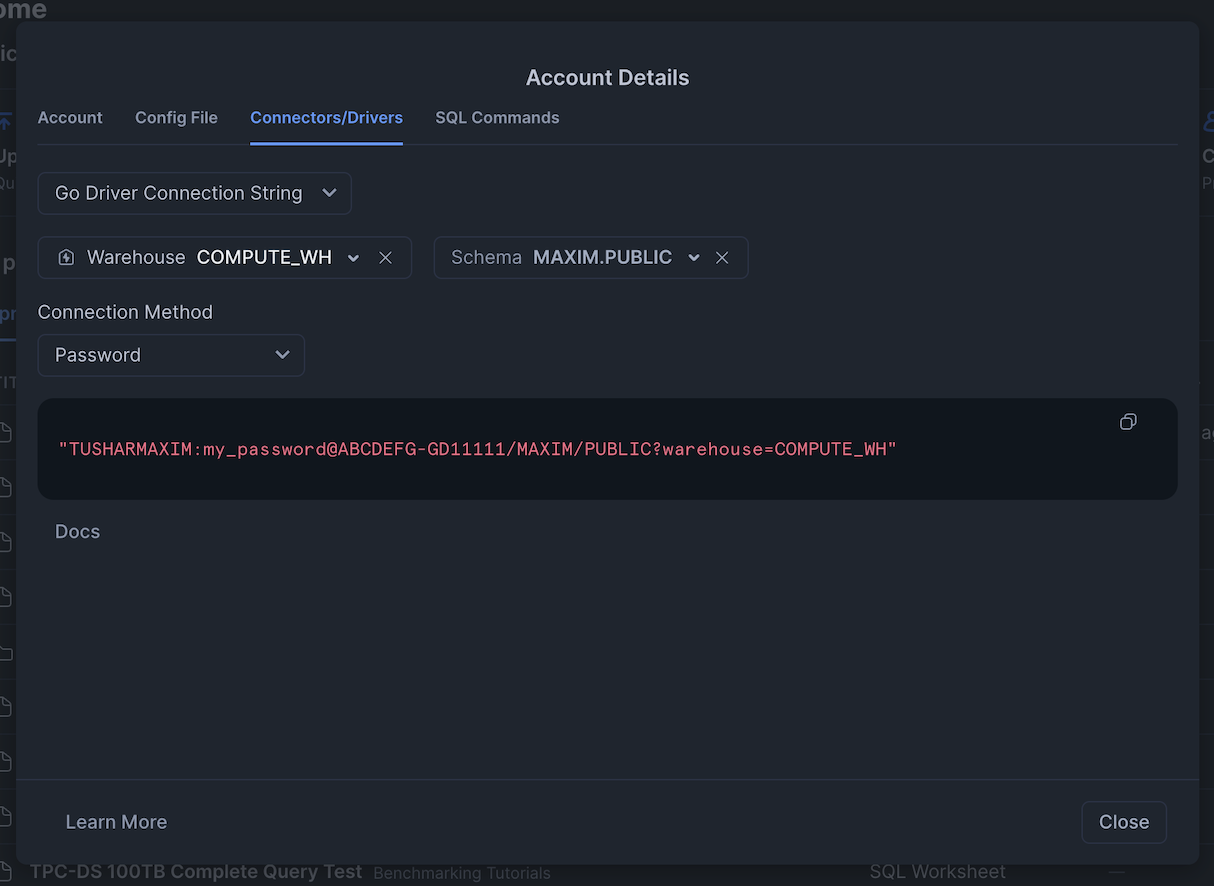 Copy the connection string and paste it in the data connectors setup dialog.
 ## Connect to an OTLP Collector
Select "Other OTel collector" in the data connectors setup dialog
Name your connector — for example, Production connector.
Configure the OTLP endpoint:
* Choose HTTP or gRPC protocol
* Enter your OTLP collector URL (Example: [https://otel-collector.acme.com](https://otel-collector.acme.com))
Configure headers:
* Add authentication headers (Example: x-api-key)
* Include additional headers as needed
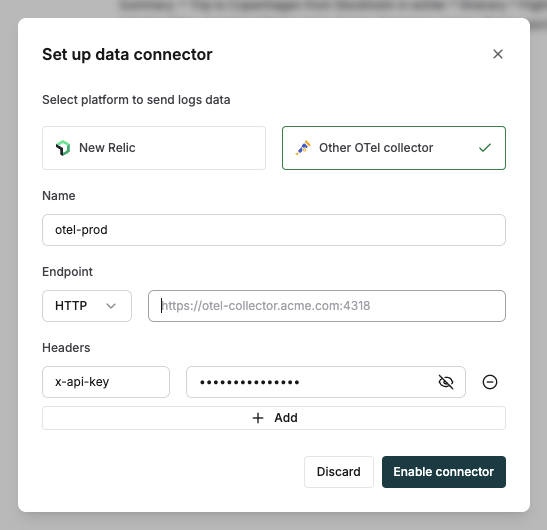
## Connect to an OTLP Collector
Select "Other OTel collector" in the data connectors setup dialog
Name your connector — for example, Production connector.
Configure the OTLP endpoint:
* Choose HTTP or gRPC protocol
* Enter your OTLP collector URL (Example: [https://otel-collector.acme.com](https://otel-collector.acme.com))
Configure headers:
* Add authentication headers (Example: x-api-key)
* Include additional headers as needed
 ## Common Use Cases
### AI/LLM Observability Across Platforms
Forward AI traces with semantic conventions to both Maxim (for specialized AI insights) and your existing observability platform (for correlation with other system metrics).
### Hybrid Observability Architecture
Use Maxim for real-time AI-powered analysis while forwarding data to Snowflake for long-term storage and business intelligence integration.
### Multi-Team Collaboration
Enable different teams to use their preferred tools (New Relic, OpenTelemetry collector, etc.) while maintaining a single source of truth in Maxim.
## How We Protect Your Data
* We encrypt all credentials in storage
* We transmit data securely using HTTPS encryption
* We recommend using dedicated API keys with minimal permissions
## Frequently Asked Questions
### How Are Traces Exported to Other Platforms?
Maxim exports traces following OpenTelemetry semantic conventions, ensuring compatibility with platforms like New Relic and other OTLP collectors. This maintains the structure and context of your trace data, including all AI/LLM-specific attributes defined in the OpenTelemetry specification.
### Will Using Maxim as a Hub Introduce Latency?
Maxim's architecture is optimized for minimal latency. Trace forwarding happens asynchronously and doesn't impact your application performance.
### Can I Send Traces Directly to Maxim?
Yes! See our [Ingesting via OTLP Endpoint](/tracing/opentelemetry/ingesting-via-otlp) documentation for details.
## Common Use Cases
### AI/LLM Observability Across Platforms
Forward AI traces with semantic conventions to both Maxim (for specialized AI insights) and your existing observability platform (for correlation with other system metrics).
### Hybrid Observability Architecture
Use Maxim for real-time AI-powered analysis while forwarding data to Snowflake for long-term storage and business intelligence integration.
### Multi-Team Collaboration
Enable different teams to use their preferred tools (New Relic, OpenTelemetry collector, etc.) while maintaining a single source of truth in Maxim.
## How We Protect Your Data
* We encrypt all credentials in storage
* We transmit data securely using HTTPS encryption
* We recommend using dedicated API keys with minimal permissions
## Frequently Asked Questions
### How Are Traces Exported to Other Platforms?
Maxim exports traces following OpenTelemetry semantic conventions, ensuring compatibility with platforms like New Relic and other OTLP collectors. This maintains the structure and context of your trace data, including all AI/LLM-specific attributes defined in the OpenTelemetry specification.
### Will Using Maxim as a Hub Introduce Latency?
Maxim's architecture is optimized for minimal latency. Trace forwarding happens asynchronously and doesn't impact your application performance.
### Can I Send Traces Directly to Maxim?
Yes! See our [Ingesting via OTLP Endpoint](/tracing/opentelemetry/ingesting-via-otlp) documentation for details.