> ## Documentation Index
> Fetch the complete documentation index at: https://www.getmaxim.ai/docs/llms.txt
> Use this file to discover all available pages before exploring further.
# Responses API
> Learn how to integrate Maxim with the OpenAI Responses API in TypeScript
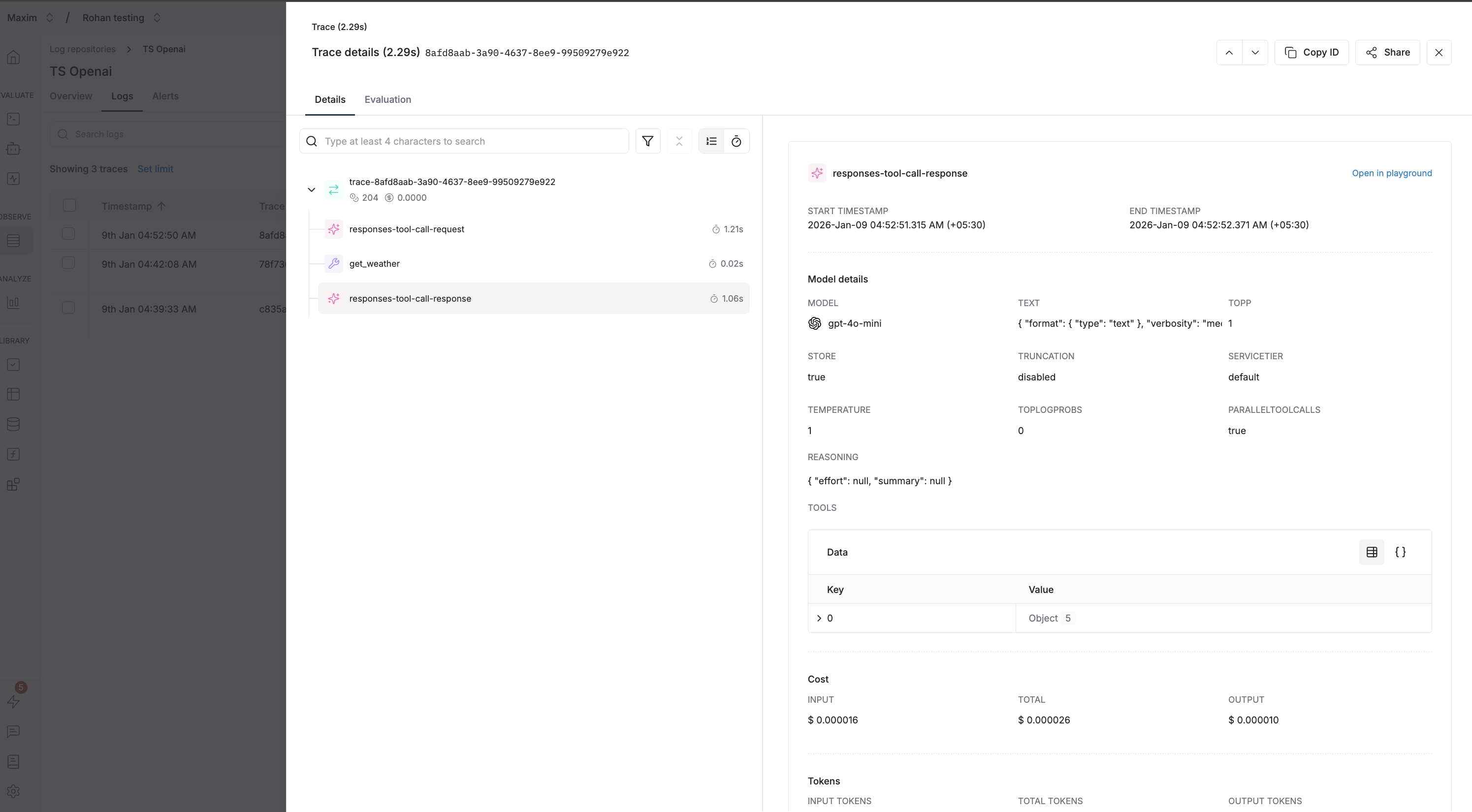
Trace OpenAI Responses API calls with Maxim to gain full observability into your LLM interactions, including tool calls and structured outputs.
## Prerequisites
* Node.js 18+
* [OpenAI TypeScript SDK](https://www.npmjs.com/package/openai) (`npm install openai`)
* [Maxim TypeScript SDK](https://www.npmjs.com/package/@maximai/maxim-js) (`npm install @maximai/maxim-js`)
* API keys for OpenAI and Maxim
## Environment Variables
```env theme={null}
MAXIM_API_KEY=your_maxim_api_key
MAXIM_LOG_REPO_ID=your_log_repository_id
OPENAI_API_KEY=your_openai_api_key
```
## Initialize Maxim Logger
```typescript theme={null}
import { Maxim } from "@maximai/maxim-js";
const maxim = new Maxim({ apiKey: process.env.MAXIM_API_KEY });
const logger = await maxim.logger({ id: process.env.MAXIM_LOG_REPO_ID });
if (!logger) {
throw new Error("Failed to create logger");
}
```
## Wrap OpenAI Client
Use `MaximOpenAIClient` to wrap your OpenAI client for automatic tracing:
```typescript {5} theme={null}
import OpenAI from "openai";
import { MaximOpenAIClient } from "@maximai/maxim-js/openai";
const openai = new OpenAI({ apiKey: process.env.OPENAI_API_KEY });
const client = new MaximOpenAIClient(openai, logger);
```
## Basic Usage
Make responses API requests using the wrapped client:
```typescript theme={null}
const response = await client.responses.create({
model: "gpt-4o-mini",
input: "What is the capital of France?",
});
console.log(response.output);
```
## Tool Calling Example
Here's an example demonstrating tool calls with the Responses API:
```typescript theme={null}
import OpenAI from "openai";
import { Maxim } from "@maximai/maxim-js";
import { MaximOpenAIClient } from "@maximai/maxim-js/openai";
async function main() {
const maxim = new Maxim({ apiKey: process.env.MAXIM_API_KEY });
const logger = await maxim.logger({ id: process.env.MAXIM_LOG_REPO_ID });
if (!logger) {
throw new Error("Logger is not available");
}
const openai = new OpenAI({ apiKey: process.env.OPENAI_API_KEY });
const client = new MaximOpenAIClient(openai, logger);
// Define tools
const tools: OpenAI.Responses.Tool[] = [
{
type: "function",
name: "get_weather",
description: "Get the current weather in a given location",
strict: false,
parameters: {
type: "object",
properties: {
location: {
type: "string",
description: "The city and state, e.g. San Francisco, CA",
},
unit: {
type: "string",
enum: ["celsius", "fahrenheit"],
},
},
required: ["location"],
},
},
];
const response = await client.responses.create({
model: "gpt-4o-mini",
input: "What's the weather like in San Francisco?",
tools: tools,
tool_choice: "required",
});
console.log("Response:", JSON.stringify(response.output, null, 2));
// Check for function calls in the output
const functionCalls = response.output.filter(
(item) => item.type === "function_call"
);
if (functionCalls.length > 0) {
console.log("Function calls:", functionCalls);
}
await logger.cleanup();
await maxim.cleanup();
}
main().catch(console.error);
```
## Responses API vs Chat Completions
The Responses API is a newer, simpler interface compared to Chat Completions:
| Feature | Responses API | Chat Completions |
| ------------- | --------------------------- | ----------------------- |
| Input format | Single `input` string | Array of `messages` |
| Output format | Array of output items | Choices with messages |
| Tool calls | Inline in output array | Nested in message |
| Conversation | Built-in context management | Manual message handling |
## Custom Headers for Tracing
You can pass custom headers to enrich your traces:
```typescript {8-11} theme={null}
const response = await client.responses.create(
{
model: "gpt-4o-mini",
input: "Hello!",
},
{
headers: {
"maxim-trace-id": "your-custom-trace-id",
"maxim-session-id": "user-session-123",
"maxim-trace-tags": JSON.stringify({ env: "production" }),
},
}
);
```
## Available Header Options
| Header | Type | Description |
| ----------------------- | --------------- | ----------------------------------------------------- |
| `maxim-trace-id` | `string` | Link this generation to an existing trace |
| `maxim-session-id` | `string` | Link the parent trace to an existing session |
| `maxim-trace-tags` | `string` (JSON) | Custom tags for the trace (e.g., `'{"env": "prod"}'`) |
| `maxim-generation-name` | `string` | Custom name for the generation in the dashboard |
## Streaming Support
The wrapped client supports streaming responses:
```typescript theme={null}
const stream = await client.responses.create({
model: "gpt-4o-mini",
input: "Write a short poem about programming",
stream: true,
});
for await (const event of stream) {
if (event.type === "response.output_text.delta") {
process.stdout.write(event.delta || "");
}
}
```
## Cleanup
Always clean up resources when done:
```typescript theme={null}
await logger.cleanup();
await maxim.cleanup();
```
## What gets logged to Maxim
* **Request Details**: Model name, parameters, and all other settings
* **Message History**: Complete conversation history including user messages and assistant responses
* **Response Content**: Full assistant responses and metadata
* **Usage Statistics**: Input tokens, output tokens, total tokens consumed
* **Error Handling**: Any errors that occur during the request
 ## Resources
Official OpenAI Responses API documentation
Maxim TypeScript SDK on npm
## Resources
Official OpenAI Responses API documentation
Maxim TypeScript SDK on npm