> ## Documentation Index
> Fetch the complete documentation index at: https://www.getmaxim.ai/docs/llms.txt
> Use this file to discover all available pages before exploring further.
# Pydantic AI Integration
> Start agent monitoring, evaluation, and observability for your Pydantic AI applications
Maxim AI provides comprehensive agent monitoring, evaluation, and observability for your Pydantic AI applications. With Maxim's one-line integration, you can easily trace and analyze agent interactions, tool usage, and performance metrics with advanced session management capabilities.
## Getting Started
### Prerequisites
* Python version >=3.10
* A Maxim account ([sign up here](https://getmaxim.ai/))
* Generate Maxim API Key
* A Pydantic AI project
### Installation
Install the required packages via pip:
```python theme={null}
pip install maxim-py pydantic-ai python-dotenv
```
Or add them to your `requirements.txt`:
```
maxim-py
pydantic-ai
python-dotenv
```
### Basic Setup
### 1. Set up environment variables
Create a `.env` file in your project root:
```python theme={null}
# Maxim API Configuration
MAXIM_API_KEY=your_api_key_here
MAXIM_LOG_REPO_ID=your_repo_id_here
# OpenAI API Configuration (for Pydantic AI)
OPENAI_API_KEY=your_openai_api_key_here
```
### 2. Import the required packages
```python theme={null}
from maxim import Maxim
from maxim.logger.pydantic_ai import instrument_pydantic_ai
from pydantic_ai import Agent, RunContext
from dotenv import load_dotenv
import os
```
### 3. Initialize Maxim with your API key
```python {5} theme={null}
# Load environment variables
load_dotenv()
# Instrument Pydantic AI with just one line
instrument_pydantic_ai(Maxim().logger())
```
### 4. Create and run your Pydantic AI application
```python theme={null}
# Create your agent with tools
agent = Agent(
model="openai:gpt-4o-mini",
name="My Agent",
instructions="You are a helpful assistant."
)
@agent.tool
def my_tool(ctx: RunContext, input_data: str) -> str:
"""A custom tool that processes input data."""
return f"Processed: {input_data}"
# Run your agent
result = agent.run_sync("Your query here")
```
That's it! All your Pydantic AI interactions will now be logged and available in your Maxim dashboard.
## Complete Example
Here's a complete example showing how to integrate Pydantic AI with Maxim, including session management and multiple tools:
```python theme={null}
import os
import asyncio
from typing import List
from dotenv import load_dotenv
# Load environment variables
load_dotenv()
# Import Maxim components
from maxim import Maxim
from maxim.logger.pydantic_ai import instrument_pydantic_ai
# Import Pydantic AI components
from pydantic_ai import Agent, RunContext
def create_simple_agent():
"""Create a simple Pydantic AI agent."""
# Create an agent with simple tools
agent = Agent(
model="openai:gpt-4o-mini",
name="Simple Agent",
instructions="You are a helpful assistant that can perform calculations."
)
@agent.tool
def add_numbers(ctx: RunContext, a: float, b: float) -> float:
"""Add two numbers together."""
print(f"[Tool] Adding {a} + {b}")
return a + b
@agent.tool
def multiply_numbers(ctx: RunContext, a: float, b: float) -> float:
"""Multiply two numbers together."""
print(f"[Tool] Multiplying {a} * {b}")
return a * b
return agent
def run_simple_example_with_session():
"""Run a simple example with session management."""
print("=== Simple Agent Example with Session Management ===")
# Create and instrument the agent
agent = create_simple_agent()
print("Instrumenting Pydantic AI...")
instrument_pydantic_ai(Maxim().logger(), debug=True)
print("Instrumentation complete!")
# Start a session trace to group multiple agent runs
print("Starting session trace...")
instrument_pydantic_ai.start_session("Math Calculator Session")
try:
# Run multiple calculations in the same session
print("Running first calculation...")
result = agent.run_sync("What is 15 + 27?")
print(f"Result: {result}")
print("Running second calculation...")
result = agent.run_sync("Calculate 8 * 12")
print(f"Result: {result}")
print("Running third calculation...")
result = agent.run_sync("What is 25 + 17 and then multiply that result by 3?")
print(f"Result: {result}")
finally:
# End the session trace
print("Ending session trace...")
instrument_pydantic_ai.end_session()
# Set up and run
run_simple_example_with_session()
```
## Advanced Usage
### Session Management
Pydantic AI integration with Maxim supports advanced session management to group related agent runs:
```python theme={null}
from maxim.logger.pydantic_ai import instrument_pydantic_ai
# Start a session to group multiple agent runs
instrument_pydantic_ai.start_session("My Workflow Session")
try:
# Multiple agent runs will be grouped in this session
result1 = agent.run_sync("First query")
result2 = agent.run_sync("Second query")
result3 = agent.run_sync("Third query")
finally:
# End the session
instrument_pydantic_ai.end_session()
```
### Advanced Agent with Complex Tools
```python theme={null}
def create_advanced_agent():
"""Create an advanced Pydantic AI agent with more complex tools."""
agent = Agent(
model="openai:gpt-4o-mini",
name="Advanced Agent",
instructions="You are an advanced assistant that can perform various tasks."
)
@agent.tool
def analyze_text(ctx: RunContext, text: str) -> dict:
"""Analyze text and return statistics."""
print(f"[Tool] Analyzing text: {text[:50]}...")
words = text.split()
return {
"word_count": len(words),
"character_count": len(text),
"average_word_length": sum(len(word) for word in words) / len(words) if words else 0
}
@agent.tool
def generate_list(ctx: RunContext, topic: str, count: int = 5) -> List[str]:
"""Generate a list of items related to a topic."""
print(f"[Tool] Generating list of {count} items for topic: {topic}")
return [f"{topic} item {i+1}" for i in range(count)]
return agent
# Use the advanced agent
agent = create_advanced_agent()
instrument_pydantic_ai.start_session("Advanced Tasks Session")
try:
result = agent.run_sync("Analyze this text: 'The quick brown fox jumps over the lazy dog.'")
print(f"Text Analysis Result: {result}")
finally:
instrument_pydantic_ai.end_session()
```
### Streaming Support
Pydantic AI integration supports streaming responses with proper trace management:
```python theme={null}
async def run_streaming_example():
"""Run a streaming example with session management."""
agent = create_simple_agent()
# Start streaming session
print("Starting streaming session trace...")
instrument_pydantic_ai.start_session("Streaming Session")
try:
# Use streaming mode
print("Running streaming calculation...")
async with agent.run_stream("Explain what is 2 + 2 in detail and then calculate 5 * 6") as stream:
# Get the final result
result = await stream.result()
print(f"Streaming result: {result}")
finally:
print("Ending streaming session trace...")
instrument_pydantic_ai.end_session()
# Run streaming example
asyncio.run(run_streaming_example())
```
### Error Handling
Ensure proper cleanup even when errors occur:
```python theme={null}
def run_error_handling_example():
"""Run an example that demonstrates error handling."""
agent = create_simple_agent()
# Start error handling session
print("Starting error handling session...")
instrument_pydantic_ai.start_session("Error Handling Session")
try:
# This should work fine
result = agent.run_sync("What is 10 + 5?")
print(f"Success result: {result.data}")
# This might cause some interesting behavior
result = agent.run_sync("What happens when you divide 10 by 0? Please use the add_numbers tool to demonstrate.")
print(f"Division by zero result: {result.data}")
except Exception as e:
print(f"Expected error caught: {e}")
finally:
print("Ending error handling session...")
instrument_pydantic_ai.end_session()
```
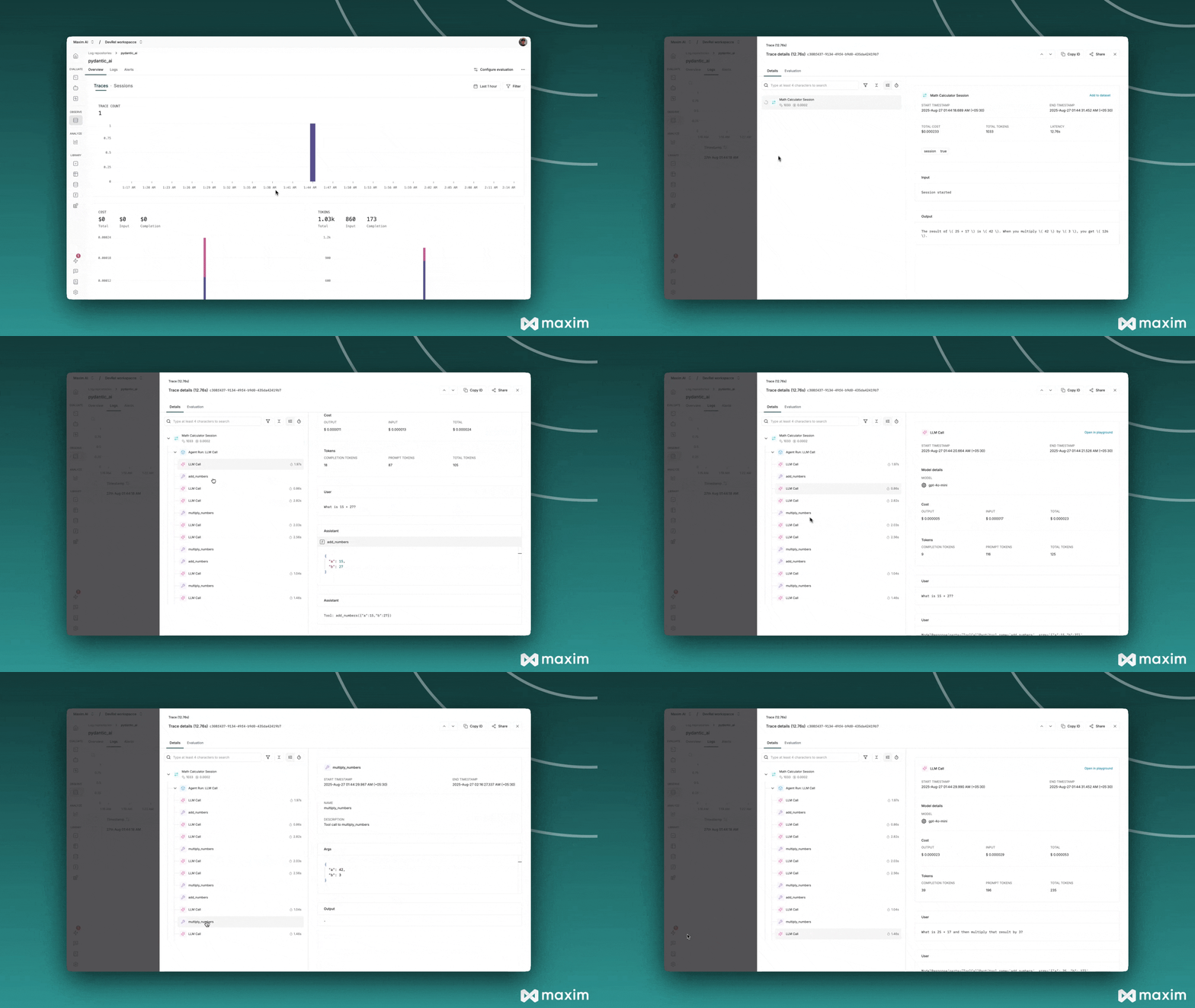
## Viewing Your Traces
After running your Pydantic AI application:
1. Log in to your [Maxim Dashboard](https://app.getmaxim.ai/login)
2. Navigate to your repository
3. View detailed agent traces, including:
* Agent conversations
* Tool usage patterns
* Performance metrics
* Cost analytics
* Session groupings
 ## Troubleshooting
### Common Issues
* **No traces appearing**: Ensure your API key and repository ID are correct
* **Import errors**: Make sure you've installed all required packages (`maxim-py`, `pydantic-ai`, `python-dotenv`)
* **Tool not working**: Ensure `instrument_pydantic_ai()` is called **before** creating your agent
* **Environment variables**: Verify your `.env` file is in the correct location and contains all required keys
* **Session management**: Make sure to call `end_session()` in a `finally` block to ensure proper cleanup
### Debug Mode
Enable debug mode to surface any internal errors:
```python theme={null}
instrument_pydantic_ai(Maxim().logger(), debug=True)
```
### Session Management Best Practices
1. **Always use try/finally**: Ensure sessions are properly ended even when errors occur
2. **Group related operations**: Use sessions to group related agent runs for better organization
3. **Meaningful session names**: Use descriptive session names for easier debugging and analysis
```python theme={null}
# Good practice
instrument_pydantic_ai.start_session("User Query Processing")
try:
# Multiple related operations
result1 = agent.run_sync("First step")
result2 = agent.run_sync("Second step")
finally:
instrument_pydantic_ai.end_session()
```
## Resources
Official Pydantic AI documentation
Official Maxim documentation
## Troubleshooting
### Common Issues
* **No traces appearing**: Ensure your API key and repository ID are correct
* **Import errors**: Make sure you've installed all required packages (`maxim-py`, `pydantic-ai`, `python-dotenv`)
* **Tool not working**: Ensure `instrument_pydantic_ai()` is called **before** creating your agent
* **Environment variables**: Verify your `.env` file is in the correct location and contains all required keys
* **Session management**: Make sure to call `end_session()` in a `finally` block to ensure proper cleanup
### Debug Mode
Enable debug mode to surface any internal errors:
```python theme={null}
instrument_pydantic_ai(Maxim().logger(), debug=True)
```
### Session Management Best Practices
1. **Always use try/finally**: Ensure sessions are properly ended even when errors occur
2. **Group related operations**: Use sessions to group related agent runs for better organization
3. **Meaningful session names**: Use descriptive session names for easier debugging and analysis
```python theme={null}
# Good practice
instrument_pydantic_ai.start_session("User Query Processing")
try:
# Multiple related operations
result1 = agent.run_sync("First step")
result2 = agent.run_sync("Second step")
finally:
instrument_pydantic_ai.end_session()
```
## Resources
Official Pydantic AI documentation
Official Maxim documentation