> ## Documentation Index
> Fetch the complete documentation index at: https://www.getmaxim.ai/docs/llms.txt
> Use this file to discover all available pages before exploring further.
# OpenAI SDK
> Learn how to integrate Maxim observability with the OpenAI SDK in just one line of code.
## Requirements
```
"openai>=1.65.4"
"maxim-py>=3.5.0"
```
## Env variables
```
MAXIM_API_KEY=
MAXIM_LOG_REPO_ID=
OPENAI_API_KEY=
```
## Initialize logger
```python theme={null}
import maxim from Maxim
logger = Maxim().logger()
```
## Initialize MaximOpenAIClient
```python {4} theme={null}
from openai import OpenAI
from maxim.logger.openai import MaximOpenAIClient
client = MaximOpenAIClient(client=OpenAI(api_key=OPENAI_API_KEY),logger=logger)
```
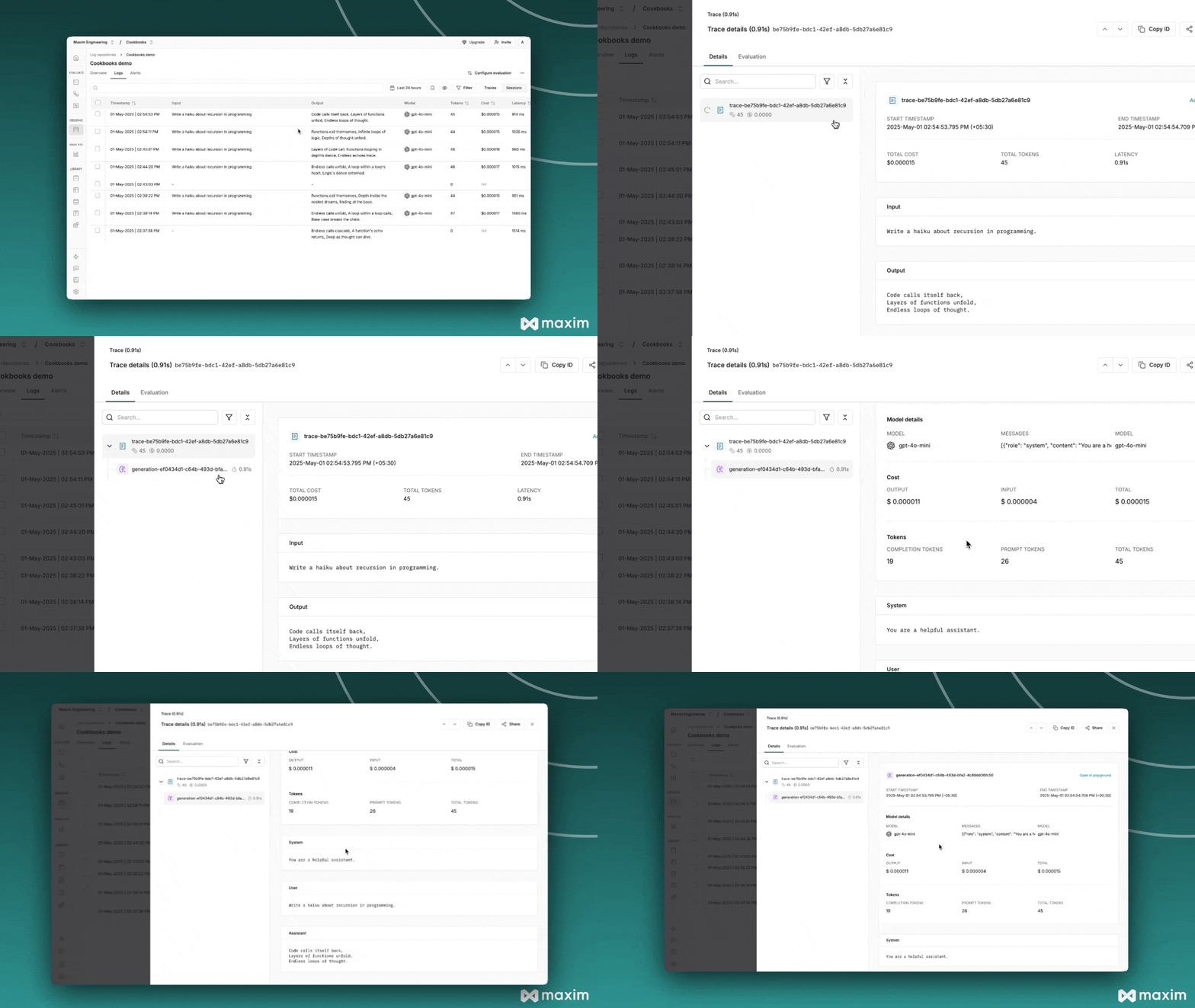
## Make LLM calls using MaximOpenAIClient
```python {4} theme={null}
from openai import OpenAI
from maxim.logger.openai import MaximOpenAIClient
client = MaximOpenAIClient(client=OpenAI(api_key=OPENAI_API_KEY),logger=logger)
messages = [
{"role": "system", "content": "You are a helpful assistant."},
{"role": "user", "content": "Write a haiku about recursion in programming."},
]
# Create a chat completion request
response = client.chat.completions.create(
model="gpt-4o-mini",
messages=messages,
)
# Extract response text and usage
response_text = response.choices[0].message.content
print(response_text)
```
## Maxim-specific Headers
The OpenAI instrumentation supports additional headers via the `extra_headers` parameter to enhance trace metadata and organization. You can use the following headers:
* **`x-maxim-trace-id`**: Associate LLM calls with a specific trace ID (UUID string). All calls with the same trace ID will be grouped together in a single trace.
* **`x-maxim-trace-tags`**: Add custom tags to traces as a JSON string containing key-value pairs. Useful for filtering and organizing traces.
* **`x-maxim-generation-name`**: Assign a custom name to a specific generation/LLM call within a trace (string).
* **`x-maxim-session-id`**: Associate traces with a specific session ID (string).
### Example: Using Extra Headers
```python theme={null}
import json
from uuid import uuid4
from openai import OpenAI
from maxim.logger.openai import MaximOpenAIClient
client = MaximOpenAIClient(client=OpenAI(api_key=OPENAI_API_KEY), logger=logger)
trace_id = str(uuid4())
response = client.chat.completions.create(
messages=[{"role": "user", "content": "Explain how AI works"}],
model="gpt-4o",
max_tokens=1000,
extra_headers={
"x-maxim-trace-tags": json.dumps({
"environment": "production",
"feature": "ai-explanation",
"version": "1.0"
}),
"x-maxim-trace-id": trace_id,
"x-maxim-generation-name": "ai-explanation-generation"
}
)
response_text = response.choices[0].message.content
print(response_text)
```
 ## Using OpenAI Responses API
The OpenAI Responses API is the new standard that will replace the Chat Completions API. Maxim provides plug-and-play observability for the Responses API, working with both sync and streaming calls while capturing model, parameters, messages, output text, tool calls, and errors without changing your OpenAI usage.
### Basic Responses API Usage (Sync)
```python theme={null}
import os
from openai import OpenAI
from maxim import Maxim
from maxim.logger.openai import MaximOpenAIClient
maxim = Maxim({"api_key": os.getenv("MAXIM_API_KEY")})
logger = maxim.logger({"id": str(os.getenv("MAXIM_LOG_REPO_ID"))})
oai = OpenAI() # reads OPENAI_API_KEY from environment
client = MaximOpenAIClient(oai, logger=logger)
res = client.responses.create(
model="gpt-4o-mini",
input="Write a one-sentence summary of Maxim."
)
print(res.output_text)
```
### Streaming Responses API
```python theme={null}
import os
from openai import OpenAI
from maxim import Maxim
from maxim.logger.openai import MaximOpenAIClient
maxim = Maxim({"api_key": os.getenv("MAXIM_API_KEY")})
logger = maxim.logger({"id": str(os.getenv("MAXIM_LOG_REPO_ID"))})
oai = OpenAI()
client = MaximOpenAIClient(oai, logger=logger)
with client.responses.stream(
model="gpt-4o-mini",
input="Stream a short poem about observability."
) as stream:
for event in stream:
print(event, end="")
final = stream.get_final_response()
```
### Async Responses API (Non-streaming)
```python theme={null}
import os
import asyncio
from openai import AsyncOpenAI
from maxim import Maxim
from maxim.logger.openai import MaximOpenAIAsyncClient
async def main():
maxim = Maxim({"api_key": os.getenv("MAXIM_API_KEY")})
logger = maxim.logger({"id": str(os.getenv("MAXIM_LOG_REPO_ID"))})
oai = AsyncOpenAI() # reads OPENAI_API_KEY from environment
client = MaximOpenAIAsyncClient(oai, logger=logger)
res = await client.responses.create(
model="gpt-4o-mini",
input="Write a one-sentence summary of Maxim.",
)
print(res.output_text)
if __name__ == "__main__":
asyncio.run(main())
```
### Async Responses API (Streaming)
```python theme={null}
import os
import asyncio
from openai import AsyncOpenAI
from maxim import Maxim
from maxim.logger.openai import MaximOpenAIAsyncClient
async def main():
maxim = Maxim({"api_key": os.getenv("MAXIM_API_KEY")})
logger = maxim.logger({"id": str(os.getenv("MAXIM_LOG_REPO_ID"))})
oai = AsyncOpenAI()
client = MaximOpenAIAsyncClient(oai, logger=logger)
async with client.responses.stream(
model="gpt-4o-mini",
input="Stream a short poem about observability.",
) as stream:
async for event in stream:
print(event, end="")
final = await stream.get_final_response()
if __name__ == "__main__":
asyncio.run(main())
```
### Controlling Trace Metadata with Headers
You can pass optional headers via `extra_headers` to control trace metadata:
* **`x-maxim-trace-id`**: Associate LLM calls with a specific trace ID (UUID string). All calls with the same trace ID will be grouped together in a single trace.
* **`x-maxim-trace-tags`**: Add custom tags to traces as a JSON string containing key-value pairs. Useful for filtering and organizing traces.
* **`x-maxim-generation-name`**: Assign a custom name to a specific generation/LLM call within a trace (string).
* **`x-maxim-session-id`**: Associate traces with a specific session ID (string).
```python theme={null}
import json
extra_headers = {
"x-maxim-trace-id": "my-trace-id",
"x-maxim-trace-tags": json.dumps({
"environment": "production",
"feature": "homepage"
}),
"x-maxim-generation-name": "homepage-summary",
"x-maxim-session-id": "abc123",
}
res = client.responses.create(
model="gpt-4o-mini",
input="Hello",
extra_headers=extra_headers,
)
```
### Responses API with Tool Calls
The Responses API handles tool calls differently from Chat Completions. Here's how to use tools with manual tracing:
```python theme={null}
import os
import json
from openai import OpenAI
from openai.types.responses.function_tool_param import FunctionToolParam
from openai.types.responses.tool_param import ToolParam
from typing_extensions import Iterable
from maxim import Maxim
from uuid import uuid4
# Initialize Maxim
maxim = Maxim({"api_key": os.getenv("MAXIM_API_KEY")})
logger = maxim.logger({"id": str(os.getenv("MAXIM_LOG_REPO_ID"))})
client = OpenAI() # reads OPENAI_API_KEY from environment
# Create tracing hierarchy
session = logger.session({"id": str(uuid4()), "name": "Weather Query Session"})
trace = session.trace({"id": str(uuid4()), "name": "Weather Tool Scenario"})
span = trace.span({"id": str(uuid4()), "name": "User <> GPT-4o"})
# Create generation to track conversation
generation = span.generation({
"id": str(uuid4()),
"name": "Weather Query",
"messages": [],
"model": "gpt-4o",
"provider": "openai",
"model_parameters": {},
})
# Define your tool using FunctionToolParam
tools: Iterable[ToolParam] = [
FunctionToolParam({
"name": "get_weather",
"description": "Get the current weather for a location",
"parameters": {
"type": "object",
"properties": {
"location": {
"type": "string",
"description": "The city and state, e.g., San Francisco, CA",
}
},
"additionalProperties": {
"type": "string",
"description": "Any other arbitrary key-value pairs as strings."
},
"required": ["location"],
},
"strict": True,
"type": "function",
})
]
# Step 1: Make initial request with tool definition
user_prompt = "What's the current weather in New York, NY?"
generation.add_message({"role": "user", "content": user_prompt})
trace.set_input(user_prompt)
first_response = client.responses.create(
model="gpt-4o",
input=user_prompt,
tools=tools,
)
# Log assistant response
generation.add_message({"role": "assistant", "content": first_response.output_text})
# Step 2: Extract and execute tool calls
tool_calls = []
if hasattr(first_response, "output") and first_response.output:
for item in first_response.output:
if hasattr(item, "type") and item.type == "function_call":
tool_calls.append(item)
if tool_calls:
tool_call = tool_calls[0]
# Create tool call on span for tracking
span_tool_call = span.tool_call({
"id": tool_call.call_id,
"name": tool_call.name,
"description": "built-in tool",
"args": tool_call.arguments,
})
# Execute your tool (your actual implementation)
args = json.loads(tool_call.arguments)
location = args.get("location", "Unknown")
# Simulate weather data
tool_result = json.dumps({
"location": location,
"temperature": 72,
"humidity": 65,
"conditions": "Partly cloudy",
"wind_speed": 8,
})
# Log tool result
span_tool_call.result(tool_result)
generation.add_message({"role": "tool", "content": tool_result})
# Step 3: Submit tool result and get final response
final_response = client.responses.create(
model="gpt-4o",
input=[{
"type": "function_call_output",
"call_id": tool_call.call_id,
"output": tool_result,
}],
previous_response_id=first_response.id,
)
# Log final response
generation.result(final_response)
# Close tracing hierarchy
span.end()
trace.end()
session.end()
```
### Key Differences: Responses API vs Chat Completions
| Feature | Chat Completions API | Responses API |
| ------------------- | ---------------------------------------- | ----------------------------------------------------- |
| **Input Parameter** | `messages` (list of message dicts) | `input` (string or structured input) |
| **Response Field** | `response.choices[0].message.content` | `response.output_text` |
| **Tool Calls** | `response.choices[0].message.tool_calls` | `response.output` (items with `type="function_call"`) |
| **Tool Results** | Added to messages array | `function_call_output` with `previous_response_id` |
| **Conversation** | All messages in single call | Chained with `previous_response_id` |
The Responses API is OpenAI's future standard and supports advanced features like web search. As the Chat Completions API is being phased out, we recommend migrating to the Responses API for new projects.
## Advanced use-cases
### Capture Multiple LLM Calls In One Trace
```python theme={null}
from openai import OpenAI
from maxim import Maxim
from maxim.logger.openai import MaximOpenAIClient
# Make sure MAXIM_API_KEY and MAXIM_LOG_REPO_ID are set in env variables
logger = Maxim().logger()
# Initialize MaximOpenAIClient
client = MaximOpenAIClient(client=OpenAI(api_key=OPENAI_API_KEY),logger=logger)
```
```python theme={null}
from uuid import uuid4
trace_id = str(uuid4())
trace = logger.trace({
id: trace_id,
name: "Trace name"
})
```
```python theme={null}
response = client.chat.completions.create(
model="gpt-4o-mini",
messages=messages,
extra_headers={"x-maxim-trace-id": trace_id}
)
# Extract response text and usage
response_text = response.choices[0].message.content
print(response_text)
```
All LLM calls with extra header `maxim_trace_id: trace_id` will add it the declared trace.
### Capture Multi-Turn Conversations
```python theme={null}
from openai import OpenAI
from maxim import Maxim
from maxim.logger.openai import MaximOpenAIClient
# Make sure MAXIM_API_KEY and MAXIM_LOG_REPO_ID are set in env variables
logger = Maxim().logger()
# Initialize MaximOpenAIClient
client = MaximOpenAIClient(client=OpenAI(api_key=OPENAI_API_KEY),logger=logger)
```
```python theme={null}
from uuid import uuid4
# use this session id to add multiple traces in one session
session_id = str(uuid4())
trace_id = str(uuid4())
trace = logger.trace({
id: trace_id,
name: "Trace name",
session_id: session_id
})
```
```python theme={null}
response = client.chat.completions.create(
model="gpt-4o-mini",
messages=messages,
extra_headers={"x-maxim-trace-id": trace_id}
)
# Extract response text and usage
response_text = response.choices[0].message.content
print(response_text)
```
## Using OpenAI Responses API
The OpenAI Responses API is the new standard that will replace the Chat Completions API. Maxim provides plug-and-play observability for the Responses API, working with both sync and streaming calls while capturing model, parameters, messages, output text, tool calls, and errors without changing your OpenAI usage.
### Basic Responses API Usage (Sync)
```python theme={null}
import os
from openai import OpenAI
from maxim import Maxim
from maxim.logger.openai import MaximOpenAIClient
maxim = Maxim({"api_key": os.getenv("MAXIM_API_KEY")})
logger = maxim.logger({"id": str(os.getenv("MAXIM_LOG_REPO_ID"))})
oai = OpenAI() # reads OPENAI_API_KEY from environment
client = MaximOpenAIClient(oai, logger=logger)
res = client.responses.create(
model="gpt-4o-mini",
input="Write a one-sentence summary of Maxim."
)
print(res.output_text)
```
### Streaming Responses API
```python theme={null}
import os
from openai import OpenAI
from maxim import Maxim
from maxim.logger.openai import MaximOpenAIClient
maxim = Maxim({"api_key": os.getenv("MAXIM_API_KEY")})
logger = maxim.logger({"id": str(os.getenv("MAXIM_LOG_REPO_ID"))})
oai = OpenAI()
client = MaximOpenAIClient(oai, logger=logger)
with client.responses.stream(
model="gpt-4o-mini",
input="Stream a short poem about observability."
) as stream:
for event in stream:
print(event, end="")
final = stream.get_final_response()
```
### Async Responses API (Non-streaming)
```python theme={null}
import os
import asyncio
from openai import AsyncOpenAI
from maxim import Maxim
from maxim.logger.openai import MaximOpenAIAsyncClient
async def main():
maxim = Maxim({"api_key": os.getenv("MAXIM_API_KEY")})
logger = maxim.logger({"id": str(os.getenv("MAXIM_LOG_REPO_ID"))})
oai = AsyncOpenAI() # reads OPENAI_API_KEY from environment
client = MaximOpenAIAsyncClient(oai, logger=logger)
res = await client.responses.create(
model="gpt-4o-mini",
input="Write a one-sentence summary of Maxim.",
)
print(res.output_text)
if __name__ == "__main__":
asyncio.run(main())
```
### Async Responses API (Streaming)
```python theme={null}
import os
import asyncio
from openai import AsyncOpenAI
from maxim import Maxim
from maxim.logger.openai import MaximOpenAIAsyncClient
async def main():
maxim = Maxim({"api_key": os.getenv("MAXIM_API_KEY")})
logger = maxim.logger({"id": str(os.getenv("MAXIM_LOG_REPO_ID"))})
oai = AsyncOpenAI()
client = MaximOpenAIAsyncClient(oai, logger=logger)
async with client.responses.stream(
model="gpt-4o-mini",
input="Stream a short poem about observability.",
) as stream:
async for event in stream:
print(event, end="")
final = await stream.get_final_response()
if __name__ == "__main__":
asyncio.run(main())
```
### Controlling Trace Metadata with Headers
You can pass optional headers via `extra_headers` to control trace metadata:
* **`x-maxim-trace-id`**: Associate LLM calls with a specific trace ID (UUID string). All calls with the same trace ID will be grouped together in a single trace.
* **`x-maxim-trace-tags`**: Add custom tags to traces as a JSON string containing key-value pairs. Useful for filtering and organizing traces.
* **`x-maxim-generation-name`**: Assign a custom name to a specific generation/LLM call within a trace (string).
* **`x-maxim-session-id`**: Associate traces with a specific session ID (string).
```python theme={null}
import json
extra_headers = {
"x-maxim-trace-id": "my-trace-id",
"x-maxim-trace-tags": json.dumps({
"environment": "production",
"feature": "homepage"
}),
"x-maxim-generation-name": "homepage-summary",
"x-maxim-session-id": "abc123",
}
res = client.responses.create(
model="gpt-4o-mini",
input="Hello",
extra_headers=extra_headers,
)
```
### Responses API with Tool Calls
The Responses API handles tool calls differently from Chat Completions. Here's how to use tools with manual tracing:
```python theme={null}
import os
import json
from openai import OpenAI
from openai.types.responses.function_tool_param import FunctionToolParam
from openai.types.responses.tool_param import ToolParam
from typing_extensions import Iterable
from maxim import Maxim
from uuid import uuid4
# Initialize Maxim
maxim = Maxim({"api_key": os.getenv("MAXIM_API_KEY")})
logger = maxim.logger({"id": str(os.getenv("MAXIM_LOG_REPO_ID"))})
client = OpenAI() # reads OPENAI_API_KEY from environment
# Create tracing hierarchy
session = logger.session({"id": str(uuid4()), "name": "Weather Query Session"})
trace = session.trace({"id": str(uuid4()), "name": "Weather Tool Scenario"})
span = trace.span({"id": str(uuid4()), "name": "User <> GPT-4o"})
# Create generation to track conversation
generation = span.generation({
"id": str(uuid4()),
"name": "Weather Query",
"messages": [],
"model": "gpt-4o",
"provider": "openai",
"model_parameters": {},
})
# Define your tool using FunctionToolParam
tools: Iterable[ToolParam] = [
FunctionToolParam({
"name": "get_weather",
"description": "Get the current weather for a location",
"parameters": {
"type": "object",
"properties": {
"location": {
"type": "string",
"description": "The city and state, e.g., San Francisco, CA",
}
},
"additionalProperties": {
"type": "string",
"description": "Any other arbitrary key-value pairs as strings."
},
"required": ["location"],
},
"strict": True,
"type": "function",
})
]
# Step 1: Make initial request with tool definition
user_prompt = "What's the current weather in New York, NY?"
generation.add_message({"role": "user", "content": user_prompt})
trace.set_input(user_prompt)
first_response = client.responses.create(
model="gpt-4o",
input=user_prompt,
tools=tools,
)
# Log assistant response
generation.add_message({"role": "assistant", "content": first_response.output_text})
# Step 2: Extract and execute tool calls
tool_calls = []
if hasattr(first_response, "output") and first_response.output:
for item in first_response.output:
if hasattr(item, "type") and item.type == "function_call":
tool_calls.append(item)
if tool_calls:
tool_call = tool_calls[0]
# Create tool call on span for tracking
span_tool_call = span.tool_call({
"id": tool_call.call_id,
"name": tool_call.name,
"description": "built-in tool",
"args": tool_call.arguments,
})
# Execute your tool (your actual implementation)
args = json.loads(tool_call.arguments)
location = args.get("location", "Unknown")
# Simulate weather data
tool_result = json.dumps({
"location": location,
"temperature": 72,
"humidity": 65,
"conditions": "Partly cloudy",
"wind_speed": 8,
})
# Log tool result
span_tool_call.result(tool_result)
generation.add_message({"role": "tool", "content": tool_result})
# Step 3: Submit tool result and get final response
final_response = client.responses.create(
model="gpt-4o",
input=[{
"type": "function_call_output",
"call_id": tool_call.call_id,
"output": tool_result,
}],
previous_response_id=first_response.id,
)
# Log final response
generation.result(final_response)
# Close tracing hierarchy
span.end()
trace.end()
session.end()
```
### Key Differences: Responses API vs Chat Completions
| Feature | Chat Completions API | Responses API |
| ------------------- | ---------------------------------------- | ----------------------------------------------------- |
| **Input Parameter** | `messages` (list of message dicts) | `input` (string or structured input) |
| **Response Field** | `response.choices[0].message.content` | `response.output_text` |
| **Tool Calls** | `response.choices[0].message.tool_calls` | `response.output` (items with `type="function_call"`) |
| **Tool Results** | Added to messages array | `function_call_output` with `previous_response_id` |
| **Conversation** | All messages in single call | Chained with `previous_response_id` |
The Responses API is OpenAI's future standard and supports advanced features like web search. As the Chat Completions API is being phased out, we recommend migrating to the Responses API for new projects.
## Advanced use-cases
### Capture Multiple LLM Calls In One Trace
```python theme={null}
from openai import OpenAI
from maxim import Maxim
from maxim.logger.openai import MaximOpenAIClient
# Make sure MAXIM_API_KEY and MAXIM_LOG_REPO_ID are set in env variables
logger = Maxim().logger()
# Initialize MaximOpenAIClient
client = MaximOpenAIClient(client=OpenAI(api_key=OPENAI_API_KEY),logger=logger)
```
```python theme={null}
from uuid import uuid4
trace_id = str(uuid4())
trace = logger.trace({
id: trace_id,
name: "Trace name"
})
```
```python theme={null}
response = client.chat.completions.create(
model="gpt-4o-mini",
messages=messages,
extra_headers={"x-maxim-trace-id": trace_id}
)
# Extract response text and usage
response_text = response.choices[0].message.content
print(response_text)
```
All LLM calls with extra header `maxim_trace_id: trace_id` will add it the declared trace.
### Capture Multi-Turn Conversations
```python theme={null}
from openai import OpenAI
from maxim import Maxim
from maxim.logger.openai import MaximOpenAIClient
# Make sure MAXIM_API_KEY and MAXIM_LOG_REPO_ID are set in env variables
logger = Maxim().logger()
# Initialize MaximOpenAIClient
client = MaximOpenAIClient(client=OpenAI(api_key=OPENAI_API_KEY),logger=logger)
```
```python theme={null}
from uuid import uuid4
# use this session id to add multiple traces in one session
session_id = str(uuid4())
trace_id = str(uuid4())
trace = logger.trace({
id: trace_id,
name: "Trace name",
session_id: session_id
})
```
```python theme={null}
response = client.chat.completions.create(
model="gpt-4o-mini",
messages=messages,
extra_headers={"x-maxim-trace-id": trace_id}
)
# Extract response text and usage
response_text = response.choices[0].message.content
print(response_text)
```