> ## Documentation Index
> Fetch the complete documentation index at: https://www.getmaxim.ai/docs/llms.txt
> Use this file to discover all available pages before exploring further.
# Mistral SDK
> Learn how to integrate Maxim observability with the Mistral SDK in just one line of code.
export const MaximPlayer = ({url}) => {
return ;
};
## Requirements
```
mistralai
maxim-py
```
## Env Variables
```
MAXIM_API_KEY=
MAXIM_LOG_REPO_ID=
MISTRAL_API_KEY=
```
## Initialize Logger
```python theme={null}
from maxim import Maxim
logger = Maxim().logger()
```
## Initialize MaximMistralClient
```python {5-7} theme={null}
from mistralai import Mistral
from maxim.logger.mistral import MaximMistralClient
import os
with MaximMistralClient(Mistral(
api_key=os.getenv("MISTRAL_API_KEY", ""),
), logger) as mistral:
# Your Mistral calls go here
pass
```
## Make LLM Calls Using MaximMistralClient
```python theme={null}
from mistralai import Mistral
from maxim.logger.mistral import MaximMistralClient
import os
with MaximMistralClient(Mistral(
api_key=os.getenv("MISTRAL_API_KEY", ""),
), logger) as mistral:
res = mistral.chat.complete(
model="mistral-small-latest",
messages=[
{
"content": "Who is the best French painter? Answer in one short sentence.",
"role": "user",
},
]
)
# Handle response
print(res)
```
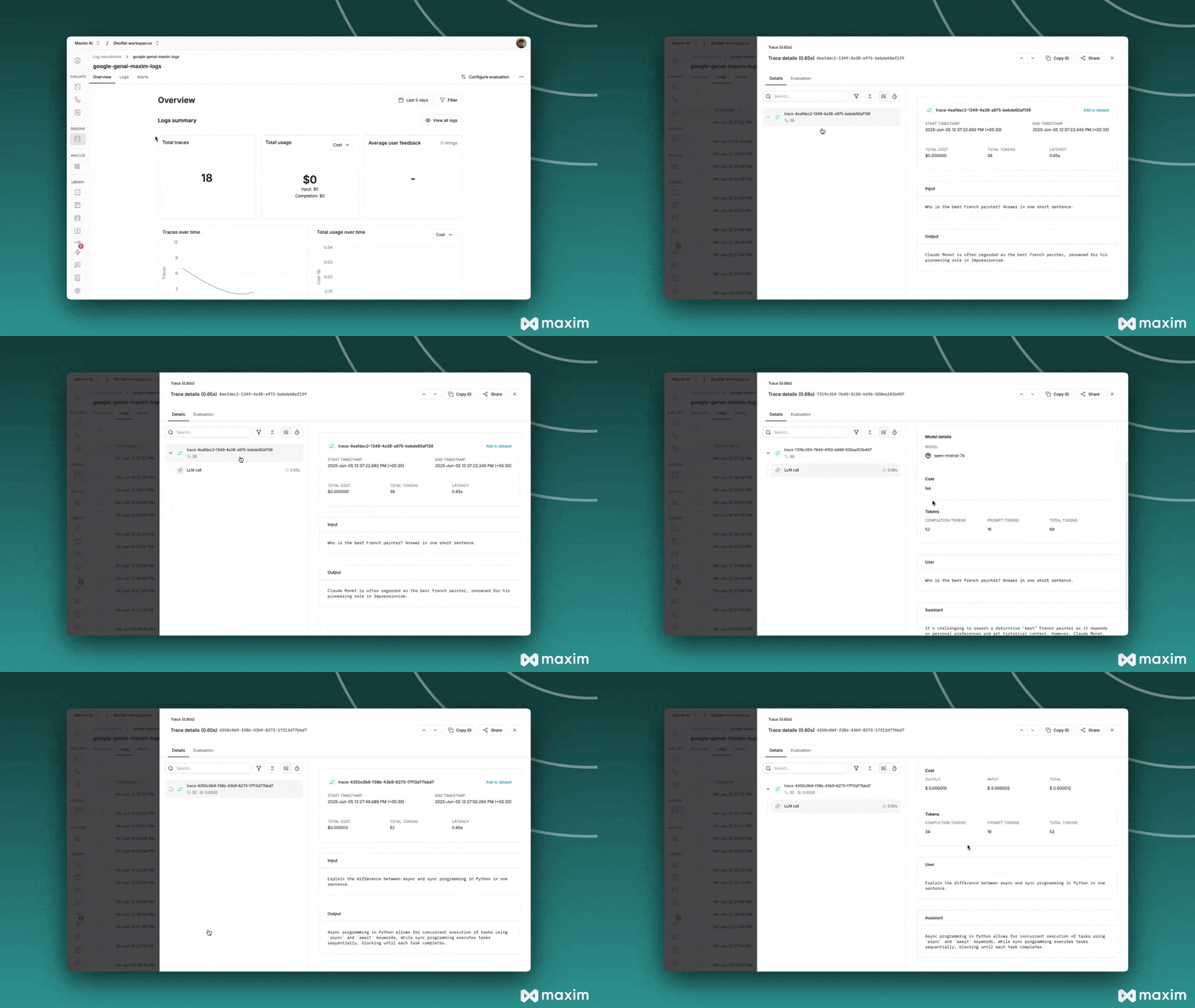 ## Async LLM calls
```python theme={null}
async with MaximMistralClient(Mistral(
api_key=os.getenv('MISTRAL_API_KEY', ''),
), logger) as mistral:
response = await mistral.chat.complete_async(
model='mistral-small-latest',
messages=[
{
'role': 'user',
'content': 'Explain the difference between async and sync programming in Python in one sentence.'
}
]
)
print(response)
```
## Supported Mistral Models
The MaximMistralClient supports all Mistral models available through the Mistral API, including:
* `mistral-small-latest`
* `mistral-medium-latest`
* `open-mistral-7b`
* And other available Mistral models
## Resources
You can quickly try the Mistral One Line Integration here -
## Async LLM calls
```python theme={null}
async with MaximMistralClient(Mistral(
api_key=os.getenv('MISTRAL_API_KEY', ''),
), logger) as mistral:
response = await mistral.chat.complete_async(
model='mistral-small-latest',
messages=[
{
'role': 'user',
'content': 'Explain the difference between async and sync programming in Python in one sentence.'
}
]
)
print(response)
```
## Supported Mistral Models
The MaximMistralClient supports all Mistral models available through the Mistral API, including:
* `mistral-small-latest`
* `mistral-medium-latest`
* `open-mistral-7b`
* And other available Mistral models
## Resources
You can quickly try the Mistral One Line Integration here -