> ## Documentation Index
> Fetch the complete documentation index at: https://www.getmaxim.ai/docs/llms.txt
> Use this file to discover all available pages before exploring further.
# Google ADK Integration
> Integrate Maxim with Google's Agent Development Kit (ADK) for comprehensive observability and monitoring of multi-agent systems.
## Overview
The Google ADK integration allows you to:
* **Automatic Instrumentation**: Automatically capture traces from ADK agents without code changes
* **Multi-Agent Monitoring**: Track complex agent interactions and workflows
* **Performance Insights**: Monitor agent execution times and resource usage
* **Metrics Collection**: Collect key metrics such as latency, token usage, and cost for each agent or workflow
* **Error Tracking**: Capture and analyze agent failures and exceptions
* **Custom Logging**: Add structured logging to your agent workflows
* **Node-Level Evaluation**: Apply evaluators to components within an agent trace using Maxim's node-level evaluation capabilities, enabling granular assessment and scoring of each step or node in an agent workflow
## Installation
### Prerequisites
* Python 3.10+
* Google ADK installed and configured
* Maxim account and API key
### Install Dependencies
```bash theme={null}
pip install maxim-py google-adk python-dotenv
```
## Quick Start
### 1. Environment Setup
Create a `.env` file in your project directory:
```bash theme={null}
# Google Cloud Configuration
GOOGLE_CLOUD_PROJECT=your-project-id
GOOGLE_CLOUD_LOCATION=us-central1
GOOGLE_API_KEY=your-google-api-key
GOOGLE_GENAI_USE_VERTEXAI=False
# Maxim Configuration
MAXIM_API_KEY=your-maxim-api-key
MAXIM_LOG_REPO_ID=your-log-repository-id
```
### 2. Basic Integration
Add Maxim instrumentation to your ADK agent:
```python {24} theme={null}
# __init__.py
import os
from dotenv import load_dotenv
# Load environment variables
load_dotenv()
# Use Gemini API instead of Vertex AI (simpler setup)
os.environ.setdefault("GOOGLE_GENAI_USE_VERTEXAI", "False")
# Import your agent
from . import agent
# Initialize Maxim instrumentation
try:
from maxim import Maxim
from maxim.logger.google_adk import instrument_google_adk
print("🔌 Initializing Maxim instrumentation for Google ADK...")
maxim = Maxim()
maxim_logger = maxim.logger()
# Apply instrumentation patches to Google ADK
instrument_google_adk(maxim_logger, debug=True)
print("✅ Maxim instrumentation complete!")
# Export the instrumented agent
root_agent = agent.root_agent
except ImportError as e:
print(f"⚠️ Could not initialize Maxim instrumentation: {e}")
print("💡 Running without Maxim logging")
# Fall back to using the agent without Maxim
root_agent = agent.root_agent
```
### 3. Run Your Agent
Create a `run_with_maxim.py` file to run your agent:
```python theme={null}
#!/usr/bin/env python3
"""
Conversational agent using Google ADK with Maxim tracing.
"""
import asyncio
import sys
from pathlib import Path
sys.path.insert(0, str(Path(__file__).parent))
from your_agent import root_agent
from google.adk.runners import InMemoryRunner
from google.genai.types import Part, UserContent
async def interactive_session():
"""Run interactive conversation with the agent."""
print("\n" + "=" * 80)
print("Agent - Conversational Mode")
print("=" * 80)
# Create runner - Maxim instrumentation is auto-applied
runner = InMemoryRunner(agent=root_agent)
session = await runner.session_service.create_session(
app_name=runner.app_name,
user_id="user"
)
print("\nType your message (or 'exit' to quit)")
print("=" * 80 + "\n")
try:
while True:
try:
user_input = input("You: ").strip()
except EOFError:
break
if not user_input:
continue
if user_input.lower() in ['exit', 'quit']:
break
# Send message to agent
content = UserContent(parts=[Part(text=user_input)])
print("\nAgent: ", end="", flush=True)
try:
async for event in runner.run_async(
user_id=session.user_id,
session_id=session.id,
new_message=content,
):
if event.content and event.content.parts:
for part in event.content.parts:
if part.text:
print(part.text, end="", flush=True)
except Exception as e:
print(f"\n\n❌ Error: {e}")
continue
print("\n")
except KeyboardInterrupt:
pass
finally:
# End Maxim session to flush remaining traces
from maxim.logger.google_adk.client import end_maxim_session
end_maxim_session()
print("\n" + "=" * 80)
print("View traces at: https://app.getmaxim.ai")
print("=" * 80 + "\n")
if __name__ == "__main__":
asyncio.run(interactive_session())
```
Then run it:
```bash theme={null}
python3 run_with_maxim.py
```
**Important**: When using the Python script approach, always call `end_maxim_session()` in a finally block to ensure all traces are properly flushed to Maxim before the program exits.
## Example: Financial Advisor Agent
Here's a complete example of a financial advisor agent ([Agent Example by Google](https://github.com/google/adk-samples/tree/main/python/agents/financial-advisor)) with Maxim instrumentation:
```python {24} theme={null}
# financial_advisor/__init__.py
import os
from dotenv import load_dotenv
# Load environment variables
load_dotenv()
# Use Gemini API instead of Vertex AI
os.environ.setdefault("GOOGLE_GENAI_USE_VERTEXAI", "False")
# Import the agent
from . import agent
# Initialize Maxim instrumentation
try:
from maxim import Maxim
from maxim.logger.google_adk import instrument_google_adk
print("🔌 Initializing Maxim instrumentation for Google ADK...")
maxim = Maxim()
maxim_logger = maxim.logger()
# Apply instrumentation patches
instrument_google_adk(maxim_logger, debug=True)
print("✅ Maxim instrumentation complete!")
# Export the instrumented agent
root_agent = agent.root_agent
except ImportError as e:
print(f"⚠️ Could not initialize Maxim instrumentation: {e}")
print("💡 Running without Maxim logging")
root_agent = agent.root_agent
```
### Running the Example
```bash theme={null}
# Navigate to the financial advisor directory
cd financial-advisor
# Install dependencies
uv sync
# Create run_with_maxim.py with the code above
# Make sure to import from 'financial_advisor' instead of 'your_agent'
# Run the agent with Maxim instrumentation
python3 run_with_maxim.py
# Optional: Run tests
uv run pytest tests
# Optional: Run evaluations
uv run pytest eval
```
## Monitoring and Observability
### Dashboard Views
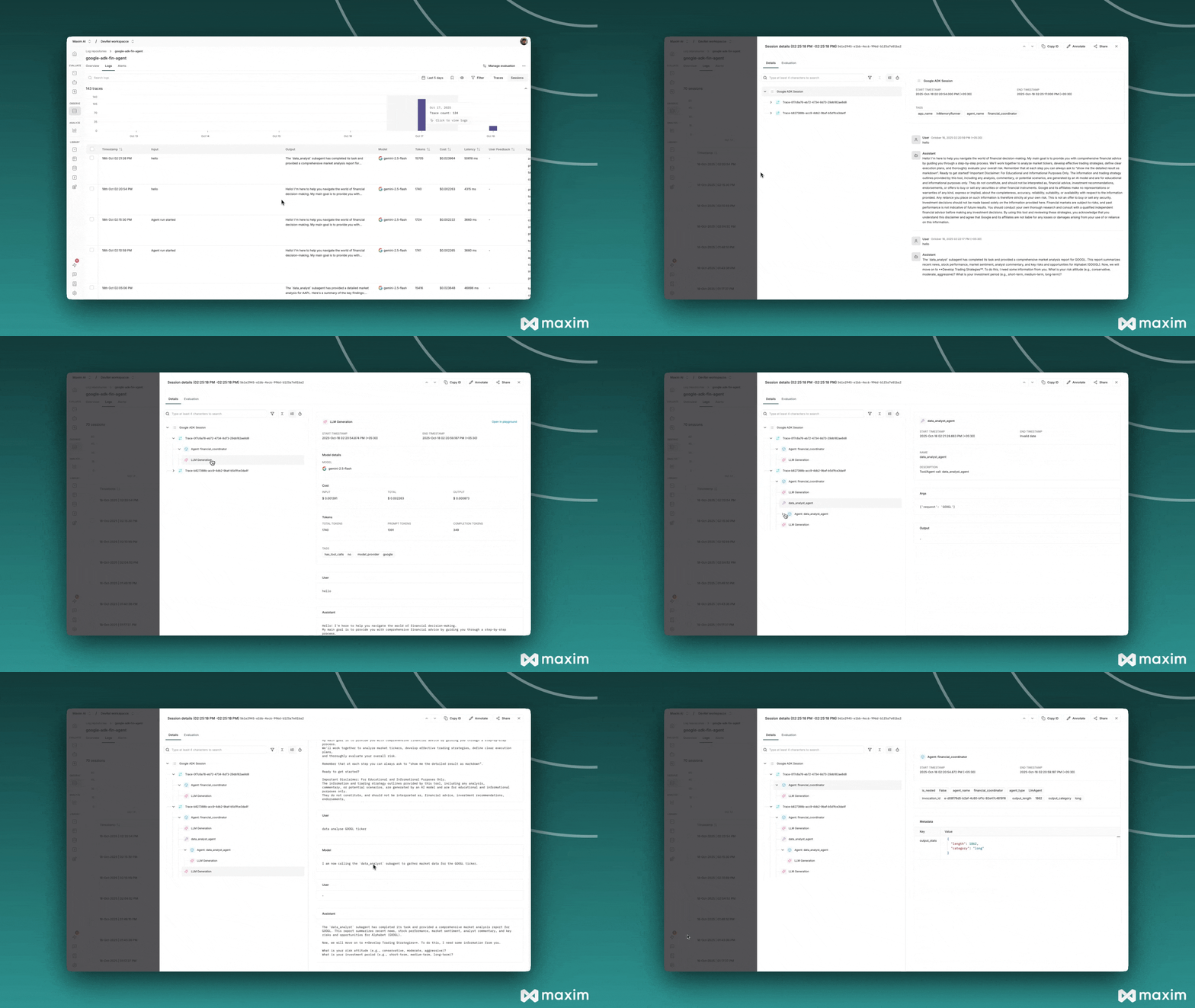
Once your agent is running with Maxim instrumentation, you can monitor:
* **Agent Performance**: Response times, success rates, and error rates
* **Workflow Traces**: Complete execution paths through your multi-agent system
* **Custom Metrics**: Business-specific metrics and KPIs
* **Error Analysis**: Detailed error tracking and debugging information
 ### Key Metrics Tracked
* Agent execution time
* Token usage and costs
* Error rates and types
* Agent interaction patterns
## Troubleshooting
### Common Issues
**Instrumentation not working:**
```bash theme={null}
# Check Maxim installation
pip show maxim-py
# Verify API key
echo $MAXIM_API_KEY
# Check debug logs
export MAXIM_DEBUG=true
```
**Agent not starting:**
```bash theme={null}
# Verify environment variables
cat .env
# Check Python path and imports
python3 -c "from your_agent import root_agent; print('Agent imported successfully')"
```
**Missing traces:**
* Ensure `instrument_google_adk()` is called before agent initialization
* Check that your agent is properly imported after instrumentation
* Verify Maxim API key and repository ID are correct
### Debug Mode
Enable debug mode for detailed logging:
```python theme={null}
# Enable debug mode
instrument_google_adk(maxim_logger, debug=True)
# Or set environment variable
os.environ["MAXIM_DEBUG"] = "true"
```
## Advanced Integration with Callbacks
For more control over tracing and custom metrics, you can use callback functions to hook into different stages of agent execution.
### Available Callbacks
The `instrument_google_adk()` function supports the following callbacks:
* **`before_generation_callback`**: Called before each LLM generation
* **`after_generation_callback`**: Called after each LLM generation completes
* **`before_trace_callback`**: Called at the start of a trace
* **`after_trace_callback`**: Called when a trace completes
* **`before_span_callback`**: Called when creating a span for an agent
* **`after_span_callback`**: Called when a span completes
### Example with Custom Callbacks
```python {76-83} theme={null}
# __init__.py
import os
import time
from dotenv import load_dotenv
load_dotenv()
os.environ.setdefault("GOOGLE_GENAI_USE_VERTEXAI", "False")
from . import agent
try:
from maxim import Maxim
from maxim.logger.google_adk import instrument_google_adk
class MaximCallbacks:
def __init__(self):
self.generation_start_times = {}
async def before_generation(self, callback_context, llm_request, model_info, messages):
"""Track generation start time and log model info"""
gen_id = id(llm_request)
self.generation_start_times[gen_id] = time.time()
print(f"🔵 Calling {model_info['model']} with {len(messages)} messages")
async def after_generation(self, callback_context, llm_response, generation,
generation_result, usage_info, content, tool_calls):
"""Add custom metrics and tags to generation"""
gen_id = id(callback_context.llm_request) if hasattr(callback_context, 'llm_request') else None
# Calculate latency
if gen_id and gen_id in self.generation_start_times:
latency = time.time() - self.generation_start_times[gen_id]
generation.add_metric("latency_seconds", latency)
# Add tokens per second metric
total_tokens = usage_info.get('total_tokens', 0)
if latency > 0:
generation.add_metric("tokens_per_second", total_tokens / latency)
del self.generation_start_times[gen_id]
# Add custom tags
generation.add_tag("model_provider", "google")
generation.add_tag("has_tool_calls", "yes" if tool_calls else "no")
async def after_trace(self, invocation_context, trace, agent_output, trace_usage):
"""Add custom metadata to trace"""
# Calculate estimated cost
total_tokens = trace_usage.get('total_tokens', 0)
estimated_cost = (total_tokens / 1000) * 0.01
trace.add_tag("estimated_cost_usd", f"${estimated_cost:.4f}")
trace.add_tag("token_efficiency",
"high" if total_tokens < 2000 else "medium" if total_tokens < 5000 else "low")
trace.add_metric("estimated_cost", estimated_cost)
async def after_span(self, invocation_context, agent_span, agent_output):
"""Add custom metadata to span"""
agent_name = invocation_context.agent.name
output_length = len(agent_output) if agent_output else 0
agent_span.add_tag("agent_name", agent_name)
agent_span.add_tag("output_length", str(output_length))
agent_span.add_metadata({
"output_stats": {
"length": output_length,
"category": "long" if output_length > 500 else "short"
}
})
# Create callbacks instance
callbacks = MaximCallbacks()
# Initialize Maxim with callbacks
maxim = Maxim()
instrument_google_adk(
maxim.logger(),
debug=True,
before_generation_callback=callbacks.before_generation,
after_generation_callback=callbacks.after_generation,
after_trace_callback=callbacks.after_trace,
after_span_callback=callbacks.after_span,
)
print("✅ Maxim instrumentation with custom callbacks enabled!")
root_agent = agent.root_agent
except ImportError as e:
print(f"⚠️ Could not initialize Maxim: {e}")
root_agent = agent.root_agent
```
### Callback Parameters
Each callback receives specific parameters that you can use:
#### Generation Callbacks
* **`callback_context`**: Context object with request/response details
* **`llm_request`**: The original LLM request
* **`llm_response`**: The LLM response (after\_generation only)
* **`generation`**: Maxim Generation object for adding metrics/tags (after\_generation only)
* **`model_info`**: Dictionary with model name and configuration
* **`messages`**: List of messages sent to the LLM
* **`usage_info`**: Token usage statistics (after\_generation only)
* **`content`**: Generated content (after\_generation only)
* **`tool_calls`**: List of tool calls made (after\_generation only)
#### Trace Callbacks
* **`invocation_context`**: Agent invocation context
* **`trace`**: Maxim Trace object for adding metrics/tags (after\_trace only)
* **`user_input`**: The user's input message (before\_trace only)
* **`agent_output`**: The agent's output (after\_trace only)
* **`trace_usage`**: Overall token usage for the trace (after\_trace only)
#### Span Callbacks
* **`invocation_context`**: Agent invocation context with agent details
* **`agent_span`**: Maxim Span object for adding tags/metadata (after\_span only)
* **`parent_context`**: Parent span context (before\_span only)
* **`agent_output`**: The agent's output (after\_span only)
### Adding Custom Metrics and Tags
You can enrich your traces with custom data:
```python theme={null}
# In after_generation callback
generation.add_metric("latency_seconds", 1.23)
generation.add_metric("tokens_per_second", 45.6)
generation.add_tag("model_provider", "google")
# In after_trace callback
trace.add_metric("estimated_cost", 0.0123)
trace.add_tag("token_efficiency", "high")
# In after_span callback (spans support tags and metadata, not metrics)
agent_span.add_tag("agent_name", "financial_advisor")
agent_span.add_metadata({
"custom_data": {
"key": "value"
}
})
```
### Use Cases for Callbacks
* **Cost Tracking**: Calculate and log estimated costs per trace
* **Performance Monitoring**: Track latency and throughput metrics
* **Custom Analytics**: Add business-specific tags for filtering and analysis
* **Debugging**: Log detailed information about agent execution
* **A/B Testing**: Tag traces with experiment variants
* **User Segmentation**: Add user metadata for cohort analysis
## Resources
### Key Metrics Tracked
* Agent execution time
* Token usage and costs
* Error rates and types
* Agent interaction patterns
## Troubleshooting
### Common Issues
**Instrumentation not working:**
```bash theme={null}
# Check Maxim installation
pip show maxim-py
# Verify API key
echo $MAXIM_API_KEY
# Check debug logs
export MAXIM_DEBUG=true
```
**Agent not starting:**
```bash theme={null}
# Verify environment variables
cat .env
# Check Python path and imports
python3 -c "from your_agent import root_agent; print('Agent imported successfully')"
```
**Missing traces:**
* Ensure `instrument_google_adk()` is called before agent initialization
* Check that your agent is properly imported after instrumentation
* Verify Maxim API key and repository ID are correct
### Debug Mode
Enable debug mode for detailed logging:
```python theme={null}
# Enable debug mode
instrument_google_adk(maxim_logger, debug=True)
# Or set environment variable
os.environ["MAXIM_DEBUG"] = "true"
```
## Advanced Integration with Callbacks
For more control over tracing and custom metrics, you can use callback functions to hook into different stages of agent execution.
### Available Callbacks
The `instrument_google_adk()` function supports the following callbacks:
* **`before_generation_callback`**: Called before each LLM generation
* **`after_generation_callback`**: Called after each LLM generation completes
* **`before_trace_callback`**: Called at the start of a trace
* **`after_trace_callback`**: Called when a trace completes
* **`before_span_callback`**: Called when creating a span for an agent
* **`after_span_callback`**: Called when a span completes
### Example with Custom Callbacks
```python {76-83} theme={null}
# __init__.py
import os
import time
from dotenv import load_dotenv
load_dotenv()
os.environ.setdefault("GOOGLE_GENAI_USE_VERTEXAI", "False")
from . import agent
try:
from maxim import Maxim
from maxim.logger.google_adk import instrument_google_adk
class MaximCallbacks:
def __init__(self):
self.generation_start_times = {}
async def before_generation(self, callback_context, llm_request, model_info, messages):
"""Track generation start time and log model info"""
gen_id = id(llm_request)
self.generation_start_times[gen_id] = time.time()
print(f"🔵 Calling {model_info['model']} with {len(messages)} messages")
async def after_generation(self, callback_context, llm_response, generation,
generation_result, usage_info, content, tool_calls):
"""Add custom metrics and tags to generation"""
gen_id = id(callback_context.llm_request) if hasattr(callback_context, 'llm_request') else None
# Calculate latency
if gen_id and gen_id in self.generation_start_times:
latency = time.time() - self.generation_start_times[gen_id]
generation.add_metric("latency_seconds", latency)
# Add tokens per second metric
total_tokens = usage_info.get('total_tokens', 0)
if latency > 0:
generation.add_metric("tokens_per_second", total_tokens / latency)
del self.generation_start_times[gen_id]
# Add custom tags
generation.add_tag("model_provider", "google")
generation.add_tag("has_tool_calls", "yes" if tool_calls else "no")
async def after_trace(self, invocation_context, trace, agent_output, trace_usage):
"""Add custom metadata to trace"""
# Calculate estimated cost
total_tokens = trace_usage.get('total_tokens', 0)
estimated_cost = (total_tokens / 1000) * 0.01
trace.add_tag("estimated_cost_usd", f"${estimated_cost:.4f}")
trace.add_tag("token_efficiency",
"high" if total_tokens < 2000 else "medium" if total_tokens < 5000 else "low")
trace.add_metric("estimated_cost", estimated_cost)
async def after_span(self, invocation_context, agent_span, agent_output):
"""Add custom metadata to span"""
agent_name = invocation_context.agent.name
output_length = len(agent_output) if agent_output else 0
agent_span.add_tag("agent_name", agent_name)
agent_span.add_tag("output_length", str(output_length))
agent_span.add_metadata({
"output_stats": {
"length": output_length,
"category": "long" if output_length > 500 else "short"
}
})
# Create callbacks instance
callbacks = MaximCallbacks()
# Initialize Maxim with callbacks
maxim = Maxim()
instrument_google_adk(
maxim.logger(),
debug=True,
before_generation_callback=callbacks.before_generation,
after_generation_callback=callbacks.after_generation,
after_trace_callback=callbacks.after_trace,
after_span_callback=callbacks.after_span,
)
print("✅ Maxim instrumentation with custom callbacks enabled!")
root_agent = agent.root_agent
except ImportError as e:
print(f"⚠️ Could not initialize Maxim: {e}")
root_agent = agent.root_agent
```
### Callback Parameters
Each callback receives specific parameters that you can use:
#### Generation Callbacks
* **`callback_context`**: Context object with request/response details
* **`llm_request`**: The original LLM request
* **`llm_response`**: The LLM response (after\_generation only)
* **`generation`**: Maxim Generation object for adding metrics/tags (after\_generation only)
* **`model_info`**: Dictionary with model name and configuration
* **`messages`**: List of messages sent to the LLM
* **`usage_info`**: Token usage statistics (after\_generation only)
* **`content`**: Generated content (after\_generation only)
* **`tool_calls`**: List of tool calls made (after\_generation only)
#### Trace Callbacks
* **`invocation_context`**: Agent invocation context
* **`trace`**: Maxim Trace object for adding metrics/tags (after\_trace only)
* **`user_input`**: The user's input message (before\_trace only)
* **`agent_output`**: The agent's output (after\_trace only)
* **`trace_usage`**: Overall token usage for the trace (after\_trace only)
#### Span Callbacks
* **`invocation_context`**: Agent invocation context with agent details
* **`agent_span`**: Maxim Span object for adding tags/metadata (after\_span only)
* **`parent_context`**: Parent span context (before\_span only)
* **`agent_output`**: The agent's output (after\_span only)
### Adding Custom Metrics and Tags
You can enrich your traces with custom data:
```python theme={null}
# In after_generation callback
generation.add_metric("latency_seconds", 1.23)
generation.add_metric("tokens_per_second", 45.6)
generation.add_tag("model_provider", "google")
# In after_trace callback
trace.add_metric("estimated_cost", 0.0123)
trace.add_tag("token_efficiency", "high")
# In after_span callback (spans support tags and metadata, not metrics)
agent_span.add_tag("agent_name", "financial_advisor")
agent_span.add_metadata({
"custom_data": {
"key": "value"
}
})
```
### Use Cases for Callbacks
* **Cost Tracking**: Calculate and log estimated costs per trace
* **Performance Monitoring**: Track latency and throughput metrics
* **Custom Analytics**: Add business-specific tags for filtering and analysis
* **Debugging**: Log detailed information about agent execution
* **A/B Testing**: Tag traces with experiment variants
* **User Segmentation**: Add user metadata for cohort analysis
## Resources