> ## Documentation Index
> Fetch the complete documentation index at: https://www.getmaxim.ai/docs/llms.txt
> Use this file to discover all available pages before exploring further.
# Maxim Integration for Agno
> Integrate Maxim with your Agno Agents for Observability
## Getting Started
### Prerequisites
* Python version >=3.10
* A Maxim account ([sign up here](https://getmaxim.ai/))
* Generate Maxim API Key
* An Agno project
### Installation
Install the Maxim SDK via pip:
```python theme={null}
pip install maxim-py
```
Or add it to your `requirements.txt`:
### Basic Setup
### 1. Set up environment variables
```env theme={null}
### Environment Variables Setup
# Create a `.env` file in your project root:
# Maxim API Configuration
MAXIM_API_KEY=your_api_key_here
MAXIM_LOG_REPO_ID=your_repo_id_here
OPENAI_API_KEY=your_openai_api_key
# You can also choose another LLM Provider (Gemini, Groq, Anthropic etc.)
```
### 2. Import the required packages
```python theme={null}
from agno.agent import Agent
from agno.models.openai import OpenAIChat
from agno.tools.googlesearch import GoogleSearchTools
from agno.tools.yfinance import YFinanceTools
from maxim import Maxim
from maxim.logger.agno import instrument_agno
```
### 3. Initialise Maxim with your API key
```python {8} theme={null}
# Instrument Agno with just one line
instrument_agno(Maxim().logger())
```
### 4. Create and run your Agno application as usual
```python theme={null}
# Create your agent
researcher = Agent(
name="Research Agent",
role="Senior Research Analyst",
model=OpenAIChat(id="gpt-4o"),
tools=[GoogleSearchTools()],
instructions="You are an expert researcher at a tech think tank...",
show_tool_calls=True,
markdown=True
)
# Run your agent
response = researcher.run("Research the latest AI advancements...")
print(response.content)
```
That's it! All your Agno agent interactions will now be logged and available in your Maxim dashboard.
Check this Cookbook for a quick reference - [Notebook](https://github.com/maximhq/maxim-cookbooks/blob/main/python/observability-online-eval/agno/agent.ipynb)
## Multi-Agent Example
Here's how to set up a multi-agent system with Maxim integration:
```python theme={null}
# Create individual agents
web_search_agent = Agent(
name="Web Agent",
role="Search the web for information",
model=OpenAIChat(id="gpt-4o"),
tools=[GoogleSearchTools()],
instructions="Always include sources",
show_tool_calls=True,
markdown=True,
)
finance_agent = Agent(
name="Finance Agent",
role="Get financial data",
model=OpenAIChat(id="gpt-4o"),
tools=[YFinanceTools(stock_price=True, analyst_recommendations=True, company_info=True)],
instructions="Use tables to display data",
markdown=True,
)
# Create multi-agent system
multi_ai_agent = Agent(
team=[web_search_agent, finance_agent],
model=OpenAIChat(id="gpt-4o"),
instructions="You are a helpful financial assistant. Answer user questions about stocks, companies, and financial data.",
show_tool_calls=True,
markdown=True
)
# Run the multi-agent system
response = multi_ai_agent.run("What's the current stock price of Apple?")
print(response.content)
```
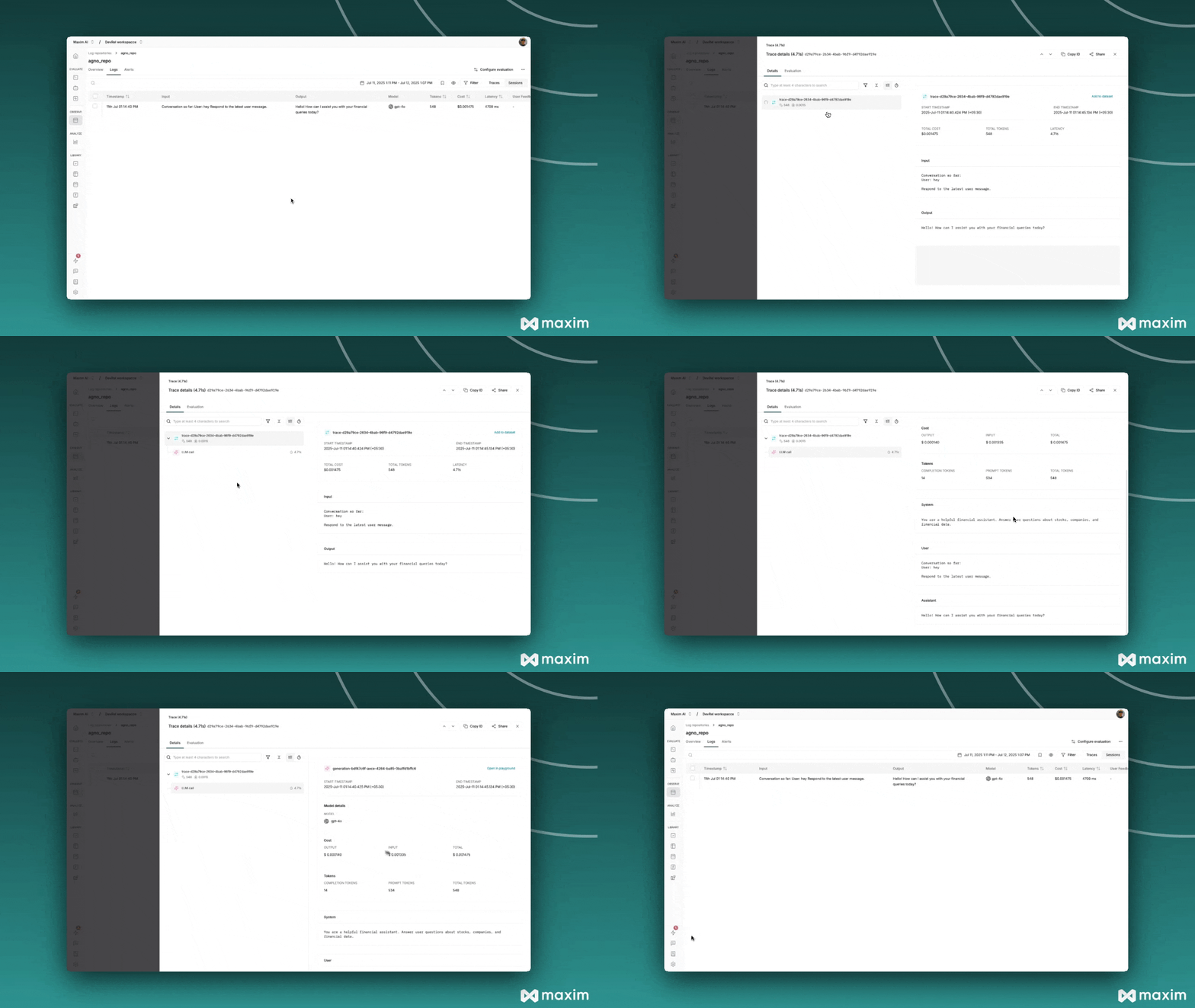
## Viewing Your Traces
After running your Agno application:
1. Log in to your [Maxim Dashboard](https://app.getmaxim.ai/login)
2. Navigate to your repository
3. View detailed agent traces, including:
* Agent conversations
* Tool usage patterns
* Performance metrics
* Cost analytics
* Token usage
* Model information
 ## Troubleshooting
### Common Issues
* **No traces appearing**: Ensure your API key and repository ID are correct
* Ensure you've **`called instrument_agno()`** ***before*** running your agents. This initializes logging hooks correctly.
* Set `debug=True` in your `instrument_agno()` call to surface any internal errors:
```python theme={null}
instrument_agno(logger, {"debug" : True})
```
* Double-check that `instrument_agno()` is called **before** creating or executing agents. This might be obvious, but it's a common oversight.
### Debug Mode
Enable debug mode to see detailed logging information:
```python theme={null}
from maxim import Maxim
from maxim.logger.agno import instrument_agno
# Enable debug mode
maxim = Maxim()
instrument_agno(maxim.logger(), {"debug":True})
```
## Resources
Official Agno documentation
Official Maxim documentation
Official Maxim GitHub repository
## Troubleshooting
### Common Issues
* **No traces appearing**: Ensure your API key and repository ID are correct
* Ensure you've **`called instrument_agno()`** ***before*** running your agents. This initializes logging hooks correctly.
* Set `debug=True` in your `instrument_agno()` call to surface any internal errors:
```python theme={null}
instrument_agno(logger, {"debug" : True})
```
* Double-check that `instrument_agno()` is called **before** creating or executing agents. This might be obvious, but it's a common oversight.
### Debug Mode
Enable debug mode to see detailed logging information:
```python theme={null}
from maxim import Maxim
from maxim.logger.agno import instrument_agno
# Enable debug mode
maxim = Maxim()
instrument_agno(maxim.logger(), {"debug":True})
```
## Resources
Official Agno documentation
Official Maxim documentation
Official Maxim GitHub repository