> ## Documentation Index
> Fetch the complete documentation index at: https://www.getmaxim.ai/docs/llms.txt
> Use this file to discover all available pages before exploring further.
# Query Agents via SDK
> Learn how to efficiently query and retrieve agents using the Maxim SDK, enabling advanced AI workflow management and customization
All Python code snippets in this document are for version 3.4.0+.
## Setting Up the SDK
### Initializing the SDK
```typescript JS/TS theme={null}
import { Maxim } from "@maximai/maxim-js";
const maxim = new Maxim({ apiKey: "" });
```
```python Python theme={null}
from maxim import Maxim, Config
maxim = Maxim(Config(api_key=""))
```
## Working with Deployment Variables
### For a prompt chain with specific deployment variables
For building query to get prompt chain with specific deployment variables, you can use `QueryBuilder`.
```typescript JS/TS theme={null}
import { Maxim, QueryBuilder } from "@maximai/maxim-js";
const maxim = new Maxim({ apiKey: "" });
const promptChain = await maxim.getPromptChain("prompt-chain-id",
new QueryBuilder()
.and()
.deploymentVar("Environment", "prod")
.build()});
```
```python Python theme={null}
from maxim import Maxim, Config
from maxim.models import QueryBuilder
maxim = Maxim(Config(api_key=""))
prompt_chain = maxim.get_prompt_chain("prompt-chain-id",
QueryBuilder()
.and_()
.deployment_var("Environment", "prod")
.build())
```
### Adding Multiple Queries
```typescript JS/TS theme={null}
import { Maxim, QueryBuilder } from "@maximai/maxim-js";
const maxim = new Maxim({ apiKey: "" });
const promptChain = await maxim.getPromptChain(
"prompt-chain-id",
new QueryBuilder().and().deploymentVar("Environment", "prod").deploymentVar("CustomerId", "123").build(),
);
```
```python Python theme={null}
from maxim import Maxim, Config
from maxim.models import QueryBuilder
maxim = Maxim(Config(api_key=""))
prompt_chain = maxim.get_prompt_chain("prompt-chain-id",
QueryBuilder()
.and_()
.deployment_var("Environment", "prod")
.deployment_var("CustomerId", "123")
.build())
```
## Querying Prompts Chains
Sometimes you have usescases where you need to fetch multiple deployed prompt chains at once using a single query. For example, you might want to fetch all prompts for a specific customer or specific workflow. You can use `getPromptChains` function for this purpose.
You will need to query using at-least one `deploymentVar` as a filter. Hence you will need to deploy prompt chain versions before querying
them.
### Query deployed prompt chains using folder
To get all prompts from a folder, you can use `getPromptChains` function with `folderId` as a query parameter.
#### First capture folder id
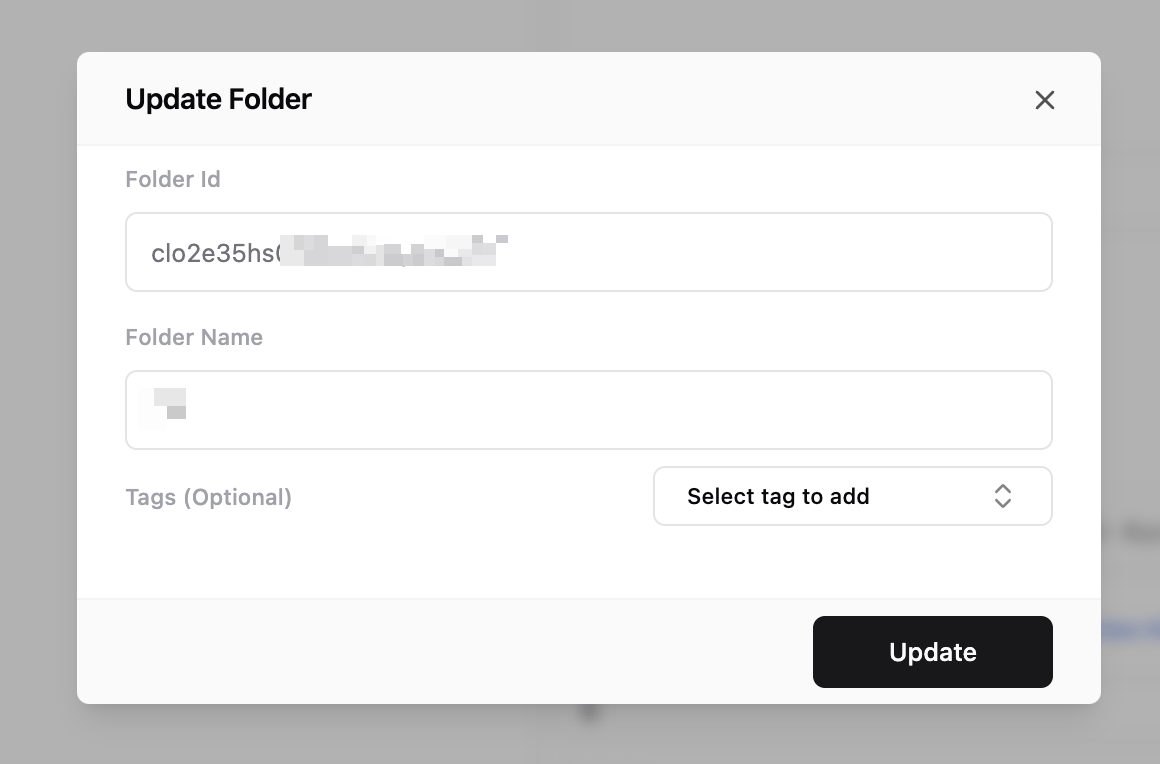
There are multiple ways to capture folder id. You can use Maxim dashboard to get folder id.
1. Right click/click on three dots on the folder you want to get id for.
2. Select `Edit Folder` option.
3. You will see folder id in the form.
 ```typescript JS/TS theme={null}
import { Maxim } from "@maximai/maxim-js";
const maxim = new Maxim({ apiKey: "" });
const folder = await maxim.getFolderById("folder-id");
```
```python Python theme={null}
from maxim import Maxim, Config
maxim = Maxim(Config(api_key=""))
folder = maxim.get_folder_by_id("folder-id")
```
### Getting Folders by Tags
```typescript JS/TS theme={null}
import { Maxim, QueryBuilder } from "@maximai/maxim-js";
const maxim = new Maxim({ apiKey: "" });
const folders = await maxim.getFolders(new QueryBuilder().and().tag("CustomerId", "123").build());
```
```python Python theme={null}
from maxim import Maxim, Config
from maxim.models import QueryBuilder
maxim = Maxim(Config(api_key=""))
folders = maxim.get_folders(QueryBuilder().and_().tag("CustomerId", "123").build())
```
All the rules of prompt chain matching algorithm apply here. You can use same overriding techniques as explained above.
### Retrieving Deployed Prompts from a Folder
```typescript JS/TS theme={null}
import { Maxim, QueryBuilder } from "@maximai/maxim-js";
const maxim = new Maxim({ apiKey: "" });
const folder = await maxim.getFolderById("folder-id");
const promptChains = await maxim.getPromptChains(
new QueryBuilder()
.and()
.folder(folder.id)
.deploymentVar("Environment", "prod")
.build(),
);
```
```python Python theme={null}
from maxim import Maxim, Config
from maxim.models import QueryBuilder
maxim = Maxim(Config(api_key=""))
folder = maxim.get_folder_by_id("folder-id")
promptChains = maxim.get_folders(
QueryBuilder()
.and_()
.folder(folder.id)
.deployment_var("Environment", "prod")
.build())
```
### Filtering Prompt Chains by Deployment Variables
```typescript JS/TS theme={null}
import { Maxim, QueryBuilder } from "@maximai/maxim-js;
const maxim = new Maxim({ apiKey: "" });
const folder = await maxim.getFolderById("folder-id");
const promptChains = await maxim.getPromptChains(
new QueryBuilder()
.and()
.folder(folder.id)
.deploymentVar("Environment", "prod")
.build());
```
```python Python theme={null}
from maxim import Maxim, Config
from maxim.models import QueryBuilder
maxim = Maxim(Config(api_key=""))
folder = maxim.get_folder_by_id("folder-id")
prompt_chains = maxim.get_prompt_chain(
QueryBuilder()
.and_()
.folder(folder.id)
.deployment_var("Environment", "prod")
.build())
```
You have to pass at-least one filter along with `folder()`.
## Data Structures
### Prompt Chain Structure
```typescript JS/TS theme={null}
export type PromptChain = {
promptChainId: string;
version: number;
versionId: string;
nodes: ({ order: number } & PromptNode)[];
};
// Prompt node
export type PromptNode = {
prompt: Prompt;
};
// Prompt
export type Prompt = {
promptId: string;
version: number;
versionId: string;
messages: { role: string; content: string | CompletionRequestContent[] }[];
modelParameters: { [key: string]: any };
model: string;
tags: PromptTags;
};
```
```python Python theme={null}
@dataclass
class PromptChain():
prompt_chain_id: str
version: int
version_id: str
nodes: List[Dict[int, PromptNode]]
@dataclass
class PromptNode():
prompt: Prompt
@dataclass
class Prompt():
prompt_id: str
version: int
version_id: str
messages: List[Message]
model_parameters: Dict[str, Union[str, int, bool, Dict, None]]
@dataclass
class Message():
role: str
content: str
```
### Folder Structure
```typescript JS/TS theme={null}
export type Folder = {
id: string;
name: string;
parentFolderId?: string;
tags: { [key: string]: string };
};
```
```python Python theme={null}
@dataclass
class Folder():
id: str
name: str
parentFolderId: str
tags: Optional[Dict[str, Union[str, int, bool, None]]] = None
```
## Caching
### Using Custom Cache Implementation
Maxim SDK uses in-memory caching by default. You can use your own caching implementation by passing a custom cache object to the SDK. This allows you to remove complete dependency on our backend.
### Cache Interface Definition
```typescript JS/TS theme={null}
export interface MaximCache {
getAllKeys(): Promise;
get(key: string): Promise;
set(key: string, value: string): Promise;
delete(key: string): Promise;
}
```
```python Python theme={null}
class MaximInMemoryCache():
def getAllKeys(self) -> List[str]:
pass
def get(self, key: str) -> Optional[str]:
pass
def set(self, key: str, value: str) -> None:
pass
def delete(self, key: str) -> None:
pass
```
### Implementing Custom Cache
```typescript JS/TS theme={null}
import { Maxim } from "@maximai/maxim-js";
const maxim = new Maxim({ apiKey: "api-key", cache: new CustomCache() });
```
```python Python theme={null}
from maxim import Maxim, Config
maxim = Maxim(Config(apiKey=apiKey, baseUrl=baseUrl, cache=CustomCache()))
```
### Default In-Memory Cache Implementation
```typescript JS/TS theme={null}
import { MaximCache } from "@maximai/maxim-js";
export class MaximInMemoryCache implements MaximCache {
private cache: Map = new Map();
getAllKeys(): Promise {
return Promise.resolve(Array.from(this.cache.keys()));
}
get(key: string): Promise {
return Promise.resolve(this.cache.get(key) || null);
}
set(key: string, value: string): Promise {
this.cache.set(key, value);
return Promise.resolve();
}
}
```
```python Python theme={null}
class MaximInMemoryCache():
def __init__(self):
self.cache = {}
def getAllKeys(self) -> List[str]:
return list(self.cache.keys())
def get(self, key: str) -> Optional[str]:
return self.cache.get(key)
def set(self, key: str, value: str) -> None:
self.cache[key] = value
def delete(self, key: str) -> None:
if key in self.cache:
del self.cache[key]
```
## Matching Algorithm
Before going into the details of how to use the SDK, let's understand how the matching algorithm works. Maxim SDK uses best matching entity algorithm.
1. Let's assume that, you have asked for a prompt chain with deployment var `env` as `prod`, `customerId` as `"123"` and a tag, `tenantId` as `456` for `promptId` - `"abc"`.
2. SDK will first try to find a prompt chain matching all conditions.
3. **If we don't find any matching entity, we enforce only `deploymentVar` conditions (you can override this behaviour, as explained in the next section) and match as many tags as possible.**
4. If we still don't find any prompt chain, we check for a prompt chain version marked as fallback.
5. If we still don't find any prompt chain, we return `null`.
## Overriding Matching Algorithm
### Enforcing Exact Matches
```typescript JS/TS theme={null}
import { QueryBuilder } from "@maximai/maxim-js;
const promptChain = await maxim.getPromptChain(
"prompt-chain-id",
new QueryBuilder().and().deploymentVar("Environment", "prod").exactMatch().build(),
);
```
```python Python theme={null}
from maxim import Maxim, Config
from maxim.models import QueryBuilder
maxim = Maxim(Config(api_key=""))
prompt_chain = maxim.get_prompt_chain(
"prompt-chain-id",
QueryBuilder()
.and_()
.deployment_var("Environment", "prod")
.exact_match()
.build()
)
```
### Variable-Level Overrides
```typescript JS/TS theme={null}
import { Maxim, QueryBuilder } from "@maximai/maxim-js;
const maxim = new Maxim({ apiKey: "" });
const promptChain = await maxim.getPromptChain("prompt-id", new QueryBuilder().and().deploymentVar("Environment", "prod").build());
```
```python Python theme={null}
from maxim import Maxim, Config
from maxim.models import QueryBuilder
maxim = Maxim(Config(api_key=""))
prompt_chain = maxim.get_prompt_chain(
"prompt-id",
QueryBuilder()
.and_()
.deployment_var("Environment", "prod")
.exact_match()
.build()
)
```
```typescript JS/TS theme={null}
import { Maxim } from "@maximai/maxim-js";
const maxim = new Maxim({ apiKey: "" });
const folder = await maxim.getFolderById("folder-id");
```
```python Python theme={null}
from maxim import Maxim, Config
maxim = Maxim(Config(api_key=""))
folder = maxim.get_folder_by_id("folder-id")
```
### Getting Folders by Tags
```typescript JS/TS theme={null}
import { Maxim, QueryBuilder } from "@maximai/maxim-js";
const maxim = new Maxim({ apiKey: "" });
const folders = await maxim.getFolders(new QueryBuilder().and().tag("CustomerId", "123").build());
```
```python Python theme={null}
from maxim import Maxim, Config
from maxim.models import QueryBuilder
maxim = Maxim(Config(api_key=""))
folders = maxim.get_folders(QueryBuilder().and_().tag("CustomerId", "123").build())
```
All the rules of prompt chain matching algorithm apply here. You can use same overriding techniques as explained above.
### Retrieving Deployed Prompts from a Folder
```typescript JS/TS theme={null}
import { Maxim, QueryBuilder } from "@maximai/maxim-js";
const maxim = new Maxim({ apiKey: "" });
const folder = await maxim.getFolderById("folder-id");
const promptChains = await maxim.getPromptChains(
new QueryBuilder()
.and()
.folder(folder.id)
.deploymentVar("Environment", "prod")
.build(),
);
```
```python Python theme={null}
from maxim import Maxim, Config
from maxim.models import QueryBuilder
maxim = Maxim(Config(api_key=""))
folder = maxim.get_folder_by_id("folder-id")
promptChains = maxim.get_folders(
QueryBuilder()
.and_()
.folder(folder.id)
.deployment_var("Environment", "prod")
.build())
```
### Filtering Prompt Chains by Deployment Variables
```typescript JS/TS theme={null}
import { Maxim, QueryBuilder } from "@maximai/maxim-js;
const maxim = new Maxim({ apiKey: "" });
const folder = await maxim.getFolderById("folder-id");
const promptChains = await maxim.getPromptChains(
new QueryBuilder()
.and()
.folder(folder.id)
.deploymentVar("Environment", "prod")
.build());
```
```python Python theme={null}
from maxim import Maxim, Config
from maxim.models import QueryBuilder
maxim = Maxim(Config(api_key=""))
folder = maxim.get_folder_by_id("folder-id")
prompt_chains = maxim.get_prompt_chain(
QueryBuilder()
.and_()
.folder(folder.id)
.deployment_var("Environment", "prod")
.build())
```
You have to pass at-least one filter along with `folder()`.
## Data Structures
### Prompt Chain Structure
```typescript JS/TS theme={null}
export type PromptChain = {
promptChainId: string;
version: number;
versionId: string;
nodes: ({ order: number } & PromptNode)[];
};
// Prompt node
export type PromptNode = {
prompt: Prompt;
};
// Prompt
export type Prompt = {
promptId: string;
version: number;
versionId: string;
messages: { role: string; content: string | CompletionRequestContent[] }[];
modelParameters: { [key: string]: any };
model: string;
tags: PromptTags;
};
```
```python Python theme={null}
@dataclass
class PromptChain():
prompt_chain_id: str
version: int
version_id: str
nodes: List[Dict[int, PromptNode]]
@dataclass
class PromptNode():
prompt: Prompt
@dataclass
class Prompt():
prompt_id: str
version: int
version_id: str
messages: List[Message]
model_parameters: Dict[str, Union[str, int, bool, Dict, None]]
@dataclass
class Message():
role: str
content: str
```
### Folder Structure
```typescript JS/TS theme={null}
export type Folder = {
id: string;
name: string;
parentFolderId?: string;
tags: { [key: string]: string };
};
```
```python Python theme={null}
@dataclass
class Folder():
id: str
name: str
parentFolderId: str
tags: Optional[Dict[str, Union[str, int, bool, None]]] = None
```
## Caching
### Using Custom Cache Implementation
Maxim SDK uses in-memory caching by default. You can use your own caching implementation by passing a custom cache object to the SDK. This allows you to remove complete dependency on our backend.
### Cache Interface Definition
```typescript JS/TS theme={null}
export interface MaximCache {
getAllKeys(): Promise;
get(key: string): Promise;
set(key: string, value: string): Promise;
delete(key: string): Promise;
}
```
```python Python theme={null}
class MaximInMemoryCache():
def getAllKeys(self) -> List[str]:
pass
def get(self, key: str) -> Optional[str]:
pass
def set(self, key: str, value: str) -> None:
pass
def delete(self, key: str) -> None:
pass
```
### Implementing Custom Cache
```typescript JS/TS theme={null}
import { Maxim } from "@maximai/maxim-js";
const maxim = new Maxim({ apiKey: "api-key", cache: new CustomCache() });
```
```python Python theme={null}
from maxim import Maxim, Config
maxim = Maxim(Config(apiKey=apiKey, baseUrl=baseUrl, cache=CustomCache()))
```
### Default In-Memory Cache Implementation
```typescript JS/TS theme={null}
import { MaximCache } from "@maximai/maxim-js";
export class MaximInMemoryCache implements MaximCache {
private cache: Map = new Map();
getAllKeys(): Promise {
return Promise.resolve(Array.from(this.cache.keys()));
}
get(key: string): Promise {
return Promise.resolve(this.cache.get(key) || null);
}
set(key: string, value: string): Promise {
this.cache.set(key, value);
return Promise.resolve();
}
}
```
```python Python theme={null}
class MaximInMemoryCache():
def __init__(self):
self.cache = {}
def getAllKeys(self) -> List[str]:
return list(self.cache.keys())
def get(self, key: str) -> Optional[str]:
return self.cache.get(key)
def set(self, key: str, value: str) -> None:
self.cache[key] = value
def delete(self, key: str) -> None:
if key in self.cache:
del self.cache[key]
```
## Matching Algorithm
Before going into the details of how to use the SDK, let's understand how the matching algorithm works. Maxim SDK uses best matching entity algorithm.
1. Let's assume that, you have asked for a prompt chain with deployment var `env` as `prod`, `customerId` as `"123"` and a tag, `tenantId` as `456` for `promptId` - `"abc"`.
2. SDK will first try to find a prompt chain matching all conditions.
3. **If we don't find any matching entity, we enforce only `deploymentVar` conditions (you can override this behaviour, as explained in the next section) and match as many tags as possible.**
4. If we still don't find any prompt chain, we check for a prompt chain version marked as fallback.
5. If we still don't find any prompt chain, we return `null`.
## Overriding Matching Algorithm
### Enforcing Exact Matches
```typescript JS/TS theme={null}
import { QueryBuilder } from "@maximai/maxim-js;
const promptChain = await maxim.getPromptChain(
"prompt-chain-id",
new QueryBuilder().and().deploymentVar("Environment", "prod").exactMatch().build(),
);
```
```python Python theme={null}
from maxim import Maxim, Config
from maxim.models import QueryBuilder
maxim = Maxim(Config(api_key=""))
prompt_chain = maxim.get_prompt_chain(
"prompt-chain-id",
QueryBuilder()
.and_()
.deployment_var("Environment", "prod")
.exact_match()
.build()
)
```
### Variable-Level Overrides
```typescript JS/TS theme={null}
import { Maxim, QueryBuilder } from "@maximai/maxim-js;
const maxim = new Maxim({ apiKey: "" });
const promptChain = await maxim.getPromptChain("prompt-id", new QueryBuilder().and().deploymentVar("Environment", "prod").build());
```
```python Python theme={null}
from maxim import Maxim, Config
from maxim.models import QueryBuilder
maxim = Maxim(Config(api_key=""))
prompt_chain = maxim.get_prompt_chain(
"prompt-id",
QueryBuilder()
.and_()
.deployment_var("Environment", "prod")
.exact_match()
.build()
)
```