> ## Documentation Index
> Fetch the complete documentation index at: https://www.getmaxim.ai/docs/llms.txt
> Use this file to discover all available pages before exploring further.
# Map Variables to Evaluators
> Map variables from your prompts, agents, or datasets to evaluator inputs using our flexible mapping system
export const MaximPlayer = ({url}) => {
return ;
};
Variable mapping defines where evaluators should access data from during evaluation. You can map variables from prompts, agents, or datasets to any pre-built or custom evaluator.
When you select an evaluator, Maxim automatically fills in variable mappings based on common patterns. You can modify these mappings to fit your specific needs. If a variable isn't found in Maxim's built-in options, it falls back to matching dataset column names.
## Dataset Variables
Access any dataset column by its type or column name. These variables are available for all entity types:
* `dataset.input` - Input column (same as `run.input`)
* `dataset.output` - Output column
* `dataset.expectedOutput` - Expected output column
* `dataset.scenario` - Scenario column
* `dataset.expectedSteps` - Expected steps column
* `dataset.expectedToolCalls` - Expected tool calls column
* `dataset.columns["column name"]` - Any custom column by name
## Run Variables
Access run-specific data using the `run.` prefix. Available options depend on your entity type (prompt or agent).
## Prompt Variable Mapping
### Single-Turn Prompts
Access prompt version data using the `version.` prefix:
* `version.messages` (`JSON`) - All messages in the prompt version, including saved messages
* `version.systemMessage` (`String`) - System message from the saved version
* `version.userMessages` (`JSON`) - User messages combining saved version messages and run input
Access run data:
* `run.input` (`String`) - Input variable
* `run.output` (`String`) - Output variable
* `run.context` (`String`) - Retrieved context based on your selection
* `run.toolCalls` (`JSON`) - Tool calls with name, arguments, and results
### Multi-Turn Prompts
Variable mapping in multi-turn prompts works the same way as in single-turn prompts.
#### Version Variables
* `version.messages` (`JSON`) — All messages defined in the prompt version
* `version.systemMessage` (`String`) — System message
* `version.userMessages` (`JSON`) — Combined user messages
#### Run Variables
* `run.input` (`String`) — Input variable
* `run.toolCalls` (`JSON`) — Tool calls with details
* `run.sessionMessages` (`JSON`) — All messages in the session
* `run.sessionMessages[*]` — All messages in the session
* `run.sessionMessages[index]` — Message at a specific index
* `run.sessionMessages[turn].input` — Input message for a specific or all turns
* `run.sessionMessages[turn].output` — Output message for a specific or all turns
For prompt simulation runs, you can also access variable bindings from all turns in a session using the `run.context` (`JSON`) object.
If your prompt defines variables such as `context` and `context2`, their resolved values across turns are available as an array in `run.context`. Each array entry represents the variable bindings for a single turn in the session.
You can:
* Map all turns using `run.context[*]` in your evaluator
* Access a specific turn using `run.context[index]`
```json theme={null}
[
{
"context": "",
"context2": ""
},
{
"context": "",
"context2": ""
}
]
```
## Agent Variable Mapping
### Single-Turn Agents
Access agent response data using the `response.` prefix:
* `run.input` (`String`) - Input variable
* `run.output` (`String`) - Output variable
* `run.context` (`String`) - Retrieved context
* `run.response` (`JSON/any`) - Agent response with nested field access via dropdown or dot notation for objects, index notation for arrays
### Multi-Turn Agent
For simulation runs, map variables from the conversation:
* `run.session` (`JSON`) - Complete conversation session
**Example session structure:**
```json theme={null}
[
{
"request": {
"type": "text",
"payload": { "query": "Can you please book a hotel for me?" }
},
"response": {
"type": "text",
"payload": {
"query": "Sure — may I know the city, check-in date, and number of guests?"
}
},
"turn": 0
},
{
"request": {
"type": "text",
"payload": {
"query": "In Bangalore, 2 guests, check-in on 5th Nov, budget around $80 per night."
}
},
"response": {
"type": "text",
"payload": {
"query": "Got it. Do you prefer a hotel near city center or closer to airport?"
}
},
"turn": 1
},
{
"request": {
"type": "text",
"payload": { "query": "City center. Also free breakfast would be great." }
},
"response": {
"type": "text",
"payload": {
"query": "Understood. Should I auto-book the best matching option or show options first?"
}
},
"turn": 2
},
{
"request": {
"type": "text",
"payload": { "query": "Show options first." }
},
"response": {
"type": "text",
"payload": {
"query": "Here are 3 hotels under $80 with free breakfast near city center. Would you like me to proceed with Hotel Blu Orchid?"
}
},
"turn": 3
}
]
```
## Voice agent Variable Mapping
For voice agent simulation runs, map variables from the conversation:
* `run.session` (`JSON`) - Complete conversation session
* `run.recordingUrl` (`String`) - Call recording url of the call
**Example session structure:**
```json theme={null}
[
{
"request": {
"type": "text",
"payload": { "query": "Can you please book a hotel for me?" }
},
"response": {
"type": "text",
"payload": {
"query": "Sure — may I know the city, check-in date, and number of guests?"
}
},
"turn": 0
},
{
"request": {
"type": "text",
"payload": {
"query": "In Bangalore, 2 guests, check-in on 5th Nov, budget around $80 per night."
}
},
"response": {
"type": "text",
"payload": {
"query": "Got it. Do you prefer a hotel near city center or closer to airport?"
}
},
"turn": 1
},
{
"request": {
"type": "text",
"payload": { "query": "City center. Also free breakfast would be great." }
},
"response": {
"type": "text",
"payload": {
"query": "Understood. Should I auto-book the best matching option or show options first?"
}
},
"turn": 2
},
{
"request": {
"type": "text",
"payload": { "query": "Show options first." }
},
"response": {
"type": "text",
"payload": {
"query": "Here are 3 hotels under $80 with free breakfast near city center. Would you like me to proceed with Hotel Blu Orchid?"
}
},
"turn": 3
}
]
```
## No-code agent Variable Mapping
Access no-code agent run data:
* `run.input` (`String`) - Input variable
* `run.output` (`String`) - Output variable
* `run.context` (`String`) - Retrieved context based on your selection
* `run.toolCalls` (`JSON`) - Tool calls with name, arguments, and results
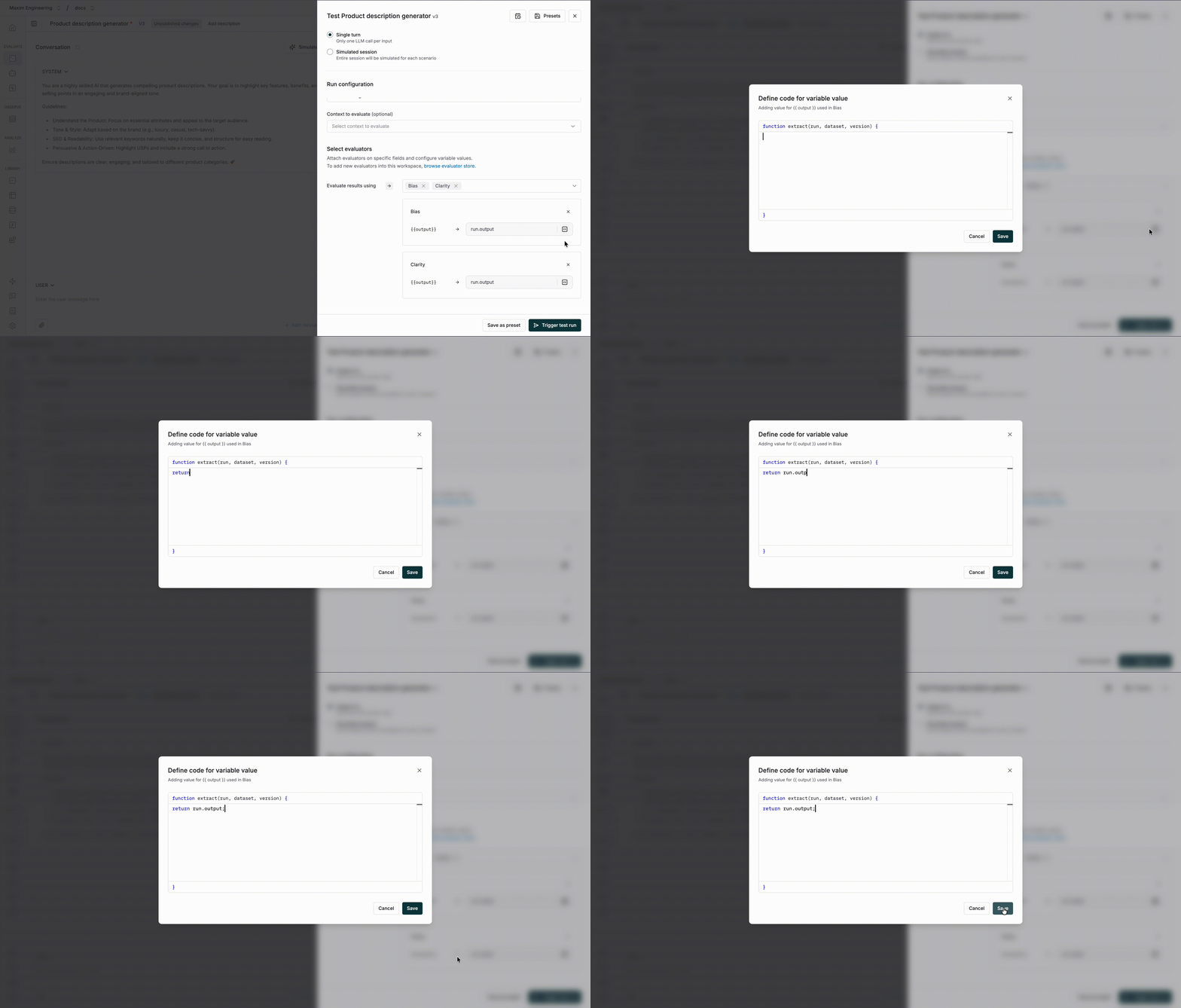
## Custom code variables mapping
If your use case is'nt met by the above variables mapping options, you can write your own custom code to manupluate and access the variables in your evaluator.
You can write your own custom code to manupluate and access the variables in your evaluator.