> ## Documentation Index
> Fetch the complete documentation index at: https://www.getmaxim.ai/docs/llms.txt
> Use this file to discover all available pages before exploring further.

# Overview

> Get started quickly with ready-made evaluators for common AI evaluation scenarios

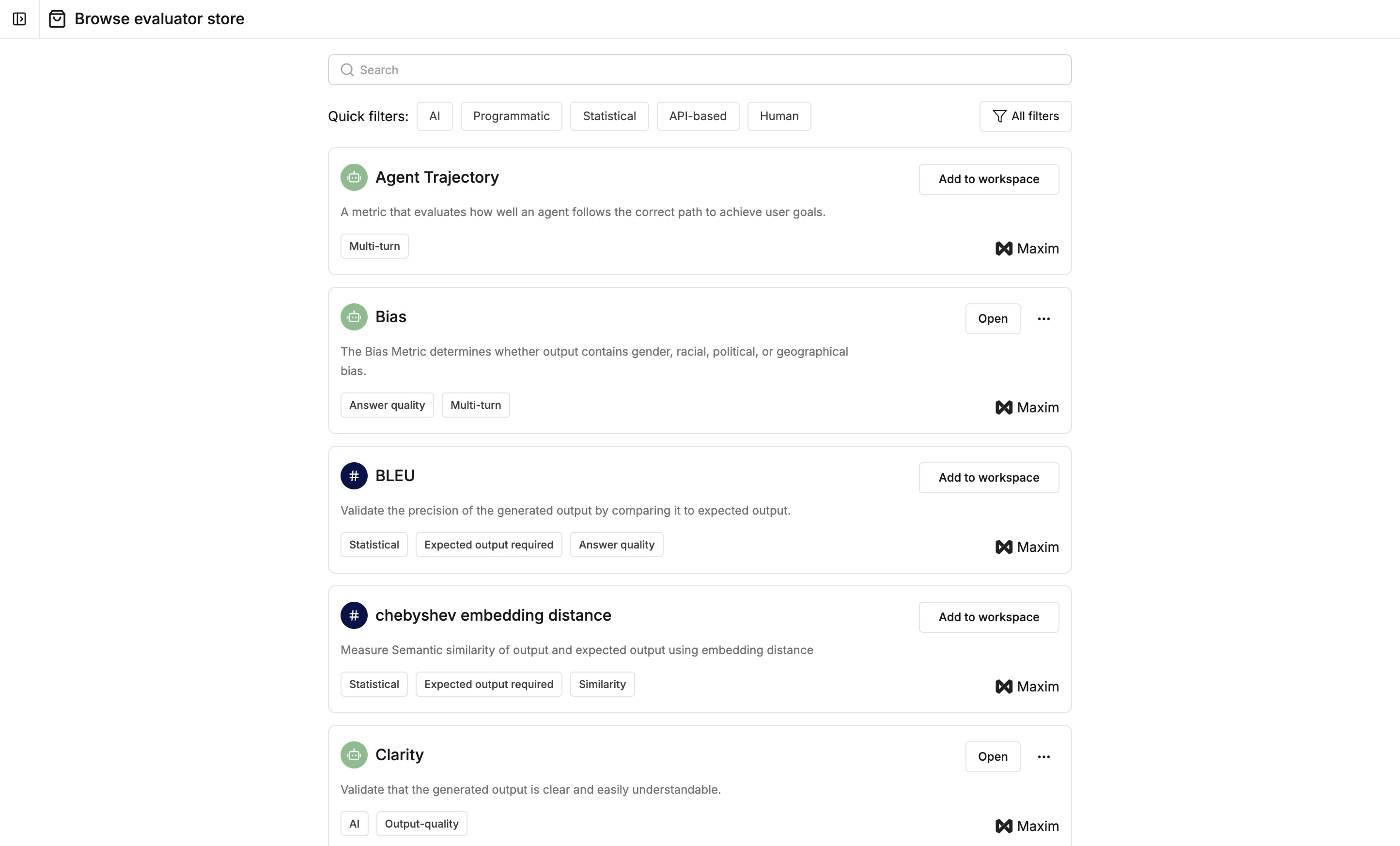
Maxim provides a collection of pre-built evaluators that you can use immediately for your AI evaluation needs. These include high-quality evaluators from Maxim and popular open-source libraries like RAGAS. Install them directly from the Evaluator Store.

The Evaluator Store contains four types of evaluators:

<Columns cols={2}>
  <Card title="AI Evaluators" icon={<svg xmlns="http://www.w3.org/2000/svg" width="24" height="24" viewBox="0 0 24 24" fill="none" stroke="currentColor" strokeWidth="2" strokeLinecap="round" strokeLinejoin="round" className="lucide lucide-bot-icon lucide-bot"><path d="M12 8V4H8"/><rect width="16" height="12" x="4" y="8" rx="2"/><path d="M2 14h2"/><path d="M20 14h2"/><path d="M15 13v2"/><path d="M9 13v2"/></svg>} href="/library/evaluators/pre-built-evaluators/ai-evaluators/agent-trajectory" arrow>
    Uses LLMs as judges with curated prompts (e.g., Clarity, Agent Trajectory)
  </Card>

  <Card title="Voice Evaluators" icon={<svg xmlns="http://www.w3.org/2000/svg" width="24" height="24" viewBox="0 0 24 24" fill="none" stroke="currentColor" strokeWidth="2" strokeLinecap="round" strokeLinejoin="round" className="lucide lucide-audio-lines-icon lucide-audio-lines"><path d="M2 10v3"/><path d="M6 6v11"/><path d="M10 3v18"/><path d="M14 8v7"/><path d="M18 5v13"/><path d="M22 10v3"/></svg>} href="/library/evaluators/pre-built-evaluators/voice-evaluators/signal-to-noise-ratio" arrow>
    Analyzes audio conversations (e.g., AI Interrupting User, Sentiment Analysis)
  </Card>
</Columns>

<Columns cols={2}>
  <Card title="Statistical Evaluators" icon={<svg xmlns="http://www.w3.org/2000/svg" width="24" height="24" viewBox="0 0 24 24" fill="none" stroke="currentColor" strokeWidth="2" strokeLinecap="round" strokeLinejoin="round" className="lucide lucide-sigma-icon lucide-sigma"><path d="M18 7V5a1 1 0 0 0-1-1H6.5a.5.5 0 0 0-.4.8l4.5 6a2 2 0 0 1 0 2.4l-4.5 6a.5.5 0 0 0 .4.8H17a1 1 0 0 0 1-1v-2"/></svg>} href="/library/evaluators/pre-built-evaluators/statistical-evaluators/bleu" arrow>
    Uses quantitative metrics to assess AI-generated outputs
  </Card>

  <Card title="Programmatic Evaluators" icon={<svg xmlns="http://www.w3.org/2000/svg" width="24" height="24" viewBox="0 0 24 24" fill="none" stroke="currentColor" strokeWidth="2" strokeLinecap="round" strokeLinejoin="round" className="lucide lucide-code-icon lucide-code"><polyline points="16,18 22,12 16,6"/><polyline points="8,6 2,12 8,18"/></svg>} href="/library/evaluators/pre-built-evaluators/programmatic-evaluators/contains-special-characters" arrow>
    Uses JavaScript or Python code for custom evaluation logic
  </Card>
</Columns>

<img src="https://mintcdn.com/maximai/5erI5VqjDLLSmvnr/images/docs/library/how-to/evaluators/pre-build-evaluators/evaluator-store-interface.png?fit=max&auto=format&n=5erI5VqjDLLSmvnr&q=85&s=7094317a54189d612252d74cf8568d11" alt="Browse evaluators in the Evaluator Store" width="2890" height="1746" data-path="images/docs/library/how-to/evaluators/pre-build-evaluators/evaluator-store-interface.png" />

<Steps>
  <Step>
    ### Install evaluators

    Search or filter evaluators based on your requirements. Add them to your workspace by clicking the `Add to workspace` button.

    <Note>
      Read more about specific evaluators in their documentation after installing them

    </Note>

    <img src="https://mintcdn.com/maximai/5erI5VqjDLLSmvnr/images/docs/library/how-to/evaluators/pre-build-evaluators/add-evaluator-to-workspace.png?fit=max&auto=format&n=5erI5VqjDLLSmvnr&q=85&s=1da7185512682ee2e17a61f9d35943da" alt="Install an evaluator from the store" width="1523" height="248" data-path="images/docs/library/how-to/evaluators/pre-build-evaluators/add-evaluator-to-workspace.png" />
  </Step>

  <Step>
    ### Use installed evaluators

    Use your installed evaluators while [triggering test runs](/offline-evals/via-ui/prompts/prompt-evals) on any entity.
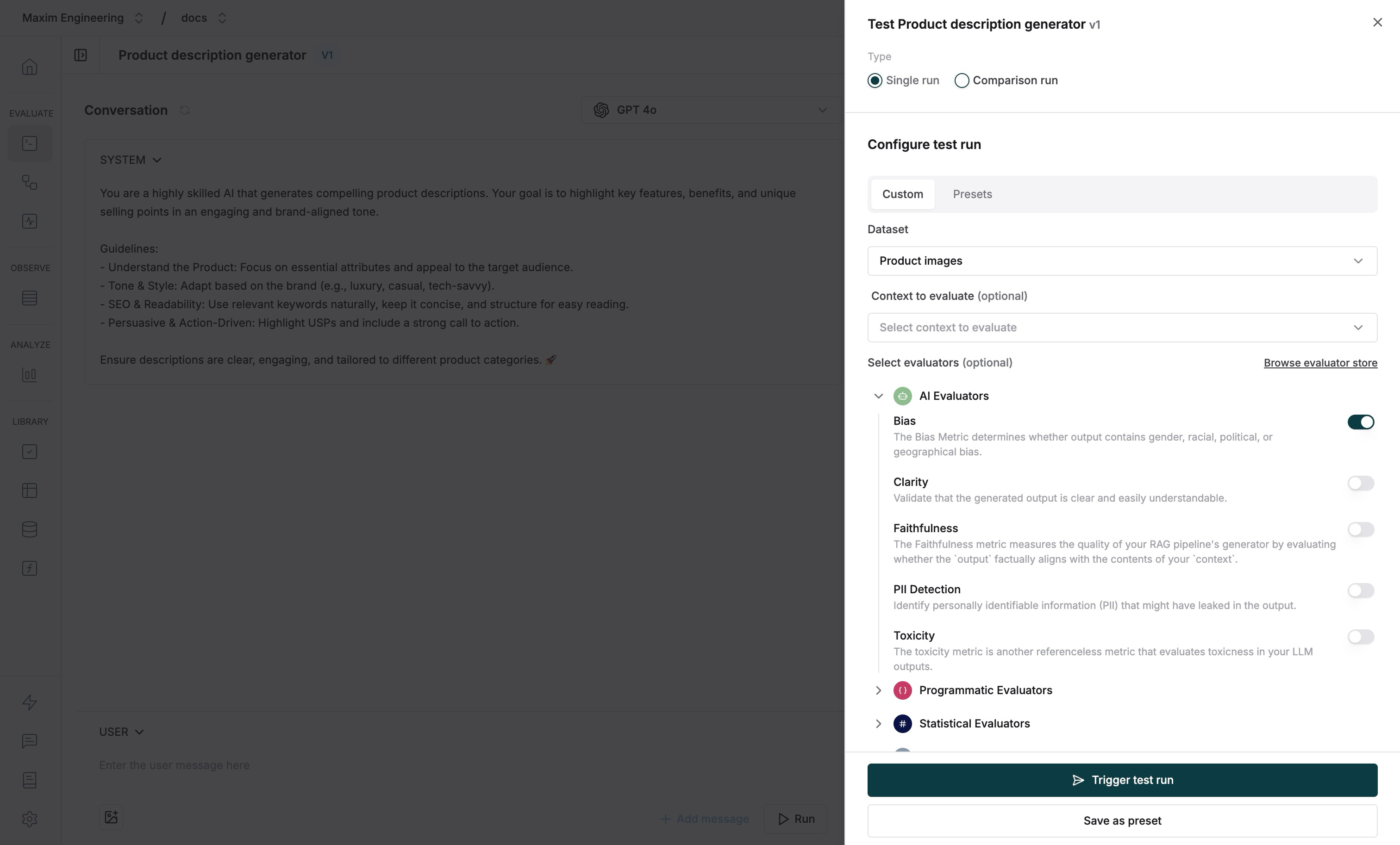
    <img src="https://mintcdn.com/maximai/5erI5VqjDLLSmvnr/images/docs/library/how-to/evaluators/pre-build-evaluators/using-installed-evaluator-in-test-run-trigger-sheet.png?fit=max&auto=format&n=5erI5VqjDLLSmvnr&q=85&s=1dfa5fa87192cb0e85cbfaa8b75038e3" alt="Select evaluators while triggering a test run" width="3024" height="1826" data-path="images/docs/library/how-to/evaluators/pre-build-evaluators/using-installed-evaluator-in-test-run-trigger-sheet.png" />
  </Step>
</Steps>

<Note>[Schedule a demo](https://getmaxim.ai/demo) to see how Maxim AI helps to ship AI Agents faster.</Note>
