> ## Documentation Index
> Fetch the complete documentation index at: https://www.getmaxim.ai/docs/llms.txt
> Use this file to discover all available pages before exploring further.
# Synthetic Data Generation
> Generate synthetic datasets automatically to kickstart your evaluation process for prompt testing or agent simulation
Synthetic data generation helps you quickly create test datasets for evaluating your AI agents and prompts without manual data entry. Generate realistic test data tailored to your specific use case, whether you're testing individual prompts, LLM workflows, multi-agent systems, or simulating multi-turn agent conversations.
## Key Features
* Generate various kinds of inputs and their respective expected outputs for prompt/workflow testing
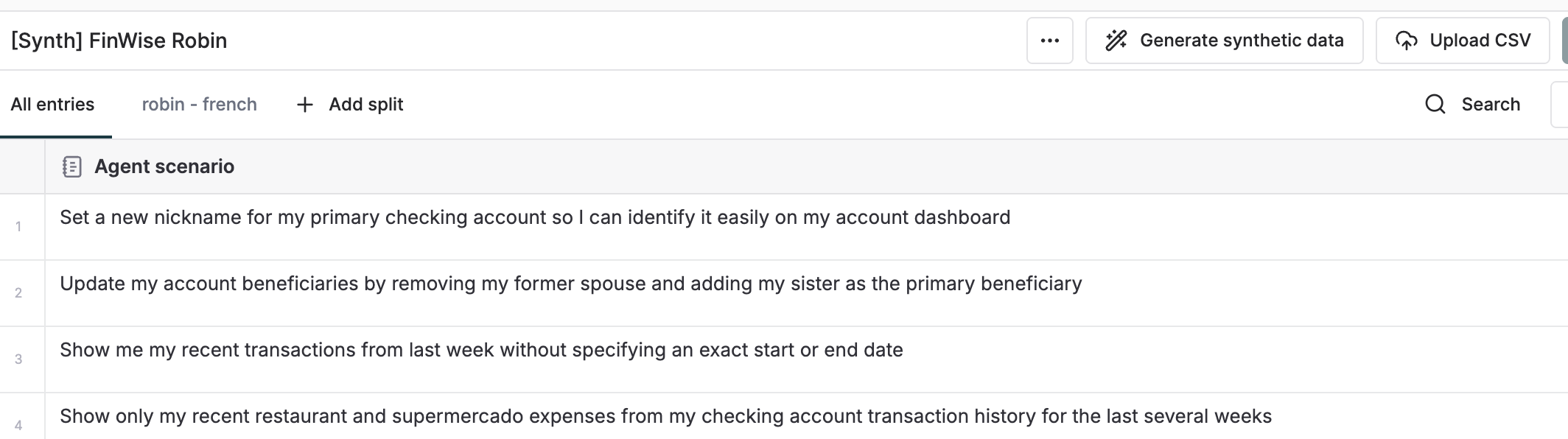
* Generate scenarios, personas, and expected steps for agent‑simulation use cases
* Configure custom variable columns with detailed descriptions
* Generate from scratch or extend existing datasets using them as reference context
* Add documents as context to guide generation quality
* Support specific formatting requirements and output patterns
## Generate Synthetic Data from Scratch
Create completely new datasets with custom configurations tailored to your evaluation needs.
1. Navigate to the **Datasets** section in the Library
2. Click **Generate Synthetic Data**
3. Enter a name for your dataset
4. Specify the number of rows to generate
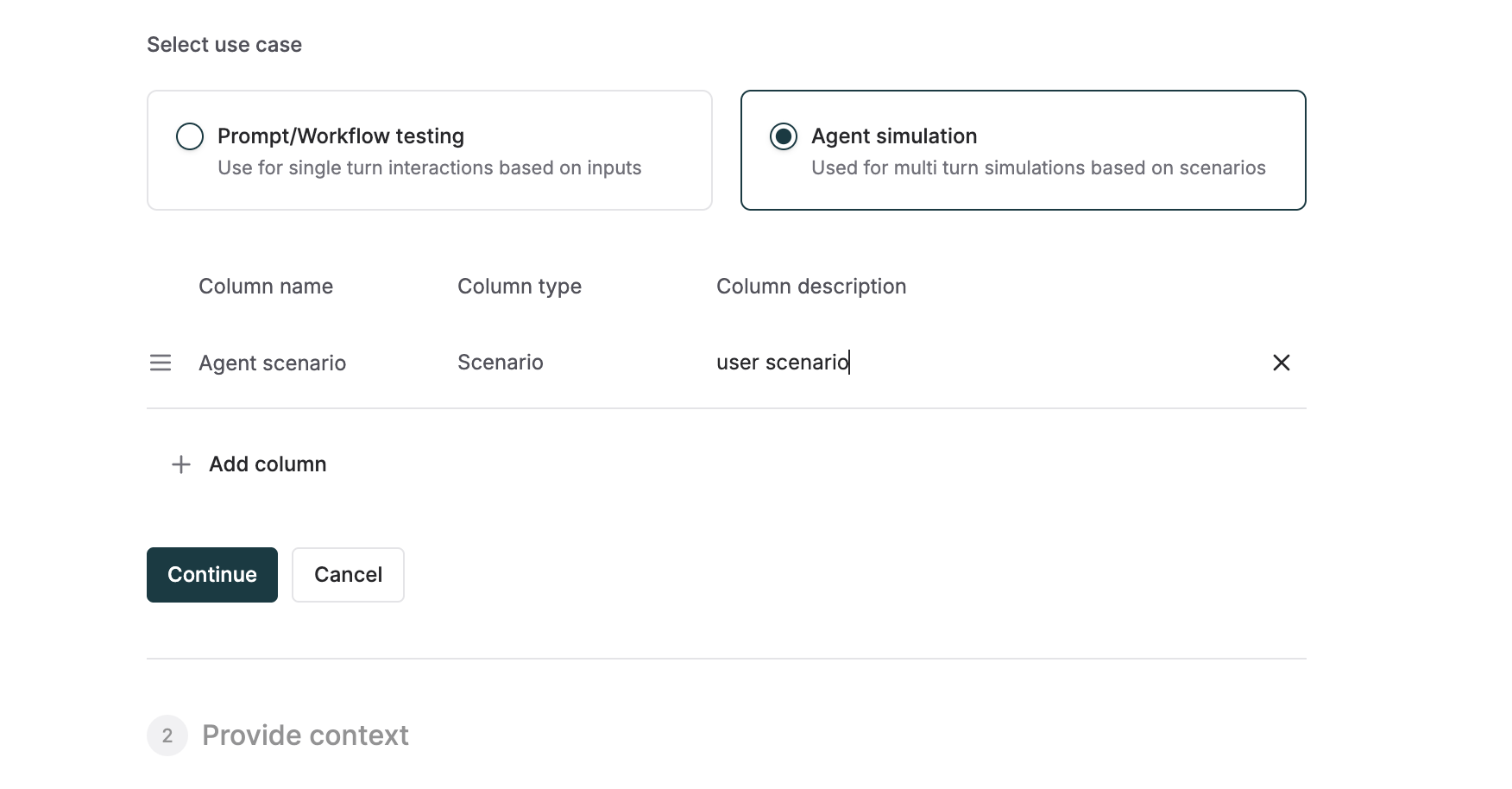
5. Select your use case:
* **Prompt/Workflow Testing**: For single-turn interactions testing individual prompts or LLM Workflows/Agents
* **Agent Simulation**: For multi-turn conversations testing agent behaviors
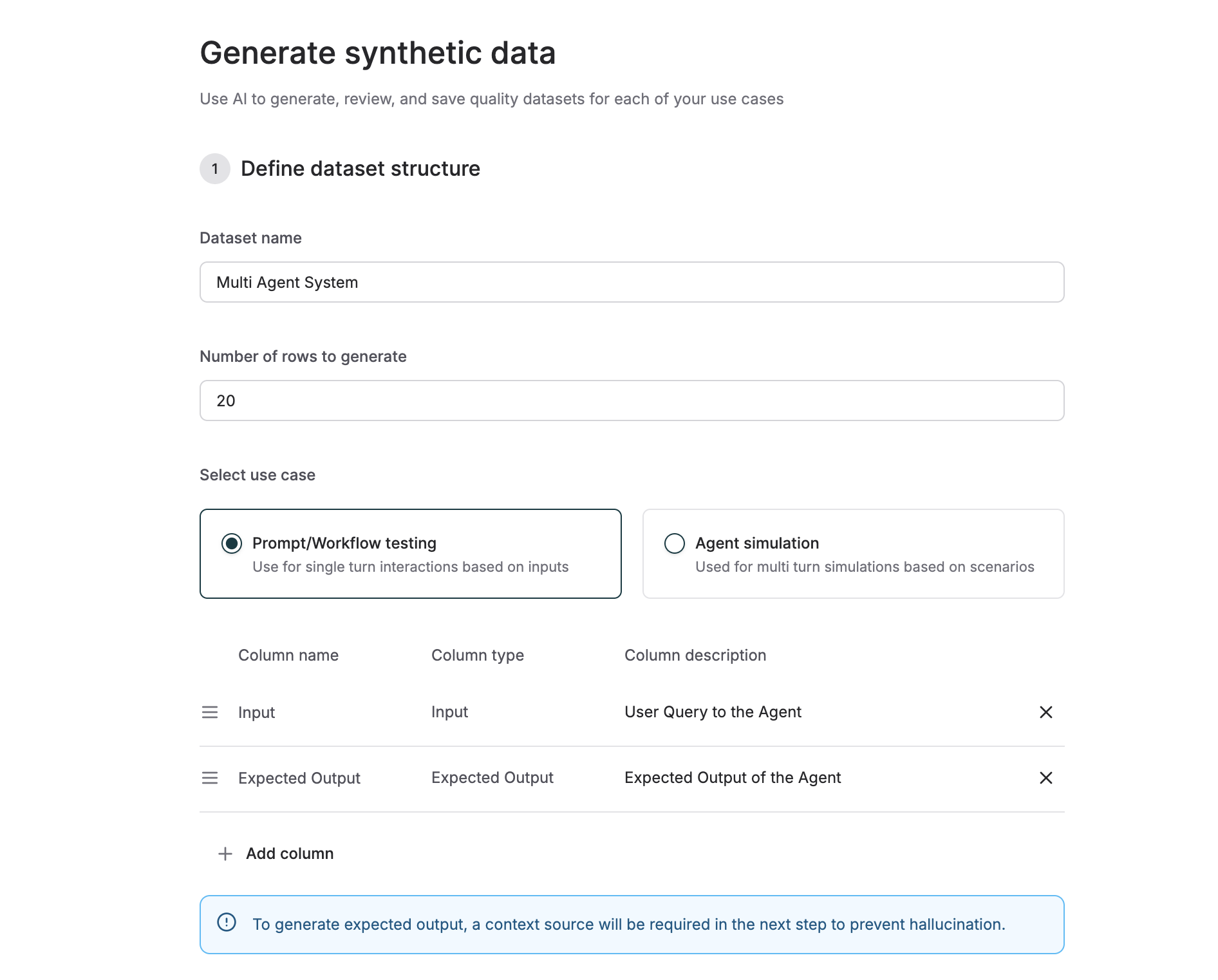 Configure the columns for your dataset based on your selected use case:
#### Use Case Templates
1. **Prompt/Workflow Testing:**
* `input`: User queries or transcripts or whatever that goes as input to a LLM (Input type)
* `expected_output`: Expected output of the agent (expected output type)
* `variable`: Any custom variable column (variable type)
2. **Agent Simulation:**
* `scenario`: User scenario or intent to be enacted by the simulation agent (Scenario type)
* `expected_steps`: Expected steps of the agent to complete the given scenario (requires documents as context)
* `persona`: User's demographic, behavioural or emotional persona (variable type)
> To generate expected output or expected steps, a context source is **mandatory** to prevent hallucination.
You can add variable columns alongside these templates, or create datasets with only variable columns.
Configure the columns for your dataset based on your selected use case:
#### Use Case Templates
1. **Prompt/Workflow Testing:**
* `input`: User queries or transcripts or whatever that goes as input to a LLM (Input type)
* `expected_output`: Expected output of the agent (expected output type)
* `variable`: Any custom variable column (variable type)
2. **Agent Simulation:**
* `scenario`: User scenario or intent to be enacted by the simulation agent (Scenario type)
* `expected_steps`: Expected steps of the agent to complete the given scenario (requires documents as context)
* `persona`: User's demographic, behavioural or emotional persona (variable type)
> To generate expected output or expected steps, a context source is **mandatory** to prevent hallucination.
You can add variable columns alongside these templates, or create datasets with only variable columns.
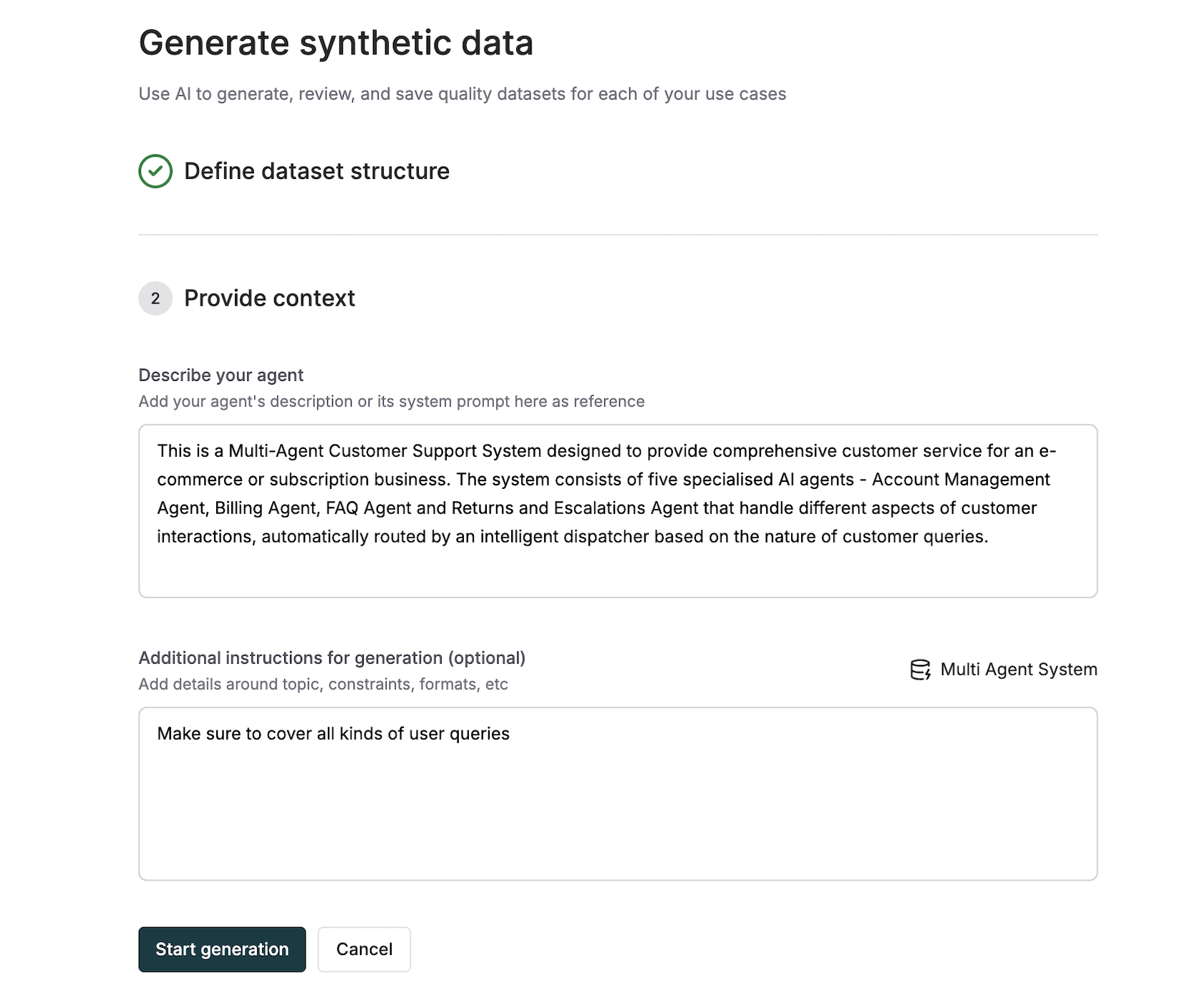
 Configure the generation parameters to ensure high-quality synthetic data:
1. **Agent Description**: Describe the AI agent's role, capabilities, and behavior
2. **Additional Instructions** (optional): Provide specific requirements for data generation
3. **Add Documents as Context** (optional except when generating expected output/steps): Upload or reference documents to guide generation quality
Configure the generation parameters to ensure high-quality synthetic data:
1. **Agent Description**: Describe the AI agent's role, capabilities, and behavior
2. **Additional Instructions** (optional): Provide specific requirements for data generation
3. **Add Documents as Context** (optional except when generating expected output/steps): Upload or reference documents to guide generation quality
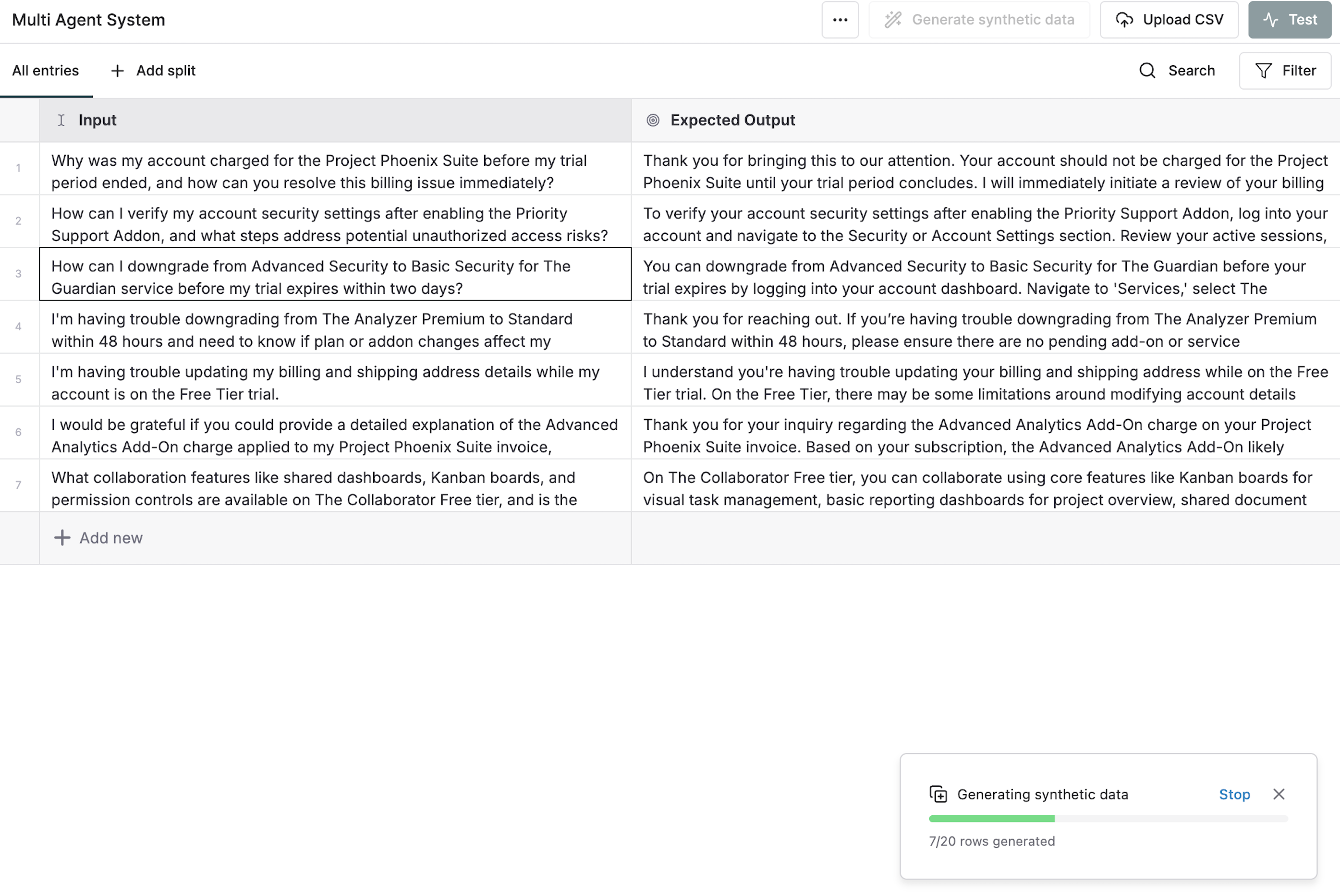
 1. Review your configuration
2. Click **Start Generation**
3. Monitor progress using the progress bar at the bottom of the screen
4. Wait for generation to complete
1. Review your configuration
2. Click **Start Generation**
3. Monitor progress using the progress bar at the bottom of the screen
4. Wait for generation to complete
 ## Generate from Existing Dataset
Use an existing dataset as reference context to generate new synthetic data that follows similar patterns and quality.
1. Navigate to the **Datasets** section in the Library
2. Select an existing dataset and then click on **Generate Synthetic Data** in the top right
3. Configure the number of rows and any additional parameters
4. Follow the same column configuration steps as above
## Generate from Existing Dataset
Use an existing dataset as reference context to generate new synthetic data that follows similar patterns and quality.
1. Navigate to the **Datasets** section in the Library
2. Select an existing dataset and then click on **Generate Synthetic Data** in the top right
3. Configure the number of rows and any additional parameters
4. Follow the same column configuration steps as above
 ## Best Practices
### Column Descriptions
Be specific and detailed in your column descriptions to get high-quality generated content:
**Good Examples:**
* "Customer support queries about product returns and refunds"
* "Medical consultation transcripts between patients and doctors"
* "Technical blog post topics about machine learning and AI"
**Poor Examples:**
* "Text content"
* "User input"
* "Data"
### Format Requirements
For specific output formats (like customer IDs, order numbers, or codes), mention the format requirements in **both** places:
1. **Column Description**: "Customer support tickets with format TIC-034"
2. **Additional Instructions**: "Ensure all customer IDs follow the format CUST-XXX where XXX is a 3-digit number"
This dual specification ensures consistent formatting across all generated entries.
### Context Documents
Upload relevant documents to improve generation quality:
* Product documentation for customer support scenarios
* Technical specifications for API testing
* Conversation examples for agent simulation
* Style guides for consistent tone and format
The more specific and detailed your configuration, the better the quality of your synthetic data will be. Take time to craft clear descriptions and provide relevant context documents.
## Best Practices
### Column Descriptions
Be specific and detailed in your column descriptions to get high-quality generated content:
**Good Examples:**
* "Customer support queries about product returns and refunds"
* "Medical consultation transcripts between patients and doctors"
* "Technical blog post topics about machine learning and AI"
**Poor Examples:**
* "Text content"
* "User input"
* "Data"
### Format Requirements
For specific output formats (like customer IDs, order numbers, or codes), mention the format requirements in **both** places:
1. **Column Description**: "Customer support tickets with format TIC-034"
2. **Additional Instructions**: "Ensure all customer IDs follow the format CUST-XXX where XXX is a 3-digit number"
This dual specification ensures consistent formatting across all generated entries.
### Context Documents
Upload relevant documents to improve generation quality:
* Product documentation for customer support scenarios
* Technical specifications for API testing
* Conversation examples for agent simulation
* Style guides for consistent tone and format
The more specific and detailed your configuration, the better the quality of your synthetic data will be. Take time to craft clear descriptions and provide relevant context documents.