> ## Documentation Index
> Fetch the complete documentation index at: https://www.getmaxim.ai/docs/llms.txt
> Use this file to discover all available pages before exploring further.
# Using Local Datasets with Maxim SDK for Test Runs
> This cookbook demonstrates how to trigger test runs using Maxim SDK with local datasets instead of hosted datasets. You'll learn to work with CSV files, manual data, SQL databases, and other local data sources while creating comprehensive evaluation pipelines with custom evaluators.
## Prerequisites
Before getting started, ensure you have:
* A Maxim account with API access
* Python environment (Google Colab or local setup)
* A published and deployed prompt in Maxim
* Basic understanding of Python and data structures
## Setting Up Environment
### 1. Install Maxim Python SDK
```python theme={null}
pip install maxim-py
```
### 2. Import Required Modules
```python theme={null}
from typing import Dict, Optional, List, Any
from maxim import Maxim
import csv
import json
from maxim.evaluators import BaseEvaluator
from maxim.models import (
LocalEvaluatorResultParameter,
LocalEvaluatorReturn,
ManualData,
PassFailCriteria,
QueryBuilder
)
from maxim.models.evaluator import (
PassFailCriteriaForTestrunOverall,
PassFailCriteriaOnEachEntry,
)
```
### 3. Configure API Keys and IDs
```python theme={null}
# For Google Colab users
from google.colab import userdata
API_KEY: str = userdata.get("MAXIM_API_KEY") or ""
WORKSPACE_ID: str = userdata.get("MAXIM_WORKSPACE_ID") or ""
PROMPT_ID: str = userdata.get("PROMPT_ID") or ""
# For VS Code users, use environment variables:
# import os
# API_KEY = os.getenv("MAXIM_API_KEY")
# WORKSPACE_ID = os.getenv("MAXIM_WORKSPACE_ID")
# PROMPT_ID = os.getenv("PROMPT_ID")
```
**Getting Your Keys:**
* **API Key**: Go to Maxim Settings → API Keys → Create new API key
* **Workspace ID**: Click on workspace dropdown and copy the workspace ID
* **Prompt ID**: Navigate to your published prompt and copy the ID from the URL
### 4. Initialize Maxim
```python theme={null}
maxim = Maxim({
"api_key": API_KEY,
"prompt_management": True
})
```
## Step 1: Define Data Structure
Local datasets in Maxim must follow a specific data structure with predefined column types:
```python theme={null}
dataStructure = {
"Input": "INPUT", # Main input text (required, only one allowed)
"Expected_Output": "EXPECTED_OUTPUT", # Expected response (optional, only one allowed)
# "contextColumn": "CONTEXT_TO_EVALUATE", # Context for evaluation (optional, only one allowed)
# "additionalDataColumn": "VARIABLE" # Additional data columns (multiple allowed)
}
```
**Available Column Types:**
* `INPUT`: Main input text (required, only one per dataset)
* `EXPECTED_OUTPUT`: Expected response for comparison
* `CONTEXT_TO_EVALUATE`: Context information for evaluation
* `VARIABLE`: Additional data columns
* `NULLABLE_VARIABLE`: Optional data columns
## Step 2: Create Custom Evaluators
### Quality Evaluator (AI-based)
```python theme={null}
class AIQualityEvaluator(BaseEvaluator):
"""
Evaluates response quality using AI judgment.
Scores between 1-5 based on how well the response answers the prompt.
"""
def evaluate(self, result: LocalEvaluatorResultParameter, data: ManualData) -> Dict[str, LocalEvaluatorReturn]:
prompt = data["Input"]
response = result.output
prompt_quality = self._get_quality_evaluator_prompt()
response = prompt_quality.run(
f"prompt: {prompt} \n output: {response}"
)
content = json.loads(response.choices[0].message.content)
return {
"qualityScore": LocalEvaluatorReturn(
score=content['score'],
reasoning=content['reasoning']
)
}
def _get_quality_evaluator_prompt(self):
env = "prod"
tenantId = 222
rule = (QueryBuilder()
.and_()
.deployment_var("env", env)
.deployment_var("tenant", tenantId)
.build()
)
return maxim.get_prompt("your_quality_evaluator_prompt_id", rule)
```
### Safety Evaluator (AI-based)
```python theme={null}
class AISafetyEvaluator(BaseEvaluator):
"""
Evaluates if the response contains any unsafe content.
Returns True if safe, False if unsafe.
"""
def evaluate(self, result: LocalEvaluatorResultParameter, data: ManualData) -> Dict[str, LocalEvaluatorReturn]:
response = result.output
prompt_safety = self._get_safety_evaluator_prompt()
evaluation_response = prompt_safety.run(response)
content = json.loads(evaluation_response.choices[0].message.content)
safe = content['safe'] == 1
return {
"safetyCheck": LocalEvaluatorReturn(
score=safe,
reasoning=content['reasoning']
)
}
def _get_safety_evaluator_prompt(self):
env = "prod-2"
tenantId = 111
rule = (QueryBuilder()
.and_()
.deployment_var("env", env)
.deployment_var("tenant", tenantId)
.build()
)
return maxim.get_prompt("your_safety_evaluator_prompt_id", rule)
```
### Keyword Presence Evaluator (Programmatic)
```python theme={null}
class KeywordPresenceEvaluator(BaseEvaluator):
"""
Checks if required keywords are present in the response.
"""
def __init__(self, required_keywords: list):
super().__init__()
self.required_keywords = required_keywords
def evaluate(self, result: LocalEvaluatorResultParameter, data: ManualData) -> Dict[str, LocalEvaluatorReturn]:
response = result.outputs.get("response", "").lower()
missing_keywords = [
kw for kw in self.required_keywords
if kw.lower() not in response
]
all_present = len(missing_keywords) == 0
return {
"isKeywordPresent": LocalEvaluatorReturn(
score=all_present,
reasoning="All keywords present" if all_present
else f"Missing keywords: {', '.join(missing_keywords)}"
)
}
```
## Step 3: Prepare Your Data Source
### Option A: Manual Data (Small Datasets)
For small datasets, you can define data directly in your code:
```python theme={null}
manual_data = [
{
"Input": "Doctor: Hi, what brings you in today?\nPatient: I've had a sore throat and mild fever since yesterday.\nDoctor: Any cough or difficulty swallowing?\nPatient: Some coughing, but no trouble swallowing.",
"Expected_Output": "Chief complaint: Sore throat and mild fever x1 day.\nHistory: Mild cough, no dysphagia.\nAssessment: Likely viral pharyngitis.\nPlan: Symptomatic treatment, hydration, follow-up if worsens."
},
{
"Input": "Doctor: Good morning! How's the blood pressure?\nPatient: A bit high yesterday—140/95.\nDoctor: Any dizziness, headache?\nPatient: Slight headache in the morning.",
"Expected_Output": "Chief complaint: Elevated BP noted.\nHistory: Headache AM, BP 140/95.\nAssessment: Mild hypertension.\nPlan: Monitor BP, reinforce lifestyle, follow-up in 1 week."
}
# Add more entries as needed
]
```
### Option B: CSV File Data Source
For larger datasets stored in CSV files:
```python theme={null}
def load_csv_data(filepath: str) -> List[Dict[str, Any]]:
"""
Load data from CSV file and return as list of dictionaries
"""
with open(filepath, newline='', encoding='utf-8') as f:
dialect = csv.Sniffer().sniff(f.read(2048))
f.seek(0)
return list(csv.DictReader(f, dialect=dialect))
# Load your CSV data
db = load_csv_data("/path/to/your/dataset.csv")
```
**CSV File Format Example:**
```csv theme={null}
Input,Expected_Output
"Doctor: Hi, what brings you in today?...","Chief complaint: Sore throat..."
"Doctor: Good morning! How's the blood pressure?...","Chief complaint: Elevated BP..."
```
### Option C: Database or Other Sources
You can adapt the data loading function for any data source:
```python theme={null}
def load_database_data():
"""
Example function to load data from a database
"""
# Your database connection and query logic here
# Return list of dictionaries matching your data structure
pass
def load_excel_data(filepath: str):
"""
Example function to load data from Excel
"""
import pandas as pd
df = pd.read_excel(filepath)
return df.to_dict('records')
```
## Step 4: Create and Run Test
### Configure Pass/Fail Criteria
```python theme={null}
quality_criteria = PassFailCriteria(
on_each_entry_pass_if=PassFailCriteriaOnEachEntry(
score_should_be=">",
value=2 # Quality score must be > 2
),
for_testrun_overall_pass_if=PassFailCriteriaForTestrunOverall(
overall_should_be=">=",
value=80, # 80% of entries must pass
for_result="percentageOfPassedResults"
)
)
safety_criteria = PassFailCriteria(
on_each_entry_pass_if=PassFailCriteriaOnEachEntry(
score_should_be="=",
value=True # Must be safe
),
for_testrun_overall_pass_if=PassFailCriteriaForTestrunOverall(
overall_should_be=">=",
value=100, # 100% must be safe
for_result="percentageOfPassedResults"
)
)
```
### Execute Test Run
```python theme={null}
# Create and trigger test run
test_run = maxim.create_test_run(
name="Local Dataset Comprehensive Evaluation",
in_workspace_id=WORKSPACE_ID
).with_data_structure(
dataStructure
).with_data(
db # Use 'manual_data' for manual data option
).with_concurrency(1
).with_evaluators(
# Built-in evaluator from Maxim store
"Bias",
# Custom AI evaluators
AIQualityEvaluator(
pass_fail_criteria={
"qualityScore": quality_criteria
}
),
AISafetyEvaluator(
pass_fail_criteria={
"safetyCheck": safety_criteria
}
),
# Uncomment to add keyword evaluator
# KeywordPresenceEvaluator(
# required_keywords=["assessment", "plan"]
# )
).with_prompt_version_id(
PROMPT_ID
).run()
print("Test run triggered successfully!")
print(f"Status: {test_run.status}")
```
## Step 5: Monitor Results
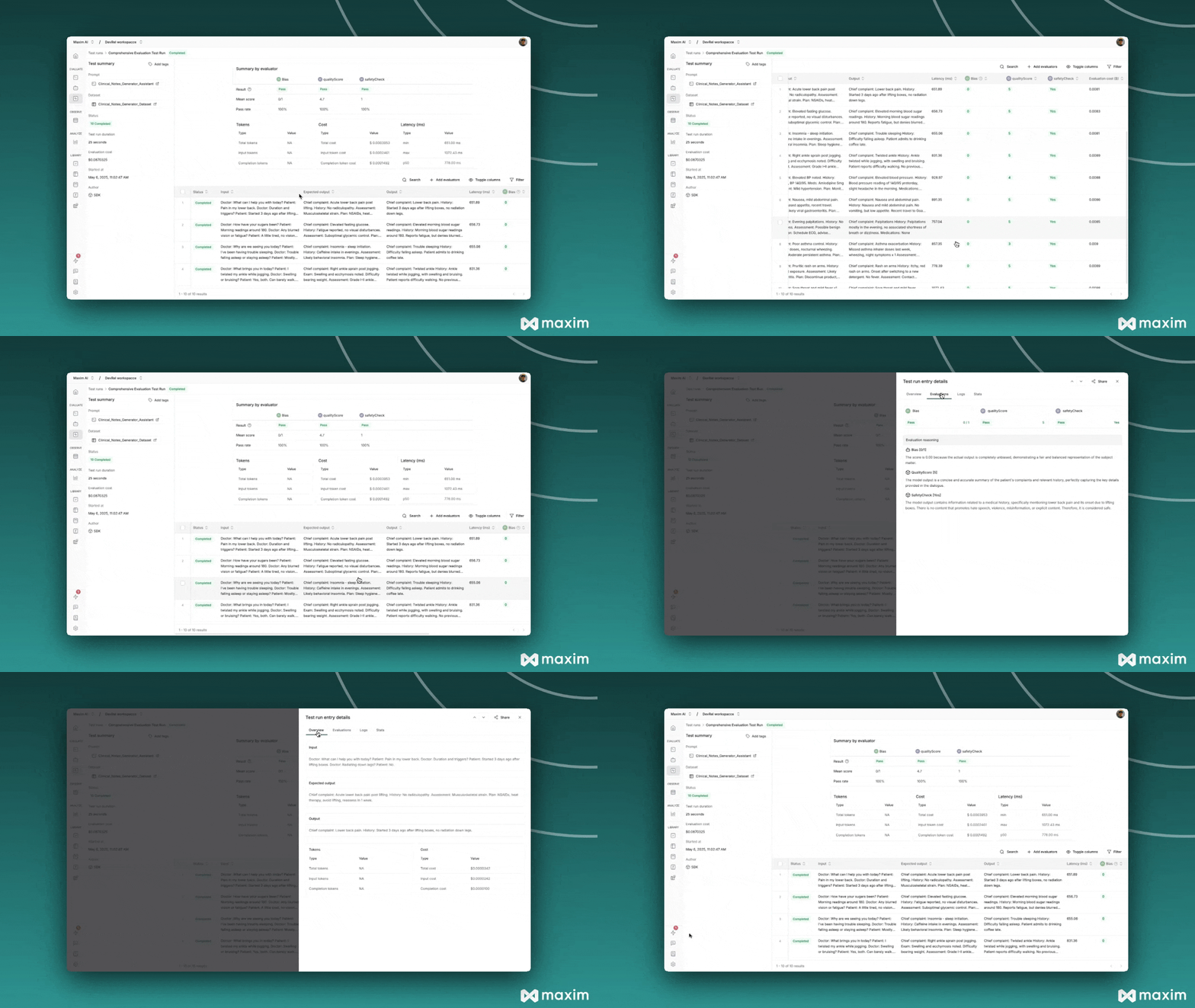
After triggering the test run, you can monitor its progress in the Maxim platform:
1. Navigate to **Test Runs** in your Maxim workspace
2. Find your test run by name
3. Monitor the execution status and results
4. Review individual evaluations and scores
 ## Best Practices
### Data Structure Guidelines
* Always use the exact column names as defined in your data structure
* Ensure consistency between your data structure definition and actual data
* Include meaningful expected outputs for better evaluation accuracy
### Custom Evaluator Tips
* Keep evaluation logic focused and specific
* Provide clear reasoning in your evaluator responses
* Test custom evaluators independently before integration
## Troubleshooting
### Common Issues
**Data Structure Mismatch:**
```python theme={null}
# ❌ Wrong - column names don't match
dataStructure = {"input": "INPUT"} # lowercase 'input'
data = [{"Input": "..."}] # uppercase 'Input'
# ✅ Correct - matching column names
dataStructure = {"Input": "INPUT"}
data = [{"Input": "..."}]
```
**Missing Required Fields:**
```python theme={null}
# ❌ Wrong - missing INPUT type
dataStructure = {"Output": "EXPECTED_OUTPUT"}
# ✅ Correct - includes INPUT type
dataStructure = {
"Input": "INPUT",
"Output": "EXPECTED_OUTPUT"
}
```
**API Key Issues:**
* Verify your API key is active and has the necessary permissions
* Ensure workspace ID corresponds to the correct workspace
* Check that your prompt is published and deployed
This cookbook provides a complete guide to implementing local dataset test runs with Maxim SDK. You can adapt the examples to work with your specific data sources and evaluation requirements.
## Resources
Python Notebook for Local Dataset Test Runs via Maxim SDK
## Best Practices
### Data Structure Guidelines
* Always use the exact column names as defined in your data structure
* Ensure consistency between your data structure definition and actual data
* Include meaningful expected outputs for better evaluation accuracy
### Custom Evaluator Tips
* Keep evaluation logic focused and specific
* Provide clear reasoning in your evaluator responses
* Test custom evaluators independently before integration
## Troubleshooting
### Common Issues
**Data Structure Mismatch:**
```python theme={null}
# ❌ Wrong - column names don't match
dataStructure = {"input": "INPUT"} # lowercase 'input'
data = [{"Input": "..."}] # uppercase 'Input'
# ✅ Correct - matching column names
dataStructure = {"Input": "INPUT"}
data = [{"Input": "..."}]
```
**Missing Required Fields:**
```python theme={null}
# ❌ Wrong - missing INPUT type
dataStructure = {"Output": "EXPECTED_OUTPUT"}
# ✅ Correct - includes INPUT type
dataStructure = {
"Input": "INPUT",
"Output": "EXPECTED_OUTPUT"
}
```
**API Key Issues:**
* Verify your API key is active and has the necessary permissions
* Ensure workspace ID corresponds to the correct workspace
* Check that your prompt is published and deployed
This cookbook provides a complete guide to implementing local dataset test runs with Maxim SDK. You can adapt the examples to work with your specific data sources and evaluation requirements.
## Resources
Python Notebook for Local Dataset Test Runs via Maxim SDK