> ## Documentation Index
> Fetch the complete documentation index at: https://www.getmaxim.ai/docs/llms.txt
> Use this file to discover all available pages before exploring further.
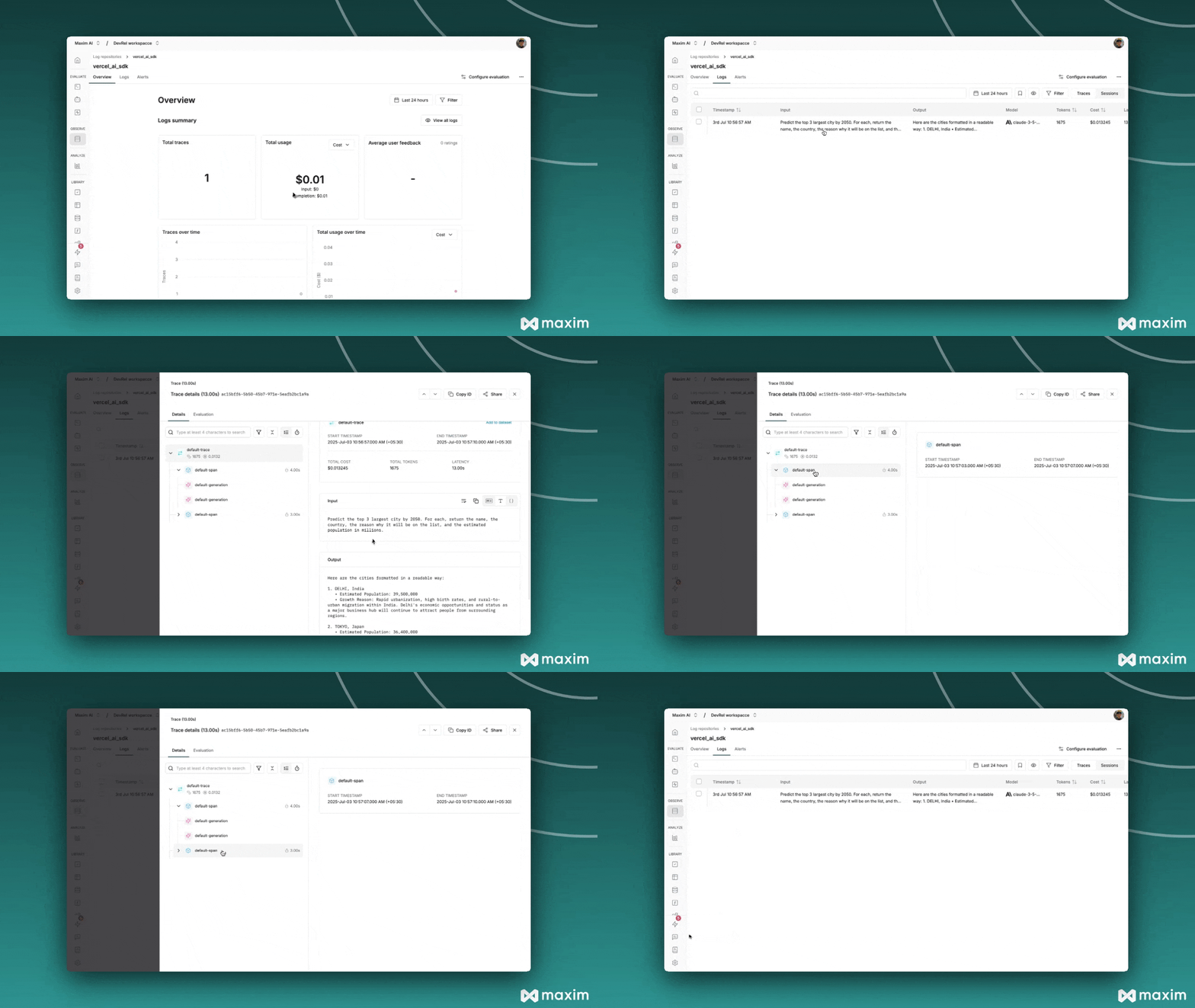
# Maxim Observability with Vercel AI SDK
> Learn how to add Maxim observability and tracing to your Vercel AI SDK applications in just one line of code.
export const MaximPlayer = ({url}) => {
return ;
};
This cookbook shows how to add Maxim observability and tracing to your Vercel AI SDK applications in
just one line of code. You'll learn how to wrap models, log LLM calls, stream responses, add custom
metadata, and integrate with Next.js APIs and client components.
## Prerequisites
* Node.js 18+
* [@ai-sdk/openai](https://www.npmjs.com/package/@ai-sdk/openai)
* [@ai-sdk/anthropic](https://www.npmjs.com/package/@ai-sdk/anthropic)
* [@ai-sdk/google](https://www.npmjs.com/package/@ai-sdk/google)
* [@maximai/maxim-js](https://www.npmjs.com/package/@maximai/maxim-js)
* [ai](https://www.npmjs.com/package/ai) (Vercel AI SDK)
Install with:
```bash theme={null}
npm install @ai-sdk/openai @ai-sdk/anthropic @ai-sdk/google @maximai/maxim-js ai
```
## 1. Set Up Environment Variables
Add the following to your `.env`:
```env theme={null}
MAXIM_API_KEY=your-maxim-api-key
MAXIM_LOG_REPO_ID=your-maxim-log-repo-id
OPENAI_API_KEY=your-openai-api-key
ANTHROPIC_API_KEY=your-anthropic-api-key
```
## 2. Initialize Maxim Logger
```js {9,13} theme={null}
import { Maxim } from '@maximai/maxim-js';
async function initializeMaxim() {
const apiKey = process.env.MAXIM_API_KEY || '';
if (!apiKey) {
throw new Error('MAXIM_API_KEY is not defined in the environment variables');
}
const maxim = new Maxim({ apiKey });
if (!process.env.MAXIM_LOG_REPO_ID) {
throw new Error('MAXIM_LOG_REPO_ID is not defined in the environment variables');
}
const logger = await maxim.logger({ id: process.env.MAXIM_LOG_REPO_ID });
if (!logger) {
throw new Error('Logger is not available');
}
return { maxim, logger };
}
```
## 3. Wrap AI SDK Models with Maxim
```js theme={null}
import { openai } from '@ai-sdk/openai';
import { wrapMaximAISDKModel } from '@maximai/maxim-js/vercel-ai-sdk';
const model = wrapMaximAISDKModel(openai('gpt-4'), logger);
```
## 4. Make LLM Calls Using Wrapped Models
```js theme={null}
import { generateText } from 'ai';
const response = await generateText({
model: model,
prompt: 'Write a haiku about recursion in programming.',
temperature: 0.8,
system: 'You are a helpful assistant.',
});
console.log('Response:', response.text);
```
## 5. Use with All Vercel AI SDK Functions
### Generate Object
```js theme={null}
import { generateObject } from 'ai';
import { z } from 'zod';
const response = await generateObject({
model: model,
prompt: 'Generate a user profile for John Doe',
schema: z.object({
name: z.string(),
age: z.number(),
email: z.string().email(),
interests: z.array(z.string()),
}),
});
console.log(response.object);
```
### Stream Text
```js theme={null}
import { streamText } from 'ai';
const { textStream } = await streamText({
model: model,
prompt: 'Write a short story about space exploration',
system: 'You are a creative writer',
});
for await (const textPart of textStream) {
process.stdout.write(textPart);
}
```
## 6. Add Custom Metadata and Tracing
You can add custom names, tags, and IDs to sessions, traces, spans, and generations.
```js theme={null}
import { MaximVercelProviderMetadata } from '@maximai/maxim-js/vercel-ai-sdk';
const response = await generateText({
model: model,
prompt: 'Hello, how are you?',
providerOptions: {
maxim: {
traceName: 'custom-trace-name',
traceTags: {
type: 'demo',
priority: 'high',
},
} as MaximVercelProviderMetadata,
},
});
```
### Available Metadata Fields
* **Entity Naming:**
* `sessionName`, `traceName`, `spanName`, `generationName`
* **Entity Tagging:**
* `sessionTags`, `traceTags`, `spanTags`, `generationTags`
* **ID References:**
* `sessionId`, `traceId`, `spanId`
## 7. Streaming Support with Metadata
```js theme={null}
import { streamText } from 'ai';
import { openai } from '@ai-sdk/openai';
import { wrapMaximAISDKModel, MaximVercelProviderMetadata } from '@maximai/maxim-js/vercel-ai-sdk';
const model = wrapMaximAISDKModel(openai('gpt-4'), logger);
const { textStream } = await streamText({
model: model,
prompt: 'Write a story about a robot learning to paint.',
system: 'You are a creative storyteller',
providerOptions: {
maxim: {
traceName: 'Story Generation',
traceTags: {
type: 'creative',
format: 'streaming'
},
} as MaximVercelProviderMetadata,
},
});
for await (const textPart of textStream) {
process.stdout.write(textPart);
}
```
## 8. Multiple Provider Support
You can wrap and use models from OpenAI, Anthropic, and Google with the same interface.
```js theme={null}
import { openai } from '@ai-sdk/openai';
import { anthropic } from '@ai-sdk/anthropic';
import { google } from '@ai-sdk/google';
import { wrapMaximAISDKModel } from '@maximai/maxim-js/vercel-ai-sdk';
const openaiModel = wrapMaximAISDKModel(openai('gpt-4'), logger);
const anthropicModel = wrapMaximAISDKModel(anthropic('claude-3-5-sonnet-20241022'), logger);
const googleModel = wrapMaximAISDKModel(google('gemini-pro'), logger);
const responses = await Promise.all([
generateText({ model: openaiModel, prompt: 'Hello from OpenAI' }),
generateText({ model: anthropicModel, prompt: 'Hello from Anthropic' }),
generateText({ model: googleModel, prompt: 'Hello from Google' }),
]);
```
## 9. Next.js API Route Example
```js theme={null}
// app/api/chat/route.js
import { streamText } from 'ai';
import { openai } from '@ai-sdk/openai';
import { wrapMaximAISDKModel, MaximVercelProviderMetadata } from '@maximai/maxim-js/vercel-ai-sdk';
import { Maxim } from "@maximai/maxim-js";
const maxim = new Maxim({ apiKey: process.env.MAXIM_API_KEY });
const logger = await maxim.logger({ id: process.env.MAXIM_LOG_REPO_ID });
const model = wrapMaximAISDKModel(openai('gpt-4'), logger);
export async function POST(req) {
const { messages } = await req.json();
const result = await streamText({
model: model,
messages,
system: 'You are a helpful assistant',
providerOptions: {
maxim: {
traceName: 'Chat API',
traceTags: {
endpoint: '/api/chat',
type: 'conversation'
},
} as MaximVercelProviderMetadata,
},
});
return result.toAIStreamResponse();
}
```
## 10. Client-side Integration Example
```js theme={null}
// components/Chat.jsx
import { useChat } from 'ai/react';
export default function Chat() {
const { messages, input, handleInputChange, handleSubmit } = useChat({
api: '/api/chat',
});
return (
{messages.map((m) => (
{m.role}: {m.content}
))}
 ***
For more details, see the
[Maxim JS SDK documentation](https://www.npmjs.com/package/@maximai/maxim-js) and the
[Vercel AI SDK documentation](https://sdk.vercel.ai/docs).
***
For more details, see the
[Maxim JS SDK documentation](https://www.npmjs.com/package/@maximai/maxim-js) and the
[Vercel AI SDK documentation](https://sdk.vercel.ai/docs).