> ## Documentation Index
> Fetch the complete documentation index at: https://www.getmaxim.ai/docs/llms.txt
> Use this file to discover all available pages before exploring further.
# LLM Observability for Together AI
> Complete examples and cookbook for integrating Together AI with Maxim for comprehensive model monitoring and observability
export const MaximPlayer = ({url}) => {
return ;
};
This cookbook provides comprehensive examples for integrating Together AI with Maxim, covering simple chat completions, streaming requests, and async operations.
## Prerequisites
Before starting, ensure you have:
* Python 3.10+
* A Maxim account ([sign up here](https://getmaxim.ai/))
* Maxim API key and repository ID
* Together AI API key
## Installation
```bash theme={null}
pip install maxim-py together python-dotenv
```
## Environment Setup
Create a `.env` file in your project root:
```env theme={null}
TOGETHER_API_KEY=your_together_api_key_here
MAXIM_API_KEY=your_maxim_api_key_here
MAXIM_LOG_REPO_ID=your_repo_id_here
```
## Basic Setup and Instrumentation
### Import Required Libraries
```python theme={null}
import os
from together import Together
from dotenv import load_dotenv
from maxim import Maxim
from maxim.logger.together import instrument_together
```
### Configure Together & Maxim
```python {10} theme={null}
# Load environment variables from .env file
load_dotenv()
# Get API keys from environment
TOGETHER_API_KEY = os.getenv('TOGETHER_API_KEY')
MAXIM_API_KEY = os.getenv('MAXIM_API_KEY')
MAXIM_LOG_REPO_ID = os.getenv('MAXIM_LOG_REPO_ID')
# Instrument Together AI with Maxim
instrument_together(Maxim().logger())
```
## Simple Chat Completion Request
This example demonstrates basic chat completion with Together AI models.
### Create Client and Make Request
```python theme={null}
from together import Together
# Create Together AI client
client = Together(api_key=TOGETHER_API_KEY)
# Make a simple chat completion request
response = client.chat.completions.create(
model="meta-llama/Meta-Llama-3.1-8B-Instruct-Turbo",
messages=[{"role": "user", "content": "What are some fun things to do in New York?"}],
)
print(response.choices[0].message.content)
```
### Example Output
The model will provide a comprehensive response about fun activities in New York, including:
* Iconic landmarks (Statue of Liberty, Central Park, Times Square)
* Museums and galleries (Metropolitan Museum, MoMA, Natural History Museum)
* Performing arts (Broadway shows, Lincoln Center, Carnegie Hall)
* Food and drink recommendations (pizza, bagels, delis)
## Streaming Request
This example demonstrates how to use streaming for real-time responses.
### Streaming Chat Completion
```python theme={null}
# Create streaming request
stream = client.chat.completions.create(
model="meta-llama/Meta-Llama-3.1-8B-Instruct-Turbo",
messages=[{"role": "user", "content": "What are some fun things to do in New York?"}],
stream=True,
)
# Process streaming response
for chunk in stream:
print(chunk.choices[0].delta.content or "", end="", flush=True)
```
### Benefits of Streaming
* **Real-time responses**: See the model's response as it's generated
* **Better user experience**: Users don't have to wait for the complete response
* **Lower perceived latency**: Content appears immediately
* **Full traceability**: Maxim captures the entire streaming interaction
## Async Requests
This example demonstrates how to make multiple concurrent requests using async operations.
### Async Chat Completions
```python theme={null}
import asyncio
from together import AsyncTogether
# Create async client
async_client = AsyncTogether(api_key=TOGETHER_API_KEY)
# Define multiple messages to process
messages = [
"What are the top things to do in San Francisco?",
"What country is Paris in?",
]
async def async_chat_completion(messages):
"""Process multiple chat completions concurrently."""
async_client = AsyncTogether(api_key=TOGETHER_API_KEY)
# Create tasks for concurrent execution
tasks = [
async_client.chat.completions.create(
model="meta-llama/Meta-Llama-3.1-8B-Instruct-Turbo",
messages=[{"role": "user", "content": message}],
)
for message in messages
]
# Execute all tasks concurrently
responses = await asyncio.gather(*tasks)
# Process responses
for response in responses:
print(response.choices[0].message.content)
# Run async function
await async_chat_completion(messages)
```
### Benefits of Async Operations
* **Concurrent processing**: Multiple requests processed simultaneously
* **Improved performance**: Faster overall execution time
* **Resource efficiency**: Better utilization of system resources
* **Scalability**: Handle multiple requests without blocking
## Advanced Usage Examples
### Custom Model Selection
```python theme={null}
# Use different Together AI models
models = [
"meta-llama/Meta-Llama-3.1-8B-Instruct-Turbo",
"meta-llama/Meta-Llama-3.1-70B-Instruct-Turbo",
"mistralai/Mixtral-8x7B-Instruct-v0.1"
]
for model in models:
response = client.chat.completions.create(
model=model,
messages=[{"role": "user", "content": "Explain quantum computing in simple terms."}],
max_tokens=150
)
print(f"\n{model}:")
print(response.choices[0].message.content)
```
### Error Handling
```python theme={null}
import time
def robust_chat_completion(client, messages, max_retries=3):
"""Make chat completion with retry logic."""
for attempt in range(max_retries):
try:
response = client.chat.completions.create(
model="meta-llama/Meta-Llama-3.1-8B-Instruct-Turbo",
messages=messages,
)
return response
except Exception as e:
print(f"Attempt {attempt + 1} failed: {e}")
if attempt < max_retries - 1:
time.sleep(2 ** attempt) # Exponential backoff
else:
raise
# Use robust completion
try:
response = robust_chat_completion(
client,
[{"role": "user", "content": "What is machine learning?"}]
)
print(response.choices[0].message.content)
except Exception as e:
print(f"Failed after all retries: {e}")
```
### Multi-turn Conversations
```python theme={null}
def multi_turn_conversation():
"""Demonstrate multi-turn conversation tracking."""
messages = [
{"role": "user", "content": "I'm planning a trip to Japan. What should I know?"}
]
# First response
response = client.chat.completions.create(
model="meta-llama/Meta-Llama-3.1-8B-Instruct-Turbo",
messages=messages,
)
assistant_message = response.choices[0].message.content
print("Assistant:", assistant_message)
# Add assistant response to conversation
messages.append({"role": "assistant", "content": assistant_message})
# Follow-up question
messages.append({"role": "user", "content": "What about the food? Any recommendations?"})
# Second response
response = client.chat.completions.create(
model="meta-llama/Meta-Llama-3.1-8B-Instruct-Turbo",
messages=messages,
)
print("\nAssistant:", response.choices[0].message.content)
# Run multi-turn conversation
multi_turn_conversation()
```
## Complete Example
Here's a comprehensive example that combines all the features:
```python theme={null}
import os
import asyncio
from together import Together, AsyncTogether
from dotenv import load_dotenv
from maxim import Maxim
from maxim.logger.together import instrument_together
# Setup
load_dotenv()
TOGETHER_API_KEY = os.getenv('TOGETHER_API_KEY')
# Instrument Together AI with Maxim
instrument_together(Maxim().logger())
async def comprehensive_example():
"""Comprehensive example showing all Together AI features."""
print("Together AI Integration with Maxim - Complete Example")
print("=" * 60)
# Create clients
client = Together(api_key=TOGETHER_API_KEY)
async_client = AsyncTogether(api_key=TOGETHER_API_KEY)
# 1. Simple chat completion
print("\n1. Simple Chat Completion:")
print("-" * 30)
response = client.chat.completions.create(
model="meta-llama/Meta-Llama-3.1-8B-Instruct-Turbo",
messages=[{"role": "user", "content": "What is artificial intelligence?"}],
)
print(response.choices[0].message.content[:200] + "...")
# 2. Streaming example
print("\n2. Streaming Response:")
print("-" * 30)
stream = client.chat.completions.create(
model="meta-llama/Meta-Llama-3.1-8B-Instruct-Turbo",
messages=[{"role": "user", "content": "Explain machine learning briefly."}],
stream=True,
)
print("Streaming: ", end="")
for chunk in stream:
content = chunk.choices[0].delta.content or ""
print(content, end="", flush=True)
print("\n")
# 3. Async concurrent requests
print("\n3. Async Concurrent Requests:")
print("-" * 30)
messages = [
"What is Python?",
"What is JavaScript?",
"What is Rust?"
]
tasks = [
async_client.chat.completions.create(
model="meta-llama/Meta-Llama-3.1-8B-Instruct-Turbo",
messages=[{"role": "user", "content": message}],
max_tokens=100
)
for message in messages
]
responses = await asyncio.gather(*tasks)
for i, response in enumerate(responses):
print(f"{messages[i]}: {response.choices[0].message.content[:100]}...")
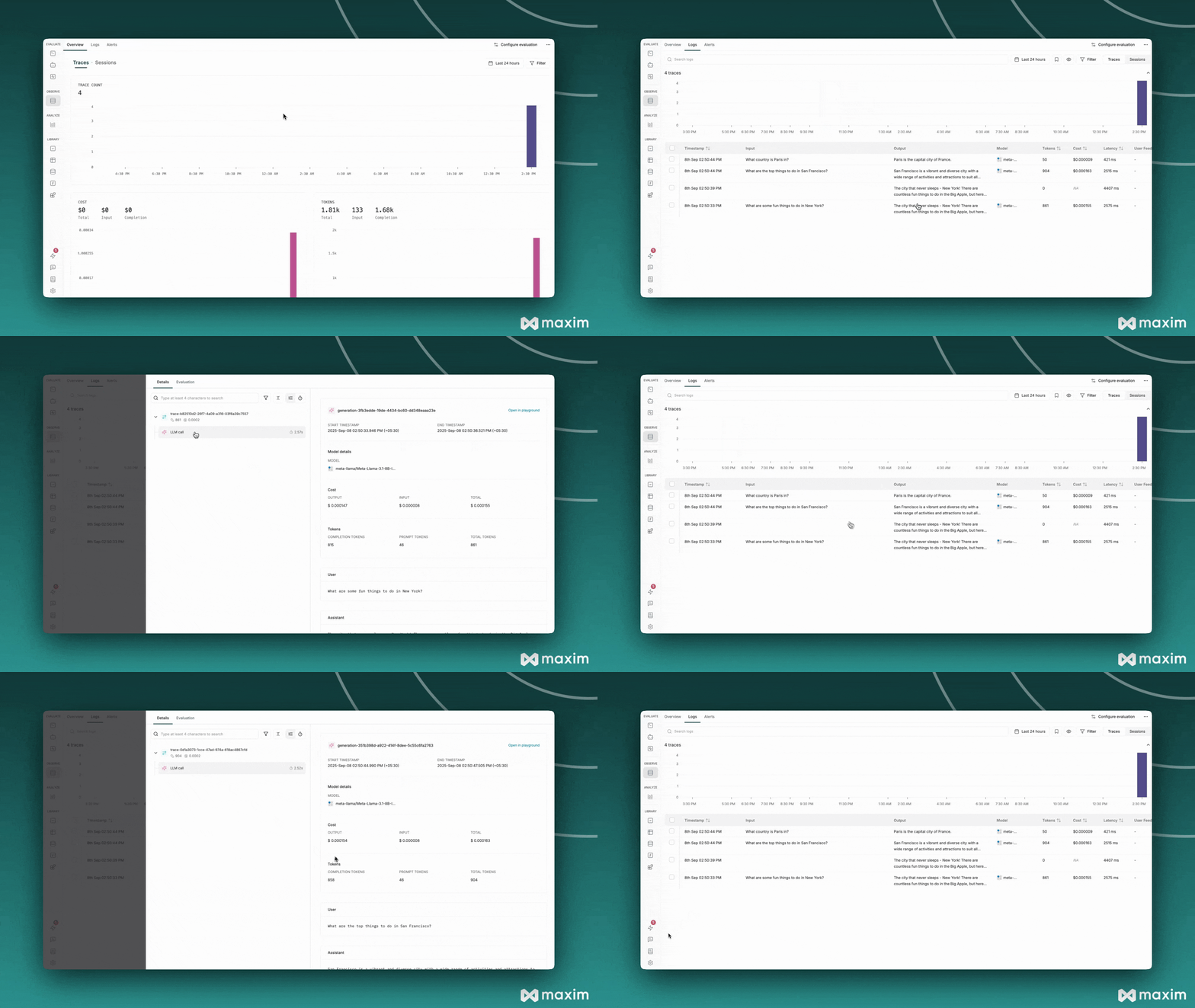
print("\n=== All Examples Completed ===")
print("Check your Maxim dashboard to see:")
print("- Chat completion traces")
print("- Streaming interactions")
print("- Async request patterns")
print("- Performance metrics")
# Run comprehensive example
await comprehensive_example()
```
 ## Best Practices
### 1. **Environment Variables**
Always use environment variables for API keys:
```python theme={null}
# Good
TOGETHER_API_KEY = os.getenv('TOGETHER_API_KEY')
# Avoid
TOGETHER_API_KEY = "your_key_here" # Don't hardcode
```
### 2. **Error Handling**
Implement proper error handling for production use:
```python theme={null}
try:
response = client.chat.completions.create(...)
except Exception as e:
print(f"Error: {e}")
# Handle error appropriately
```
### 3. **Model Selection**
Choose appropriate models for your use case:
* **Fast responses**: Use smaller models like `Meta-Llama-3.1-8B-Instruct-Turbo`
* **High quality**: Use larger models like `Meta-Llama-3.1-70B-Instruct-Turbo`
* **Specialized tasks**: Use domain-specific models
### 4. **Streaming for UX**
Use streaming for better user experience:
```python theme={null}
# Good for real-time applications
stream = client.chat.completions.create(..., stream=True)
# Good for batch processing
response = client.chat.completions.create(...)
```
### 5. **Async for Performance**
Use async operations for multiple concurrent requests:
```python theme={null}
# Good for multiple requests
tasks = [async_client.chat.completions.create(...) for _ in range(5)]
responses = await asyncio.gather(*tasks)
```
This cookbook provides a comprehensive foundation for integrating Together AI with Maxim. You can extend these examples with your own use cases and requirements.
***
For more details, see the [Maxim Python SDK documentation](https://www.getmaxim.ai/docs).
## Resources
Python Notebook for Together AI & Maxim AI
## Best Practices
### 1. **Environment Variables**
Always use environment variables for API keys:
```python theme={null}
# Good
TOGETHER_API_KEY = os.getenv('TOGETHER_API_KEY')
# Avoid
TOGETHER_API_KEY = "your_key_here" # Don't hardcode
```
### 2. **Error Handling**
Implement proper error handling for production use:
```python theme={null}
try:
response = client.chat.completions.create(...)
except Exception as e:
print(f"Error: {e}")
# Handle error appropriately
```
### 3. **Model Selection**
Choose appropriate models for your use case:
* **Fast responses**: Use smaller models like `Meta-Llama-3.1-8B-Instruct-Turbo`
* **High quality**: Use larger models like `Meta-Llama-3.1-70B-Instruct-Turbo`
* **Specialized tasks**: Use domain-specific models
### 4. **Streaming for UX**
Use streaming for better user experience:
```python theme={null}
# Good for real-time applications
stream = client.chat.completions.create(..., stream=True)
# Good for batch processing
response = client.chat.completions.create(...)
```
### 5. **Async for Performance**
Use async operations for multiple concurrent requests:
```python theme={null}
# Good for multiple requests
tasks = [async_client.chat.completions.create(...) for _ in range(5)]
responses = await asyncio.gather(*tasks)
```
This cookbook provides a comprehensive foundation for integrating Together AI with Maxim. You can extend these examples with your own use cases and requirements.
***
For more details, see the [Maxim Python SDK documentation](https://www.getmaxim.ai/docs).
## Resources
Python Notebook for Together AI & Maxim AI