> ## Documentation Index
> Fetch the complete documentation index at: https://www.getmaxim.ai/docs/llms.txt
> Use this file to discover all available pages before exploring further.
# Observe Pydantic AI Based AI Agents
> Complete examples and cookbook for integrating Pydantic AI with Maxim for comprehensive agent monitoring and observability
This cookbook provides comprehensive examples for integrating Pydantic AI with Maxim, covering simple agents, advanced agents with complex tools, and streaming capabilities.
## Prerequisites
Before starting, ensure you have:
* Python 3.10+
* A Maxim account ([sign up here](https://getmaxim.ai/))
* Maxim API key and repository ID
* OpenAI API key (for Pydantic AI)
## Installation
```bash theme={null}
pip install maxim-py pydantic-ai python-dotenv
```
## Environment Setup
Create a `.env` file in your project root:
```env theme={null}
MAXIM_API_KEY=your_maxim_api_key_here
MAXIM_LOG_REPO_ID=your_repo_id_here
OPENAI_API_KEY=your_openai_api_key_here
```
## Simple Agent Example
This example demonstrates basic Pydantic AI integration with Maxim using a simple math agent.
### Setup and Instrumentation
```python {17} theme={null}
import os
from dotenv import load_dotenv
# Load environment variables
load_dotenv()
# Import Maxim components and instrument once at the top
from maxim import Maxim
from maxim.logger.pydantic_ai import instrument_pydantic_ai
# Set up Maxim logger
maxim = Maxim()
maxim_logger = maxim.logger()
# Instrument Pydantic AI once at the top
print("Initializing Maxim instrumentation for Pydantic AI...")
instrument_pydantic_ai(maxim_logger, debug=True)
print("Instrumentation complete!")
# Import Pydantic AI components
from pydantic_ai import Agent, RunContext
```
### Create a Simple Agent
```python theme={null}
def create_simple_agent():
"""Create a simple Pydantic AI agent with math tools."""
agent = Agent(
model="openai:gpt-4o-mini",
name="Simple Math Agent",
instructions="You are a helpful assistant that can perform calculations."
)
@agent.tool
def add_numbers(ctx: RunContext, a: float, b: float) -> float:
"""Add two numbers together."""
print(f"[Tool] Adding {a} + {b}")
return a + b
@agent.tool
def multiply_numbers(ctx: RunContext, a: float, b: float) -> float:
"""Multiply two numbers together."""
print(f"[Tool] Multiplying {a} * {b}")
return a * b
return agent
```
### Run the Agent
```python theme={null}
import asyncio
async def run_simple_example():
"""Run the simple agent example."""
print("=== Simple Math Agent Example ===")
# Create the agent
agent = create_simple_agent()
# Run multiple calculations
print("Running first calculation...")
result = await agent.run("What is 15 + 27?")
print(f"Result: {result}")
print("Running second calculation...")
result = await agent.run("Calculate 8 * 12")
print(f"Result: {result}")
print("Running third calculation...")
result = await agent.run("What is 25 + 17 and then multiply that result by 3?")
print(f"Result: {result}")
print("Simple agent example completed!")
# Run the example
await run_simple_example()
```
## Advanced Agent Example
This example demonstrates a more complex agent with multiple sophisticated tools.
### Create an Advanced Agent
```python theme={null}
from typing import List
def create_advanced_agent():
"""Create an advanced Pydantic AI agent with complex tools."""
agent = Agent(
model="openai:gpt-4o-mini",
name="Advanced Analysis Agent",
instructions="You are an advanced assistant that can perform various analysis tasks."
)
@agent.tool
def analyze_text(ctx: RunContext, text: str) -> dict:
"""Analyze text and return statistics."""
print(f"[Tool] Analyzing text: {text[:50]}...")
words = text.split()
return {
"word_count": len(words),
"character_count": len(text),
"average_word_length": sum(len(word) for word in words) / len(words) if words else 0
}
@agent.tool
def generate_list(ctx: RunContext, topic: str, count: int = 5) -> List[str]:
"""Generate a list of items related to a topic."""
print(f"[Tool] Generating list of {count} items for topic: {topic}")
return [f"{topic} item {i+1}" for i in range(count)]
@agent.tool
def calculate_statistics(ctx: RunContext, numbers: List[float]) -> dict:
"""Calculate basic statistics for a list of numbers."""
print(f"[Tool] Calculating statistics for {len(numbers)} numbers")
if not numbers:
return {"error": "No numbers provided"}
return {
"sum": sum(numbers),
"average": sum(numbers) / len(numbers),
"min": min(numbers),
"max": max(numbers),
"count": len(numbers)
}
return agent
```
### Run the Advanced Agent
```python theme={null}
async def run_advanced_example():
"""Run the advanced agent example."""
print("=== Advanced Analysis Agent Example ===")
# Create the agent
agent = create_advanced_agent()
# Run text analysis
print("Running text analysis...")
result = await agent.run("Analyze this text: 'The quick brown fox jumps over the lazy dog.'")
print(f"Text Analysis Result: {result}")
# Run list generation
print("Running list generation...")
result = await agent.run("Generate a list of 3 programming languages")
print(f"List Generation Result: {result}")
# Run statistics calculation
print("Running statistics calculation...")
result = await agent.run("Calculate statistics for the numbers [10, 20, 30, 40, 50]")
print(f"Statistics Result: {result}")
# Run combined task
print("Running combined task...")
result = await agent.run("Analyze the text 'Python is awesome' and then generate a list of 2 related programming concepts")
print(f"Combined Task Result: {result}")
print("Advanced agent example completed!")
# Run the example
await run_advanced_example()
```
## Streaming Example
This example demonstrates how to use Pydantic AI's streaming capabilities with Maxim integration.
### Create a Streaming Agent
```python theme={null}
def create_streaming_agent():
"""Create a Pydantic AI agent with streaming capabilities."""
agent = Agent(
model="openai:gpt-4o-mini",
name="Streaming Agent",
instructions="You are a helpful assistant that can provide detailed explanations and perform calculations."
)
@agent.tool
def add_numbers(ctx: RunContext, a: float, b: float) -> float:
"""Add two numbers together."""
print(f"[Tool] Adding {a} + {b}")
return a + b
@agent.tool
def multiply_numbers(ctx: RunContext, a: float, b: float) -> float:
"""Multiply two numbers together."""
print(f"[Tool] Multiplying {a} * {b}")
return a * b
@agent.tool
def explain_concept(ctx: RunContext, topic: str) -> str:
"""Provide a brief explanation of a concept."""
print(f"[Tool] Explaining concept: {topic}")
return f"Here's a brief explanation of {topic}: It's an important concept in its field."
return agent
```
### Run Streaming Examples
```python theme={null}
async def run_streaming_example():
"""Run the streaming agent example."""
print("=== Streaming Agent Example ===")
# Create the agent
agent = create_streaming_agent()
# Use streaming mode for detailed explanations
print("Running streaming explanation...")
async with agent.run_stream("Explain what is 2 + 2 in detail and then calculate 5 * 6") as stream:
print("Streaming in progress...")
# The stream will complete automatically when the context manager exits
print("Streaming completed")
# Run another streaming example
print("Running streaming concept explanation...")
async with agent.run_stream("Explain the concept of machine learning and then add 10 + 15") as stream:
print("Streaming concept explanation in progress...")
print("Streaming concept explanation completed")
# Run a simple calculation without blocking the event loop
print("Running calculation for comparison...")
result = await agent.run("What is 7 * 8?")
print(f"Result: {result}")
print("Streaming agent example completed!")
# Run the streaming example
await run_streaming_example()
```
### Additional Example
```python theme={null}
async def run_additional_example():
"""Run an additional agent example."""
print("=== Additional Agent Example ===")
agent = create_streaming_agent()
# Run multiple operations
print("Running first calculation...")
result = await agent.run("What is 12 + 18?")
print(f"Result: {result}")
print("Running second calculation...")
result = await agent.run("Calculate 6 * 9")
print(f"Result: {result}")
print("Example completed!")
# Run example
await run_additional_example()
```
## Complete Example with All Features
Here's a comprehensive example that combines all the features:
```python theme={null}
async def main():
"""Main function to run all examples."""
print("Pydantic AI Integration with Maxim - Complete Example")
print("=" * 55)
# Run simple agent example
await run_simple_example()
print("\n" + "=" * 55)
# Run advanced agent example
await run_advanced_example()
print("\n" + "=" * 55)
# Run streaming example
await run_streaming_example()
print("\n" + "=" * 55)
# Run additional example
await run_additional_example()
print("\n=== All Examples Completed ===")
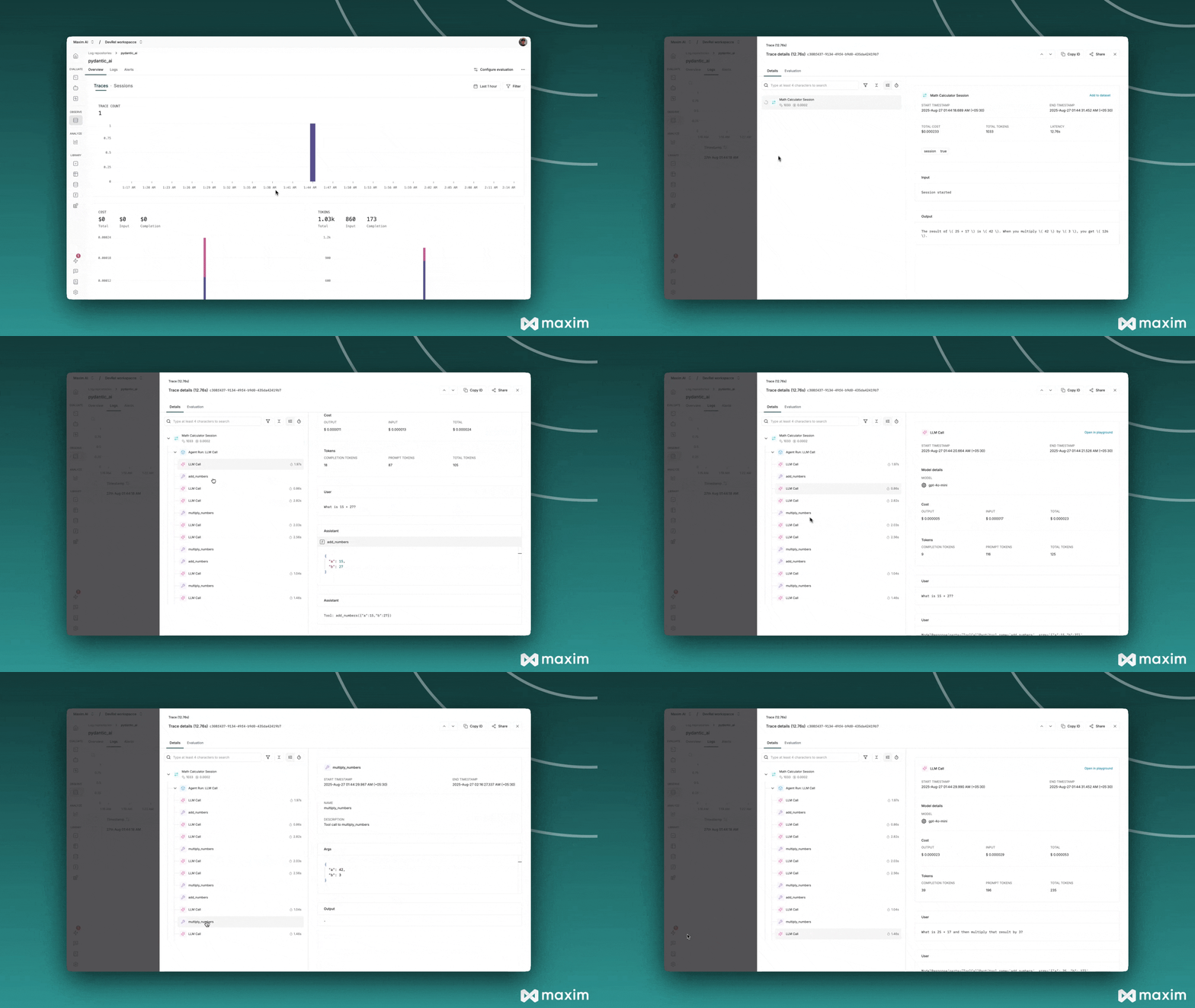
print("Check your Maxim dashboard to see:")
print("- Agent traces with tool calls")
print("- Model generations")
print("- Performance metrics")
print("- Streaming responses")
# Run all examples
await main()
```
 ## Best Practices
### 1. **Environment Variables**
Always use environment variables for API keys and sensitive configuration.
### 2. **Error Handling**
Wrap agent calls in try-catch blocks for robust error handling:
```python theme={null}
try:
result = await agent.run("Your query here")
print(f"Result: {result}")
except Exception as e:
print(f"Error: {e}")
```
### 3. **Tool Documentation**
Provide clear docstrings for your tools to help the agent understand their purpose:
```python theme={null}
@agent.tool
def my_tool(ctx: RunContext, param: str) -> str:
"""
Clear description of what this tool does.
Args:
param: Description of the parameter
Returns:
Description of the return value
"""
return "result"
```
### 4. **Async vs Sync**
* Use `await agent.run()` for async operations
* Use `agent.run()` for synchronous operations
* Use `async with agent.run_stream()` for streaming
## Troubleshooting
### Common Issues
1. **Import Errors**: Ensure all packages are installed correctly
2. **API Key Issues**: Verify environment variables are set correctly
3. **Tool Not Working**: Check tool function signatures and docstrings
4. **No Traces**: Ensure Maxim instrumentation is called before creating agents
### Debug Mode
Enable debug mode for detailed logging:
```python theme={null}
instrument_pydantic_ai(maxim_logger, debug=True)
```
This cookbook provides a comprehensive foundation for integrating Pydantic AI with Maxim. You can extend these examples with your own custom tools and use cases.
***
For more details, see the [Maxim Python SDK documentation](https://www.getmaxim.ai/docs).
## Resources
Python Notebook for Pydantic AI & Maxim AI
## Best Practices
### 1. **Environment Variables**
Always use environment variables for API keys and sensitive configuration.
### 2. **Error Handling**
Wrap agent calls in try-catch blocks for robust error handling:
```python theme={null}
try:
result = await agent.run("Your query here")
print(f"Result: {result}")
except Exception as e:
print(f"Error: {e}")
```
### 3. **Tool Documentation**
Provide clear docstrings for your tools to help the agent understand their purpose:
```python theme={null}
@agent.tool
def my_tool(ctx: RunContext, param: str) -> str:
"""
Clear description of what this tool does.
Args:
param: Description of the parameter
Returns:
Description of the return value
"""
return "result"
```
### 4. **Async vs Sync**
* Use `await agent.run()` for async operations
* Use `agent.run()` for synchronous operations
* Use `async with agent.run_stream()` for streaming
## Troubleshooting
### Common Issues
1. **Import Errors**: Ensure all packages are installed correctly
2. **API Key Issues**: Verify environment variables are set correctly
3. **Tool Not Working**: Check tool function signatures and docstrings
4. **No Traces**: Ensure Maxim instrumentation is called before creating agents
### Debug Mode
Enable debug mode for detailed logging:
```python theme={null}
instrument_pydantic_ai(maxim_logger, debug=True)
```
This cookbook provides a comprehensive foundation for integrating Pydantic AI with Maxim. You can extend these examples with your own custom tools and use cases.
***
For more details, see the [Maxim Python SDK documentation](https://www.getmaxim.ai/docs).
## Resources
Python Notebook for Pydantic AI & Maxim AI