> ## Documentation Index
> Fetch the complete documentation index at: https://www.getmaxim.ai/docs/llms.txt
> Use this file to discover all available pages before exploring further.
# Maxim Observability with CrewAI Research Agent
> Learn how to add Maxim observability and tracing to your CrewAI agent applications in just one line of code.
export const MaximPlayer = ({url}) => {
return ;
};
This cookbook shows how to add Maxim observability and tracing to your [CrewAI](https://github.com/joaomdmoura/crewAI) agent applications in just one line of code. You'll learn how to instrument CrewAI, log agent interactions, and view traces in the Maxim dashboard.
## Prerequisites
* Python >= 3.10
* A Maxim account ([sign up here](https://app.getmaxim.ai/))
* Maxim API Key
* A CrewAI project ([CrewAI GitHub](https://github.com/joaomdmoura/crewAI))
## 1. Installation
Install the Maxim SDK via pip:
```bash theme={null}
pip install maxim-py
```
Or add to your `requirements.txt`:
```text theme={null}
maxim-py
```
## 2. Set Up Environment Variables
Create a `.env` file in your project root:
```env theme={null}
# Maxim API Configuration
MAXIM_API_KEY=your_api_key_here
MAXIM_LOG_REPO_ID=your_repo_id_here
```
## 3. Import Required Packages
```python theme={null}
from crewai import Agent, Task, Crew, Process
from maxim import Maxim
from maxim.config import Config
from maxim.logger import LoggerConfig
from maxim.logger.crewai import instrument_crewai
```
## 4. Instrument CrewAI with Maxim
Instrument CrewAI with just one line:
```python {7} theme={null}
import os
from dotenv import load_dotenv
load_dotenv()
maxim = Maxim(Config(api_key=os.environ["MAXIM_API_KEY"]))
instrument_crewai(maxim.logger(LoggerConfig(id=os.environ["MAXIM_LOG_REPO_ID"])))
```
You can enable debug logging for troubleshooting:
```python theme={null}
instrument_crewai(maxim.logger(LoggerConfig(id=MAXIM_LOG_REPO_ID)), debug=True)
```
## 5. Create and Run Your CrewAI Application
```python theme={null}
# Create your agent
researcher = Agent(
role='Senior Research Analyst',
goal='Uncover cutting-edge developments in AI',
backstory="You are an expert researcher at a tech think tank...",
verbose=True, # Enable verbose for detailed logs
)
# Define the task
research_task = Task(
description="Research the latest AI advancements...",
expected_output="",
agent=researcher
)
# Configure and run the crew
crew = Crew(
agents=[researcher],
tasks=[research_task],
verbose=True
)
try:
result = crew.kickoff()
finally:
maxim.cleanup() # Ensure cleanup happens even if errors occur
```
That's it! All your CrewAI agent interactions will now be logged and available in your Maxim dashboard.
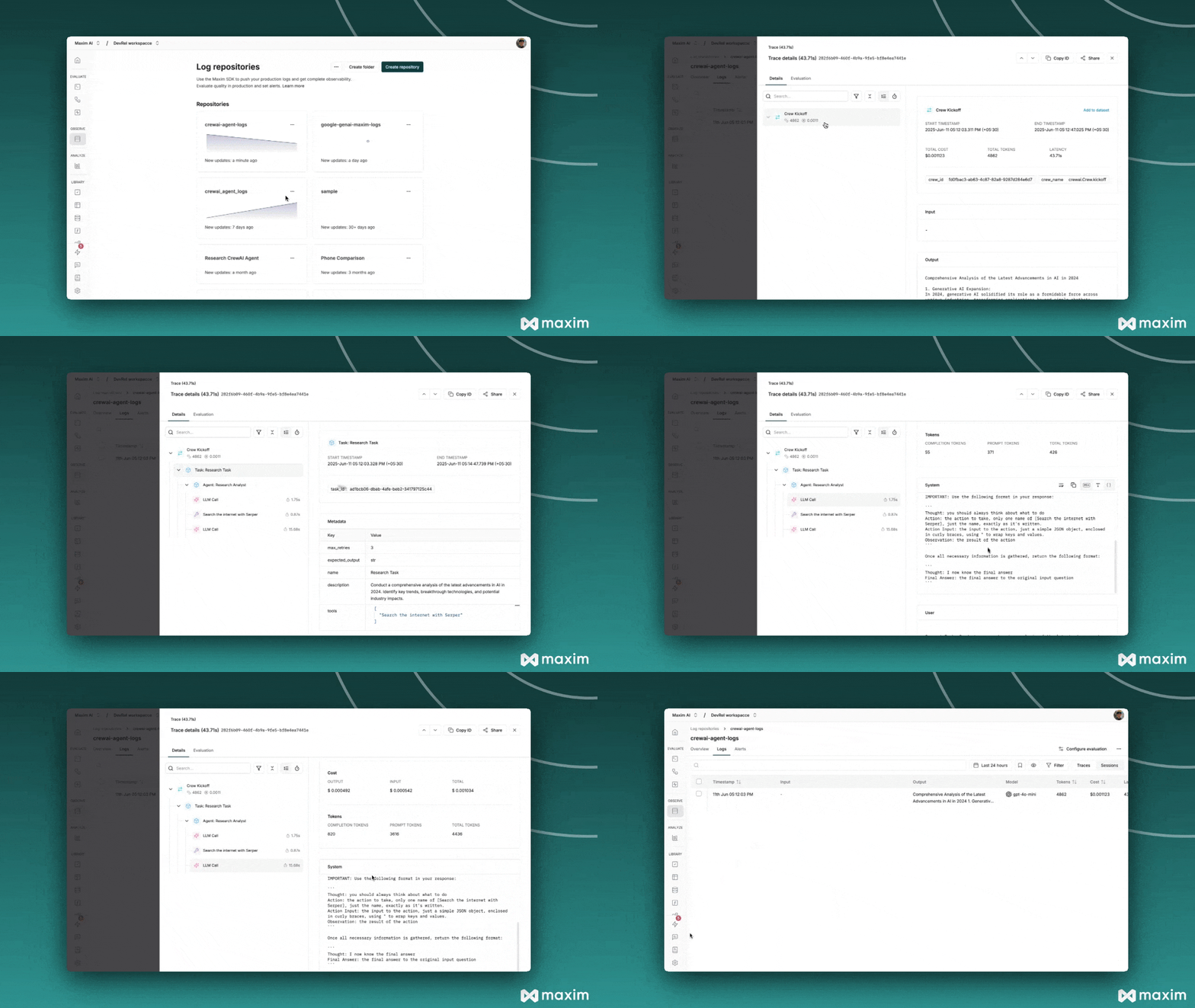
## 6. Viewing Your Traces
After running your CrewAI application:
* Log in to your [Maxim Dashboard](https://app.getmaxim.ai/)
* Navigate to your repository
* View detailed agent traces, including:
* Agent conversations
* Tool usage patterns
* Performance metrics
* Cost analytics
## 7. Troubleshooting
### Common Issues
* **No traces appearing:**
* Ensure your API key and repository ID are correct
* Ensure you've called `instrument_crewai()` before running your crew
* Set `debug=True` in your `instrument_crewai()` call to surface any internal errors
* **Verbose logging:**
* Configure your agents with `verbose=True` to capture detailed logs
* **Order of operations:**
* Double-check that `instrument_crewai()` is called before creating or executing agents
 ***
For more details, see the [CrewAI documentation](https://docs.crewai.com/) and the [Maxim Python SDK documentation](https://getmaxim.ai/docs).
## Resources
Python Notebook for CrewAI & Maxim
***
For more details, see the [CrewAI documentation](https://docs.crewai.com/) and the [Maxim Python SDK documentation](https://getmaxim.ai/docs).
## Resources
Python Notebook for CrewAI & Maxim