> ## Documentation Index
> Fetch the complete documentation index at: https://www.getmaxim.ai/docs/llms.txt
> Use this file to discover all available pages before exploring further.
# Tracing Anthropic Claude with Maxim
> Learn how to integrate Anthropic's Claude models with Maxim for full observability and tracing, including both standard and streaming completions.
export const MaximPlayer = ({url}) => {
return ;
};
This cookbook shows how to integrate Anthropic's Claude models with Maxim for full observability and tracing. You'll learn how to log both standard and streaming completions, making it easy to monitor and debug your LLM-powered applications.
## Prerequisites
* Python 3.8+
* [Anthropic Python SDK](https://pypi.org/project/anthropic/) (`pip install anthropic`)
* [Maxim Python SDK](https://pypi.org/project/maxim-py/) (`pip install maxim-py`)
* [python-dotenv](https://pypi.org/project/python-dotenv/) (`pip install python-dotenv`)
* API keys for Anthropic and Maxim
* (Optional) Set up a `.env` file with your API keys
## 1. Set Up Environment Variables
```python theme={null}
import os
import dotenv
dotenv.load_dotenv()
MODEL_NAME = "claude-3-5-sonnet-20241022"
ANTHROPIC_API_KEY = os.getenv("ANTHROPIC_API_KEY")
if not ANTHROPIC_API_KEY:
raise RuntimeError("Missing ANTHROPIC_API_KEY environment variable")
```
## 2. Initialize Maxim SDK
Maxim will automatically pick up `MAXIM_API_KEY` and `MAXIM_LOG_REPO_ID` from your environment variables.
```python theme={null}
from maxim import Maxim
logger = Maxim().logger()
```
## 3. Wrap Anthropic Client with Maxim
```python {5} theme={null}
from uuid import uuid4
from anthropic import Anthropic
from maxim.logger.anthropic import MaximAnthropicClient
client = MaximAnthropicClient(Anthropic(api_key=ANTHROPIC_API_KEY), logger)
```
## 4. Basic Usage: Log a Claude Completion
```python theme={null}
user_input = "What was the capital of France in 1800s?"
response = client.messages.create(
model=MODEL_NAME,
max_tokens=1024,
messages=[{"role": "user", "content": user_input}],
extra_headers={"x-maxim-trace-id": str(uuid4())}
)
print(response)
```
## 5. Streaming Usage: Log a Claude Streaming Completion
```python theme={null}
user_input = "What was the capital of France in 1800s?"
final_response = ""
response_chunks = []
with client.messages.stream(
max_tokens=1024,
messages=[{"role": "user", "content": user_input}],
model=MODEL_NAME,
) as stream:
for text_chunk in stream.text_stream:
# Collect streamed chunks
response_chunks.append(text_chunk)
# Print the streamed text chunk
print(text_chunk, end="", flush=True)
final_response = "".join(response_chunks)
```
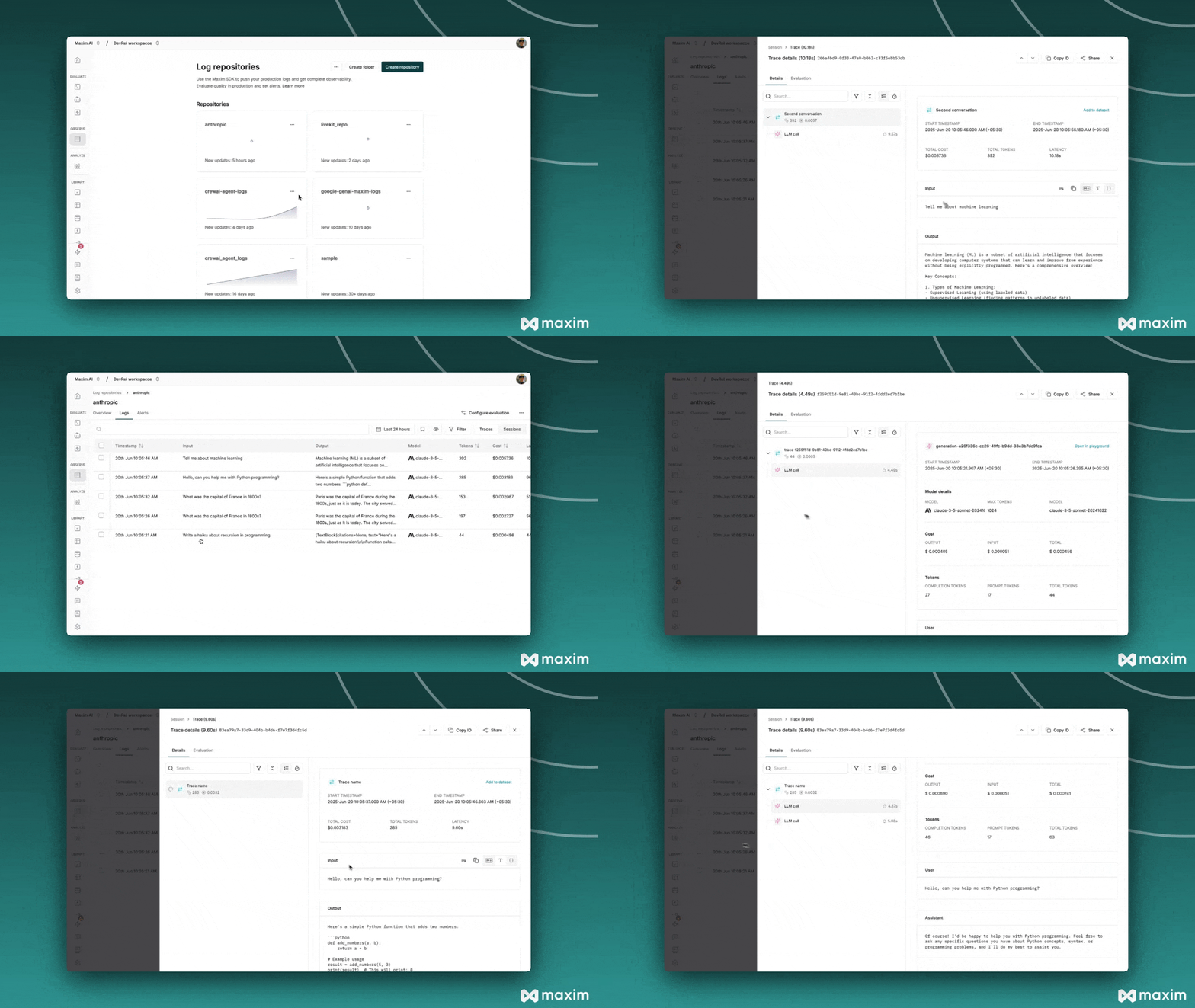
## 6. Visualize in Maxim
All requests, responses, and streaming events are automatically traced and can be viewed in your [Maxim dashboard](https://app.getmaxim.ai/).
 ***
For more details, see the [Anthropic Python SDK documentation](https://docs.anthropic.com/en/home) and the [Maxim Python SDK documentation](https://www.getmaxim.ai/docs/introduction/overview).
## Resources
Python Notebook for Anthropic & Maxim
***
For more details, see the [Anthropic Python SDK documentation](https://docs.anthropic.com/en/home) and the [Maxim Python SDK documentation](https://www.getmaxim.ai/docs/introduction/overview).
## Resources
Python Notebook for Anthropic & Maxim