> ## Documentation Index
> Fetch the complete documentation index at: https://www.getmaxim.ai/docs/llms.txt
> Use this file to discover all available pages before exploring further.
# Building a Financial Conversational Agent with Agno and Maxim
> Learn how to build a multi-agent financial conversational assistant using Agno for agent orchestration and Maxim for observability and tracing.
In this cookbook, you'll learn how to build a multi-agent financial conversational assistant using
[Agno](https://github.com/agno-agi/agno) for agent orchestration and
[Maxim](https://getmaxim.ai/docs) for observability and tracing. The agent can answer questions
about stocks, companies, and financial data by leveraging both web search and financial data tools,
with all interactions traced in Maxim.
## Prerequisites
* Python 3.8+
* [Agno](https://pypi.org/project/agno/) (`pip install agno`)
* [Maxim Python SDK](https://pypi.org/project/maxim-py/) (`pip install maxim-py`)
* [python-dotenv](https://pypi.org/project/python-dotenv/) (`pip install python-dotenv`)
* API keys for OpenAI and Maxim (and optionally Google Gemini)
* (Optional) Set up a `.env` file with your API keys
## 1. Import Required Libraries
```python theme={null}
from dotenv import load_dotenv
from agno.agent import Agent
# from agno.models.google.gemini import Gemini
from agno.models.openai import OpenAIChat
from agno.tools.googlesearch import GoogleSearchTools
from agno.tools.yfinance import YFinanceTools
from maxim import Maxim
from maxim.logger.agno import instrument_agno
```
## 2. Load Environment Variables and Instrument Agno with Maxim
```python {6} theme={null}
# Load environment variables from .env file
load_dotenv()
# Instrument Agno with Maxim's logger for observability
maxim = Maxim(api_key=os.getenv("MAXIM_API_KEY"))
instrument_agno(maxim.logger())
```
## 3. Define the Web Search Agent
This agent uses an LLM and Google Search tools to fetch financial information from the web.
```python theme={null}
web_search_agent = Agent(
name="Web Agent",
role="Search the web for information",
# model=Gemini(id="gemini-2.0-flash-001"),
model=OpenAIChat(id="gpt-4o"),
tools=[GoogleSearchTools()],
instructions="Always include sources",
show_tool_calls=True,
markdown=True,
)
```
## 4. Define the Finance Agent
This agent uses an LLM and YFinance tools to retrieve financial data such as stock prices, analyst
recommendations, and company information.
```python theme={null}
finance_agent = Agent(
name="Finance Agent",
role="Get financial data",
# model=Gemini(id="gemini-2.0-flash-001"),
model=OpenAIChat(id="gpt-4o"),
tools=[YFinanceTools(stock_price=True, analyst_recommendations=True, company_info=True)],
instructions="Use tables to display data",
markdown=True,
)
```
## 5. Aggregate Agents into a Multi-Agent System
Combine both agents into a multi-agent system that can answer user questions by leveraging both web
search and financial data tools.
```python theme={null}
multi_ai_agent = Agent(
team=[web_search_agent, finance_agent],
# model=Gemini(id="gemini-2.0-flash-001"),
model=OpenAIChat(id="gpt-4o"),
instructions="You are a helpful financial assistant. Answer user questions about stocks, companies, and financial data.",
show_tool_calls=True,
markdown=True
)
```
## 6. Interactive Loop for the Financial Conversational Agent
This loop allows users to input queries and receive responses from the multi-agent system.
```python theme={null}
if __name__ == "__main__":
print("Welcome to the Financial Conversational Agent! Type 'exit' to quit.")
messages = []
while True:
print("********************************")
user_input = input("You: ")
if user_input.strip().lower() in ["exit", "quit"]:
print("Goodbye!")
break
messages.append({"role": "user", "content": user_input})
conversation = "\n".join([
("User: " + m["content"]) if m["role"] == "user" else ("Agent: " + m["content"]) for m in messages
])
response = multi_ai_agent.run(
f"Conversation so far:\n{conversation}\n\nRespond to the latest user message."
)
agent_reply = getattr(response, "content", response)
print("---------------------------------")
print("Agent:", agent_reply)
messages.append({"role": "agent", "content": str(agent_reply)})
```
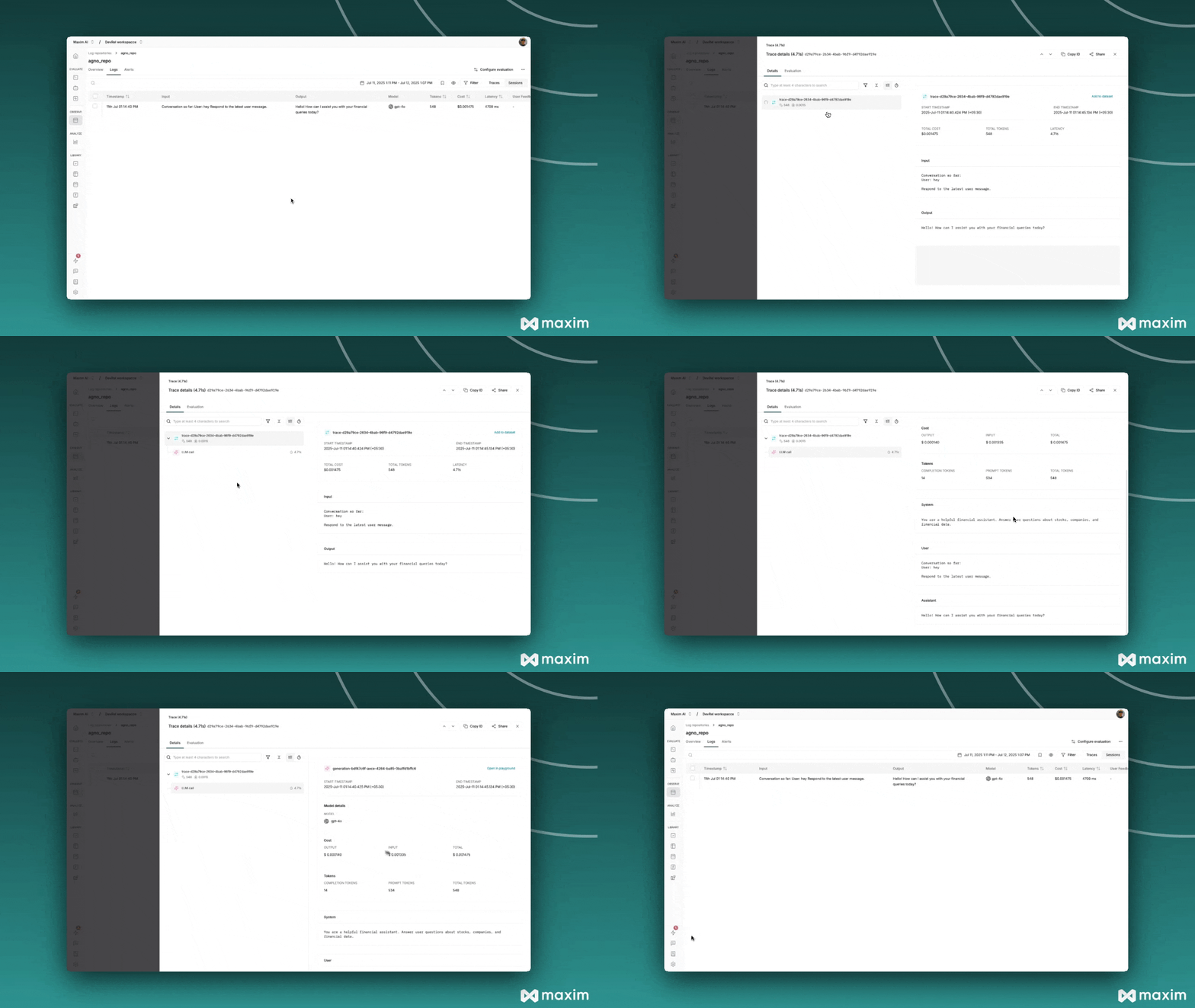
## 7. Observability with Maxim
All agent interactions, tool calls, and responses are automatically traced and can be visualized in
your [Maxim dashboard](https://app.getmaxim.ai/). This provides deep insights into agent reasoning,
tool usage, and user interactions.
 ***
For more details, see the [Agno documentation](https://github.com/agno-agi/agno) and the
[Maxim Python SDK documentation](https://www.getmaxim.ai/docs/introduction/overview).
## Resources
Python Notebook for Agno & Maxim
***
For more details, see the [Agno documentation](https://github.com/agno-agi/agno) and the
[Maxim Python SDK documentation](https://www.getmaxim.ai/docs/introduction/overview).
## Resources
Python Notebook for Agno & Maxim