---
description: "The best MCP servers for Claude Code in 2026: 15 official servers for code, browsers, docs, and data, with install commands and one gateway to run them all."
title: 15 Best MCP Servers for Claude Code in 2026, and How to Run Them Through One Gateway
image: https://storage.ghost.io/c/84/03/8403f2f6-141c-411a-8f55-a32d4291533e/content/images/size/w1200/2026/10/15-best-mcp-servers-for-claude-code-in-2026-and-how-to-run-t-bifrost-1920x1080.png
---
Try Bifrost Enterprise free for 14 days. [Request access](https://www.getmaxim.ai/#enterprise-trial)
**TL;DR**
- The best MCP servers for Claude Code are vendor-maintained: GitHub, Sentry, Linear, Atlassian, Playwright, Chrome DevTools, Figma, Context7, Notion, Firecrawl, Supabase, Neon, DBHub, Grafana, and Terraform.
- Claude Code adds servers with `claude mcp add` at local, project, or user scope, and project-scoped servers are shared through a checked-in `.mcp.json` file.
- Each direct connection adds tool definitions to the context and a credential to the laptop.
- Bifrost exposes every connected MCP server behind one `/mcp` endpoint, filters tools per virtual key, holds upstream credentials, and logs tool calls.
- Bifrost Code Mode cut input tokens by 58.2% to 92.8% in benchmarks as the connected tool count grew from 96 to 508.
The best MCP servers for Claude Code are the official, vendor-maintained servers that connect the terminal agent to systems a developer already works in, such as GitHub, Sentry, Playwright, Context7, and Supabase. Each one added with `claude mcp add` is another config entry, credential, and set of tool definitions in the context window. [Bifrost](https://www.getmaxim.ai/bifrost), the [open-source MCP and AI gateway](https://github.com/maximhq/bifrost) built by Maxim AI, is the best choice for enterprises running mission-critical AI workloads that require best-in-class performance, scalability, and reliability, because it puts all of those servers behind a single Claude Code connection. This guide covers 15 servers worth installing and how to run them through Bifrost.
## What Makes the Best MCP Servers for Claude Code
The best MCP servers for Claude Code share four traits: a vendor maintains them, they expose a focused tool set, they support a safe read-only or scoped mode, and they authenticate with OAuth or a scoped token rather than a broad admin key.
The [Model Context Protocol](https://modelcontextprotocol.io/) defines how an agent calls external tools, but not which servers to trust. The public [MCP Registry](https://registry.modelcontextprotocol.io/) lists thousands of servers of uneven quality, so this list favors servers published by the company that owns the API. For why a control layer belongs between agents and these servers, see the [MCP gateway as a control plane for MCP servers](https://www.getmaxim.ai/articles/mcp-gateway-the-control-plane-for-mcp-servers/).
| Criterion | What to look for | Why it matters in Claude Code |
| --- | --- | --- |
| Maintainer | Official vendor repo or hosted endpoint | Tracks API changes; fewer abandoned forks |
| Tool surface | Toolsets, profiles, or a read-only endpoint | Fewer tool definitions loaded into context |
| Auth | OAuth 2.0 or a scoped token | No long-lived admin keys in `~/.claude.json` |
| Transport | Remote HTTP for SaaS, stdio for local tools | HTTP servers need no local runtime |
| Write safety | Read-only flag or least-privilege credential | Limits damage from a wrong tool call |
## The 15 Best MCP Servers for Claude Code at a Glance
The table below lists the 15 most useful Claude Code MCP servers, with maintainer, transport, and auth verified from each vendor's repository or docs. Row 0 is [the Bifrost MCP gateway](https://www.getmaxim.ai/bifrost), which fronts the other 15 rather than replacing them.
| # | Server | Maintainer | Transport | Auth |
| --- | --- | --- | --- | --- |
| 0 | Bifrost (MCP gateway in front of the rest) | Bifrost, open source | HTTP `/mcp` | Virtual key |
| 1 | GitHub MCP Server | GitHub | Remote HTTP | PAT or OAuth |
| 2 | Sentry MCP | Sentry | Remote HTTP | OAuth |
| 3 | Linear MCP | Linear | Remote HTTP | OAuth |
| 4 | Atlassian Rovo MCP | Atlassian | Remote HTTP | OAuth 2.1 or API token |
| 5 | Playwright MCP | Microsoft | Local stdio | None |
| 6 | Chrome DevTools MCP | Chrome DevTools team | Local stdio | None |
| 7 | Figma MCP | Figma | Remote HTTP | OAuth |
| 8 | Context7 | Upstash | Remote HTTP | API key |
| 9 | Notion MCP | Notion | Remote HTTP | OAuth |
| 10 | Firecrawl MCP | Firecrawl | Remote HTTP | Keyless or API key |
| 11 | Supabase MCP | Supabase | Remote HTTP | OAuth |
| 12 | Neon MCP | Neon | Remote HTTP | OAuth or API key |
| 13 | DBHub | Bytebase | Local stdio | Connection string |
| 14 | Grafana MCP | Grafana Labs | Local stdio | Service account token |
| 15 | Terraform MCP | HashiCorp | stdio or HTTP | HCP token (optional) |
Teams that already know their servers can skip to the [MCP gateway setup for Claude Code](https://www.getmaxim.ai/bifrost/resources/mcp-gateway) below.
## Code and Issue Tracking Servers
Code and issue servers give Claude Code the context around a change: the pull request under review, the error that triggered the work, and the ticket that defines done. Most coding sessions start from one of these four Claude Code MCP servers.
### 1. GitHub MCP Server
GitHub's official server reads code, manages issues and pull requests, inspects Actions runs, and surfaces Dependabot and code scanning findings. Toolsets limit which tool groups load.
```bash
claude mcp add --transport http github \
--header "Authorization: Bearer YOUR_GITHUB_PAT"
```
**Best for:** reviewing a PR, reading failed CI logs, and filing follow-up issues.
### 2. Sentry MCP
Sentry's remote server is built for coding agents and focuses on debugging. The URL can be scoped to one organization or project.
```bash
claude mcp add --transport http sentry
```
**Best for:** turning a production stack trace into a fix and a regression test.
### 3. Linear MCP
Linear's hosted server signs in with OAuth through `/mcp` in Claude Code. A separate `/mcp/readonly` endpoint exposes only read tools, useful for review or CI agents.
```bash
claude mcp add --transport http linear-server
```
**Best for:** reading acceptance criteria and updating issue status.
### 4. Atlassian Rovo MCP Server
Atlassian's cloud-hosted server covers Jira, Confluence, Jira Service Management, Bitbucket, Compass, and Loom.
```bash
claude mcp add --transport http atlassian
```
**Best for:** teams with specs in Confluence and work in Jira. Each developer should act as themselves here, which Bifrost supports through [per-user OAuth for upstream MCP servers](https://docs.getbifrost.ai/mcp/auth/per-user-oauth).
## Browser and Frontend Servers
Browser and frontend servers let Claude Code check its own work: load the page it changed, read console errors, profile performance, and compare the result to the design. Playwright and Chrome DevTools run locally and need Node.js.
### 5. Playwright MCP
Microsoft's Playwright server drives a browser through accessibility snapshots instead of screenshots. Its README notes the Playwright CLI can be more token-efficient for coding agents, and recommends MCP for stateful loops.
```bash
claude mcp add playwright npx @playwright/mcp@latest
```
**Best for:** reproducing a UI bug and generating end-to-end tests.
### 6. Chrome DevTools MCP
The Chrome DevTools team's server gives an agent a live Chrome instance with performance traces, network analysis, and console messages, showing why a page is slow or broken.
```bash
claude mcp add chrome-devtools --scope user npx chrome-devtools-mcp@latest
```
**Best for:** diagnosing a slow page load or a failing API call from the browser.
### 7. Figma MCP Server
Figma's remote server gives Claude Code frames, variables, and components as context. Only clients in Figma's MCP catalog can connect, and Figma recommends its Claude Code plugin.
```bash
claude mcp add --transport http figma
```
**Best for:** implementing a frame with existing components. Because Figma restricts clients, it may need to stay a direct entry while the rest are grouped behind a gateway with [Virtual MCPs](https://docs.getbifrost.ai/mcp/virtual-mcps).
## Documentation and Knowledge Servers
Documentation servers close the gap between a model's training data and the library versions a project uses, and bring specs, runbooks, and web content into the session. They are among the most popular MCP servers for coding agents.
### 8. Context7
Upstash's Context7 injects current, version-specific library docs and examples into the prompt, which reduces hallucinated APIs. `npx ctx7 setup --claude` configures it automatically.
```bash
claude mcp add --transport http context7 \
--header "Authorization: Bearer YOUR_CONTEXT7_KEY"
```
**Best for:** framework releases newer than the model's training data.
### 9. Notion MCP
Notion's hosted server searches a workspace and reads and edits pages in Markdown. The older self-hosted repository is no longer maintained, so use the remote endpoint.
```bash
claude mcp add --transport http notion
```
**Best for:** reading the design doc behind the code.
### 10. Firecrawl MCP
Firecrawl's server searches the web and scrapes pages into clean data. The keyless tier exposes three tools; the full profile registers 27.
```bash
claude mcp add --transport http firecrawl
```
**Best for:** researching an error message mid-task. Routing SaaS servers like this through a gateway is covered in [connecting and securing remote MCP servers](https://www.getmaxim.ai/articles/remote-mcp-servers-connecting-and-securing-saas-servers-through-one-gateway/).
## Database, Infrastructure, and Observability Servers
Data and infrastructure servers carry the highest risk on this list, because a wrong tool call can change production state. Each of the five below offers a read-only mode or works with a least-privilege credential, which should be the default for agent sessions.
### 11. Supabase MCP
Supabase's hosted server lists tables, runs SQL, and applies migrations. The URL accepts `project_ref` and `read_only=true` to pin the agent to one project without write tools.
```bash
claude mcp add --transport http supabase \
"&read_only=true"
```
**Best for:** checking a schema before writing a query.
### 12. Neon MCP Server
Neon's server turns requests into Neon API calls, including creating branches, so an agent can apply and test a migration on a branch before anyone promotes it.
```bash
claude mcp add --transport http neon
```
**Best for:** testing migrations away from the shared database.
### 13. DBHub
Bytebase's DBHub connects to PostgreSQL, MySQL, SQL Server, SQLite, and MariaDB with two tools, `execute_sql` and `search_objects`. It is the example in Anthropic's [Claude Code MCP documentation](https://code.claude.com/docs/en/mcp), with a read-only user in the DSN.
```bash
claude mcp add --transport stdio db -- npx -y @bytebase/dbhub \
--dsn "postgresql://readonly:pass@db.internal:5432/analytics"
```
**Best for:** data questions with a credential that cannot write. A gateway can go further and expose only `search_objects` to a key with [MCP tool filtering](https://docs.getbifrost.ai/mcp/filtering).
### 14. Grafana MCP Server
Grafana Labs' server queries dashboards, runs PromQL and LogQL, and reads alerts and incidents. The `--disable-write` flag removes write operations and raw-SQL tools.
```bash
claude mcp add grafana --env GRAFANA_URL=https://grafana.internal \
--env GRAFANA_SERVICE_ACCOUNT_TOKEN=YOUR_TOKEN -- uvx mcp-grafana --disable-write
```
**Best for:** correlating a latency spike with a deploy.
### 15. Terraform MCP Server
HashiCorp's server integrates the Terraform Registry and HCP Terraform, so Claude Code can look up current provider schemas and modules. HashiCorp warns it can expose Terraform data to the model.
```bash
claude mcp add terraform -s user -t stdio -- docker run -i --rm hashicorp/terraform-mcp-server
```
**Best for:** writing modules against the current provider schema. Credentials like these are the case for [connecting internal MCP servers without exposing credentials](https://www.getmaxim.ai/articles/claude-code-internal-mcp-servers-connect-without-exposing-credentials/).
## How to Add MCP Servers to Claude Code
Claude Code adds MCP servers with `claude mcp add`, using `--transport http` for remote servers and `--` plus a launch command for local stdio servers. The `--scope` flag decides where the entry is stored, and `/mcp` in a session shows status and handles OAuth sign-in for each server.
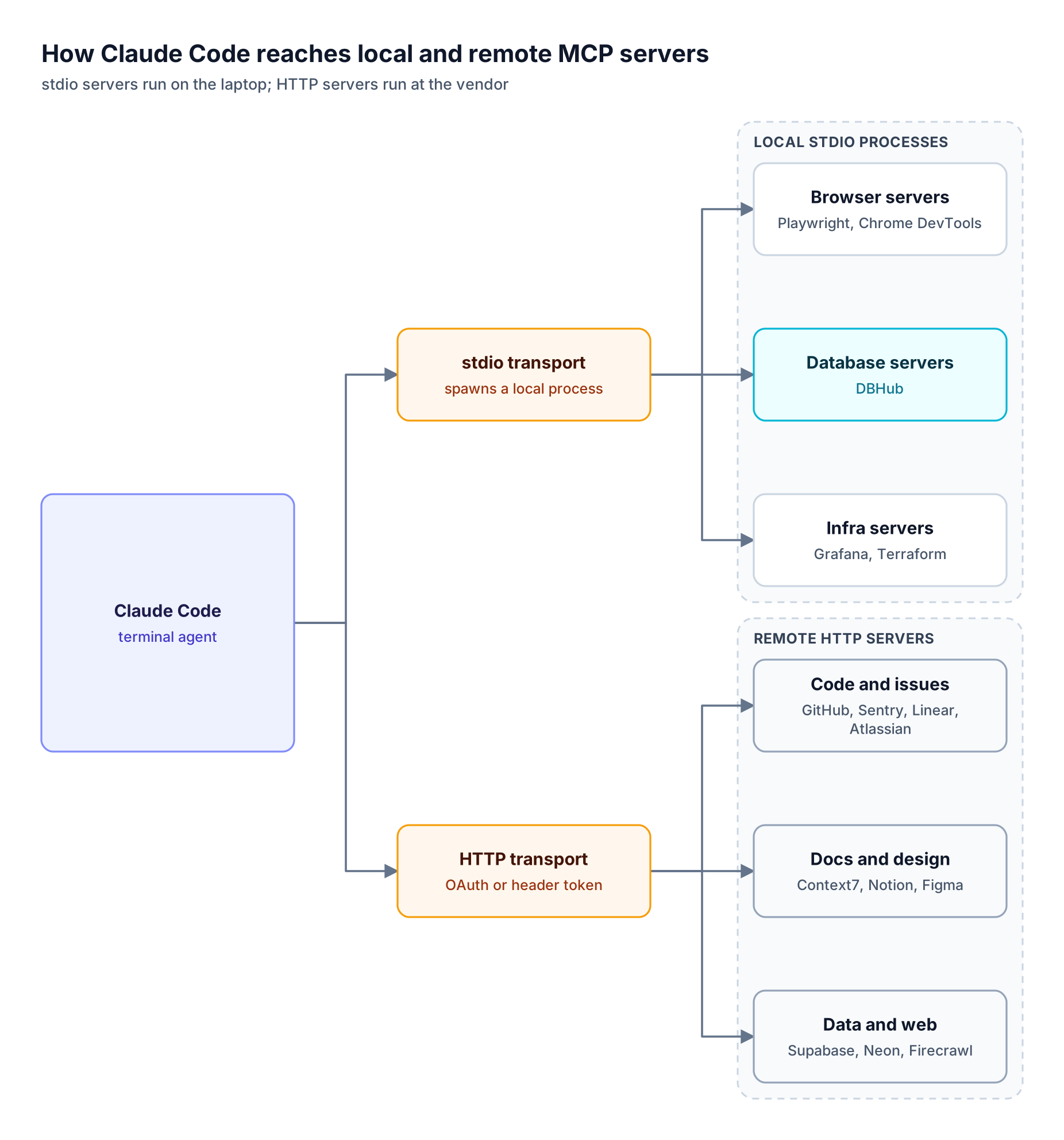
*Figure 1: Local servers inherit credentials from the developer's environment, while remote servers sign in with OAuth or a header token.*
As Figure 1 shows, remote HTTP servers run at the vendor and Claude Code stores only a URL and a token, while stdio servers run as child processes that need Node.js, `uv`, or Docker. Scopes control where entries live:
| Scope | Loads in | Shared with team | Stored in |
| --- | --- | --- | --- |
| Local (default) | Current project only | No | `~/.claude.json` |
| Project | Current project only | Yes, via version control | `.mcp.json` in project root |
| User | All your projects | No | `~/.claude.json` |
`claude mcp list`, `get`, and `remove` manage entries, and Claude Code asks for approval before using servers from a checked-in `.mcp.json`. The Bifrost [Claude Code integration guide](https://docs.getbifrost.ai/cli-agents/claude-code) covers the same commands for a gateway entry, and the step-by-step version lives in [how to add and govern MCP servers in Claude Code](https://www.getmaxim.ai/articles/how-to-add-and-govern-mcp-servers-in-claude-code/).
## Why Fifteen Direct Connections Become a Problem
Connecting 15 servers directly works for one developer and breaks down for a team. The costs are context, credentials, and visibility: tool definitions compete for the context window, tokens accumulate on laptops, and no one sees which servers each Claude Code install uses or what its tool calls did.
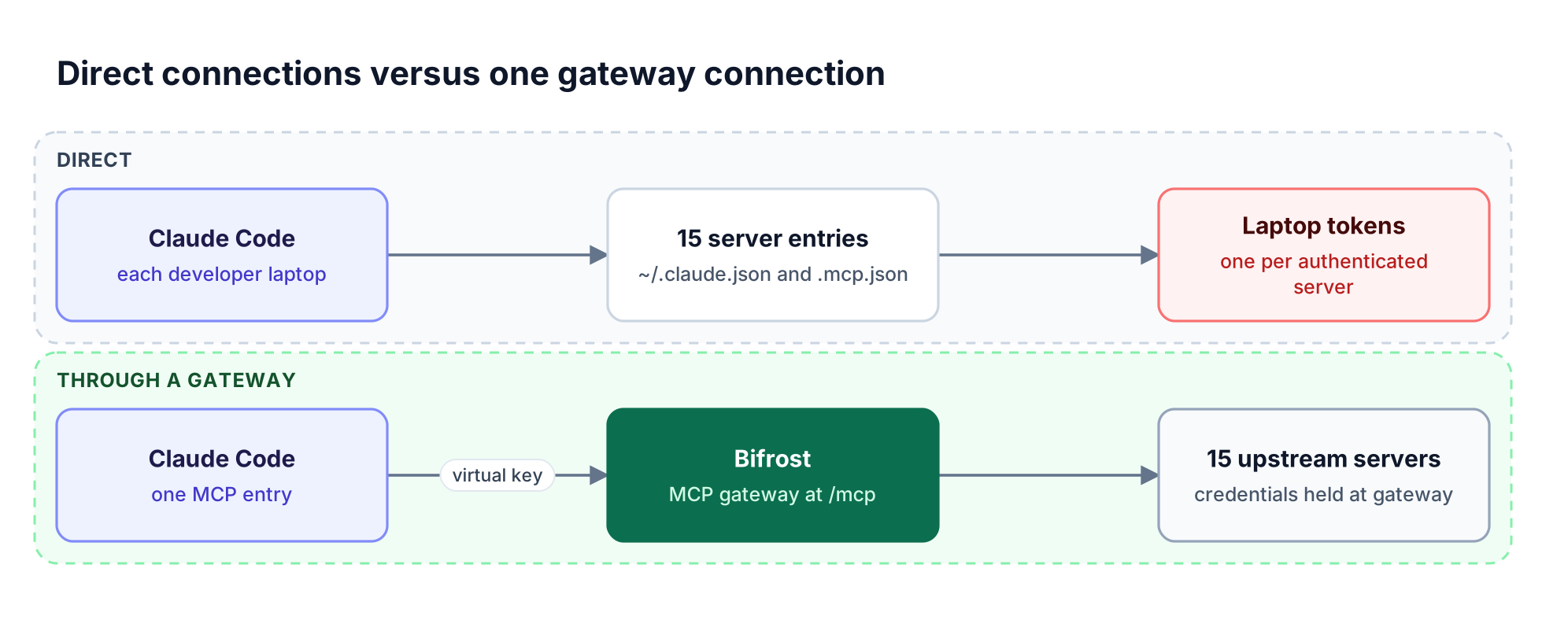
*Figure 2: Moving the server list to the gateway turns fifteen per-laptop configurations into one entry and one place to rotate credentials.*
**Context.** Claude Code's tool search defers MCP tool definitions by default, but falls back to loading every tool upfront on older models, some cloud deployments, and when `ANTHROPIC_BASE_URL` points to a non-first-party host. Then the [hidden cost of connecting multiple MCP servers](https://www.getmaxim.ai/articles/the-hidden-cost-of-connecting-multiple-mcp-servers-to-an-agent/) shows up on the bill.
**Credentials.** A GitHub PAT, a Context7 key, a Grafana token, and a database DSN end up on each machine. Rotating one means touching every laptop.
**Visibility.** Claude Code's [managed MCP configuration](https://code.claude.com/docs/en/managed-mcp) can allow or deny servers, but tool calls still go from each laptop to each vendor with no shared log. With AI Gateway + Bifrost Edge, the gateway holds the policy and Bifrost Edge (in alpha) [inventories the MCP servers configured in Claude Code](https://docs.getbifrost.ai/edge/mcp-governance) across a fleet and enforces it on each device. Related: [shadow MCP servers and gateway-level control](https://www.getmaxim.ai/articles/shadow-mcp-servers-visibility-and-control-at-the-gateway/).
## Running Every Claude Code MCP Server Through Bifrost
[The Bifrost gateway](https://www.getmaxim.ai/bifrost) connects to upstream MCP servers as a client and exposes their aggregated tools to Claude Code as a single MCP server at `/mcp`. A virtual key scopes each request, while the gateway holds upstream credentials and logs tool calls.
**Best for:** Bifrost is built for enterprises running mission-critical AI workloads that require best-in-class performance, scalability, and reliability. It serves as a centralized AI gateway to route, govern, and secure all AI traffic across models and environments with ultra low latency. Bifrost unifies LLM gateway, MCP gateway, and Agents gateway capabilities into a single platform. Designed for regulated industries and strict enterprise requirements, it supports air-gapped deployments, VPC isolation, and on-prem infrastructure. It provides full control over data, access, and execution, along with robust security, policy enforcement, and governance capabilities.
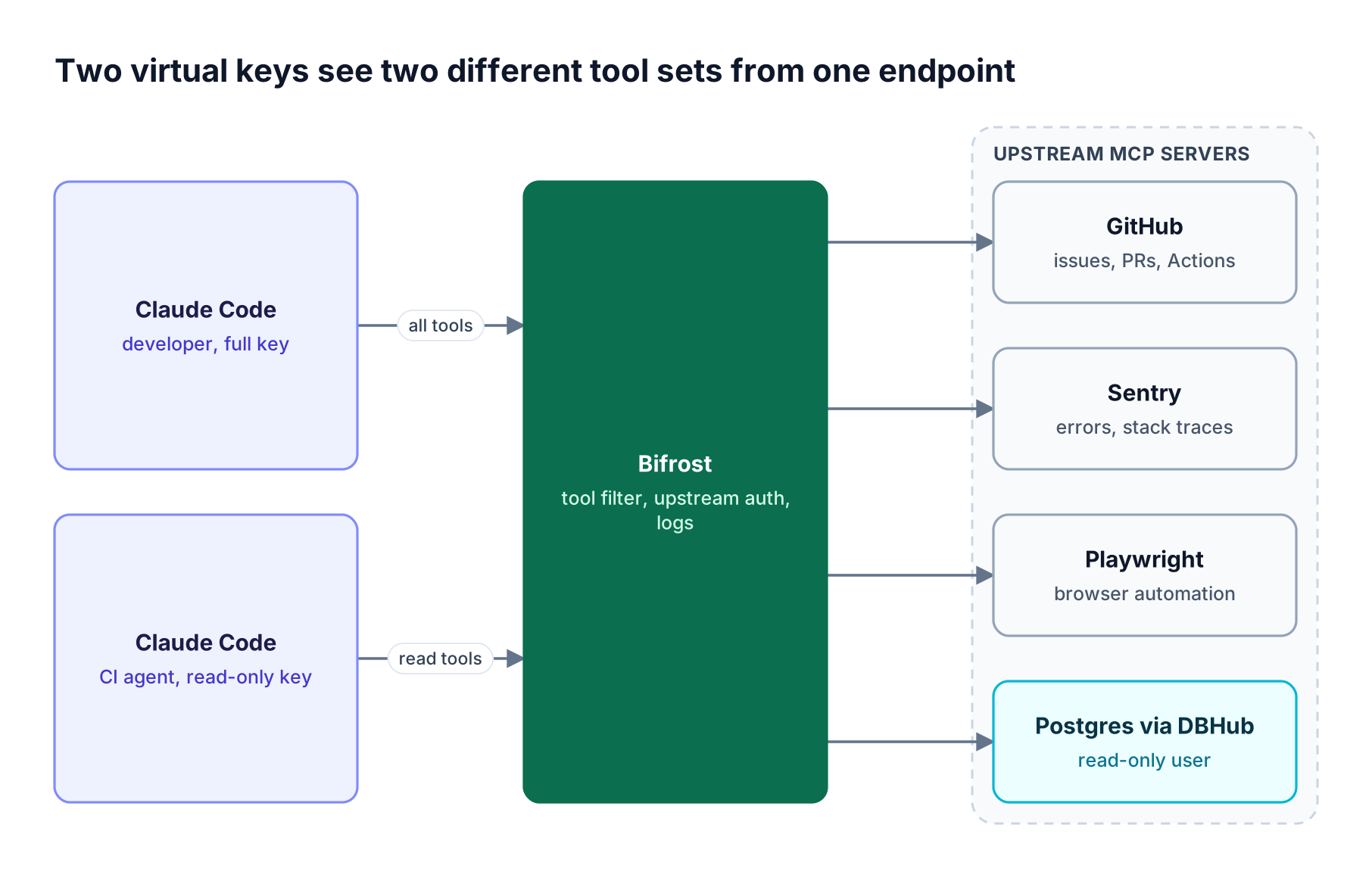
*Figure 3: Tool access is decided by the virtual key at the gateway, so the same server list can be safe for a developer and for an unattended agent.*
**Step 1: Run the gateway.** `npx -y @maximhq/bifrost` or `docker run -p 8080:8080 maximhq/bifrost` starts Bifrost on port 8080, as described in the [gateway setup guide](https://docs.getbifrost.ai/quickstart/gateway/setting-up).
**Step 2: Register upstream servers.** Each server becomes an MCP client over [STDIO, HTTP, or SSE](https://docs.getbifrost.ai/mcp/connecting-to-servers). Header values can use the `env.` prefix, so the GitHub token lives on the gateway host:
```json
{
"mcp": {
"client_configs": [
{
"name": "github",
"connection_type": "http",
"connection_string": "",
"auth_type": "headers",
"headers": { "Authorization": "env.GITHUB_MCP_AUTH" },
"tools_to_execute": ["*"]
}
]
}
}
```
Bifrost supports six [MCP authentication types](https://docs.getbifrost.ai/mcp/auth/overview): None, Headers, OAuth 2.0, Per-User OAuth, Per-User Headers, and Token Exchange.
**Step 3: Scope tools with virtual keys.** A [virtual key](https://docs.getbifrost.ai/features/governance/virtual-keys) with no MCP configuration gets no tools, except from clients marked Allow by Default. The CI key below can read pull requests and search schemas but cannot open a PR or run SQL, and [per-key MCP tool filtering](https://docs.getbifrost.ai/features/governance/mcp-tools) applies the allow-list to `tools/list` and `tools/call`:
```json
{
"name": "ci-review-agent",
"mcp_configs": [
{ "mcp_client_name": "github", "tools_to_execute": ["list_pull_requests", "pull_request_read", "get_file_contents"] },
{ "mcp_client_name": "dbhub", "tools_to_execute": ["search_objects"] }
]
}
```
**Step 4: Point Claude Code at the gateway.** One command replaces the per-server entries:
```bash
claude mcp add --transport http bifrost \
--header "Authorization: Bearer YOUR_VIRTUAL_KEY" --scope user
```
Run `/mcp` to confirm `bifrost` is connected with a tool count. If Claude Code also routes inference through Bifrost, turn on Disable Auto Tool Injection so tools are not attached twice. The full walkthrough is in [connecting Claude Code to multiple MCP servers through one gateway](https://www.getmaxim.ai/articles/connect-claude-code-to-multiple-mcp-servers-through-one-gateway/).
Bifrost health-checks each upstream server, reconnects dropped sessions, and keeps [request and MCP logs](https://docs.getbifrost.ai/features/observability/default) in one place. The same gateway routes model traffic to [25+ providers and 10,000+ models](https://docs.getbifrost.ai/providers/supported-providers/overview) through one OpenAI-compatible API, with [11 microseconds of overhead at 5,000 RPS](https://www.getmaxim.ai/bifrost/resources/benchmarks).
Teams running in a private network can review [Bifrost Enterprise](https://www.getmaxim.ai/bifrost/enterprise), and the [MCP gateway architecture overview](https://www.getmaxim.ai/articles/mcp-gateway-the-control-plane-for-mcp-servers/) covers the design in depth.
## Cutting Claude Code Token Costs with Code Mode
Code Mode replaces the raw tool definitions of an MCP server with four meta-tools, and the model writes a short Python script that Bifrost runs in a Starlark sandbox. Only the final result returns to the model, so token use stays roughly flat as more servers are connected.
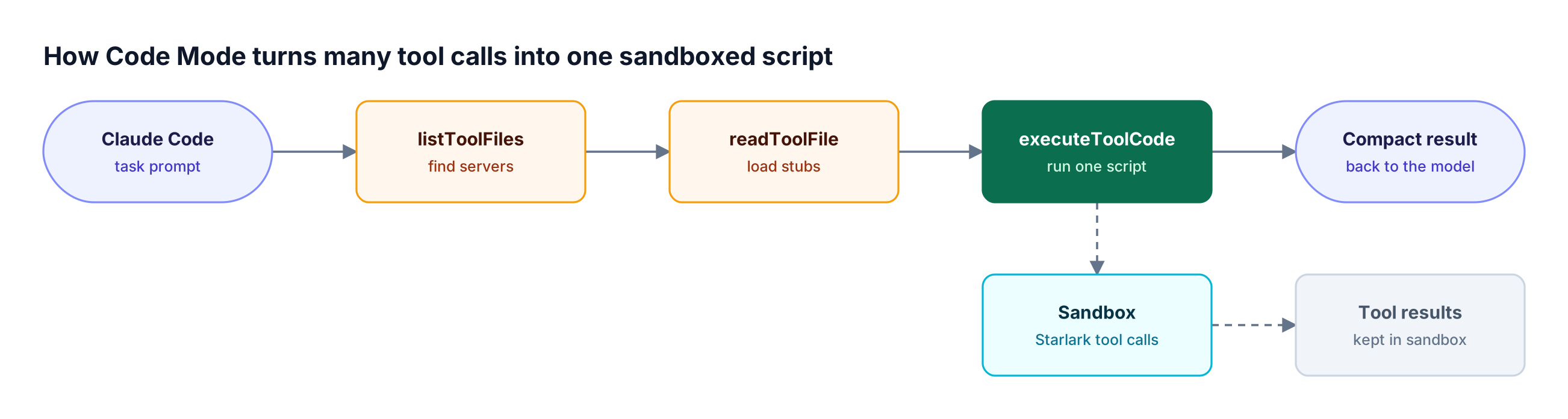
*Figure 4: Intermediate tool results stay inside the sandbox, so the model pays for the final answer rather than every hop.*
The four tools are `listToolFiles`, `readToolFile`, `getToolDocs`, and `executeToolCode`, and [Code Mode](https://docs.getbifrost.ai/mcp/code-mode) is enabled per MCP client, with virtual keys still limiting discovery. In Bifrost's benchmark, input tokens fell as the footprint grew while pass rates held:
| MCP footprint | Input tokens, classic MCP | Input tokens, Code Mode | Change |
| --- | --- | --- | --- |
| 96 tools / 6 servers | 19.9M | 8.3M | -58.2% |
| 251 tools / 11 servers | 35.7M | 5.5M | -84.5% |
| 508 tools / 16 servers | 75.1M | 5.4M | -92.8% |
The [Bifrost MCP gateway benchmark writeup](https://www.getmaxim.ai/bifrost/blog/bifrost-mcp-gateway-access-control-cost-governance-and-92-lower-token-costs-at-scale) covers methodology and cost results, and the [MCP gateway resource page](https://www.getmaxim.ai/bifrost/resources/mcp-gateway) summarizes access control and governance options.
## Frequently Asked Questions
### What MCP servers should I use with Claude Code?
Start where work begins: GitHub for code review, Sentry or Linear for the bug or ticket, Playwright or Chrome DevTools for UI checks, and Context7 for library docs. Add DBHub, Supabase, or Neon with a read-only credential, and route them through an MCP gateway that filters tools per key.
### How do I add MCP servers to Claude Code?
Run `claude mcp add --transport http ` for a remote server, or `claude mcp add -- ` for a local stdio server. Add `--scope project` to write a shared `.mcp.json`, or `--scope user` to load it everywhere. In a session, `/mcp` shows status and handles OAuth sign-in.
### Can Claude Code act as an MCP server?
Yes. Running `claude mcp serve` starts Claude Code as a stdio MCP server that clients such as Claude Desktop can connect to, reversing the usual setup where Claude Code is the client. To aggregate many servers behind one endpoint, an MCP gateway like [Bifrost, the open-source MCP gateway](https://www.getmaxim.ai/bifrost), is the common pattern.
### Can Claude Desktop run MCP servers?
Yes. Claude Desktop reads servers from the `mcpServers` block in `claude_desktop_config.json`, and the servers in this list work there too. It can also connect to the Bifrost `/mcp` endpoint with a virtual key header, so Claude Desktop and Claude Code share one governed tool set, as the [MCP gateway mode setup](https://docs.getbifrost.ai/mcp/overview) describes.
### How many MCP servers can Claude Code use at once?
Claude Code sets no fixed per-server tool cap; the practical limit is the context window. With tool search on, only tool names load at session start. With it off, every definition loads upfront, so a few large servers can consume much of the context. Filtering tools per key or using Code Mode keeps that in check.
### Are remote MCP servers safer than local ones?
Remote servers are easier to secure for SaaS APIs because they use OAuth and need no local runtime, while stdio servers inherit the credentials in the developer's environment. Neither is safe by default: use read-only modes, least-privilege tokens, and a [governance layer](https://www.getmaxim.ai/bifrost/resources/governance) for servers that touch production.
## Run the Best MCP Servers for Claude Code Through One Gateway
The best MCP servers for Claude Code give the agent real context: code, errors, tickets, browsers, docs, and data. Connected directly, they multiply credentials and tool definitions on every developer machine. Bifrost turns the list into one Claude Code MCP connection with per-key tool filtering, centralized auth, Code Mode, and shared logs. To see Bifrost running as the MCP gateway for your Claude Code rollout, [book a demo](https://getmaxim.ai/bifrost/book-a-demo) with the Bifrost team.
## Read next
[ MintMCP, now renamed Mintive, is a managed MCP gateway for governing which tools AI agents can reach. This guide compares five MintMCP alternatives, including Bifrost, Docker MCP Gateway, IBM ContextForge, and Obot, on deployment, tool-level access control, identity, and audit.](https://www.getmaxim.ai/articles/mintmcp-alternatives/)
[ The best MCP servers for Cursor connect the editor to design files, browsers, docs, and delivery tools. This guide ranks Figma, Playwright, Context7, GitHub, Linear, and five more by Cursor workflow, then shows how Bifrost runs them all behind one governed endpoint.](https://www.getmaxim.ai/articles/best-mcp-servers-for-cursor/)
[ An MCP gateway is a control layer that gives AI agents one endpoint for every Model Context Protocol server while centralizing authentication, tool access, guardrails, and audit logging. This guide explains how an MCP gateway works and how it compares to MCP servers, proxies, and LLM gateways.](https://www.getmaxim.ai/articles/what-is-an-mcp-gateway/)
## More in MCP Gateway
[ An MCP gateway is a control layer that gives AI agents one endpoint for every Model Context Protocol server while centralizing authentication, tool access, guardrails, and audit logging. This guide explains how an MCP gateway works and how it compares to MCP servers, proxies, and LLM gateways.](https://www.getmaxim.ai/articles/what-is-an-mcp-gateway/)
[ The best MCP servers for Cursor connect the editor to design files, browsers, docs, and delivery tools. This guide ranks Figma, Playwright, Context7, GitHub, Linear, and five more by Cursor workflow, then shows how Bifrost runs them all behind one governed endpoint.](https://www.getmaxim.ai/articles/best-mcp-servers-for-cursor/)
```json
{
"@context": "https://schema.org",
"@type": "Article",
"publisher": {
"@type": "Organization",
"name": "Maxim Articles",
"url": "https://www.getmaxim.ai/articles/",
"logo": {
"@type": "ImageObject",
"url": "https://storage.ghost.io/c/84/03/8403f2f6-141c-411a-8f55-a32d4291533e/content/images/size/w256h256/2025/08/thumbnail.png",
"width": 60,
"height": 60
}
},
"author": {
"@type": "Person",
"name": "Kuldeep Paul",
"image": {
"@type": "ImageObject",
"url": "https://storage.ghost.io/c/84/03/8403f2f6-141c-411a-8f55-a32d4291533e/content/images/2025/08/1727978381919.jpeg",
"width": 800,
"height": 800
},
"url": "https://www.getmaxim.ai/articles/author/kuldeep/",
"sameAs": []
},
"headline": "15 Best MCP Servers for Claude Code in 2026, and How to Run Them Through One Gateway",
"url": "https://www.getmaxim.ai/articles/best-mcp-servers-for-claude-code/",
"datePublished": "2026-10-13T10:07:00.000Z",
"dateModified": "2026-10-18T10:08:12.000Z",
"image": {
"@type": "ImageObject",
"url": "https://storage.ghost.io/c/84/03/8403f2f6-141c-411a-8f55-a32d4291533e/content/images/size/w1200/2026/10/15-best-mcp-servers-for-claude-code-in-2026-and-how-to-run-t-bifrost-1920x1080.png",
"width": 1200,
"height": 675
},
"keywords": "MCP Gateway",
"description": "The best MCP servers for Claude Code are vendor-maintained servers that connect the terminal agent to GitHub, Sentry, Playwright, Context7, Supabase, and more. This guide covers 15 of them, how to add each one, and how to run them all through Bifrost as one MCP gateway.",
"mainEntityOfPage": "https://www.getmaxim.ai/articles/best-mcp-servers-for-claude-code/"
}
```